
EMEET PIXY JP
EMEET PIXY 4K AI Auto-Tracking PTZ WebInstrukcja obsługi kamery
Model: PIXY JP
Wstęp
The EMEET PIXY is a state-of-the-art 4K AI auto-tracking PTZ webcam designed to enhance your live streaming, online classes, video conferences, and content creation. Featuring a dual-camera system with PDAF high-speed autofocus, a 1/2.55-inch ultra-sensitive Sony sensor, and three integrated AI chips for superior image processing, AI analysis, and PTZ control, the PIXY delivers unparalleled video quality and intelligent tracking capabilities. Its versatile design and dedicated EMEET STUDIO software provide intuitive control and customization for a professional-grade experience.
Co jest w pudełku
Sprawdź zawartość opakowania, aby upewnić się, że znajdują się w nim wszystkie elementy:
- EMEET PIXY Camera
- Webcam Clip
- Adapter USB-C na A
- Kabel USB-C o długości 1.5 m
- Szybki przewodnik
- Karta gwarancyjna
- Instrukcja obsługi

Produkt ponadview
The EMEET PIXY features an innovative dual-camera design and advanced AI processing to deliver superior video and audio performance.
System podwójnej kamery
The PIXY integrates a main imaging camera with a 1/2.55-inch Sony sensor for stunning 4K resolution at 30 frames per second (FPS) and 1080P at 60FPS. An auxiliary AI camera assists in precise facial recognition and environmental light adaptation, ensuring optimal focus and exposure.

AI Chips for Enhanced Performance
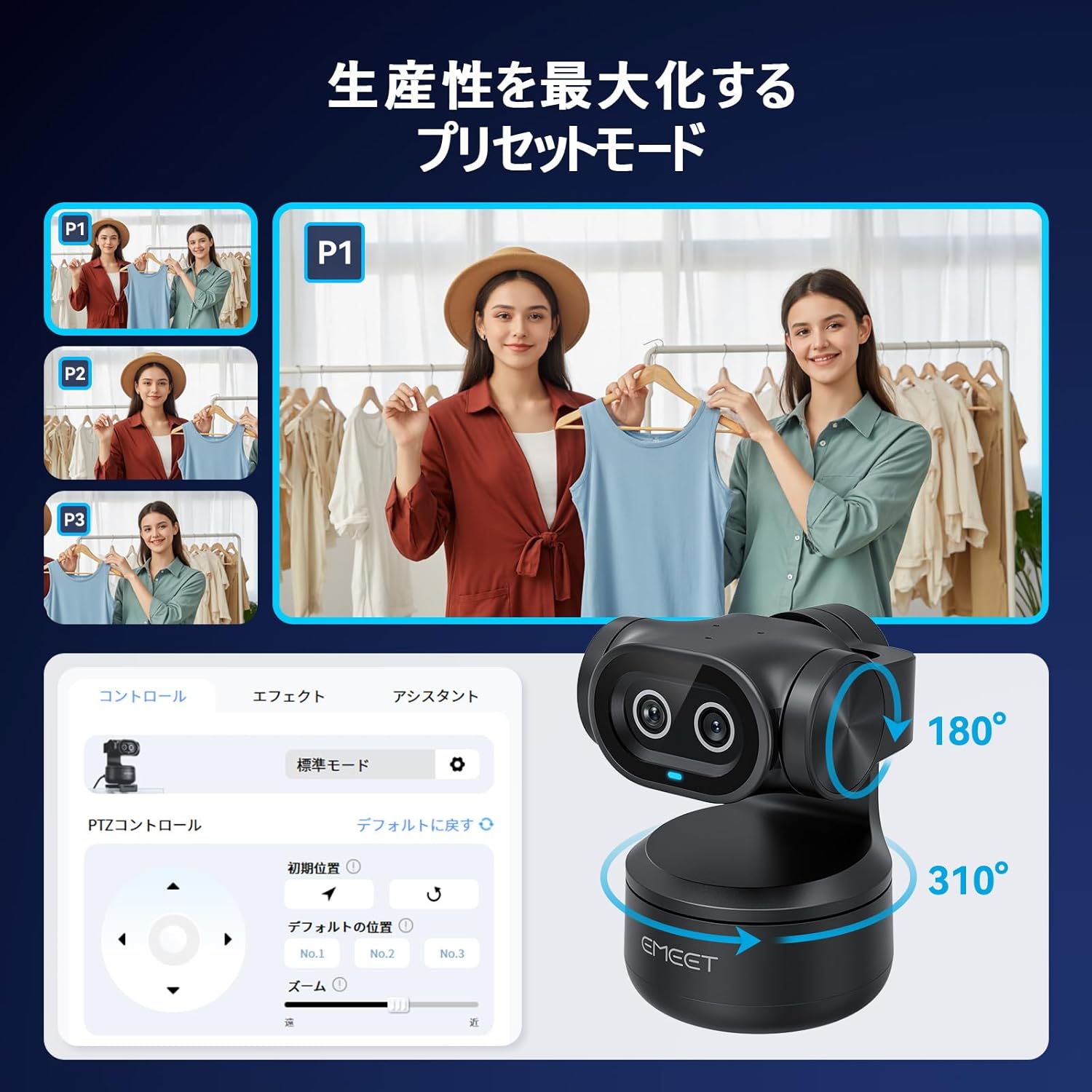
Three dedicated AI chips manage image processing, AI analysis, and PTZ (Pan-Tilt-Zoom) control. This multi-chip architecture enables rapid autofocus (0.2 seconds), smooth 310° pan and 180° tilt movements, and real-time optimization of video quality based on movement and lighting.

Triple Microphone Array
The PIXY is equipped with three built-in microphones that deliver clear and immersive audio. It offers three distinct audio modes: Live Mode for suppressing constant background noise, Noise Cancelling Mode for reducing sudden sounds, and Original Sound Mode for faithful recording of environmental and musical nuances.

Organizować coś
Instalacja fizyczna
- Dołącz webcam clip to the bottom of the EMEET PIXY.
- Securely mount the PIXY on your monitor, laptop, or a tripod using the clip.
- Connect the PIXY to your computer using the provided USB-C cable. Use the USB-C to A adapter if your computer only has USB-A ports.
Software Installation (EMEET STUDIO)
For full functionality and customization, download and install the EMEET STUDIO software from the official EMEET webStrona (www.emeet.com). EMEET STUDIO is compatible with Windows 10 (64-bit) or later and macOS 10.14 or later.

Instrukcja obsługi
AI Auto-Tracking and Autofocus
The EMEET PIXY utilizes advanced AI to automatically track your movements and maintain sharp focus. The PDAF high-speed autofocus ensures that you remain clear and in focus even with rapid movements.

EMEET STUDIO Software Features
- Wstępnie ustawione tryby: Use EMEET STUDIO to save and switch between different camera angles and zoom levels instantly. This is ideal for presentations or multi-angle streaming.
- Sterowanie gestami: Control certain camera functions, such as starting/stopping tracking, using simple hand gestures.
- Tryb tablicy: Automatically recognizes and corrects whiteboard content, making it clear and legible for viewers without the need for special stickers.
- Tryb portretowy: Rotate the camera to a vertical orientation for optimized smartphone-style video content.
- AIGC Function: EMEET's unique AI Generated Content feature can automatically create shot plans tailored to your scene, simplifying complex setups.


Funkcje audio
The EMEET PIXY's triple microphone array offers specialized audio modes to suit various environments:
- Tryb na żywo: Suppresses constant background noise (e.g., air conditioners, PC fans) for a stable, noise-free streaming environment.
- Tryb redukcji szumów: Reduces sudden sounds (e.g., keyboard clicks, door opening/closing) for clear online classes and web konferencje.
- Oryginalny tryb dźwięku: Faithfully records environmental sounds and subtle musical nuances, providing studio-quality audio without additional microphones.
Funkcje prywatności
The EMEET PIXY offers a dedicated Privacy Mode to ensure your privacy when the camera is not in use. This mode can be activated by:
- Tilting the camera unit downwards.
- Manually switching via the EMEET STUDIO application.
- Setting an automatic timer for privacy activation within the software.

Łączność i kompatybilność
The EMEET PIXY connects via USB and is compatible with a wide range of operating systems and streaming platforms:
- Systemy operacyjne: Windows 10 (64-bit) or later, macOS 10.14 or later, Switch 2.
- Oprogramowanie do streamingu: OBS, Twitch, YouTube, Facebook, XSplit, ManyCam, and more.
Demonstracja wideo
Konserwacja
To ensure the longevity and optimal performance of your EMEET PIXY, follow these maintenance guidelines:
- Utrzymuj obiektyw aparatu w czystości, przecierając go miękką, niepozostawiającą włókien ściereczką. Unikaj materiałów ściernych i silnych środków chemicznych.
- Przechowuj kamerę w suchym i chłodnym miejscu, z dala od bezpośredniego światła słonecznego i ekstremalnych temperatur.
- Unikaj upuszczania aparatu i narażania go na silne uderzenia.
- Regularly check for firmware updates via the EMEET STUDIO software to ensure you have the latest features and improvements.
Rozwiązywanie problemów
If you encounter any issues with your EMEET PIXY, please refer to the following common troubleshooting steps:
- Brak obrazu/wideo: Ensure the USB cable is securely connected to both the camera and your computer. Try a different USB port or cable. Verify that the camera is selected as the video input device in your application settings.
- Problemy z autofokusem: Ensure there is adequate lighting. Check for obstructions in front of the lens. Update EMEET STUDIO software and camera firmware.
- Problemy z dźwiękiem: Confirm the PIXY's microphones are selected as the audio input device in your application. Check microphone levels. Ensure no physical obstructions are blocking the microphones.
- Tracking Not Working: Ensure you are within the recommended tracking range. Check lighting conditions. Verify that AI tracking is enabled in EMEET STUDIO.
- Oprogramowanie nie rozpoznaje kamery: Restart your computer and the EMEET STUDIO software. Reinstall the EMEET STUDIO software.
For further assistance, please contact EMEET customer support.
Specyfikacje
| Funkcja | Szczegół |
|---|---|
| Marka | Spotkanie |
| Numer modelu | PIXY JP |
| Rozdzielczość przechwytywania wideo | 4K |
| Technologia czujnika fotograficznego | CMOS (1/2.55" Sony Sensor) |
| Maksymalna ogniskowa | 3000 milimetra |
| Min. ogniskowa | 100 milimetra |
| Format przechwytywania wideo | MP4 |
| Obsługiwane formaty audio | AAC, MP3, PCM |
| Technologia łączności | USB |
| Cechy specjalne | Scene Mode, Microphone Input, Face Detection, AI Auto-Tracking, PTZ Control |
| Stabilizacja obrazu | Optyczny |
| Współczynnik kształtu | Palmheld |
| Obsługiwany system operacyjny | Windows 10 (64bit) or later, macOS 10.14 or later, Switch 2 Camera |
| Proporcje obrazu | 16:9 |
Gwarancja i wsparcie
The EMEET PIXY comes with a warranty card included in the package. Please refer to the warranty card for specific terms and conditions. For technical support, product inquiries, or warranty claims, please visit the official EMEET webwitryny lub skontaktuj się z zespołem obsługi klienta.
Ask a question about this manual
Ask about setup, troubleshooting, compatibility, parts, safety, or missing instructions. Manuals+ will review the question and use this page’s manual context to help answer it.