
1. Wprowadzenie
Thank you for choosing the VAVA 5.5" 720P HD Video Baby Monitor. This manual provides essential information for the safe and effective use of your device. Please read it thoroughly before operation and retain it for future reference.
This monitor offers a secure and clear way to observe your baby with its 5.5-inch 720p display, two-way audio, night vision, and pan/tilt/zoom capabilities. It operates on a dedicated wireless connection, ensuring privacy and reliability.
Co jest w pudełku
- Baby Monitor (Parent Unit)
- Kamera (jednostka dziecka)
- Zasilacz sieciowy x2
- Zestaw do montażu
- Mocowanie kamery
- Kabel zasilający x2
- Instrukcja użytkownika

Image 1.1: VAVA 5.5" 720P HD Video Baby Monitor components, including the parent unit (monitor) and baby unit (camera).
2. Informacje dotyczące bezpieczeństwa
Please observe the following safety precautions to prevent electric shock, injury, or damage to the product:
- Keep the monitor and camera out of reach of children.
- Do not place the camera or power cords within 3 feet (1 meter) of the crib.
- Use only the provided AC power adapters.
- Nie narażać produktu na działanie wody i wilgoci.
- Unikaj umieszczania produktu w pobliżu źródeł ciepła lub bezpośredniego światła słonecznego.
- Ensure proper ventilation; do not cover the product with blankets or other materials.
- Do not attempt to repair or modify the product yourself. Contact customer support for assistance.
3. Koniec produktuview
Jednostka rodzicielska (monitor)
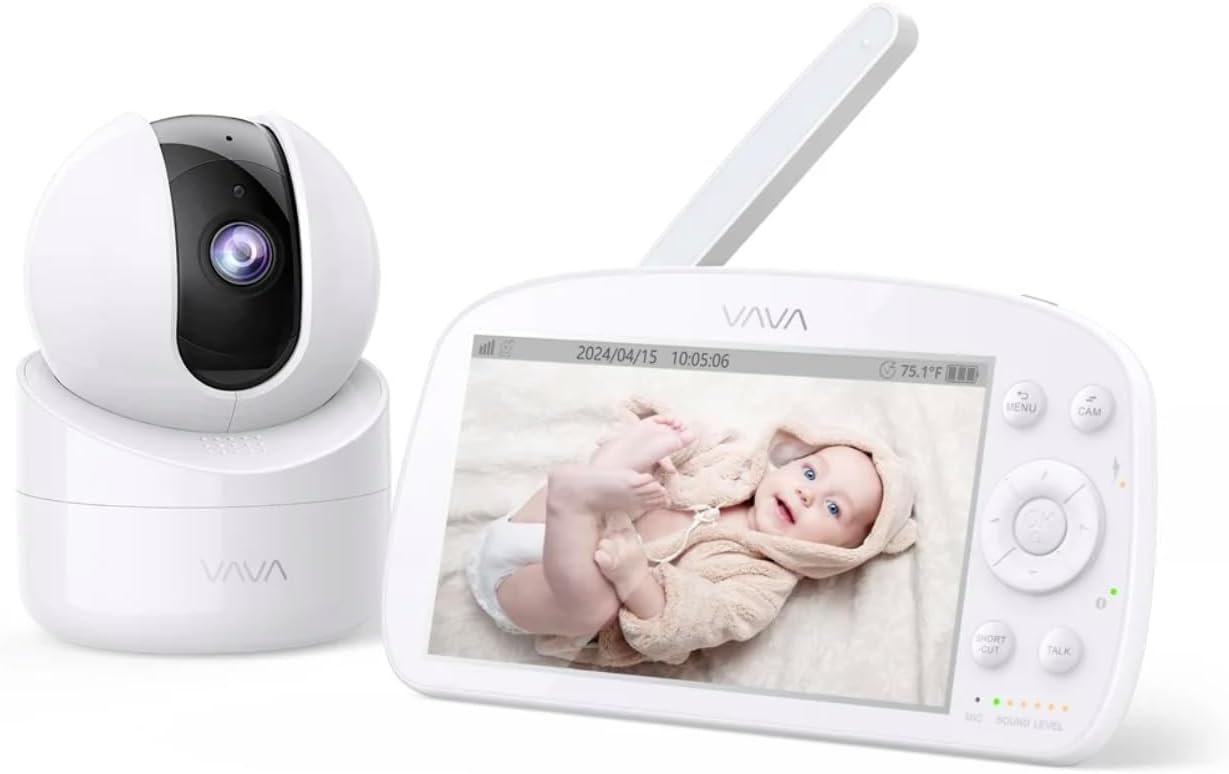
Image 3.1: The VAVA parent unit (monitor) and baby unit (camera) shown together.
The parent unit features a 5.5-inch HD display, control buttons, a microphone, speaker, and an antenna for signal reception.
Jednostka dziecka (kamera)

Image 3.2: The VAVA baby unit (camera) with its pan/tilt base, featuring the lens and microphone.
The baby unit includes a 720p camera with infrared LEDs for night vision, a microphone, speaker, and a temperature sensor. It supports pan, tilt, and digital zoom functions.
4. Konfiguracja
4.1 Umiejscowienie kamery
Umieść jednostkę dla dziecka (kamerę) w miejscu zapewniającym dobrą widoczność. view of your baby in the crib. Ensure it is at least 3 feet (1 meter) away from the crib to prevent entanglement with cords. The camera can be placed on a flat surface or mounted to a wall using the included mount kit.

Obraz 4.1: Example of camera placement, mounted above a crib for optimal viewing.
4.2 Włączanie
- Connect one AC power adapter to the baby unit and plug it into a power outlet.
- Connect the second AC power adapter to the parent unit and plug it into a power outlet. The parent unit has a built-in rechargeable battery for portable use.
- Press and hold the power button on the parent unit to turn it on. The display will activate.
4.3 Parowanie (jeśli konieczne)
The baby unit and parent unit are pre-paired at the factory. If the connection is lost or you are adding an additional camera (up to 4 cameras supported), follow these steps:
- Na jednostce nadrzędnej naciśnij przycisk MENU przycisk.
- Navigate to the camera icon (Pairing) and select it.
- Choose an available camera channel (e.g., CAM 2, CAM 3, CAM 4).
- Press the pairing button on the back of the baby unit within 10 seconds.
- Once paired, the image from the camera will appear on the parent unit display.
5. Instrukcja obsługi
5.1 Sterowanie jednostką nadrzędną

Image 5.1: The parent unit in use, displaying the live feed from the baby unit.
- Przycisk MENU: Access settings, pairing, lullabies, and other functions.
- Przyciski nawigacyjne (góra/dół/lewo/prawo): Move through menus and control camera pan/tilt.
- Przycisk OK: Potwierdź wybór.
- Przycisk ROZMOWA: Press and hold to speak to your baby through the camera's speaker (Two-Way Audio).
- Przycisk POWIĘKSZENIA: Magnify the image (2X-4X digital zoom).
- Tryb VOX: Voice Operated eXchange. The screen will turn on automatically when sound is detected from the baby unit. Adjust sensitivity in the menu.
- Kołysanki: Select and play lullabies from the menu to soothe your baby.
- Widzenie nocne: Automatically activates in low light conditions, providing a clear black and white image.
- Tryb automatycznego pilota: Cycles through connected cameras automatically.
5.2 Camera Control (Pan & Tilt)
From the parent unit, use the navigation buttons to remotely adjust the camera's viewkąt:
- Naciskać W górę/w dół to tilt the camera vertically.
- Naciskać Lewo/Prawo to pan the camera horizontally.
6. Konserwacja
6.1 Czyszczenie
- Disconnect both units from power before cleaning.
- Use a soft, dry cloth to wipe the surfaces of the monitor and camera.
- For the camera lens, use a lens cleaning cloth to avoid scratches.
- Nie należy używać środków czyszczących o właściwościach ściernych ani rozpuszczalników.
6.2 Battery Care (Parent Unit)
- Aby przedłużyć żywotność baterii, należy unikać częstego całkowitego rozładowywania baterii.
- Charge the parent unit regularly.
- Jeśli urządzenie będzie przechowywane przez dłuższy czas, naładuj akumulator do około 50% i przechowuj go w chłodnym, suchym miejscu.
7. Rozwiązywanie Problemów
| Problem | Możliwa przyczyna | Rozwiązanie |
|---|---|---|
| Brak obrazu na jednostce nadrzędnej | Parent unit is off; Camera is off; Out of range; Not paired. | Ensure both units are powered on. Move units closer. Re-pair the camera (see Section 4.3). |
| Niska jakość obrazu | Weak signal; Obstructions; Dirty lens. | Move units closer. Remove obstructions. Clean camera lens. |
| Brak dźwięku lub dźwięk zniekształcony | Volume too low; Out of range; Interference. | Increase parent unit volume. Move units closer. Avoid placing near other electronic devices. |
| Bateria jednostki rodzicielskiej szybko się rozładowuje | High screen brightness; VOX mode off; Old battery. | Reduce screen brightness. Enable VOX mode. Contact support for battery replacement if necessary. |
| Camera not responding to pan/tilt | Connection issue; Camera malfunction. | Check connection. Power cycle both units. If issue persists, contact support. |
8. Specyfikacje
| Funkcja | Szczegół |
|---|---|
| Nazwa modelu | VAVA 5.5" 720P Video Baby Monitor |
| Numer modelu | 83-24011-022 |
| Rozmiar wyświetlacza | 5.5 cali |
| Rozdzielczość wideo | Rozdzielczość 720p HD |
| Zasięg transmisji | Do 900 stóp (w linii wzroku) |
| Technologia łączności | Wireless (Dedicated 2.4GHz FHSS) |
| Źródło zasilania | Corded Electric, Rechargeable (Parent Unit) |
| Cechy specjalne | 2-Way Audio, Night Vision, Pan & Tilt, Zoom (2X-4X), VOX Mode, Lullabies, Temperature Sensor |
| Zastosowanie wewnątrz/na zewnątrz | Wnętrz |
| Typ montażu | Uchwyt na blat |
| Wymiary produktu | 8.46 x 8 x 5 cala |
| Waga przedmiotu | 2.2 funta |
| UPC | 191280045666 |
9. Gwarancja i wsparcie
9.1 Informacje o gwarancji
VAVA products are designed and manufactured to the highest quality standards. This product is covered by a manufacturer's warranty from the date of purchase. Please refer to the warranty card included in your package or visit the official VAVA webSzczegółowe warunki gwarancji można znaleźć na naszej stronie.
9.2 Obsługa klienta
If you encounter any issues or have questions regarding your VAVA 5.5" 720P HD Video Baby Monitor, please contact VAVA Customer Support. Our team is available to assist you with troubleshooting, technical support, and warranty claims.
Aktualne dane kontaktowe znajdziesz na stronie: www.vava.com/support