
Wstęp
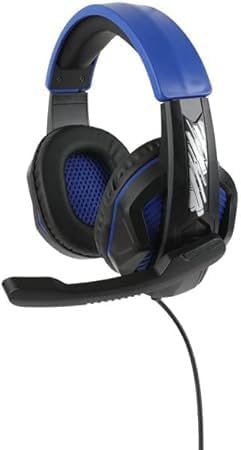
Thank you for choosing the Nerf GAM83056A-BLU Gaming Headphones. These headphones are designed to enhance your gaming experience with comfortable wear, clear audio, and seamless communication. Featuring a built-in microphone and a sleek black and blue design, they are suitable for extended gaming sessions across various platforms.
Informacje dotyczące bezpieczeństwa
Przed użyciem produktu należy uważnie przeczytać wszystkie instrukcje bezpieczeństwa. Zachowaj instrukcję do wykorzystania w przyszłości.
- Aby zapobiec uszkodzeniu słuchu, należy unikać długotrwałego słuchania muzyki na wysokim poziomie głośności.
- Nie wystawiaj słuchawek na działanie ekstremalnych temperatur, wilgoci ani płynów.
- Nie próbuj demontować ani modyfikować słuchawek. Spowoduje to unieważnienie gwarancji.
- Przechowywać poza zasięgiem małych dzieci ze względu na małe części, które mogą stwarzać ryzyko zadławienia.
- Use only with compatible devices and accessories.
Zawartość opakowania
Sprawdź, czy w przesyłce znajdują się wszystkie elementy:
- 1 x Nerf GAM83056A-BLU Gaming Headphones with Integrated Microphone
- 1 x Instrukcja obsługi użytkownika (ten dokument)

Image: The Nerf GAM83056A-BLU Gaming Headphones shown in their retail box, highlighting the product and its key features.
Produkt ponadview
Familiarize yourself with the components of your new gaming headphones:
- Regulowany pałąk: Dla wygodnego dopasowania do różnych rozmiarów głowy.
- Cushioned Ear Cups: Ergonomically designed for extended wear and passive noise cancellation.
- Zintegrowany mikrofon: Elastyczny mikrofon na wysięgniku zapewniający wyraźną komunikację głosową.
- Gniazdo audio 3.5 mm: Standard connector for compatibility with multiple devices.
- Inline Control (if applicable): For volume adjustment and microphone mute (refer to specific model features).

Obraz: Lewy: Bok view of the headphones showing the adjustable headband, ear cup, and the extended microphone. Right: Front view of the headphones, highlighting the ear cup design and overall structure.
Organizować coś
Follow these steps to set up your Nerf GAM83056A-BLU Gaming Headphones:
- Połącz z urządzeniem: Locate the 3.5mm audio jack on your gaming console controller, PC, laptop, or other compatible device. Insert the 3.5mm plug from your headphones firmly into the audio jack.
- Dopasuj opaskę: Gently slide the adjustable headband to fit comfortably over your head. The ear cups should fully enclose your ears without excessive pressure.
- Pozycja mikrofonu: Adjust the flexible microphone boom so that the microphone is positioned near your mouth for optimal voice pickup. Ensure it is not obstructing your vision.
- Początkowa kontrola głośności: Before starting your game or communication, set the volume on your device to a low level. Gradually increase the volume to a comfortable listening level.
Instrukcja obsługi
Using your Nerf GAM83056A-BLU Gaming Headphones for various activities:
Hazard
- Once connected, the headphones will provide immersive stereo sound for your games.
- Utilize the integrated microphone for in-game voice chat with teammates. Ensure your device's audio settings recognize the headphone's microphone as the input source.
- Adjust game audio and chat volume independently through your gaming platform's settings for balanced sound.
Communication (Voice Calls, Online Meetings)
- For voice calls or online meetings on PC/laptop, ensure the headphones are selected as both the audio output and microphone input device in your system's sound settings or the application's settings.
- Speak clearly into the microphone for optimal voice clarity.
Volume Control and Microphone Mute (if applicable)
If your headphones feature an inline control:
- Volume Wheel/Slider: Rotate or slide to increase or decrease the audio volume.
- Przełącznik wyciszania mikrofonu: Toggle the switch to mute or unmute your microphone. This is useful for privacy during calls or when you don't want your voice transmitted in-game.
Konserwacja
Aby zapewnić długą żywotność i optymalną wydajność słuchawek, należy przestrzegać poniższych wskazówek dotyczących konserwacji:
- Czyszczenie: Use a soft, dry, lint-free cloth to wipe down the ear cups and headband. For stubborn dirt, slightly dampWytrzyj szmatkę wodą. Nie używaj silnych środków chemicznych ani ściernych środków czyszczących.
- Składowanie: Gdy słuchawki nie są używane, przechowuj je w czystym, suchym miejscu, z dala od bezpośredniego światła słonecznego i ekstremalnych temperatur. Unikaj splątania kabla.
- Pielęgnacja kabli: Do not pull on the cable to disconnect the headphones. Always grasp the plug. Avoid sharp bends or kinks in the cable.
Rozwiązywanie problemów
Jeśli masz problemy ze słuchawkami, zapoznaj się z poniższymi typowymi problemami i ich rozwiązaniami:
| Problem | Możliwa przyczyna | Rozwiązanie |
|---|---|---|
| Brak dźwięku ze słuchawek |
|
|
| Mikrofon nie działa |
|
|
| Zniekształcenia dźwięku lub szumy |
|
|
Jeśli po wypróbowaniu tych rozwiązań problem nadal występuje, skontaktuj się z obsługą klienta.
Specyfikacje
| Funkcja | Szczegół |
|---|---|
| Nazwa modelu | GAM83056A-BLU |
| Technologia łączności | Przewodowy (gniazdo 3.5 mm) |
| Umieszczenie ucha | Na ucho |
| Rozmiar sterownika audio | 40 milimetrów |
| Wrażliwość | 100dB |
| Impedancja | 32 omy |
| Kontrola hałasu | Pasywna redukcja szumów |
| Mikrofon | Built-in, Flexible Boom |
| Tworzywo | Plastic, Memory Foam, Metal |
| Kolor | Black And Blue |
| Waga przedmiotu | 10 uncji (ok. 283 gramów) |
| Kompatybilne urządzenia | PC, Gaming Consoles, Laptops |
| Zalecany przedział wiekowy | 8 Years And Up |
| Producent | Osłabić |
| Kraj pochodzenia | Chiny |
Gwarancja i wsparcie
This product comes with a standard manufacturer's warranty. Please refer to the warranty card included with your purchase for specific terms and conditions, or visit the manufacturer's official webStrona zawiera szczegółowe informacje o gwarancji.
For technical support, troubleshooting assistance beyond this manual, or warranty claims, please contact Nerf customer service. Contact information can typically be found on the product packaging or the manufacturer's webstrona.
Please have your product model number (GAM83056A-BLU) and proof of purchase ready when contacting support.