
1. Wprowadzenie
Dziękujemy za wybranie Blackview MP20 Mini PC. This compact and powerful desktop computer is designed for various applications, from office productivity to home entertainment. This manual provides essential information for setting up, operating, maintaining, and troubleshooting your device to ensure optimal performance and longevity.
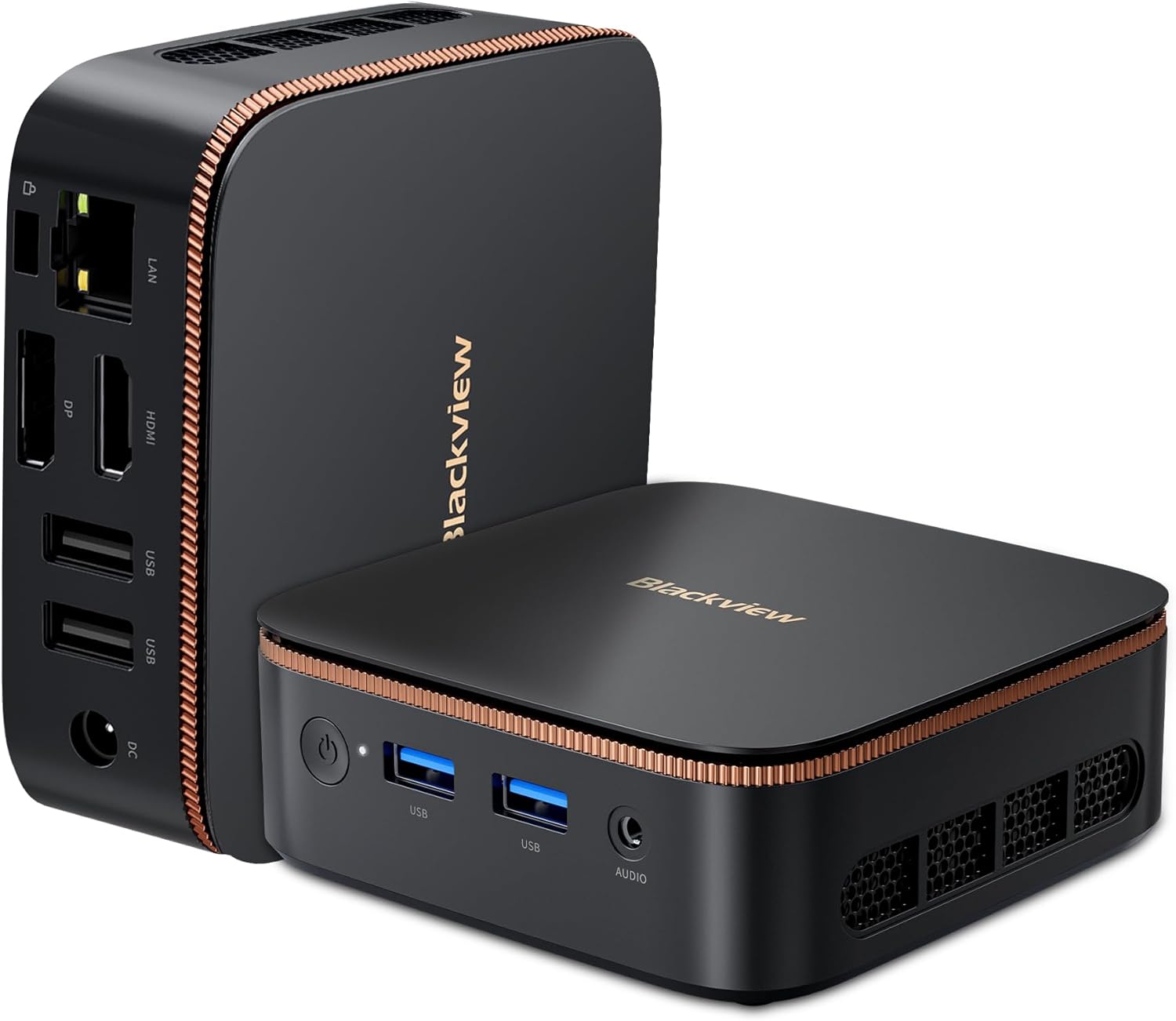
Rysunek 1.1: Czarnyview MP20 Mini PC, pokazasindzięki kompaktowej konstrukcji i licznym portom.
2. Co znajduje się w pudełku
Ostrożnie rozpakuj swój czarnyview MP20 Mini PC and ensure all items are present:
- Czarnyview MP20 N150 Mini PC (1 unit)
- Zasilacz (1 sztuka)
- Kabel HDMI (1 sztuka)
- Uchwyt VESA ze śrubami (1 zestaw)
- Instrukcja obsługi (1 szt.)

Figure 2.1: All components included in the Blackview MP20 Mini PC package.
3. Koniec produktuview
3.1 Wymiary i przenośność
Czarnyview MP20 is designed for ultra-compactness, measuring approximately 3.94 x 1.39 x 3.94 inches (10 x 3.5 x 10 cm) and weighing only 9.3 ounces (265g). Its small footprint allows for easy integration into any workspace, and it is highly portable for on-the-go use.
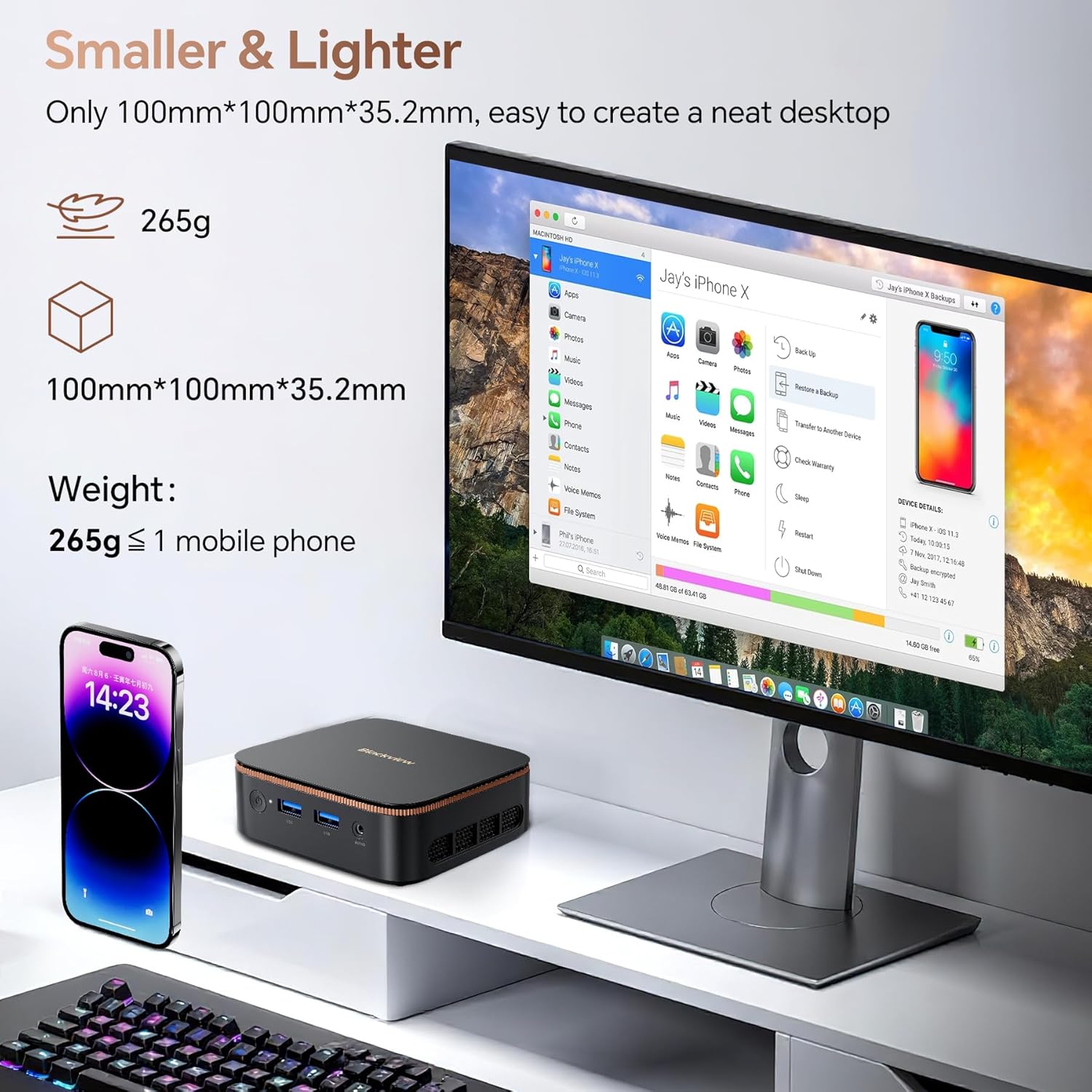
Figure 3.1: The compact size of the Blackview MP20 Mini PC compared to a mobile phone.

Figure 3.2: The Blackview MP20 Mini PC is easy to carry for remote work or travel.
3.2. Porty i łączność
The MP20 Mini PC offers a comprehensive set of ports for versatile connectivity:
- Porty przednie: Power Button, 2x USB 3.0, 3.5mm Audio In/Out Jack
- Porty tylne: Gigabit Ethernet (RJ45), HDMI, DisplayPort, 2x USB 2.0, DC Power Jack
Wireless connectivity includes Bluetooth 5.2 and Dual-Band Wi-Fi 6 for fast and stable network access.

Figure 3.3: The MP20 Mini PC supports both wired and wireless connections for various peripherals.

Rysunek 3.4: Szczegółowy view of the MP20's versatile port layout.
3.3. Dane techniczne
The MP20 Mini PC is powered by the Intel Twin Lake N150 processor, offering speeds up to 3.6GHz for efficient multitasking and demanding office applications. It comes equipped with 16GB of DDR4 RAM and a 512GB M.2 SSD, with storage expandable up to 2TB (SSD not included).

Figure 3.5: The Intel Twin Lake N150 processor ensures smooth performance for daily tasks.

Figure 3.6: Intel N150 Processor details.

Rysunek 3.7: Ample RAM and expandable SSD storage for efficient operation.

Figure 3.8: The 512GB M.2 SSD provides fast storage, expandable for more applications and files.
3.4. Możliwości wyświetlania
The MP20 supports dual 4K 60Hz display output via its HDMI and DisplayPort connections, providing a stable, clear, and fast visual experience for enhanced productivity or immersive entertainment.

Figure 3.9: Dual 4K 60Hz display support for expanded visual workspace.

Figure 3.10: Dual 4K display enhances multitasking and viewzdobywania doświadczenia.
3.5. Układ chłodzenia
The MP20 Mini PC features a twofold cooling system with a 35,455mm² heat dissipation area, ensuring efficient heat management and stable performance even under load.
Wideo 3.1: Overview Czarnegoview MP20 Mini PC, highlighting its compact size, Intel N150 processor, 4K display support, dual-screen capabilities, RAM and SSD, versatile ports, Wi-Fi 6, Bluetooth 5.2, and the efficient twofold cooling system.
4. Przewodnik konfiguracji
Aby skonfigurować urządzenie Black, wykonaj następujące kroki:view Minikomputer MP20:
- Podłącz do zasilania: Plug the power adapter into the DC Power Jack on the rear of the Mini PC, then plug the adapter into a power outlet.
- Połącz z wyświetlaczem: Use the provided HDMI cable to connect the Mini PC to your monitor or TV. Alternatively, use a DisplayPort cable for DisplayPort connections.
- Podłącz urządzenia peryferyjne: Plug in your USB keyboard, mouse, and any other desired peripherals into the available USB ports.
- Połączenie internetowe: For a wired connection, connect an Ethernet cable to the RJ45 port. For wireless, ensure your Wi-Fi network is available after booting.
- Włączanie: Naciśnij przycisk zasilania z przodu komputera Mini PC. Zaświeci się kontrolka zasilania.
The included VESA mount allows for discreet installation behind a compatible monitor or TV, helping to create a clutter-free workspace.
Figure 4.1: VESA mount installation for a tidy setup.
5. System operacyjny
Czarnyview MP20 Mini PC comes pre-installed with Windows 11 Pro, offering a secure and productive environment for your computing needs. It is also compatible with other operating systems such as Linux and Ubuntu, providing flexibility for advanced users.

Figure 5.1: Windows 11 Pro pre-installed for immediate use.

Figure 5.2: Linux compatibility for diverse computing needs.

Figure 5.3: Ubuntu compatibility for open-source enthusiasts.
6. Konserwacja
Aby zapewnić długowieczność i optymalną wydajność Twojego Blackview MP20 Mini PC, follow these maintenance guidelines:
- Utrzymuj czystość: Regularly clean the exterior of the Mini PC with a soft, dry cloth. Use compressed air to gently clear dust from the ventilation grilles to prevent overheating.
- Zapewnij odpowiednią wentylację: Do not block the ventilation openings. Place the Mini PC in a well-ventilated area to allow for proper airflow.
- Aktualizacje oprogramowania: Aby zwiększyć bezpieczeństwo i wydajność, aktualizuj system operacyjny i sterowniki do najnowszych wersji.
- Unikaj ekstremalnych warunków: Nie wystawiaj komputera Mini PC na działanie ekstremalnych temperatur, wilgoci ani bezpośredniego światła słonecznego.
7. Rozwiązywanie Problemów
Jeśli masz problemy z urządzeniem Blackview MP20 Mini PC, refer to the following common troubleshooting tips:
| Problem | Możliwa przyczyna | Rozwiązanie |
|---|---|---|
| Brak zasilania | Luźny kabel zasilający, uszkodzony zasilacz, problem z gniazdkiem elektrycznym | Check all power connections. Try a different power outlet. Ensure the power adapter is working. |
| Brak wyświetlacza | Monitor wyłączony, kabel wideo luźny/uszkodzony, nieprawidłowe źródło sygnału wejściowego na monitorze | Ensure monitor is on and set to correct input. Check HDMI/DisplayPort cable connections. Try a different cable or monitor. |
| Brak połączenia internetowego (Wi-Fi) | Wi-Fi wyłączone, nieprawidłowe hasło, problem z routerem | Check Wi-Fi settings. Re-enter password. Restart router. Ensure Wi-Fi drivers are installed. |
| No internet connection (Ethernet) | Ethernet cable loose/faulty, network driver issue, router/modem issue | Check Ethernet cable. Restart router/modem. Check network adapter settings and drivers. |
| Niska wydajność | Too many programs running, low disk space, overheating | Close unnecessary applications. Free up disk space. Ensure proper ventilation and clean dust. |
If the problem persists after trying these solutions, please contact Blackview obsługi klienta w celu uzyskania dalszej pomocy.
8. Specyfikacje techniczne
Poniżej znajdują się szczegółowe dane techniczne modelu Blackview MP20 N150 Mini PC:
| Funkcja | Specyfikacja |
|---|---|
| Model | MP20 N150 |
| Edytor | Intel Twin Lake N150 (up to 3.6 GHz) |
| BARAN | 16 GB DDR4 (2666 MHz) |
| Składowanie | Dysk SSD M.2 512 GB (z możliwością rozbudowy do 2 TB) |
| Koprocesor graficzny | Karta graficzna Intel UHD (zintegrowana) |
| Maksymalna rozdzielczość ekranu | 4096x2160 (4K) |
| System operacyjny | Windows 11 Pro |
| Typ bezprzewodowy | Wi-Fi 6 (802.11ax), Bluetooth 5.2 |
| Sieć Ethernetowa | Gigabitowy Ethernet (RJ45) |
| Porty USB | 2x USB 3.0, 2x USB 2.0 |
| Wyjście wideo | HDMI, DisplayPort (Dual 4K@60Hz support) |
| Gniazdo audio | Wejście/wyjście audio 3.5 mm |
| Wymiary (dł. x szer. x wys.) | 3.94 x 1.39 x 3.94 cala (10 x 3.5 x 10 cm) |
| Waga przedmiotu | 9.3 uncji (265 g) |
| Kolor | Czarny |
9. Gwarancja i wsparcie
Czarnyview offers a comprehensive two-year warranty for your MP20 Mini PC, covering parts and labor for manufacturing defects. Beyond the warranty period, lifetime technical support is provided to ensure your device operates trouble-free for many years.
Our expert team is available to assist you with software updates, troubleshooting, and optimization suggestions via email, live chat, or phone.

Rysunek 9.1: Czarnyview Care commitment to customer satisfaction and support.
For support, please refer to the contact information provided in your user guide or visit the official Blackview wsparcie webstrona.