
1. Wprowadzenie
Thank you for choosing the Ctronics 4K Outdoor PTZ Security Camera (Model 550C-4K-Z30). This manual provides essential information for the proper installation, operation, and maintenance of your new security camera. Please read this manual thoroughly before using the product and retain it for future reference. This camera is designed to provide high-resolution surveillance with advanced features such as 30x optical zoom, AI-powered detection, and comprehensive night vision capabilities, ensuring robust security for your property.
2. Informacje dotyczące bezpieczeństwa
- Zasilanie: Use only the provided power adapter. Ensure the power source meets the camera's voltagwymagania (12V).
- Instalacja: Install the camera securely to prevent it from falling. Ensure all cables are properly routed and protected from damage.
- Wodoodporność: The camera is IP66 weatherproof, suitable for outdoor use. However, avoid submerging it in water or exposing it to extreme conditions beyond its rating.
- Temperatura pracy: Do not operate the camera outside its specified temperature range to prevent damage.
- Czyszczenie: Przed czyszczeniem odłącz zasilanie. Użyj miękkiej, suchej ściereczki. Unikaj silnych środków chemicznych i ściernych środków czyszczących.
- Demontaż: Nie próbuj demontować ani modyfikować aparatu. Spowoduje to unieważnienie gwarancji i może spowodować uszkodzenia lub obrażenia.
- Ingerencja: Keep the camera away from strong electromagnetic fields that may interfere with its operation.
3. Zawartość opakowania
Proszę sprawdzić, czy w paczce znajdują się następujące elementy:
- Ctronics 4K Outdoor PTZ Security Camera (Model 550C-4K-Z30)
- Stojak montażowy
- Śruby montażowe
- Zasilacz
- Instrukcja obsługi (ten dokument)
- Security Sticker (for deterrence)
4. Koniec produktuview
The Ctronics 4K Outdoor PTZ Security Camera is a robust surveillance solution featuring a durable metal body and advanced imaging capabilities. It is designed for both wall and ceiling mounting, offering flexible installation options.
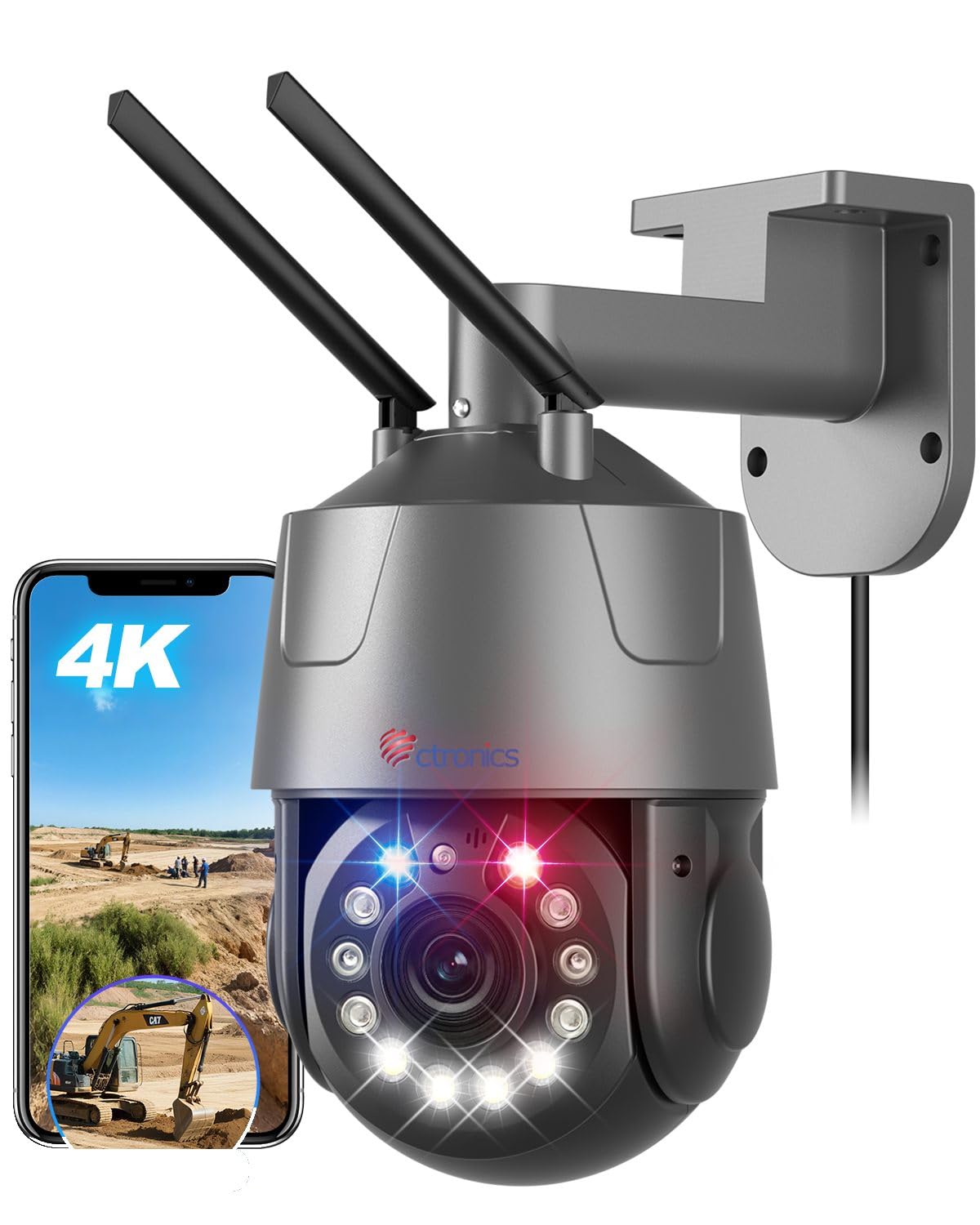
Figure 1: Ctronics 4K Outdoor PTZ Security Camera (Model 550C-4K-Z30)
Kluczowe komponenty:
- Obiektyw aparatu: High-resolution 4K (3840x2160) lens with 30x optical zoom.
- Diody podczerwieni: For black and white night vision up to 150m.
- Białe diody LED: For full-color night vision up to 50m and warning lights.
- Mikrofon: Do wprowadzania danych audio podczas komunikacji dwukierunkowej.
- Głośnik: Do wyjścia audio podczas komunikacji dwukierunkowej i alarmów.
- Anteny: For 2.4GHz/5GHz Wi-Fi connectivity.
- Port Ethernet: Do przewodowego połączenia LAN.
- Pobór mocy: Podłączenie do zasilania prądem stałym 12 V.
- Gniazdo kart microSD: Obsługuje do 256 GB pamięci lokalnej.
5. Konfiguracja
5.1. Montaż kamery
Kamerę można zamontować na ścianie lub suficie. Wybierz lokalizację zapewniającą pożądany viewing angle and is within range of your Wi-Fi network or Ethernet cable.
- Zaznacz otwory wiertnicze: Use the mounting stand as a template to mark the positions for drilling.
- Wiercenie otworów: Wywierć otwory w zaznaczonych miejscach. W przypadku montażu na murze włóż kołki rozporowe.
- Attach Mounting Stand: Secure the mounting stand to the wall or ceiling using the provided screws.
- Podłącz kamerę: Mount the camera onto the secured stand. Adjust the angle as needed.

Figure 2: Flexible mounting options for wall or ceiling installation.
5.2. Podłączenie zasilania
Connect the provided power adapter to the camera's power input port and then plug it into a power outlet. The camera will power on and initiate its startup sequence.
5.3. Pobieranie aplikacji i konfiguracja początkowa
Download the 'Ctronics Pro' app from your smartphone's app store (iOS or Android). Follow the in-app instructions for initial setup. The camera supports one-click Bluetooth setup for easy pairing.
Video 1: QR Code Connection Guide. This video demonstrates the process of connecting the camera using a QR code via the mobile application.
5.4. Network Connection (Wi-Fi / LAN)
The camera supports both 2.4GHz and 5GHz Wi-Fi, as well as a wired LAN connection.
- Połączenie Wi-Fi: Follow the 'Ctronics Pro' app instructions to connect the camera to your Wi-Fi network. Ensure your phone is connected to the same Wi-Fi network during setup.
- Połączenie LAN: Podłącz kabel Ethernet z routera do portu Ethernet kamery. Kamera automatycznie nawiąże połączenie przewodowe.

Figure 3: The camera supports both 2.4GHz and 5GHz Wi-Fi for stable and fast connections.
6. Instrukcja obsługi
6.1. Na żywo View i sterowanie PTZ
Open the 'Ctronics Pro' app to access the live view. Use the on-screen controls to pan (355° horizontally) and tilt (90° vertically) the camera. Tap on the screen to activate the 3D zoom feature, which automatically focuses on the selected area.

Figure 4: Control the camera's pan and tilt movements and set up to 30 preset positions for quick viewing.
6.2. Funkcjonalność powiększania
The camera features a powerful 30x optical zoom. Pinch to zoom in/out on the live view to see distant objects in detail without loss of clarity. The intelligent 3D zoom allows you to tap on an area to automatically zoom and center it.

Figure 5: Experience clear, detailed views with 30x optical zoom, allowing identification of distant objects like vehicle license plates.
6.3. Tryby widzenia nocnego
Kamera oferuje wiele trybów widzenia nocnego:
- Pełnokolorowa wizja nocna: Utilizes high-brightness white LEDs to provide color images up to 50m in low-light conditions.
- Widzenie nocne w podczerwieni (IR): Uses enhanced IR lights for clear black and white images up to 150m in complete darkness.
- Tryb inteligentny: Automatycznie przełącza się między widzeniem nocnym w podczerwieni a pełnokolorowym trybem widzenia w zależności od wykrytego ruchu lub warunków oświetlenia.

Figure 6: Comparison of IR night vision (top) and full-color night vision (bottom) in 4K resolution.
6.4. AI Detection and Auto Tracking
The camera's AI capabilities allow it to distinguish between humans, pets, and vehicles, reducing false alarms. When a target is detected, the camera can automatically track its movement and zoom in.

Figure 7: AI detection identifies humans, pets, and vehicles, sending accurate notifications.

Figure 8: The camera automatically tracks moving subjects and adjusts focus dynamically.
6.5. Funkcje alarmowe
Configure alarm settings in the app. The camera features red and blue warning lights and a customizable sound alarm to deter intruders. You can define specific detection areas to minimize unwanted alerts.

Figure 9: The camera's red and blue warning lights and customizable sound alarm act as a strong deterrent against intruders.
6.6. Dźwięk dwukierunkowy
Use the two-way audio feature via the app to communicate with visitors or deter unwanted guests. The built-in microphone and speaker provide clear audio transmission.
6.7. Rejestrowanie i przechowywanie
The camera supports multiple recording options:
- Karta MicroSD: Insert a microSD card (up to 256GB, sold separately) into the camera's slot for local continuous or event-triggered recording.
- Przechowywanie w chmurze: Subscribe to cloud storage services via the app for secure off-site recording.
- NVR/NAS/FTP: The camera supports ONVIF, RTSP, FTP, and NAS protocols for integration with compatible network video recorders or storage solutions.
7. Główne cechy
- Rozdzielczość 4K UHD: Equipped with a SONY IMX415 sensor, delivering true 4K (3840x2160) resolution for crisp, clear images and videos.
- 30-krotny zoom optyczny: Provides lossless 30x optical zoom for detailed viewing of distant objects, combined with intelligent 3D zoom technology for automatic focus and tracking.
- Zaawansowane widzenie w nocy: Features 50m full-color night vision and 150m infrared night vision, ensuring comprehensive surveillance day and night.
- Inteligentne wykrywanie AI: Accurately detects humans, pets, and vehicles, reducing false alarms and enabling precise auto-tracking.
- Konfigurowalne alarmy: Includes high-brightness red and blue warning lights and a customizable sound alarm to deter intruders effectively.
- Dual-Band Wi-Fi & LAN: Supports both 2.4GHz and 5GHz Wi-Fi for flexible and stable network connectivity, along with a wired LAN option.
- Zdalny dostęp i kontrola: Monitor and control the camera from anywhere using the 'Ctronics Pro' mobile app or PC client.
- Dwukierunkowy dźwięk: Wbudowany mikrofon i głośnik umożliwiają komunikację w czasie rzeczywistym.
- Wiele opcji przechowywania: Supports up to 256GB microSD card, cloud storage, and integration with NVR/NAS/FTP via ONVIF/RTSP protocols.
- Trwałe i odporne na warunki atmosferyczne: Constructed with a metal body and IP66 rating, ensuring reliable operation in various outdoor weather conditions.
8. Konserwacja
- Czyszczenie: Regularly clean the camera lens with a soft, lint-free cloth to ensure optimal image clarity. Do not use abrasive materials or harsh chemicals.
- Aktualizacje oprogramowania układowego: Check the 'Ctronics Pro' app periodically for available firmware updates. Keeping your camera's firmware up-to-date ensures optimal performance, new features, and security enhancements.
- Kontrola kabla: Periodically inspect all cables for any signs of wear, damage, or corrosion. Replace damaged cables immediately.
- Bezpieczeństwo montażu: Ensure the camera remains securely mounted. Tighten screws if necessary.
9. Rozwiązywanie Problemów
| Problem | Możliwa przyczyna | Rozwiązanie |
|---|---|---|
| Kamera nie włącza się | Brak zasilania, uszkodzony adapter, luźne połączenie | Check power outlet, ensure adapter is connected correctly, try a different outlet. |
| Nie można połączyć się z siecią Wi-Fi | Incorrect Wi-Fi password, camera too far from router, router issues, incorrect band (2.4/5GHz) | Verify Wi-Fi password, move camera closer to router, restart router, ensure correct Wi-Fi band is selected during setup. |
| Niska jakość obrazu | Dirty lens, low network bandwidth, incorrect resolution settings | Clean the lens, ensure stable internet connection, set video quality to 4K in app settings. |
| Częste fałszywe alarmy | Sensitive detection settings, objects outside detection area triggering alerts | Adjust AI detection sensitivity, define specific detection zones to exclude irrelevant areas. |
| Dwukierunkowe audio nie działa | Microphone/speaker disabled in app, low volume, network issues | Enable microphone/speaker in app, adjust volume, check network stability. |
10. Specyfikacje
| Funkcja | Szczegół |
|---|---|
| Nazwa modelu | 550C-4K-Z30 |
| Zalecane zastosowanie | Bezpieczeństwo na zewnątrz |
| Technologia łączności | Wired, Wireless (Bluetooth, Wi-Fi 2.4/5GHz) |
| Cechy specjalne | 4K UHD, PTZ Technology, Motion Sensor, Night Vision |
| Do użytku wewnątrz/na zewnątrz | Plenerowy |
| Kompatybilne urządzenia | Smartfony, tablety, laptopy |
| Źródło zasilania | Elektryczny przewodowy (12 V, 12 W) |
| Protokoły połączeń | Ethernet, ONVIF, RTSP, Wi-Fi |
| Typ montażu | Wall Mount (also Ceiling Mount supported) |
| Product Exterior Material | Metal |
| Stopień wodoodporności | IP66 |
| Typ alarmu | Dźwięk i ruch |
| Efektywna rozdzielczość obrazu nieruchomego | 8 MP |
| Rozdzielczość czujnika obrazu | 8 MP |
| Format kodowania wideo | H.265 |
| Format przechwytywania wideo | MP4 |
| Zakres noktowizora | 150 meters (IR), 50 meters (Color) |
| Liczba diod LED podczerwieni | 4 |
| Wymiary produktu | Wymiary 30 x 15 x 31 cm |
| Efektywna rozdzielczość wideo | 3840P |
| Szybkość klatek | 15 klatek na sekundę |
| Pole View | 90 stopnia |
| Współczynnik zoomu optycznego | 30x |
| Funkcja fokusu | Autofokus |
| Max Flash Memory Support | 256 GB (microSD) |
11. Informacje o gwarancji
Ctronics products typically come with a manufacturer's warranty. Please refer to the warranty card included in your package or visit the official Ctronics webSzczegółowe warunki gwarancji znajdziesz na stronie. Zachowaj paragon jako dowód zakupu na wypadek roszczeń gwarancyjnych.
12. Obsługa klienta
If you encounter any issues or have questions regarding your Ctronics 4K Outdoor PTZ Security Camera, please contact our customer support team:
- E-mail: support@ctronics.com (Byłyample)
- Webstrona: Visit the official Ctronics webwitryna z odpowiedziami na często zadawane pytania, poradnikami rozwiązywania problemów i formularzami kontaktowymi.
Please have your model number (550C-4K-Z30) and purchase details ready when contacting support.