
Posture FI2211LB
Posture Smart Body Composition Scale (Model FI2211LB)
Instrukcja obsługi
1. Wprowadzenie
This manual provides essential instructions for the safe and effective use of your Posture Smart Body Composition Scale, Model FI2211LB. This digital scale is designed to measure body weight and analyze various body composition metrics using advanced 8-electrode technology. Please read this manual thoroughly before first use and retain it for future reference.
2. Informacje dotyczące bezpieczeństwa
- Nie używaj tego urządzenia, jeśli masz rozrusznik serca lub inne wszczepione urządzenie medyczne.
- Nie używaj tego urządzenia, jeśli jesteś w ciąży.
- Waga jest przeznaczona wyłącznie do użytku domowego. Nie jest przeznaczona do diagnostyki ani leczenia.
- Zawsze umieszczaj wagę na twardej, płaskiej powierzchni. Używanie jej na miękkich powierzchniach, takich jak dywan, może mieć wpływ na dokładność pomiaru.
- Powierzchnia wagi może być śliska, gdy jest mokra. Upewnij się, że powierzchnia jest sucha przed wejściem na nią.
- Nie należy wskakiwać na wagę i używać jej do celów innych niż ważenie.
- Keep the scale away from extreme temperatures, direct sunlight, and damp środowiska.
- Przechowywać w miejscu niedostępnym dla dzieci.
3. Zawartość opakowania
- Posture Smart Body Composition Scale (Model FI2211LB)
- Retractable Handle with 8 Electrodes
- 4 baterie AA
- Instrukcja obsługi (ten dokument)
4. Funkcje produktu
- 8-Electrode Technology: Provides comprehensive body composition analysis by sending a safe, low-level electrical current through the body via both feet and hands.
- 28 Pomiarów Składu Ciała: Tracks metrics such as body weight, body fat percentage, BMI, muscle mass, bone mass, water weight, and more.
- Czujniki o wysokiej precyzji: Utilizes advanced sensor technology for accurate and reliable measurements.
- Przejrzysty wyświetlacz LED: Features a bright, easy-to-read LED screen for instant weight and key data display.
- Funkcja komunikatów głosowych: Announces measurement results automatically after each use for convenience.
- Łączność Bluetooth: Seamlessly connects to the Fitdays mobile application for data synchronization and tracking.
- Integracja aplikacji: Compatible with popular health apps including Apple Health, Google Fit, Samsung Health, and Fitbit.
- Large Platform Design: Provides a stable and comfortable weighing experience.
5. Konfiguracja
5.1 Instalacja baterii
- Otwórz komorę baterii znajdującą się na spodzie wagi.
- Włóż 4 baterie AA, zwracając uwagę na prawidłową biegunowość (+/-).
- Dokładnie zamknij komorę baterii.
5.2 Pobieranie i parowanie aplikacji
The Posture Smart Scale uses the Fitdays app to track and analyze your body composition data. Ensure your smartphone's Bluetooth is enabled.
- Download the "Fitdays" app from the Apple App Store or Google Play Store.
- Załóż konto i skonfiguruj swój osobisty profilfile (gender, age, height, etc.). This information is crucial for accurate body composition calculations.
- Step onto the scale briefly to activate it. The LED display will light up.
- Open the Fitdays app. The app will automatically detect and pair with the scale via Bluetooth. Follow any on-screen prompts to confirm the connection.
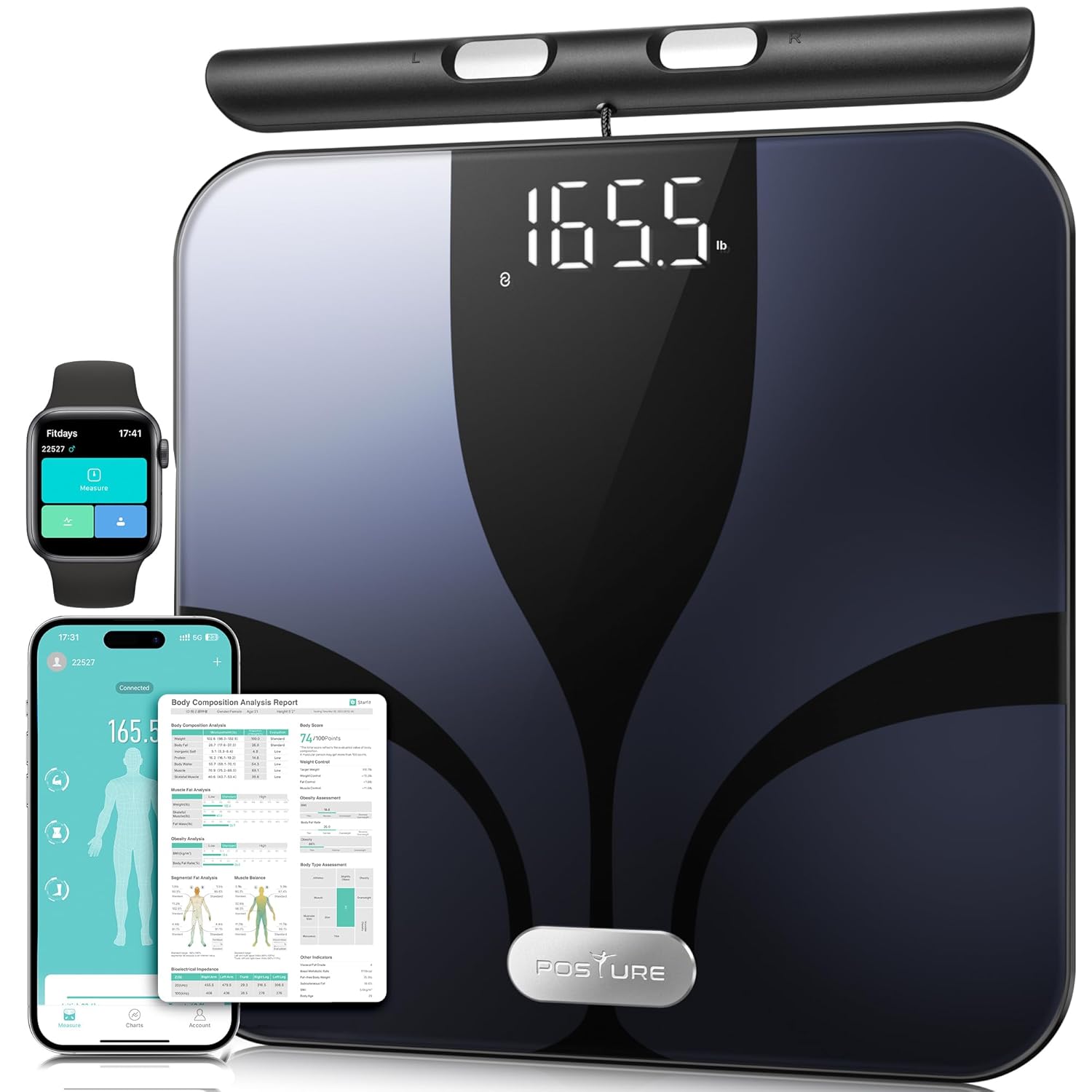
Figure 1: Posture Smart Body Composition Scale with connected mobile and smartwatch applications.
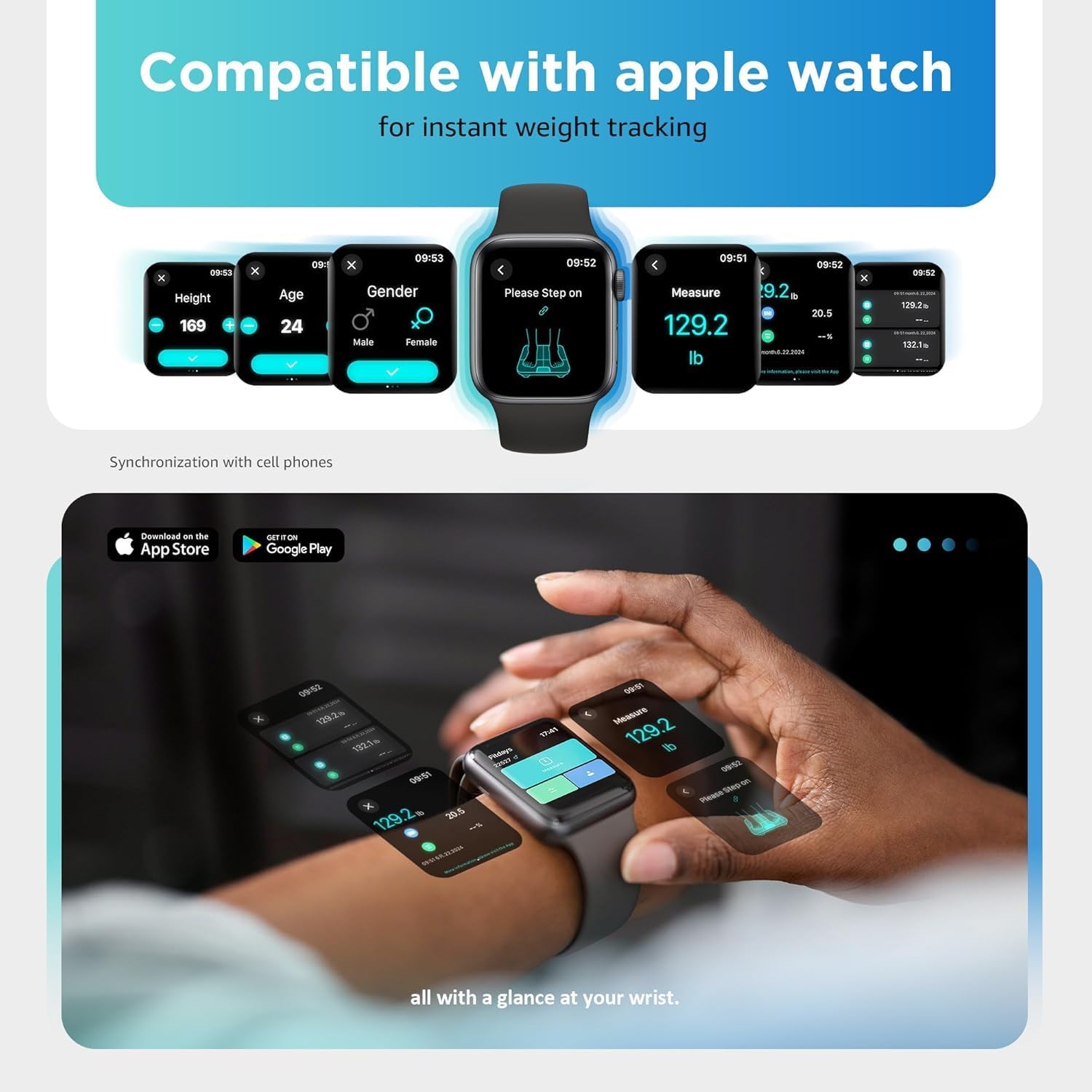
Figure 2: Smartwatch interface showing instant weight tracking, compatible with the Posture scale.
6. Instrukcja obsługi
6.1 Wykonywanie pomiaru
- Wagę należy ustawić na twardej, płaskiej i stabilnej powierzchni.
- Ensure your feet are bare and clean.
- Step onto the scale with both feet, positioning them on the electrode pads.
- Grasp the retractable handle with both hands, ensuring your palms are in full contact with the handle electrodes. Hold the handle at approximately a 45-degree angle, keeping your arms slightly away from your body to avoid interference.
- Stand still until the measurement is complete. The LED display will show your weight, body fat, and BMI. The voice prompt function will announce the results.
- Your data will automatically synchronize with the Fitdays app on your paired smartphone.

Figure 3: Proper posture and hand placement for accurate 8-electrode body composition measurement.
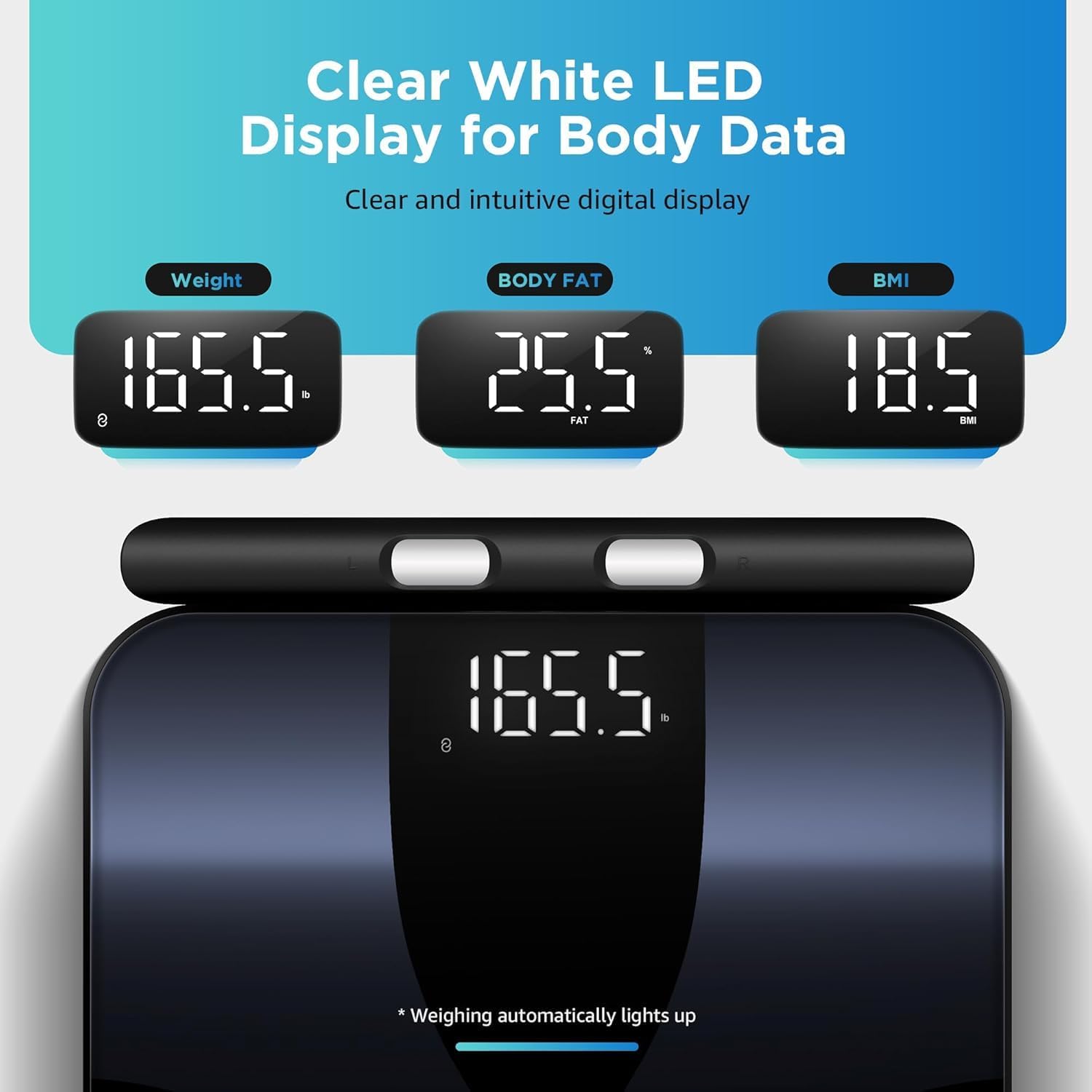
Figure 4: Clear white LED display showing weight, body fat percentage, and BMI readings.
6.2 Consistent Measurements
For the most consistent and comparable results, it is recommended to take measurements:
- At the same time each day (e.g., in the morning before eating or drinking).
- Under similar conditions (e.g., after using the restroom).
- Without clothing, or with minimal, consistent clothing.
7. Zrozumienie pomiarów
The Posture Smart Scale provides 28 different body composition metrics. These metrics are calculated based on your bio-electrical impedance analysis (BIA) data and your profile information (age, gender, height). The Fitdays app offers detailed explanations and historical tracking for each metric.

Figure 5: Visual representation of the 28 body composition metrics measured by the scale, including BMI, body fat, muscle rate, and more.
Key Metrics Include:
- Waga: Całkowita masa Twojego ciała.
- BMI (wskaźnik masy ciała): Miara tkanki tłuszczowej oparta na wzroście i wadze.
- Procent tkanki tłuszczowejtage: Stosunek tkanki tłuszczowej do całkowitej masy ciała.
- Masa mięśniowa: Całkowita masa mięśni w Twoim ciele.
- Masa wody: Procenttage wody w Twoim organizmie.
- Masa kostna: Całkowita masa minerałów kostnych w Twoim ciele.
- Tłuszcz trzewny: Tłuszcz gromadzący się wokół narządów w jamie brzusznej.
- Tłuszcz podskórny: Tłuszcz gromadzony bezpośrednio pod skórą.
- BMR (podstawowa przemiana materii): Liczba kalorii, jakiej potrzebuje Twój organizm do funkcjonowania w stanie spoczynku.
- Białko: Procenttagbiałka w twoim organizmie.
- Wiek ciała: Oszacowanie biologicznego wieku Twojego ciała.
- Tempo wzrostu mięśni szkieletowych: Procenttagmięśni szkieletowych w twoim ciele.
- Left/Right Arm/Leg Mass & Fat: Detailed segmental analysis of body composition.
8. App Integration and Data Tracking
The Fitdays app is your central hub for all body composition data. It provides comprehensive charts, trends, and insights to help you monitor your health journey.
- Dane historyczne: View your measurements over time with daily, weekly, monthly, and yearly trends.
- Zarządzanie użytkownikami: Add multiple users to the app, allowing each family member to track their individual progress.
- Wyznaczanie celów: Set personal health goals and track your progress towards them.
- Synchronizacja z aplikacjami innych firm: The Fitdays app can synchronize data with other popular health platforms:
- Zdrowie Apple
- Google Fit
- Zdrowie Samsunga
- Fitbit

Figure 6: Fitdays app displaying historical data and trends for various body metrics.

Figure 7: The Fitdays app integrates with major health platforms for comprehensive data management.
9. Konserwacja i pielęgnacja
- Czyszczenie: Przetrzyj powierzchnię wagi za pomocąamp szmatką i łagodnym detergentem. Nie używaj środków czyszczących o działaniu ściernym ani nie zanurzaj wagi w wodzie.
- Składowanie: Przechowuj wagę w chłodnym i suchym miejscu. Unikaj umieszczania ciężkich przedmiotów na wadze, gdy nie jest używana.
- Wymiana baterii: If the display shows a low battery indicator or becomes dim, replace all four AA batteries simultaneously.
- Kalibrowanie: If the scale is moved or stored vertically, it may require recalibration. Step on the scale briefly to turn it on, then step off and wait for it to display "0.0" before taking a measurement.
10. Rozwiązywanie Problemów
| Problem | Możliwa przyczyna | Rozwiązanie |
|---|---|---|
| Waga nie włącza się. | Baterie są rozładowane lub nieprawidłowo zainstalowane. | Sprawdź biegunowość baterii lub wymień baterie. |
| Niedokładne odczyty wagi. | Scale on soft surface; not calibrated; inconsistent measurement conditions. | Place on hard, flat surface. Step on, then off, wait for "0.0" before weighing. Ensure consistent measurement times and conditions. |
| Body composition data not displayed or inconsistent. | Feet/hands not bare or fully contacting electrodes; profile incomplete in app; inconsistent measurement conditions. | Ensure bare feet and hands make full contact with all 8 electrodes. Complete your profile in the Fitdays app. Maintain consistent measurement conditions. |
| Problemy z połączeniem Bluetooth. | Bluetooth wyłączony w telefonie; aplikacja nieotwarta; waga nieaktywna; zakłócenia. | Ensure phone Bluetooth is on. Open Fitdays app. Step on scale to activate. Move closer to the scale. Restart phone/app. |
| Voice prompt not working. | Feature disabled in app; low battery. | Check app settings to ensure voice prompt is enabled. Replace batteries. |
11. Specyfikacje
- Model: FI2211LB
- Marka: Postawa
- Wymiary: 13.1 x 12 x 1.3 cala (33.3 x 30.5 x 3.35 cm)
- Nośność: Do 400 funtów (180 kg)
- Źródło zasilania: 4 x baterie AA (w zestawie)
- Wyświetlacz: PROWADZONY
- Łączność: Bluetooth
- Wskaźniki składu ciała: 28
- Elektrody: 8 (4 on platform, 4 on retractable handle)
12. Gwarancja i wsparcie
Posture products are manufactured with high-quality standards. For warranty information and customer support, please refer to the contact details provided with your purchase or visit the official Posture website. Please have your model number (FI2211LB) and purchase date available when contacting support.
For additional assistance, you may also refer to the Fitdays app's help section.
Ask a question about this manual
Ask about setup, troubleshooting, compatibility, parts, safety, or missing instructions. Manuals+ will review the question and use this page’s manual context to help answer it.