
1. Wprowadzenie
This manual provides essential information for the safe installation, operation, and maintenance of your TOMZN TOB9-VAP 63A 1P+N WiFi Smart Switch Energy Meter. This device is a miniature circuit breaker (MCB) with integrated energy metering (Kwh, Voltage, Ampwiek, Wattage), monitoring, and timer relay functions, compatible with TUYA Smartlife applications. It is designed to protect electrical circuits from overloads and short circuits while offering smart control and energy consumption insights.
2. Informacje dotyczące bezpieczeństwa
OSTRZEŻENIE: Ryzyko porażenia prądem.
- Instalację i konserwację może wykonywać wyłącznie wykwalifikowany personel.
- Przed instalacją lub serwisowaniem urządzenia należy zawsze odłączyć zasilanie za pomocą głównego wyłącznika.
- Upewnij się, że wszystkie połączenia przewodów są solidne i zgodne z lokalnymi przepisami elektrycznymi.
- Nie używaj urządzenia, jeśli wygląda na uszkodzone.
- This device is designed for indoor use in dry environments unless otherwise specified for specific outdoor enclosures.
- The device is rated for 1P+N (Single Phase + Neutral) systems. Ensure correct polarity during installation.
3. Koniec produktuview
The TOMZN TOB9-VAP is a versatile smart circuit breaker offering protection and advanced monitoring capabilities.
3.1. Główne cechy
- Zabezpieczenie przed przeciążeniem i zwarciem: Prevents damage caused by excessive current.
- Energy Metering (Kwh, V, A, W): Monitors real-time and historical energy consumption.
- Łączność WiFi: Remote control and monitoring via smartphone app.
- Timer Relay Function: Schedule on/off times for connected loads.
- VA Protection: Regulowana objętośćtagi i Amperage protection settings.
- TUYA Smartlife Compatible: Integrates with popular smart home platforms.
- Trwała konstrukcja: Made with high-quality insulating, flame-retardant, and UV-resistant materials.
- Bezpieczne połączenia: Screw-type terminals for stable electrical connections.
3.2. Komponenty i wskaźniki

Figure 1: TOMZN TOB9-VAP WiFi Smart Switch Energy Meter (Metering VA Protection, 1-63A Adjustable). This image shows the device with its input (Power) and output (Load) terminals, WiFi indicator, CE mark, signal light, and the main power button. The display indicates 'Metering VA protection In: 1-63A'.

Figure 2: TOMZN TOB9-63M WiFi Smart Switch Energy Meter (Metering). This variant includes energy metering capabilities (kW·h, W, V, A) but may not have the adjustable VA protection of the TOB9-VAP.
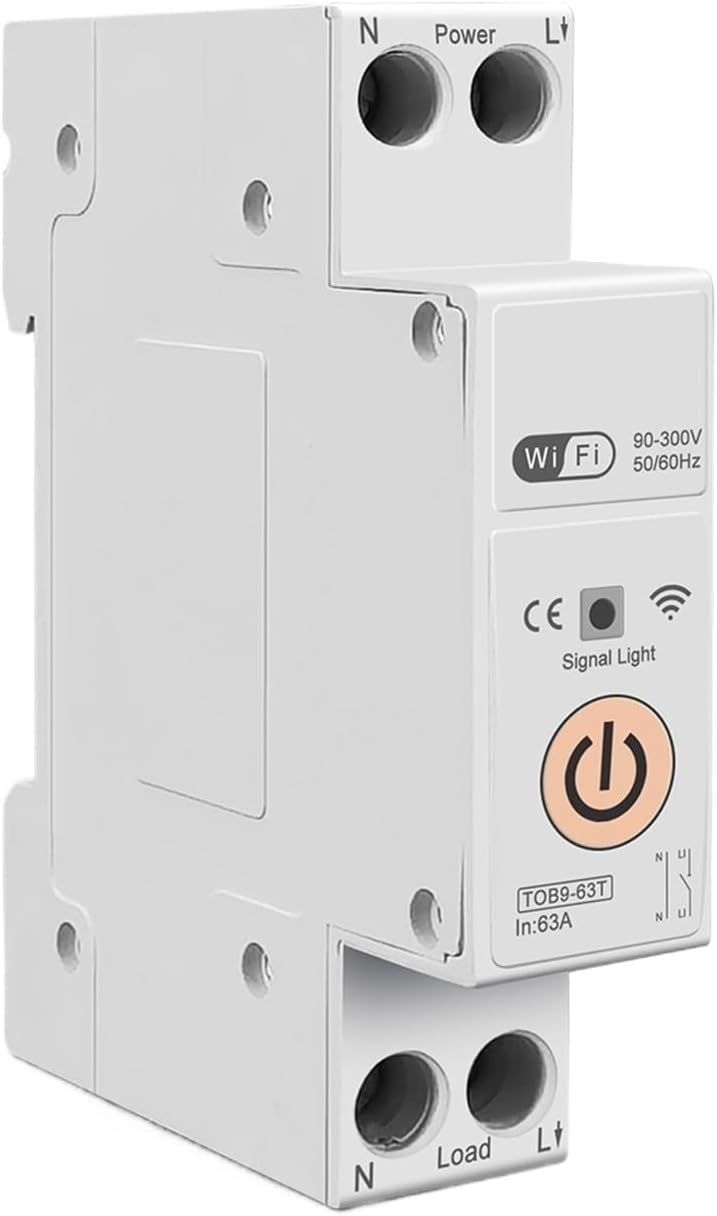
Figure 3: TOMZN TOB9-63T WiFi Smart Switch (No Metering). This basic variant provides WiFi control and circuit protection without energy metering functions.
- Power Terminals (N, L): Input connections for neutral and live wires.
- Load Terminals (N, L): Output connections for neutral and live wires to the load.
- Wskaźnik Wi-Fi: Shows the status of the WiFi connection.
- Sygnał świetlny: Wskazuje stan urządzenia.
- Główny przycisk zasilania: Manual ON/OFF control for the circuit breaker.
- Display (TOB9-VAP/TOB9-63M): Shows real-time energy data (Kwh, W, V, A) and protection settings.
4. Konfiguracja
4.1. Instalacja i okablowanie
- Odłączenie zasilania: Before starting, ensure the main power supply to the installation area is completely disconnected.
- Montowanie: Mount the TOB9-VAP on a standard DIN rail within an appropriate electrical enclosure.
- Okablowanie wejściowe: Connect the incoming neutral wire to the 'N' terminal under 'Power' and the incoming live wire to the 'L' terminal under 'Power'. Ensure secure screw-type connections.
- Okablowanie wyjściowe: Connect the neutral wire to your load to the 'N' terminal under 'Load' and the live wire to your load to the 'L' terminal under 'Load'.
- Weryfikacja: Sprawdź dokładnie wszystkie połączenia pod kątem szczelności i prawidłowej polaryzacji.
- Przywróć zasilanie: Once installation is complete and verified, restore power to the main circuit.
4.2. App Pairing (TUYA Smartlife)
- Pobierz aplikację: Download the 'TUYA Smart' or 'Smart Life' app from your smartphone's app store.
- Zarejestruj się/Zaloguj: Utwórz konto lub zaloguj się na istniejące konto.
- Dodaj urządzenie: In the app, tap '+' to add a new device. Select 'Electrical' > 'Circuit Breaker (Wi-Fi)'.
- Tryb parowania: Ensure the TOB9-VAP's WiFi indicator is blinking rapidly. If not, press and hold the main power button for 5-10 seconds until it blinks rapidly to enter pairing mode.
- Połącz się z Wi-Fi: Follow the in-app instructions to connect the device to your 2.4GHz WiFi network. (5GHz networks are not supported).
- Zmiana nazwy urządzenia: Once paired, you can rename the device for easy identification in the app.
5. Instrukcja obsługi
5.1. Obsługa ręczna
- Włącz/wyłącz: Press the main power button on the device to manually switch the circuit breaker ON or OFF.
5.2. Kontrola i monitorowanie aplikacji
- Zdalne włączanie/wyłączanie: Use the TUYA Smartlife app to remotely switch the circuit breaker ON or OFF.
- Monitorowanie energii: View real-time and historical data for Kwh consumption, current (A), voltage (V) i moc (W) bezpośrednio w aplikacji.
- Timer/Harmonogram: Set up schedules or countdown timers for automatic ON/OFF operations.
- VA Protection Settings: Adjust the over-voltage, pod objętościątage, over-current, and over-power protection thresholds within the app. The device will automatically trip if these thresholds are exceeded.
- Automatyzacja scen: Integrate the device into smart scenes with other TUYA-compatible devices.
6. Konserwacja
- Regularna kontrola: Periodically inspect the device and its wiring for any signs of damage, loose connections, or overheating.
- Czyszczenie: Clean the exterior of the device with a dry, soft cloth. Do not use liquid cleaners or solvents.
- Aktualizacje oprogramowania układowego: Check the TUYA Smartlife app for any available firmware updates to ensure optimal performance and security.
- Kontrola profesjonalna: For any internal issues or complex repairs, consult a qualified electrician.
7. Rozwiązywanie Problemów
| Problem | Możliwa przyczyna | Rozwiązanie |
|---|---|---|
| Urządzenie nie włącza się. | Brak zasilania, luźne okablowanie, usterka wewnętrzna. | Check main power supply. Verify all wiring connections. If problem persists, contact support. |
| WiFi indicator not blinking/connecting. | Incorrect pairing mode; weak WiFi signal; 5GHz network. | Ensure device is in rapid blinking pairing mode. Move device closer to router. Ensure router is 2.4GHz. |
| Urządzenie często się wyłącza. | Overload/short circuit; incorrect VA protection settings. | Reduce load on the circuit. Check for short circuits. Adjust VA protection thresholds in the app if necessary. |
| Inaccurate energy readings. | Nieprawidłowe okablowanie; awaria urządzenia. | Sprawdź połączenia okablowania. Jeśli problem będzie się powtarzał, skontaktuj się z pomocą techniczną. |
8. Specyfikacje
| Funkcja | Szczegół |
|---|---|
| Model | TOB9-VAP |
| Prąd znamionowy | 1-63A (regulowane) |
| Znamionowa objętośćtage | 90-300V AC |
| Częstotliwość | 50/60Hz |
| Polacy | 1P+N |
| Łączność | Wi-Fi (tylko 2.4 GHz) |
| Zgodność aplikacji | TUYA Inteligentne/inteligentne życie |
| Funkcje ochronne | Overload, Short Circuit, Over-Voltage, poniżej objętościtage, Over-Current, Over-Power |
| Wymiary opakowania | 0.39 x 0.39 x 0.39 cala |
| Waga przedmiotu | 3.53 uncji |
| Producent | Generic (TOMZN) |
| Numer modelu przedmiotu | JCZWUUZZB-DFE767306BB9FC909ED20C115B9 |
9. Gwarancja i wsparcie
Aby uzyskać informacje dotyczące gwarancji, pomocy technicznej lub serwisu, zapoznaj się z dokumentacją dołączoną do zakupu lub skontaktuj się bezpośrednio ze sprzedawcą. Zachowaj paragon jako dowód zakupu.