
1. Wprowadzenie
This manual provides essential information for the safe and efficient operation of your Dreo 110-Pint Smart Dehumidifier, Model DR-HDH001S. This appliance is designed to remove excess moisture from the air in large spaces up to 4500 sq ft, such as basements, bedrooms, living rooms, bathrooms, and laundry rooms. Please read this manual thoroughly before use and retain it for future reference.

Przód view of the Dreo 110-Pint Smart Dehumidifier, showing the control panel with digital display and water level indicator.
2. Instrukcje bezpieczeństwa
Aby zmniejszyć ryzyko pożaru, porażenia prądem lub obrażeń ciała, zawsze należy przestrzegać poniższych podstawowych środków ostrożności:
- Przed użyciem urządzenia należy przeczytać całą instrukcję.
- Upewnij się, że zasilanie jest zgodne z objtage podano na tabliczce znamionowej.
- Nie należy używać osuszacza powietrza, jeśli przewód lub wtyczka są uszkodzone.
- Zawsze podłączaj urządzenie do uziemionego gniazdka.
- Nie blokuj wlotów ani wylotów powietrza.
- Trzymaj urządzenie z dala od źródeł ciepła i bezpośredniego światła słonecznego.
- Nie stosować w miejscach, w których przechowywane są łatwopalne ciecze lub gazy.
- Przed czyszczeniem lub jakąkolwiek konserwacją należy odłączyć urządzenie od zasilania.
- The unit features a 90° tilt waterproof design that automatically powers off when tilted.
- Equipped with comprehensive thermal protection (23°F to 248°F) and 15A overcurrent protection.
3. Koniec produktuview
The Dreo DR-HDH001S dehumidifier is designed for efficient moisture removal with user-friendly controls and smart features.
Składniki:
- Panel sterowania z wyświetlaczem cyfrowym
- Kratka wlotu powietrza
- Kratka wylotu powietrza
- Water Tank (2 Gallon / 8L capacity)
- Wyjście węża spustowego
- Przewód zasilający
- Caster Wheels for easy mobility

The Dreo 110-Pint Dehumidifier in a living space, illustrating its dimensions (11.3"D x 15.4"W x 24.4"H) and coverage area of 4,500 sq ft.
4. Konfiguracja
Umieszczenie:
Place the dehumidifier on a level surface in the desired area. Ensure there is at least 8 inches (20 cm) of space around the unit for proper airflow. The unit is suitable for large spaces up to 4500 sq ft.
Podłączenie zasilania:
Podłącz przewód zasilający do uziemionego gniazdka elektrycznego. Urządzenie przejdzie w tryb czuwania.
Opcje drenażu:
Your Dreo dehumidifier offers two drainage methods:
- Drenaż ręczny: The 2-gallon (8L) water tank collects condensed moisture. When the tank is full, the LED display will show a water-full alert, and the unit will automatically stop operation. Carefully remove the tank and empty the water.
- Drenaż ciągły: For uninterrupted operation, connect a standard garden hose (not included, 25mm diameter recommended) to the drain hose outlet at the back of the unit. Ensure the hose is sloped downwards to allow gravity drainage into a floor drain or larger container.

Diagram showing the two drainage options for the Dreo Dehumidifier: manual emptying of the water tank and continuous drainage via a garden hose connection.
5. Instrukcja obsługi
Panel sterowania:
The intuitive control panel allows you to manage settings directly on the unit.
Close-up of the dehumidifier's control panel showing 'Auto Mode' and a graphic indicating precise humidity detection within ±5%.
Tryby pracy:
- Tryb automatyczny: Set your desired humidity level. The dehumidifier's high-precision sensor will automatically adjust fan speed (low/medium/high) to maintain the target humidity within a 5% tolerance.
- Tryb komfortowy: Optimizes humidity levels for general comfort based on ambient temperature.
- Tryb ciągły: The unit will operate continuously regardless of the humidity level, ideal for very damp warunki.
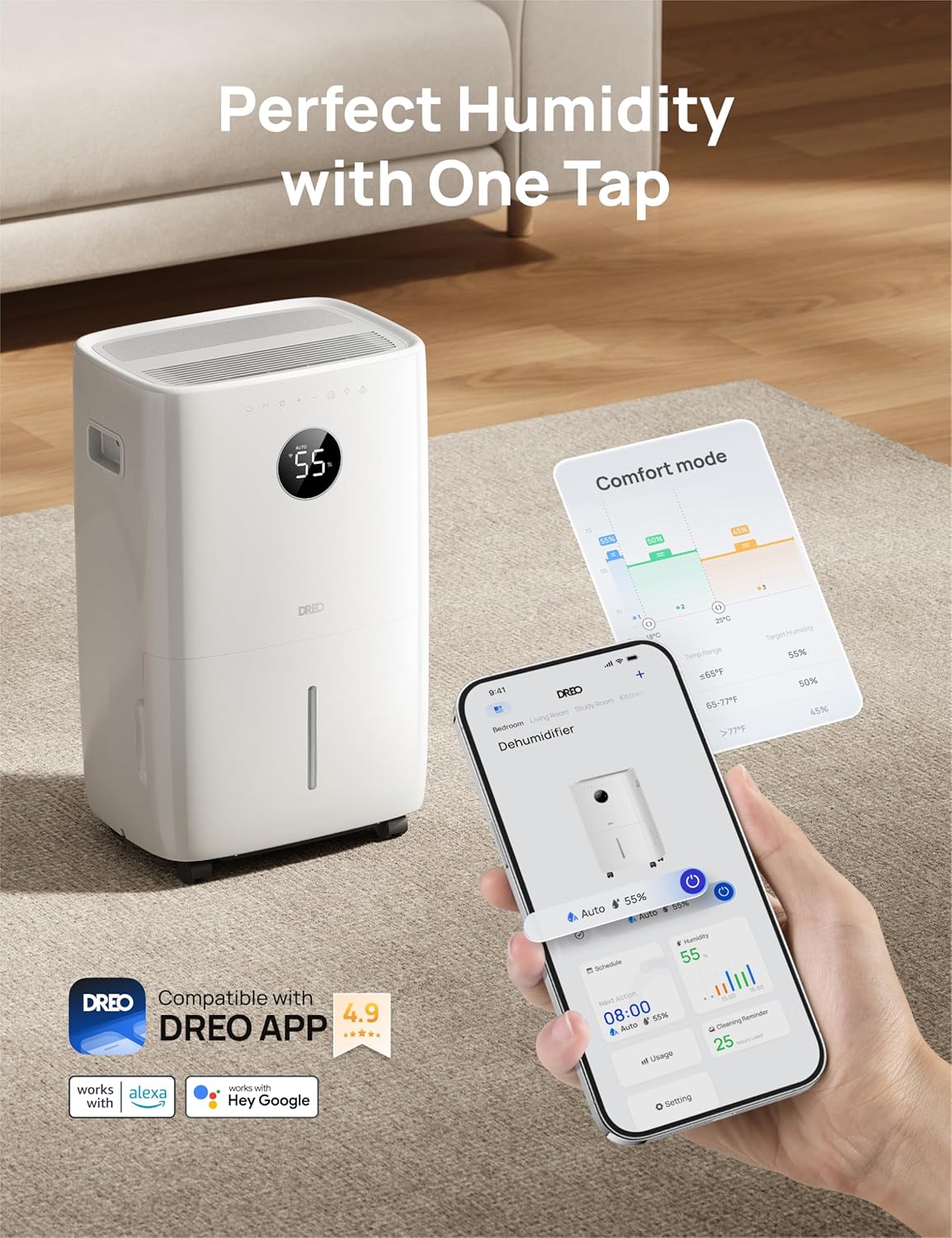
Smart Control (DREO App):
For enhanced control, download the DREO app on your smartphone. The app allows you to:
- Monitoruj poziom wilgotności w czasie rzeczywistym.
- Set schedules for operation.
- Adjust modes and fan speeds remotely.
- Utilize voice commands with Alexa and Google Home assistants.

Image depicting the Dreo Dehumidifier alongside a smartphone displaying the DREO app interface, highlighting smart control features.
Funkcja automatycznego rozmrażania:
The intelligent auto-defrost system activates automatically at 41°F (5°C) to prevent frost buildup on the coils, ensuring efficient operation in cooler environments.
6. Konserwacja
Regularna konserwacja gwarantuje optymalną wydajność i długą żywotność osuszacza powietrza.
Czyszczenie zbiornika na wodę:
Empty the water tank regularly. Clean it with mild detergent and water, then rinse thoroughly. Ensure the tank is completely dry before reinserting it into the unit.
Czyszczenie filtra powietrza:
The dehumidifier is equipped with a washable filter. It is recommended to clean the filter every 250 hours of operation or as needed. Remove the filter, wash it with warm, soapy water, rinse, and allow it to air dry completely before reinstalling.
Czyszczenie zewnętrzne:
Wytrzyj obudowę urządzenia miękką, damp płótno. Nie używaj ostrych środków chemicznych ani ściernych środków czyszczących.
Składowanie:
If storing the unit for an extended period, ensure the water tank is empty and clean, and the filter is clean and dry. Store the dehumidifier upright in a cool, dry place.
7. Rozwiązywanie Problemów
W tej sekcji znajdziesz informacje o typowych problemach i ich rozwiązaniach.
| Problem | Możliwa przyczyna | Rozwiązanie |
|---|---|---|
| Osuszacz powietrza nie włącza się. | No power; Power cord not securely plugged in; Water tank full or incorrectly installed. | Check power outlet; Ensure power cord is firmly plugged in; Empty and correctly reinsert water tank. |
| Unit is running but not removing moisture. | Air filter clogged; Room temperature too low; Humidity setting too high; Air inlets/outlets blocked. | Clean air filter; Ensure room temperature is above 41°F (5°C); Lower the target humidity setting; Clear any obstructions. |
| Wskaźnik zapełnienia zbiornika na wodę świeci się, ale zbiornik nie jest pełny. | Awaria lub przeszkoda czujnika zbiornika na wodę. | Remove and reinsert the water tank to reset the sensor. Clean the sensor area if visible. |
| Urządzenie jest głośne. | Unit not on a level surface; Air filter clogged; Loose parts. | Place unit on a firm, level surface; Clean air filter; Check for any loose components. |
| DREO App connectivity issues. | Wi-Fi signal weak; Incorrect network password; Dehumidifier not in pairing mode. | Ensure strong 2.4GHz Wi-Fi signal; Re-enter Wi-Fi password; Follow app instructions to put dehumidifier in pairing mode. |
8. Specyfikacje
| Marka | Dreo |
| Nazwa modelu | DR-HDH001S |
| Pokrycie powierzchni podłogi | 4500 stóp kwadratowych |
| Pojemność | 110 Pints/Day (at 86°F, RH 90%) |
| Objętość zbiornika | 2 galona (8 litrów) |
| Wymiary produktu | 11.3" gł. x 15.4" szer. x 24.4" wys. |
| Liczba prędkości | 3 |
| Przepływ powietrza | 210 stóp sześciennych na minutę (CFM) |
| Waga przedmiotu | 44.1 funta |
| Funkcja specjalna | Adjustable Humidity Control, Smart App Control, Auto-Defrost |
| Tryb działania | Auto, Komfort, Ciągły |
| Zawarte komponenty | Dehumidifier, Drain Hose, User Manual |
| UPC | 810142859813 |
9. Gwarancja i wsparcie
Dreo products are manufactured to the highest quality standards. For warranty information or technical support, please contact Dreo customer service. Keep your purchase receipt as proof of purchase.
For assistance, please visit the official Dreo webodwiedź witrynę lub skontaktuj się bezpośrednio z działem wsparcia.