
Wstęp
This manual provides comprehensive instructions for the safe and effective use of your VOCOO Digital Timer (Model 5260) and Visual Timer (Model 6233). Please read this manual thoroughly before operating the devices and retain it for future reference.
Informacje dotyczące bezpieczeństwa
- Keep timers away from water and high humidity.
- Do not expose timers to extreme temperatures or direct sunlight.
- Use only specified battery types (AAA).
- Do not attempt to disassemble or repair the timers. Contact customer support for assistance.
- Przechowuj baterie w miejscu niedostępnym dla dzieci.
Zawartość opakowania
Sprawdź, czy w opakowaniu znajdują się wszystkie elementy:
- 1 x VOCOO Digital Timer (Model 5260)
- 1 x VOCOO Visual Timer (Model 6233)
- 2 x AAA Batteries (for Visual Timer, typically also for Digital Timer)
- 1 x Instrukcja obsługi

Image: Contents of the VOCOO timer package, including the Digital Timer (Model 5260), Visual Timer (Model 6233), AAA batteries, and instruction manual.
Produkt ponadview
VOCOO Visual Timer (Model 6233)

Image: Diagram of the VOCOO Visual Timer (Model 6233) detailing its dimensions, battery compartment, volume control, and alarm duration switch.
- Pokrętło timera: Used to set the desired time.
- Visual Disk: Red disk that recedes as time passes.
- Komora baterii: Located on the back, requires 2 x AAA batteries.
- Przycisk głośności: Adjusts alarm sound (Mute/Loud).
- Alarm Duration Set: Switches between 3-second and 60-second alarm duration.
- Magnetyczny tył: Umożliwia mocowanie do powierzchni metalowych.
VOCOO Digital Timer (Model 5260)

Image: VOCOO Digital Timer (Model 5260) displaying time, held in a hand in a kitchen setting.
- Wyświetlacz LED: Shows time in minutes and seconds.
- Pokrętło kontrolne: Rotates to set time, press to start/stop.
- Przycisk zasilania/wyciszania: Located on the bottom, controls power and mute function.
- Magnetyczny tył: Umożliwia mocowanie do powierzchni metalowych.
Organizować coś
Instalacja baterii
Both timers require 2 x AAA batteries (included for the Visual Timer, typically also for the Digital Timer).
- Znajdź komorę baterii z tyłu timera.
- Otwórz pokrywę komory baterii.
- Włóż 2 baterie AAA, zwracając uwagę na prawidłową biegunowość (+/-).
- Dokładnie zamknij pokrywę komory baterii.
Image: Visual Timer's rear view showing the battery compartment and magnet.
Instrukcja obsługi
VOCOO Visual Timer (Model 6233)
- Ustawianie timera: Rotate the timer dial clockwise to the desired time (up to 60 minutes). The red visual disk will appear, indicating the set time.
- Uruchamianie timera: The timer begins counting down immediately after setting. The red disk will gradually disappear as time elapses.
- Alarm: When the red disk completely disappears, the alarm will sound.
- Regulacja głośności alarmu: Use the volume button on the side to switch between Mute and Loud settings.
- Dostosowywanie czasu trwania alarmu: Use the alarm duration switch on the side to select between 3 seconds and 60 seconds.
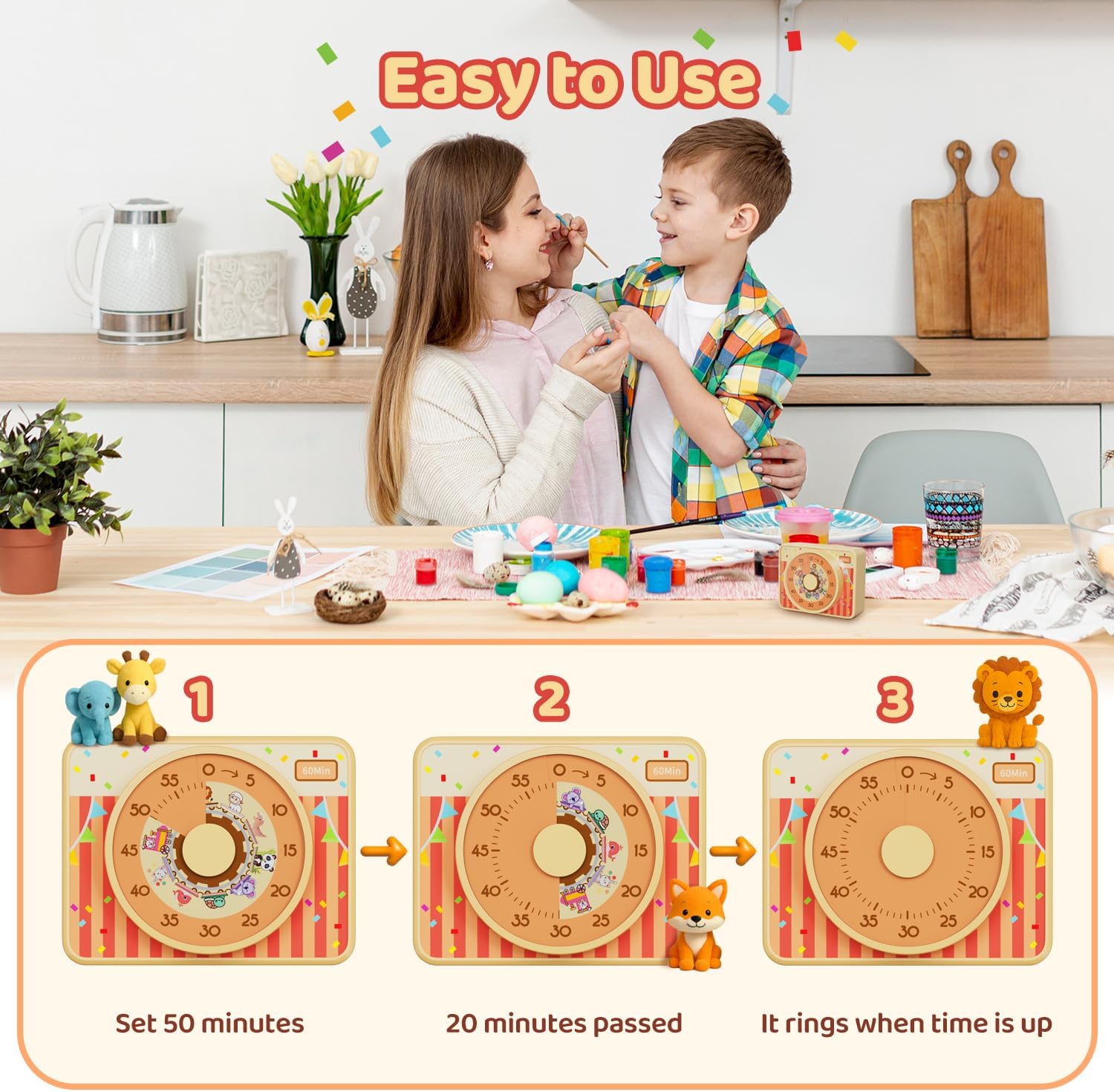
Image: Visual Timer (Model 6233) operation sequence: setting the dial to 50 minutes, showing 20 minutes elapsed, and the alarm sounding at zero.
VOCOO Digital Timer (Model 5260)
- Włączanie/wyłączanie: Press and hold the power button on the bottom to turn the timer on or off.
- Ustawianie czasu odliczania: When the timer is paused or reset to 00:00, rotate the control dial clockwise to increase the time or counter-clockwise to decrease the time. The maximum countdown time is 99 minutes and 55 seconds.
- Starting/Pausing Countdown: Press the control dial once to start the countdown. Press it again to pause.
- Resetting Countdown: When the timer is paused, press and hold the control dial for 3 seconds to reset the time to 00:00.
- Count-up Mode: When the timer is at 00:00, press the control dial once to start counting up. The maximum count-up time is 99 minutes and 55 seconds.
- Funkcja wyciszenia: Press the power/mute button on the bottom to toggle between audible alarm and mute mode. In mute mode, the numbers on the display will blink when the alarm triggers.

Image: VOCOO Digital Timer (Model 5260) illustrating both count-up and count-down timing modes.

Image: VOCOO Digital Timer (Model 5260) demonstrating its 2-level volume and mute function, with blinking numbers indicating mute mode.
Konserwacja
- Czyszczenie: Wipe the timers with a soft, dry cloth. Do not use abrasive cleaners or immerse in water.
- Wymiana baterii: Replace batteries when the display dims or the timer functions become unreliable. Always replace both batteries at the same time.
- Składowanie: Store the timers in a cool, dry place when not in use for extended periods. Remove batteries if storing for several months.
Rozwiązywanie problemów
| Problem | Możliwa przyczyna | Rozwiązanie |
|---|---|---|
| Timer się nie włącza. | Baterie są rozładowane lub nieprawidłowo włożone. | Wymień baterie na nowe baterie AAA, zwracając uwagę na prawidłową biegunowość. |
| Alarm nie włącza się. | Timer is in mute mode or volume is set too low. | For Visual Timer: Check the volume button setting. For Digital Timer: Press the power/mute button to toggle sound. |
| Visual disk does not move. | Timer dial not set correctly or mechanism issue. | Ensure the dial is rotated fully to the desired time. If issue persists, contact support. |
| Digital display is dim or flickering. | Niski poziom naładowania baterii. | Wymień baterie. |
Specyfikacje
- Nazwa produktu: VOCOO Digital and Visual Timer
- Modele: 5260 (Digital Timer), 6233 (Visual Timer)
- Źródło zasilania: 2 x AAA Batteries (per timer, if applicable)
- Visual Timer Max Time: 60 minut
- Digital Timer Max Time: 99 minutes 55 seconds (Count-up/Count-down)
- Visual Timer Dimensions (approx.): 3.7 cala (9.5 cm) x 2.95 cala (7.5 cm) x 1.6 cala (4.1 cm)
- Digital Timer Alarm Volume: Loud (80-90dB), Soft (60-75dB)
- Visual Timer Alarm Duration: 3 sekund / 60 sekund
- ASIN: B0F7RL6H89
- Data pierwszej dostępności: 7 maja 2025 r.
Gwarancja i wsparcie
VOCOO products are designed for reliability and performance. For warranty information, technical support, or any questions regarding your timer, please contact VOCOO customer service through the retailer's platform or the official VOCOO webstrona.
Please have your product model number (5260 or 6233) and ASIN (B0F7RL6H89) available when contacting support.