
1. Wprowadzenie
The NGS Singer Star Duo is a set of two dynamic wireless microphones designed for clear and powerful audio. Featuring stable 2.4 GHz wireless technology, integrated volume and echo controls, and a long-lasting rechargeable battery, this system is suitable for various events and public speaking engagements. This manual provides detailed instructions for setup, operation, and maintenance to ensure optimal performance.
2. Co znajduje się w pudełku
Sprawdź zawartość paczki, aby upewnić się, że znajdują się w niej wszystkie elementy:
- 2 x mikrofony bezprzewodowe
- 1 x Odbiornik bezprzewodowy
- 1 x kabel ładujący USB
- 1 x 6.3mm Jack Adapter

Figure 2.1: Contents of the NGS Singer Star Duo package.
3. Koniec produktuview
3.1. Mikrofon bezprzewodowy
- Głowica mikrofonu: Przechwytuje dźwięk.
- Ekran wyświetlacza: Shows battery level and channel information.
- Przycisk zasilania: Włącza/wyłącza mikrofon.
- Regulacja głośności: Reguluje głośność mikrofonu (góra/dół).
- Echo Controls: Adjusts echo effect (Plus/Minus).
- Port ładowania: Port USB-C umożliwiający ładowanie wewnętrznego akumulatora.

Figure 3.1: Microphone display and controls.

Figure 3.2: Microphone features including power and wireless connectivity.
3.2. Odbiornik bezprzewodowy
- Jack 3.5mm Connector: Umożliwia podłączenie urządzeń wejściowych audio.
- Adapter jack 6.3 mm: For wider compatibility with professional audio equipment.
- Wskaźnik zasilania: Dioda LED wskazująca stan zasilania.
- Wskaźnik parowania: LED light indicating connection status.

Figure 3.3: Wireless receiver with adapter.
4. Konfiguracja
4.1. Ładowanie początkowe
Before first use, ensure both microphones and the receiver are fully charged. Use the provided USB charging cable to connect them to a suitable USB power source. The battery indicator on the microphone screen will show charging status.
4.2. Podłączenie odbiornika
- Plug the wireless receiver directly into the 3.5mm audio input jack of your speaker, mixer, amplifier, or other compatible sound system.
- If your audio device has a 6.3mm input, attach the included 6.3mm jack adapter to the receiver before plugging it in.
- Włącz urządzenie audio.
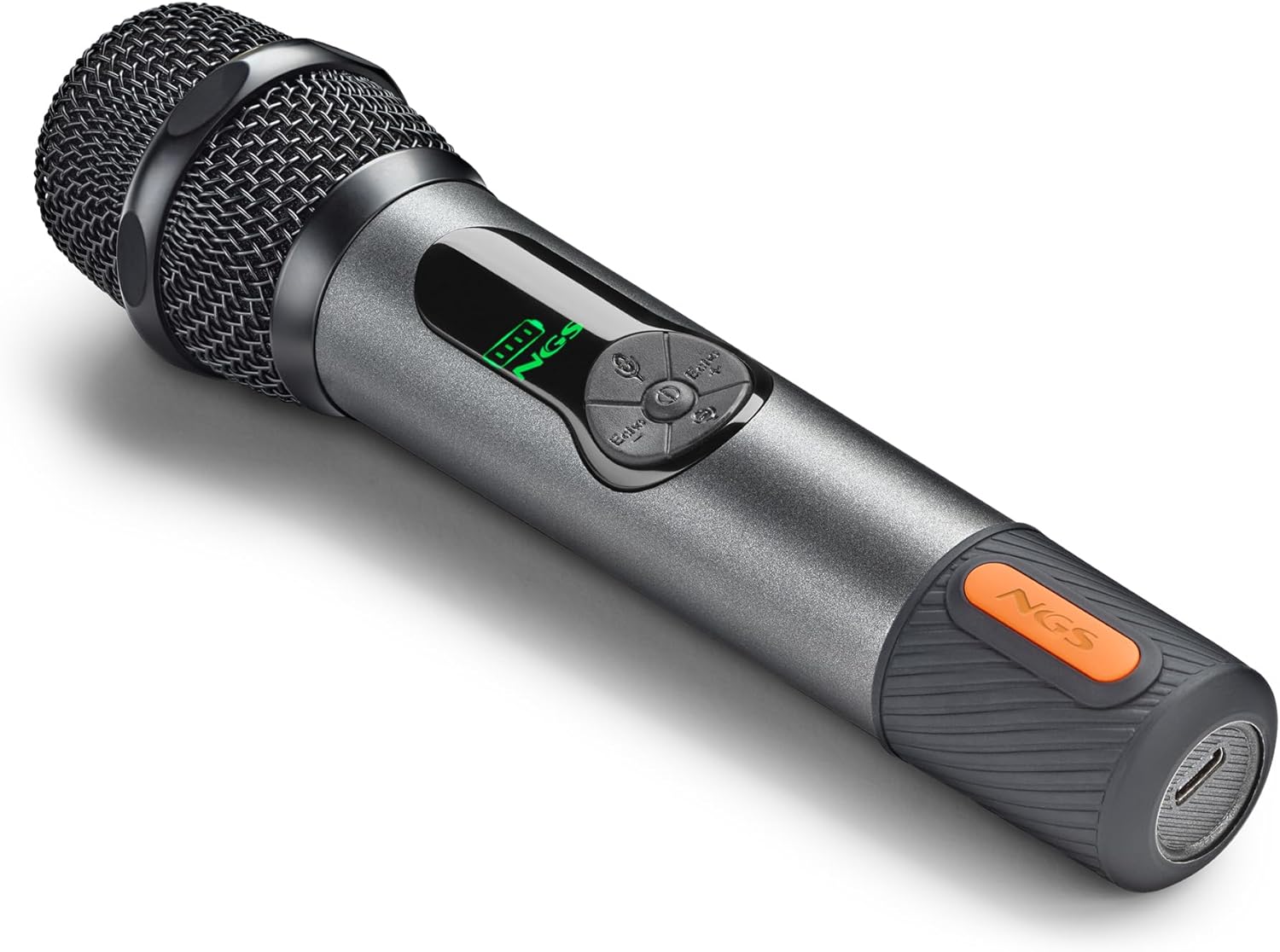
Figure 4.1: Connecting the microphone receiver to an audio system.
4.3. Pairing the Microphones
The microphones and receiver should automatically pair upon powering on. If pairing does not occur automatically, follow these steps:
- Ensure both the microphone and receiver are powered off.
- Press the power button on the microphone three separate times.
- Press the power button on the receiver three separate times.
- The LED on the microphone should turn solid green, and the LED on the receiver should turn solid blue, indicating a successful connection.
5. Operating the Microphones
5.1. Włączanie/wyłączanie zasilania
Press and hold the Power button on each microphone to turn it on or off. The display screen will illuminate when powered on.
5.2. Regulacja głośności i echa
Each microphone features independent controls for volume and echo:
- Tom: Use the Volume Up (+) and Volume Down (-) buttons on the microphone to adjust the audio output level.
- Echo: Use the Echo Plus (+) and Echo Minus (-) buttons to add or reduce the echo effect.
5.3 Zasięg bezprzewodowy
The 2.4 GHz wireless technology provides a stable connection with an operating range of up to 15 meters (approximately 49 feet). Ensure there are no major obstructions between the microphones and the receiver for optimal performance.

Figure 5.1: Wireless range and connectivity.
6. Konserwacja
6.1. Ładowanie akumulatorów
The microphones and receiver are equipped with internal rechargeable batteries. The microphones have a 1500 mAh battery, and the receiver has a 650 mAh battery. A full charge provides up to 30 hours of continuous use for the microphones. The display screen on the microphones shows the real-time battery level.
- Podłącz dołączony kabel ładujący USB do portu ładowania w mikrofonie lub odbiorniku.
- Podłącz drugi koniec kabla USB do standardowego zasilacza USB (nie ma go w zestawie) lub do portu USB komputera.
- A red indicator light will typically show during charging, turning off or changing color when fully charged.
6.2. Czyszczenie i przechowywanie
- Wipe the microphones and receiver with a soft, dry cloth. Do not use abrasive cleaners or solvents.
- Przechowuj system w chłodnym, suchym miejscu, z dala od bezpośredniego światła słonecznego i ekstremalnych temperatur.
7. Rozwiązywanie Problemów
| Problem | Możliwa przyczyna | Rozwiązanie |
|---|---|---|
| Brak dźwięku z mikrofonu | Microphone or receiver not powered on; Not paired; Low battery; Incorrect connection to audio device. | Ensure both devices are on. Perform manual pairing (Section 4.3). Charge batteries. Verify receiver is correctly plugged into audio input. |
| Mikrofon nie łączy się | Kolejność parowania nie została zachowana prawidłowo. | Follow the manual pairing steps in Section 4.3. |
| Audio delay or poor reception | Zakłócenia; Odległość od odbiornika; Niski poziom naładowania baterii. | Reduce distance between microphone and receiver. Ensure no major obstructions. Charge batteries. Avoid other 2.4GHz devices if possible. |
| Krótki czas pracy baterii | Batteries not fully charged; Aging batteries. | Ensure full charge before use. If issues persist, contact support. |
8. Specyfikacje
| Numer modelu | ELEC-MIC-0048 |
| Marka | NGS |
| Typ mikrofonu | Dynamic, Handheld |
| Technologia łączności | RF (2.4 GHz Wireless) |
| Zasięg działania | Do 15 metrów |
| Typ złącza | Jack 3.5 mm, Jack 6.35 mm (with adapter) |
| Bateria mikrofonu | Akumulator 1500 mAh |
| Akumulator odbiornika | Akumulator 650 mAh |
| Czas pracy baterii (mikrofon) | Do 30 godzin |
| Cechy specjalne | Volume Control, Echo Control, Mute Function |
| Kompatybilne urządzenia | Amplifiers, Mixers, Speakers with 3.5mm/6.3mm input |
| Waga produktu | 210 gram |
| Kolor | Czarny |
| Kraj pochodzenia | Hiszpania |
9. Gwarancja i wsparcie
9.1. Gwarancja na produkt
Ten produkt jest dostarczany z 2-letnia gwarancja od daty zakupu. Zachowaj dowód zakupu na wypadek roszczeń gwarancyjnych.
9.2. Obsługa klienta
For technical assistance, troubleshooting, or warranty inquiries, please visit the official NGS website or contact their customer support directly. Refer to the product packaging or the NGS webstrona zawierająca najbardziej aktualne dane kontaktowe.