
Wstęp
This manual provides detailed instructions for the assembly, operation, and maintenance of your FLEXISPOT One-Piece Standing Desk with Rattan Drawers. Please read this manual thoroughly before installation and use to ensure proper function and safety. Keep this manual for future reference.

Image: The FLEXISPOT One-Piece Standing Desk in black with rattan drawers, featuring a monitor shelf and an integrated control panel.
Ważne informacje dotyczące bezpieczeństwa
Aby zapobiec obrażeniom ciała lub uszkodzeniu produktu, należy przestrzegać następujących wskazówek bezpieczeństwa:
- Zawsze dokładnie postępuj zgodnie z instrukcją montażu.
- Trzymaj dzieci i zwierzęta domowe z dala od miejsca montażu.
- Podczas montażu należy używać odpowiednich narzędzi i sprzętu ochronnego.
- Przed użyciem biurka należy sprawdzić, czy wszystkie połączenia są solidne.
- Do not overload the desk. The maximum weight capacity is 110 lbs.
- Podczas regulacji wysokości trzymaj ręce i przedmioty z dala od ruchomych części.
Zawartość opakowania
Verify that all components are present before beginning assembly. The desk ships in two separate packages.
- Desktop with integrated monitor shelf and rattan drawers
- Desk frame and legs
- Panel sterowania
- Zasilacz i kable
- Sprzęt montażowy (śruby, śruby, narzędzia)
- Instrukcja obsługi

Image: A diagram illustrating the dimensions of the desk components and indicating that the product ships in two separate packages.
Instrukcja montażu
Assembly typically takes approximately one hour. Refer to the separate detailed assembly guide included in your package for step-by-step instructions and diagrams. Ensure all fasteners are correctly identified and used in their designated locations.
- Rozpakuj wszystkie komponenty i sprawdź je na liście zawartości opakowania.
- Attach the desk legs to the desktop frame using the provided hardware.
- Connect the control panel and motor cables as instructed.
- Secure any cable management components.
- Place the desk in its desired location.
Organizować coś
After assembly, connect the desk to a power source.
- Plug the power adapter into the desk's control box.
- Podłącz przewód zasilający do standardowego gniazdka elektrycznego.
- The desk is now ready for initial use.
Instrukcja obsługi
Regulacja wysokości
The desk features an electric motor system for smooth height transitions.
- Naciśnij Strzałka w górę przycisk do podnoszenia biurka.
- Naciśnij Strzałka w dół przycisk do obniżania biurka.
- The desk can adjust between 28.9 inches (minimum) and 46.5 inches (maximum).
- The motor operates quietly, typically below 50dB.

Image: The desk shown at its minimum (28.9") and maximum (46.5") adjustable heights.
Ustawienia pamięci
Program up to three preferred height settings for quick adjustments.
- Dostosuj wysokość biurka do swoich potrzeb.
- Naciśnij M button, then press one of the numbered preset buttons (1, 2, Lub 3) w ciągu 3 sekund, aby zapisać aktualną wysokość.
- To recall a saved height, simply press the corresponding numbered preset button.

Obraz: Zbliżenie view of the desk's control panel, highlighting the up/down arrows and memory preset buttons.
Półka na monitory
The integrated monitor shelf is designed to elevate screens to an ergonomic eye level.
- Place your monitor(s) on the shelf to reduce neck and back strain.
- This helps maintain proper posture during extended work sessions.

Image: Visual comparison of poor posture versus ergonomic sitting and standing postures facilitated by the adjustable desk.
Rattan Drawers
The desk includes both sliding-door desktop compartments and an under-desk drawer for organized storage.
- Use the desktop compartments (47.2"x8.7"x5.5") for easy access to frequently used items.
- The under-desk drawer (23.6"x11.8"x3.9") provides discreet storage for documents or books.
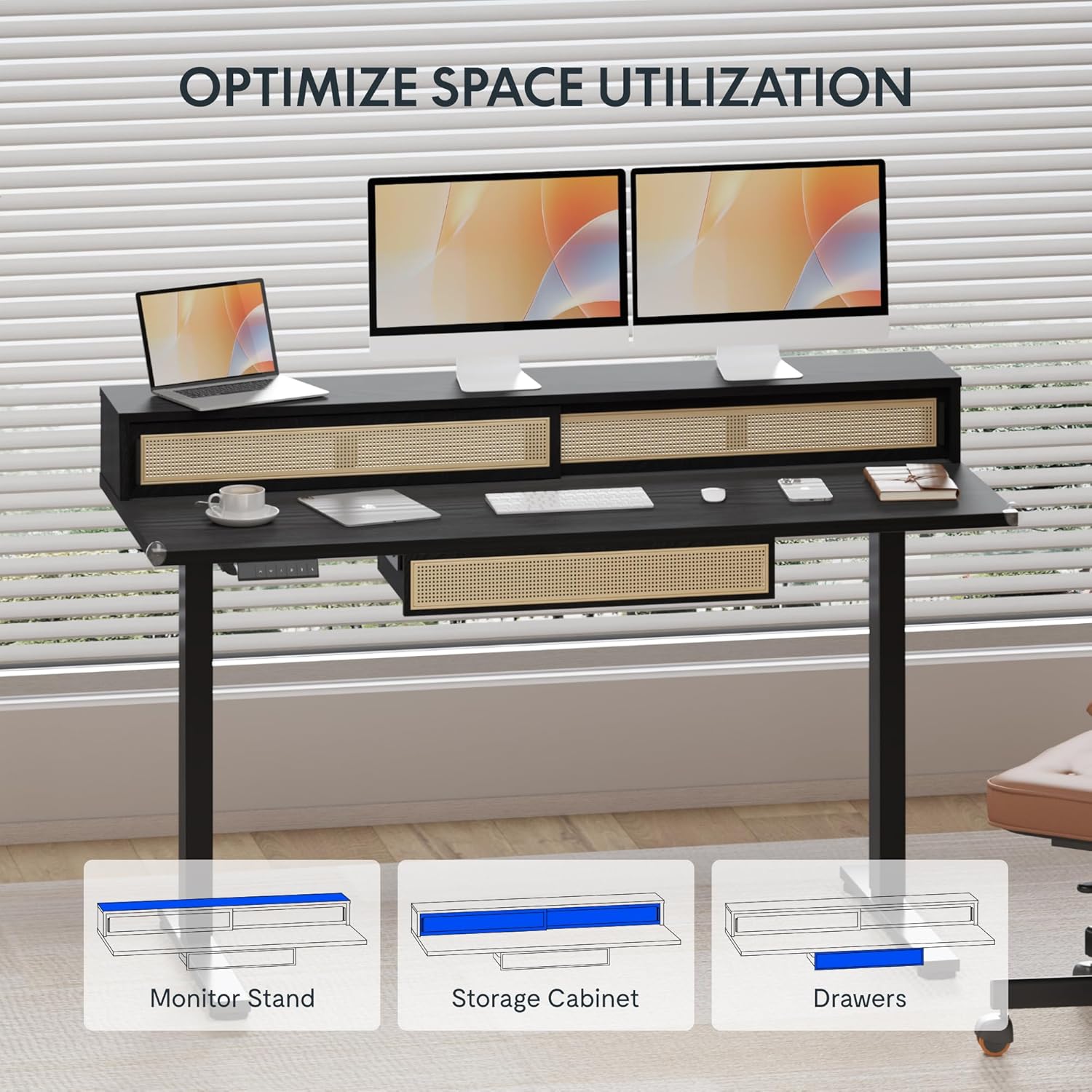
Image: An illustration demonstrating the various storage options, including the monitor stand, storage cabinet, and drawers, for optimal space utilization.
Konserwacja
Regularna konserwacja gwarantuje długowieczność i optymalną wydajność Twojego biurka.
- Czyszczenie: Przetrzyj powierzchnie biurka miękką,amp płótno. Unikaj ściernych środków czyszczących lub ostrych środków chemicznych, które mogą uszkodzić wykończenie.
- Kontrola: Okresowo sprawdzaj dokręcenie wszystkich śrub i nakrętek. W razie potrzeby dokręć je.
- Zarządzanie kablami: Ensure cables are neatly organized and not interfering with the desk's movement.
Rozwiązywanie problemów
Jeśli masz problemy z biurkiem, zapoznaj się z poniższymi typowymi rozwiązaniami:
| Problem | Możliwa przyczyna | Rozwiązanie |
|---|---|---|
| Biurko nie porusza się i nie reaguje na polecenia. | Power connection issue, cable disconnected, motor error. | Check power cord connection to outlet and desk. Ensure all motor cables are securely connected. Unplug and replug the power for 10 seconds to reset. |
| Biurko porusza się nierównomiernie lub wydaje nietypowe dźwięki. | Nierównomierne obciążenie, luźne połączenia, przeszkody. | Ensure weight is evenly distributed. Check for any obstructions under the desk. Verify all assembly screws are tight. |
| Ustawienia pamięci nie działają. | Ustawienia predefiniowane nie zostały zapisane prawidłowo. | Re-save the desired height settings by pressing 'M' then the preset number within 3 seconds. |
Specyfikacje
| Funkcja | Szczegół |
|---|---|
| Marka | ELASTYCZNI |
| Wymiary produktu (Gł. x Szer. x Wys.) | 23.6"D x 47.2"W x 29"H (at lowest point) |
| Kolor | Czarny |
| Materiał bazowy | Stal stopowa |
| Najlepszy rodzaj materiału | Drewno |
| Minimalna wysokość | 28.9 cali |
| Maksymalna wysokość | 46.5 cali |
| Liczba szuflad | 1 (under-desk) |
| Enclosed Shelves | 2 (sliding-door desktop compartments) |
| Funkcja specjalna | Corded electric height adjustment, Memory Presets |
| Wymagany montaż | Tak |
Gwarancja i wsparcie
FLEXISPOT provides comprehensive warranty coverage for your standing desk:
- Frame and Motor: 5-year coverage.
- Elektronika: 2-year coverage.
This warranty ensures lasting security for your workspace investment. For customer support, technical assistance, or warranty claims, please refer to the contact information provided in your product packaging or visit the official FLEXISPOT webstrona.