
1. Ważne informacje dotyczące bezpieczeństwa
Przed instalacją i użytkowaniem prosimy o dokładne zapoznanie się z niniejszą instrukcją. Zachowaj instrukcję do wykorzystania w przyszłości.
- Nośność: Do not exceed the maximum weight capacity of 33 lbs (15 kg) per arm. Exceeding this limit may result in serious injury or product damage.
- Rozmiar monitora: Uchwyt przeznaczony jest do monitorów o przekątnej od 13 do 39 cali.
- Zgodność z VESA: Ensure your monitor has VESA mounting patterns of 75x75 mm or 100x100 mm. If your monitor does not have these patterns, a VESA adapter (sold separately) may be required.
- Grubość biurka: C-clamp is suitable for desks 0.39"-1.77" thick. The grommet mount is suitable for desks 0.39"-1.77" thick with a hole diameter of 0.39"-2.36".
- Materiał biurka: Do not install this product on tempered glass desks or other fragile table tops. Ensure your desk is structurally sound to support the combined weight of the mount and monitors.
- Montaż: Assemble the product according to the instructions. Incorrect assembly can lead to product failure or injury.
- Ruchome części: Podczas regulacji trzymaj dłonie i palce z dala od ruchomych części, aby zapobiec przytrzaśnięciu.
2. Koniec produktuview
The MOUNT PRO Dual Monitor Desk Mount provides an ergonomic solution for mounting two monitors, offering extensive adjustability and integrated features for an organized workspace.
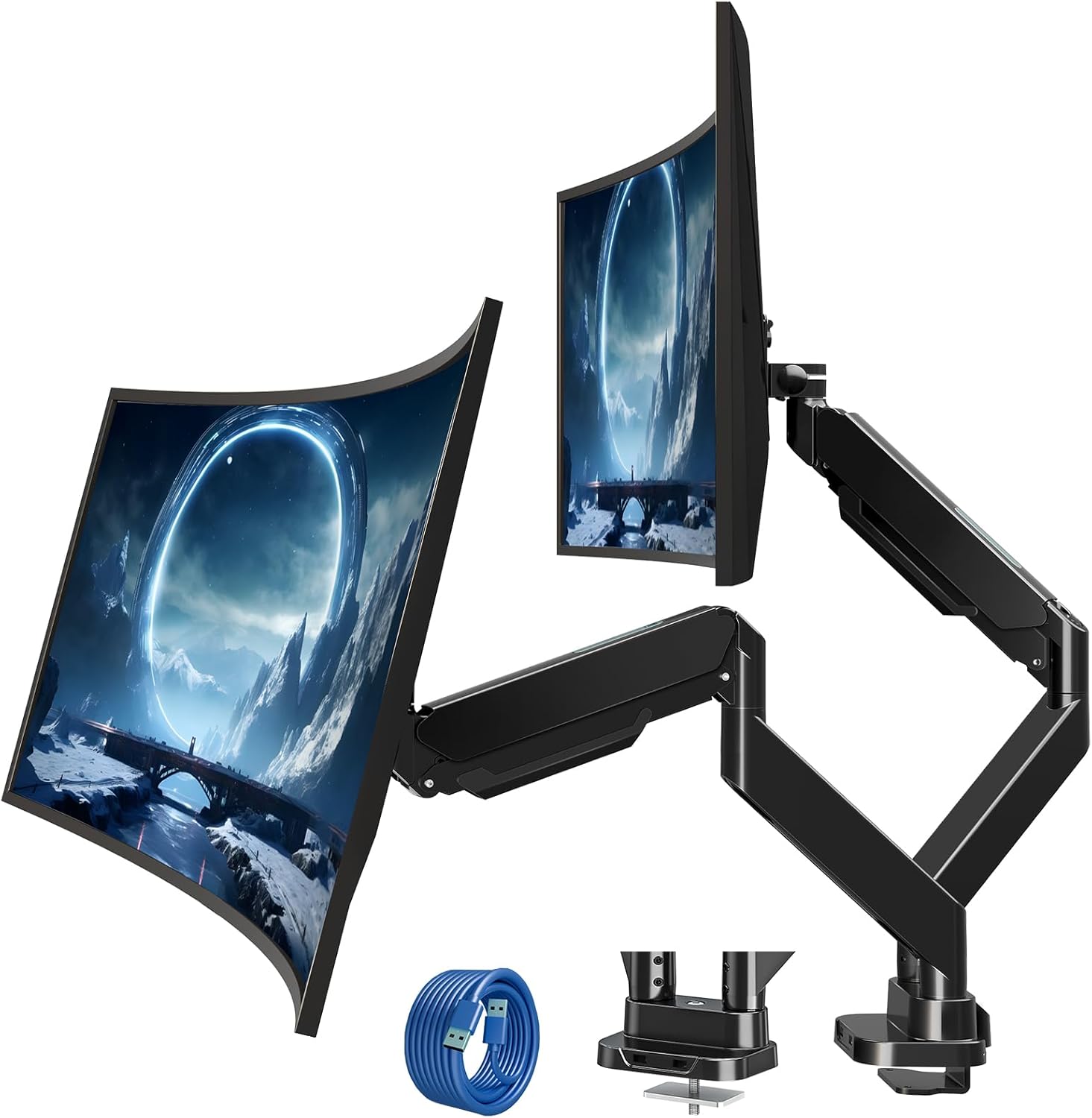
Figure 2.1: MOUNT PRO Dual Monitor Desk Mount with two monitors.
2.1 Główne cechy
- Supports two flat or curved monitors from 13" to 39" in size.
- Each arm supports monitors weighing between 4.4 lbs (2 kg) and 33 lbs (15 kg).
- Compatible with VESA patterns 75x75 mm and 100x100 mm.
- Full range of motion: tilt +90°/-45°, swivel 180°, rotation 360°.
- Adjustable height and extension for optimal viewkąty.
- Integrated cable management system.
- Two USB ports at the base for convenient charging and data transfer.

Figure 2.2: Compatibility details for monitor size, weight, and VESA standards.

Figure 2.3: The mount's capability to support large and heavy monitors, up to 33 lbs per arm.
3. Zawartość opakowania
Sprawdź, czy wszystkie elementy są na miejscu i nieuszkodzone. Jeśli brakuje którejkolwiek części lub jest ona uszkodzona, skontaktuj się z obsługą klienta.
- Monitor Arms (x2)
- Biurko Clamp Opierać
- Sprzęt montażowy do przelotek
- VESA Plates (x2)
- Przedłużacz kabla USB
- Zestaw montażowy (śruby, podkładki, dystanse)
- Klucze imbusowe (różne rozmiary)
- Instrukcja obsługi
4. Instrukcja instalacji
4.1 Kontrola przed instalacją
Before beginning installation, confirm your monitor and desk meet the following requirements:
- Rozmiar monitora: 13"-39"
- Waga monitora: 4.4-33 lbs (per arm)
- Wzór VESA: 75x75 mm or 100x100 mm
- Grubość biurka (C-clamp/Grommet): 0.39"-1.77"
- Grommet Hole Diameter (Grommet mount only): 0.39"-2.36"

Figure 4.1: Compatibility requirements for monitors and desk.
4.2 Zgodność z biurkiem
Ensure your desk edge or grommet hole is suitable for installation. Avoid installing on desks with fragile materials like tempered glass.

Figure 4.2: Desk edge requirements for secure clamp instalacja.
4.3 Opcje montażu
The mount offers two installation methods: C-clamp lub mocowanie przelotki.
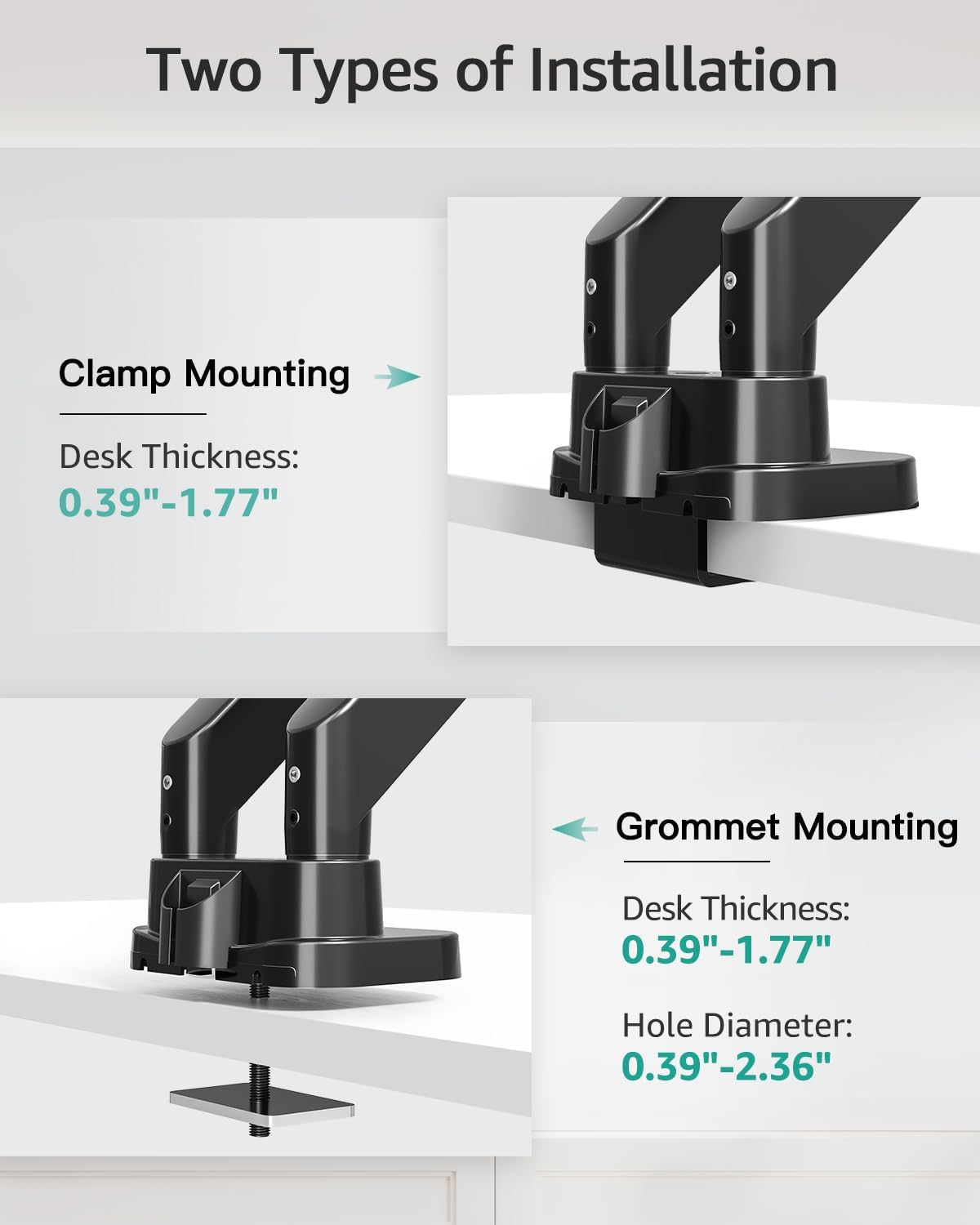
Figure 4.3: Visual representation of C-clamp and grommet mounting methods.
4.3.1 C-Clamp Instalacja
- Dołącz C-klamp to the desk base.
- Position the base on the desired location on your desk.
- Dokręć C-clamp screw until the mount is securely fastened to the desk.
4.3.2 Grommet Installation
- Zdemontuj C-clamp from the base and attach the grommet plate.
- Przełóż śrubę przelotową przez otwór w biurku.
- Secure the mount from underneath the desk using the provided washer and nut.

Figure 4.4: Steps for easy base installation using either C-clamp or grommet method.
4.4 Podłączanie monitorów
- Attach the VESA plate to the back of your monitor using the appropriate screws and spacers from the hardware kit. Ensure the screws are tightened securely.
- Slide the monitor with the attached VESA plate onto the monitor arm's VESA head. The quick-release design allows for easy attachment.
- Sprawdź, czy monitor jest bezpiecznie zablokowany na swoim miejscu.

Figure 4.5: Detail of VESA quick release boards and monitor locking mechanism.
5. Obsługa i regulacje
The MOUNT PRO Dual Monitor Desk Mount offers a wide range of adjustments to customize your viewzdobywania doświadczenia.
5.1 Pozycjonowanie monitora (pochylenie, obrót, obrót)
Each monitor arm allows for flexible positioning:
- Przechylenie: Adjust the monitor angle up to 90° upwards and 45° downwards.
- Obracać: Rotate the monitor horizontally up to 180° left or right.
- Obrót: Obróć monitor o 360°, aby przełączać się między orientacją poziomą i pionową.

Figure 5.1: Illustrates the full range of motion including swivel, tilt, and 360° rotation.
5.2 Height and Extension Adjustment
The gas spring arms allow for smooth vertical and horizontal adjustments.
- Maksymalna wysokość: Monitors can be raised up to 21.5 inches from the desk surface.
- Maksymalne wydłużenie: Arms can extend up to 20.9 inches.

Figure 5.2: Maximum height and extension capabilities of the monitor arm.
5.3 Regulacja napięcia sprężyny gazowej
The gas spring tension must be adjusted to match the weight of your monitor for optimal stability and ease of movement. Hold the arm in a horizontal position during adjustment.
- For lighter monitors (monitor raises up): Turn the adjustment screw clockwise towards the "-" symbol to reduce tension.
- For heavier monitors (monitor drops down): Turn the adjustment screw counter-clockwise towards the "+" symbol to increase tension.
A scale line on the arm indicates the approximate gas spring force value, with each division representing about 2 lbs. Adjust until the arm holds the monitor's position stably.

Figure 5.3: Gas spring tension adjustment mechanism with a visual scale.
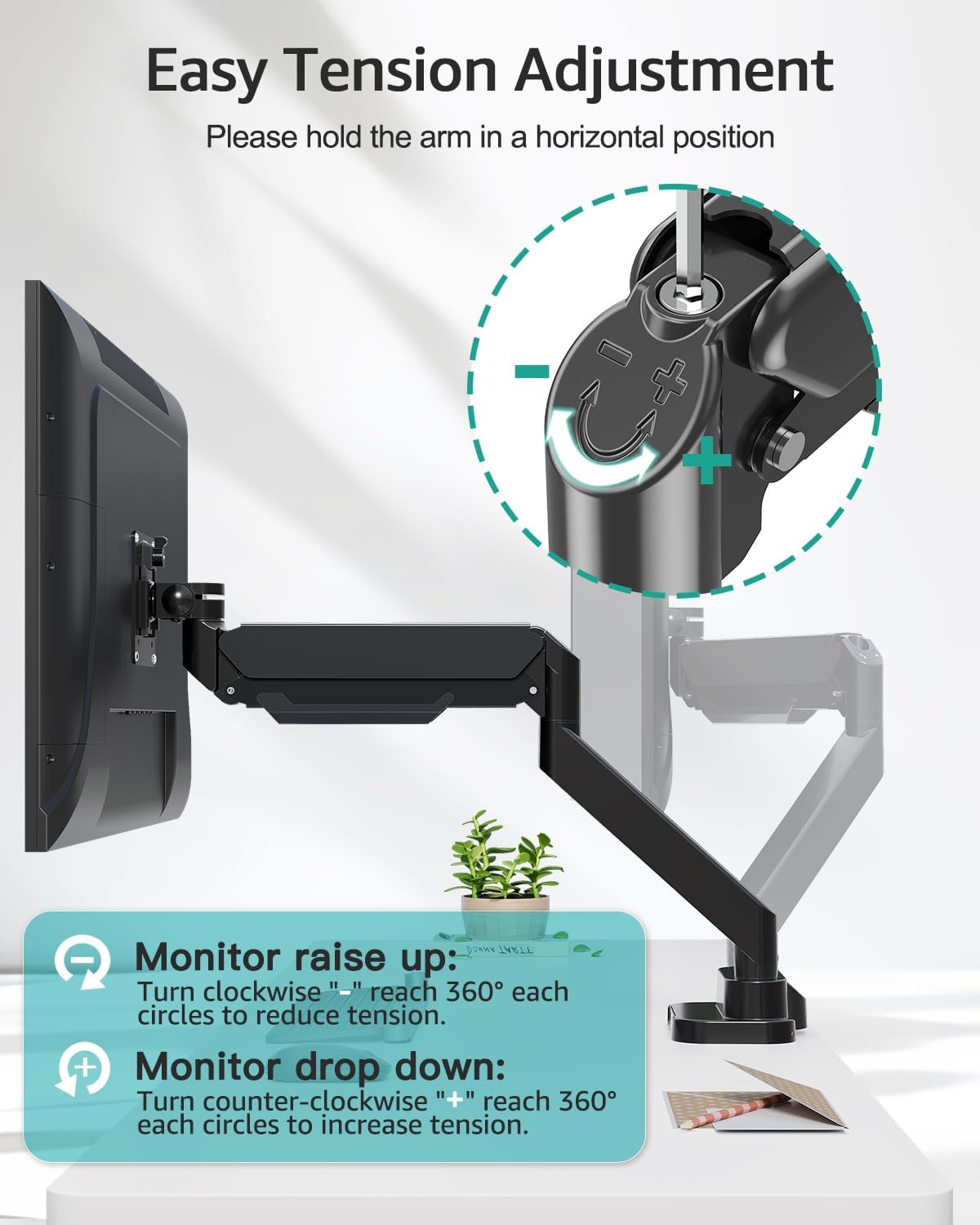
Figure 5.4: Detailed instructions for adjusting tension to suit monitor weight.
5.4 Zarządzanie kablami
Route your monitor cables through the integrated cable management channels along the arms to maintain a tidy workspace.
5.5 porty USB
The base of the mount includes two USB ports. Connect the provided USB extension cable from the mount's base to your computer to enable these ports for charging devices or data transfer.

Figure 5.5: Cable management system and integrated USB ports for desktop organization.
6. Konserwacja
- Regularnie sprawdzaj wszystkie śruby i połączenia, aby mieć pewność, że są dobrze dokręcone i bezpieczne.
- Wyczyść uchwyt miękką ściereczką.amp szmatką. Unikaj środków czyszczących o działaniu ściernym i rozpuszczalników.
- Periodically verify that the gas spring tension is still appropriate for your monitor's weight.
7. Rozwiązywanie Problemów
7.1 Monitor Sags or Does Not Stay in Position
- Rozwiązanie: The gas spring tension is too low for the monitor's weight. Increase the tension by turning the adjustment screw counter-clockwise towards the "+" symbol (refer to Section 5.3).
7.2 Monitor Arm is Too Stiff or Hard to Move
- Rozwiązanie: The gas spring tension is too high for the monitor's weight. Decrease the tension by turning the adjustment screw clockwise towards the "-" symbol (refer to Section 5.3).
7.3 Mount Feels Unstable on Desk
- Rozwiązanie: Ponownie dokręć C-clamp or grommet bolt. Ensure the desk thickness is within the specified range (0.39"-1.77") and the desk material is sturdy.
7.4 Monitor Does Not Fit VESA Plate
- Rozwiązanie: Verify your monitor's VESA pattern is 75x75 mm or 100x100 mm. If not, a VESA adapter may be required. Some monitors may require removing a cover or original stand before attaching the VESA plate.
8. Specyfikacje
| Funkcja | Specyfikacja |
|---|---|
| Marka | MONTAŻ PRO |
| Model | B0F7LRZF4F |
| Zgodność rozmiaru monitora | 13" - 39" (flat or curved) |
| Nośność (na ramię) | 4.4 - 33 funta (2 - 15 kg) |
| Zgodność ze standardem VESA | 75x75 mm, 100x100 mm |
| Kąt nachylenia | +90° / -45° |
| Kąt obrotu | 180° |
| Obrót | 360° |
| Maksymalna wysokość | 21.5 cali |
| Maksymalne rozszerzenie | 20.9 cali |
| Grubość biurka (Clamp/Przelotka) | 0.39" - 1.77" |
| Średnica otworu przelotki | 0.39" - 2.36" |
| Tworzywo | Metal |
| Kolor | Czarny |
| Waga przedmiotu | 14.63 funta |
9. Gwarancja i wsparcie
MOUNT PRO products are designed and manufactured to high-quality standards. This product is covered by a limited warranty from the date of purchase. For warranty details, technical support, or to report missing/damaged parts, please contact MOUNT PRO customer service through the retailer where the product was purchased or visit the official MOUNT PRO webstrona.
Please have your model number (B0F7LRZF4F) and purchase information ready when contacting support.