
Pisichen 21.5INTS-White-NEW
Instrukcja obsługi monitora dotykowego Pisichen o przekątnej 21.5 cala
Model: 21.5INTS-White-NEW
Wstęp
This user manual provides comprehensive instructions for the setup, operation, maintenance, and troubleshooting of your Pisichen 21.5-Inch Touchscreen Monitor. Please read this manual thoroughly before using the product to ensure proper functionality and to prevent damage.
The Pisichen 21.5-inch touch monitor is designed to enhance your work efficiency and provide an interactive experience with its responsive 10-point capacitive touchscreen. It features a Full HD 1920x1080 resolution display, built-in speakers, and versatile connectivity options including HDMI, VGA, and USB for touch functionality.
Główne cechy
- Sensitive 10-Point Capacitive Touchscreen: Offers seamless and responsive interaction, allowing direct engagement with content and simultaneous multi-finger input.
- Stunning FHD 1080P Display: A 21.5-inch Full HD (1920x1080) resolution screen with a 1000:1 contrast ratio, 250cd/㎡ brightness, 170° viewing angle, and 60Hz refresh rate for clear and smooth visuals. Includes low-blue-light and eye-care technology.
- Szeroka kompatybilność urządzeń: Equipped with USB2.0 (for touch), HDMI, VGA, and DC ports for easy connection to PCs, laptops, PS3/4, and gaming consoles.
- Wszechstronne tryby wyświetlania: Supports duplicate, extend, and second-screen modes to enhance productivity and workspace.
- Built-in Speakers and VESA Mounting: Integrated speakers provide audio, and the 75x75mm VESA mount allows for flexible installation options.
Zawartość opakowania
Przed przystąpieniem do instalacji sprawdź, czy w opakowaniu znajdują się wszystkie elementy.

The package includes the Pisichen 21.5-inch touchscreen monitor, a user manual, an HDMI cable, a USB cable, and a power adapter, ensuring it is ready for immediate use.
- Pisichen 21.5-Inch Touchscreen Monitor
- Zasilacz
- Kabel HDMI
- Kabel USB (do funkcji dotykowych)
- Instrukcja obsługi
Instrukcje konfiguracji
1. Podłączanie monitora
The monitor offers various connection options to suit your needs. Ensure all connections are secure before powering on the device.

Szczegółowy view of the monitor's input/output ports, including HDMI, VGA, headphone, DC power, and USB 2.0 touch ports.
- Podłączenie zasilania: Connect the provided power adapter to the DC power port on the monitor and then plug it into a wall outlet.
- Połączenie wideo (HDMI): Use the HDMI cable to connect the monitor's HDMI port to the HDMI output port on your computer, laptop, or gaming console.
- Połączenie wideo (VGA): Alternatively, use a VGA cable to connect the monitor's VGA port to the VGA output port on your computer or laptop.
- Połączenie funkcji dotykowej: To enable the touch function, connect the included USB cable from the monitor's USB 2.0 touch port to an available USB port on your computer. This step is crucial for touch signal transmission.
- Wyjście audio (opcjonalnie): If you prefer external audio, you can connect headphones or external speakers to the headphone jack. The monitor also has built-in speakers.
2. Opcje montażu
The Pisichen monitor supports both desktop placement and VESA wall mounting for flexible setup.
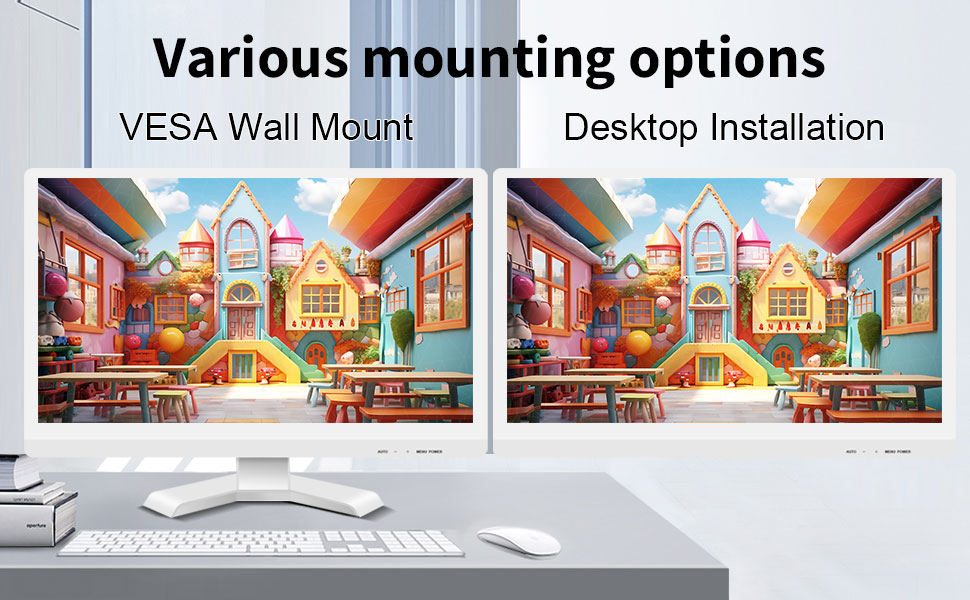
The monitor can be set up on a desktop stand or mounted on a wall using a VESA compatible bracket.
- Instalacja na komputerze: Attach the provided stand to the monitor base and place it on a stable, flat surface.
- Uchwyt ścienny VESA: The monitor features a 75x75mm VESA mounting pattern. Use a compatible VESA bracket (not included) to mount the monitor on a wall or an adjustable arm. Ensure the mount can support the monitor's weight (9.88 pounds).

Tył view of the monitor highlighting the VESA 75x75mm mounting pattern and overall dimensions.
Instrukcja obsługi
1. Włączanie/wyłączanie zasilania
Locate the power button on the monitor. Press it to turn the monitor on or off. The power indicator light will illuminate when the monitor is on.
2. Using the Touchscreen Function
Once the USB cable is connected to your computer, the 10-point capacitive touch function will be active. You can interact with the screen using your fingers or a passive capacitive stylus.

The monitor supports direct touch interaction for intuitive control.
- Pojedynczy dotyk: Odpowiednik kliknięcia myszką.
- Naciśnij i przytrzymaj: Odpowiednik kliknięcia prawym przyciskiem myszy.
- Opór: Move items by touching and dragging.
- Powiększanie za pomocą szczypania: Użyj dwóch palców, aby przybliżać i oddalać zawartość.
- Wielodotykowy: The monitor supports up to 10 simultaneous touch points, enabling collaborative work or complex gestures.

The 10-point multi-touch feature allows for multiple users or complex interactions simultaneously.
Ważna uwaga: The touch functionality is disabled on Mac OS, iPad OS, and iOS. This monitor only supports passive capacitive styluses.
3. Tryby wyświetlania
Monitor obsługuje różne tryby wyświetlania po podłączeniu do komputera:
- Tryb duplikacji: Displays the same content on both your primary screen and the Pisichen monitor.
- Tryb rozszerzania: Rozszerza pulpit na oba ekrany, zapewniając większą przestrzeń roboczą.
- Tryb tylko drugiego ekranu: Displays content only on the Pisichen monitor, turning off your primary screen.
You can typically switch between these modes through your operating system's display settings (e.g., Windows Display Settings).
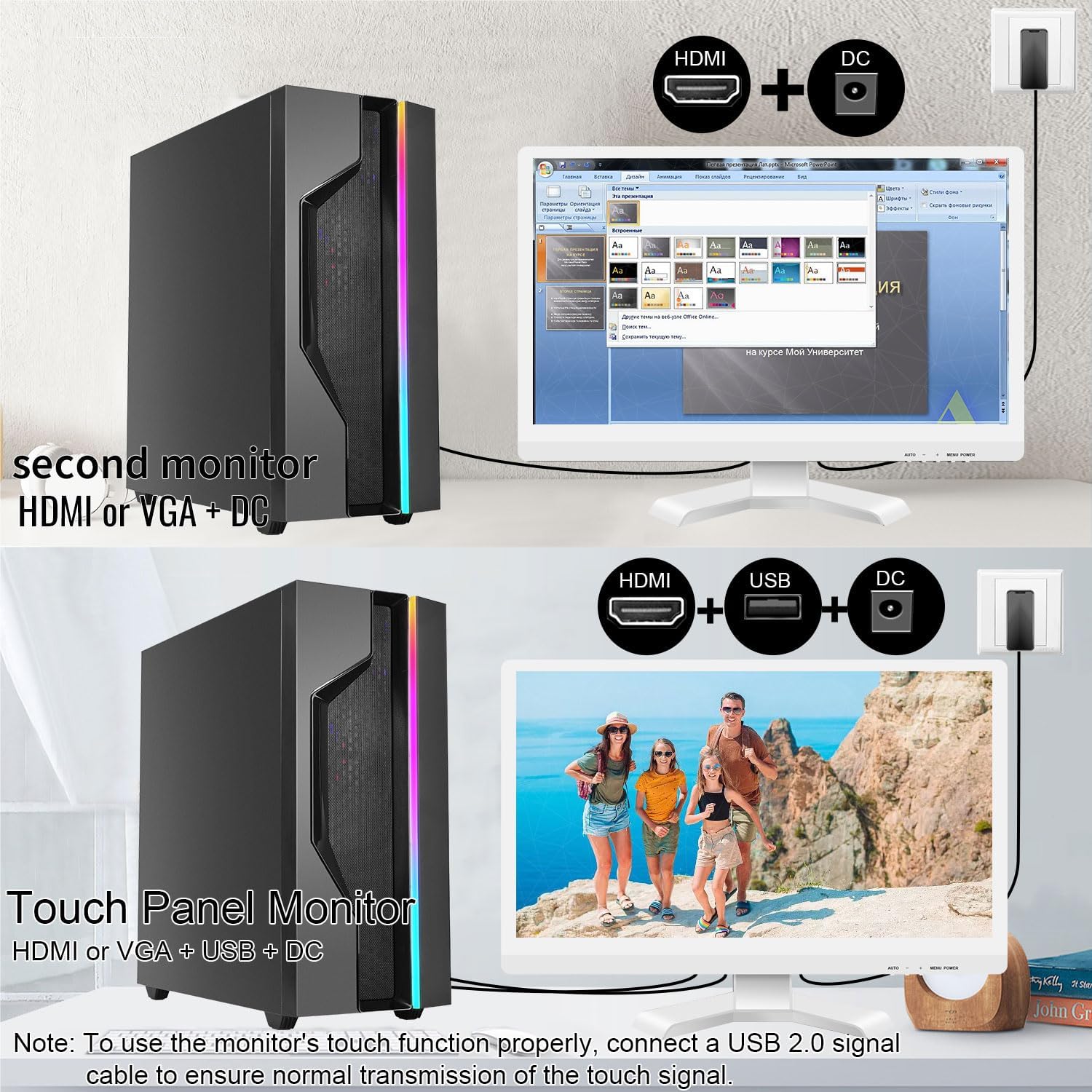
Illustrations of connecting the monitor as a secondary display or as a touch-enabled display.
4. Menu ekranowe (OSD)
The monitor features an OSD menu for adjusting display settings. Use the buttons located on the monitor's frame (usually on the bottom right) to navigate and select options.
- Przycisk menu: Otwiera menu ekranowe.
- Przyciski w górę/w dół: Poruszaj się po opcjach menu.
- Przycisk Enter/Wybierz: Potwierdza wybór lub przechodzi do podmenu.
- Przycisk wyjścia: Wychodzi z bieżącego menu lub OSD.
Common OSD settings include brightness, contrast, color temperature, input source selection, and aspect ratio.
Konserwacja i pielęgnacja
- Czyszczenie ekranu:
Always power off the monitor and unplug it before cleaning. Use a soft, lint-free cloth lightly dampened with water or a non-abrasive, monitor-specific cleaning solution. Do not spray liquid directly onto the screen. Avoid using alcohol, ammonia, or abrasive cleaners, as they can damage the screen surface.
- Czyszczenie Casing:
Wytrzyj monitor casing miękką, suchą ściereczką. W razie potrzeby delikatnieamp Można użyć ściereczki, ale należy uważać, aby wilgoć nie dostała się do otworów wentylacyjnych i portów.
- Składowanie:
When not in use for extended periods, store the monitor in a cool, dry place, away from direct sunlight and extreme temperatures. If possible, use the original packaging for protection.
- Wentylacja:
Ensure the monitor's ventilation openings are not blocked. Proper airflow is essential to prevent overheating.
- Obsługiwanie:
Ostrożnie obchodź się z monitorem. Unikaj upuszczania go i narażania na silne uderzenia. Nie kładź ciężkich przedmiotów na monitorze.
Rozwiązywanie problemów
| Problem | Możliwa przyczyna | Rozwiązanie |
|---|---|---|
| Brak obrazu na ekranie |
|
|
| Ekran dotykowy nie reaguje |
|
|
| Obraz jest niewyraźny lub zniekształcony |
|
|
| Brak dźwięku z wbudowanych głośników |
|
|
Specyfikacje
| Numer modelu | 21.5INTS-White-NEW |
| Rozmiar ekranu | 21.5 cali |
| Rezolucja | 1920 x 1080 pikseli (FHD 1080p) |
| Proporcje obrazu | 16:9 |
| Jasność | 250 kandeli (cd/㎡) |
| Współczynnik kontrastu | 1000:1 |
| Viewing kąt | 170° |
| Częstotliwość odświeżania | 60 Hz |
| Technologia dotykowa | 10-punktowy pojemnościowy ekran dotykowy |
| Porty wejściowe | HDMI, VGA, USB 2.0 (for touch), DC Power |
| Audio | Wbudowane głośniki, gniazdo słuchawkowe |
| Zgodność z mocowaniem VESA | 75x75mm |
| Wymiary produktu (dł. x szer. x wys.) | 0.78 x 20.4 x 14.9 cala |
| Waga przedmiotu | 9.88 funta |
| Producent | Shenzhen Konowa Electronics Co., LTD |
| Kraj pochodzenia | Chiny |
Gwarancja i wsparcie
For warranty information and technical support, please refer to the official Pisichen website or contact their customer service directly. Details are typically provided on the product packaging or the manufacturer's official support channels.
Możesz odwiedzić Pisichen Store on Amazon for more product information and potential support contacts.