
Wstęp
Thank you for choosing the Philips Solar Security Light. This manual provides essential information for the safe and efficient operation of your solar-powered, wall-mounted flood light with PIR motion sensor. Please read these instructions carefully before installation and use, and retain them for future reference.
Informacje dotyczące bezpieczeństwa
- Upewnij się, że powierzchnia montażu jest stabilna i może utrzymać ciężar oprawy oświetleniowej.
- Nie należy podejmować prób demontażu ani modyfikacji produktu. Może to spowodować unieważnienie gwarancji i zagrożenie bezpieczeństwa.
- Aby zapewnić optymalną wydajność ładowania, utrzymuj panel słoneczny w czystości.
- Avoid looking directly into the light source when it is active, as it may cause eye strain.
- Po zakończeniu okresu użytkowania produktu należy poddać go wraz z jego częściami składowymi odpowiedzialnej utylizacji, zgodnie z lokalnymi przepisami.
Zawartość opakowania
Przed instalacją sprawdź, czy wszystkie komponenty są obecne:
- Philips Solar Security Light (1 unit)
- Pilot zdalnego sterowania (1 szt.)
- Uchwyt montażowy (1 sztuka)
- Śruby (2 sztuki)
- Wall Plugs (2 units)
Produkt ponadview
The Philips Solar Security Light is an outdoor, solar-powered flood light designed for enhanced security and illumination. It features a PIR motion sensor, high-brightness LEDs, and multiple lighting modes.

Obraz: Ponadview of the Philips Solar Security Light, highlighting its durable design with a solar panel, three LED light heads, and an integrated motion sensor.
Główne cechy:
- Wysoka jasność: 800 lumens with 6500K cool daylight color temperature.
- Czujnik ruchu PIR: Detects motion up to 49.2 feet with a 180-degree detection angle.
- 3 tryby oświetlenia: Customizable illumination settings for various needs.
- Zasilane energią słoneczną: Equipped with an upgraded polycrystalline solar panel and a 2000 mAh high-capacity battery for efficient charging and extended use.
- Odporność na warunki atmosferyczne: IP65 rated for resistance against heavy rain, humidity, and extreme temperatures.
- Zdalne sterowanie: Allows convenient adjustment of light modes without manual interaction.
Konfiguracja i instalacja
The Philips Solar Security Light is designed for easy wall-mounted installation with no wiring required. It comes pre-assembled.
Kroki instalacji:
- Wybierz lokalizację: Select an outdoor location that receives direct sunlight for most of the day to ensure optimal charging of the solar panel. The light should be mounted on a wall.
- Zaznacz punkty wiercenia: Hold the mounting bracket against the desired wall location and mark the positions for the two screws.
- Wiercenie otworów: Drill two holes at the marked points. Insert the wall plugs into the drilled holes.
- Zamontuj wspornik montażowy: Przymocuj uchwyt montażowy do ściany za pomocą dołączonych śrub.
- Zamontuj światło: Slide the solar security light onto the mounting bracket until it clicks securely into place.
- Regulacja głowic i czujnika światła: Adjust the three light heads and the PIR motion sensor to cover the desired area. The motion sensor has an adjustable angle of 180 degrees.
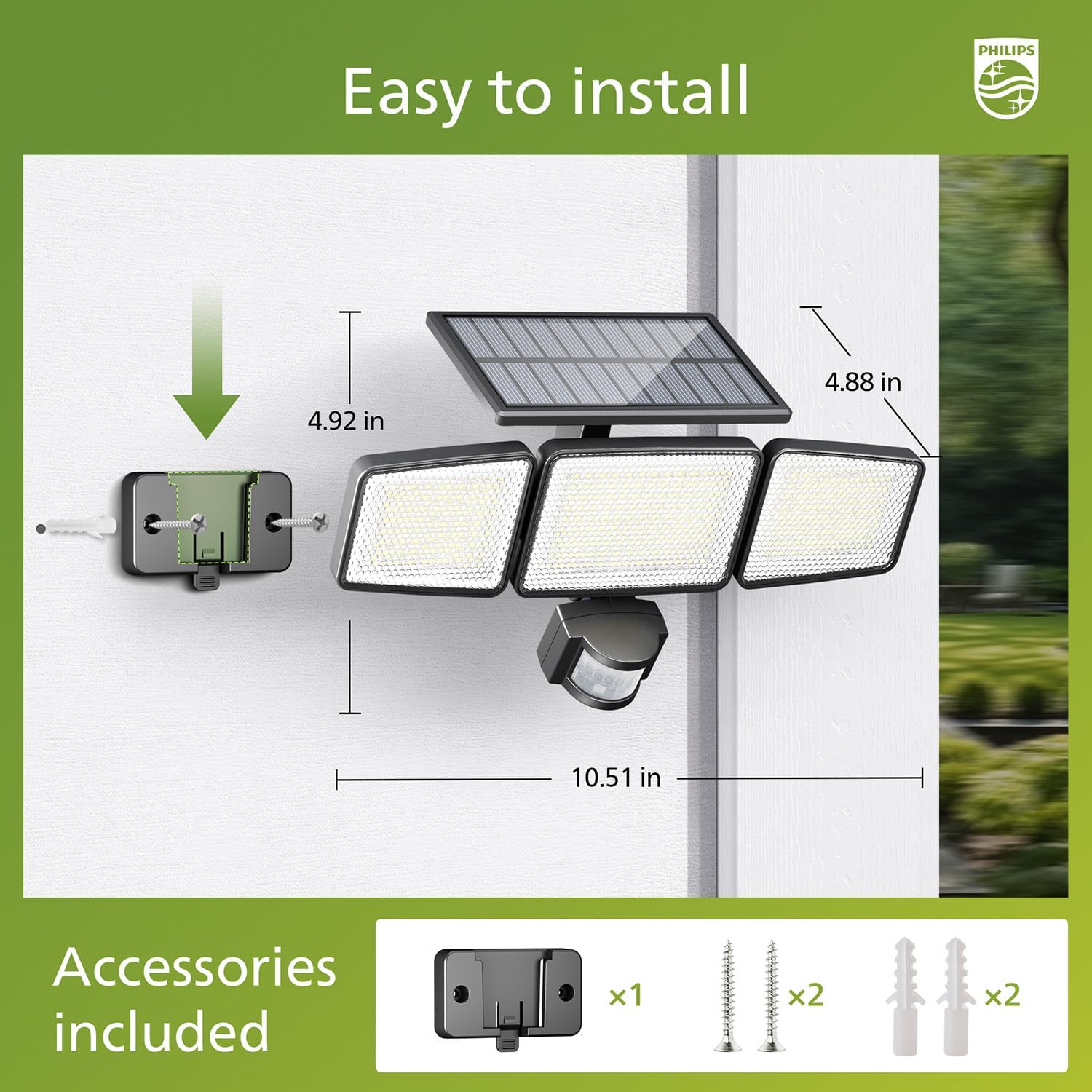
Image: Visual guide for installing the Philips Solar Security Light, including dimensions and the accessories provided for wall mounting.
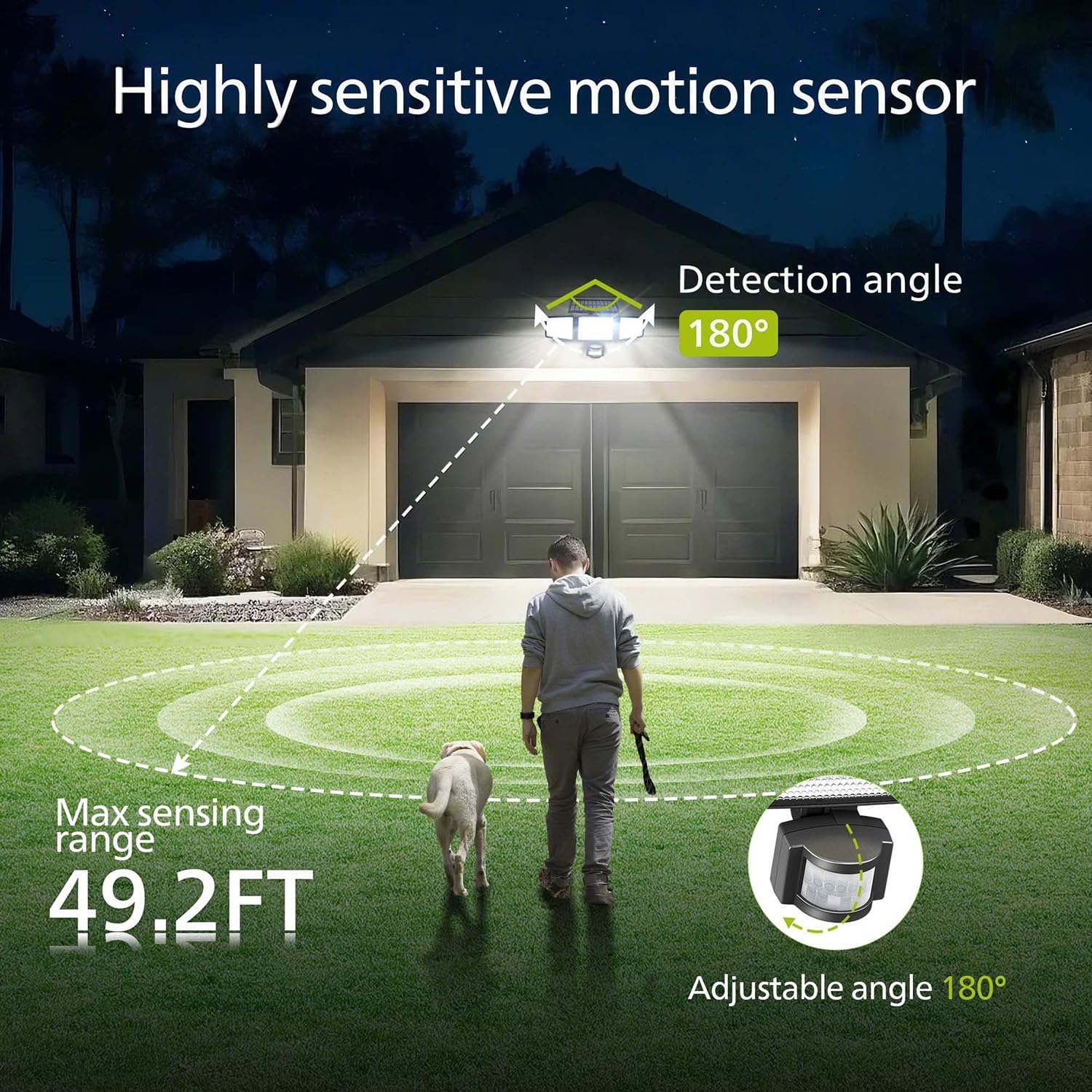
Image: Illustration of the motion sensor's coverage, showing a 180-degree detection angle and a maximum sensing range of 49.2 feet.
Instrukcja obsługi
The Philips Solar Security Light features three distinct lighting modes, controllable via the included remote control.
Tryby oświetlenia:
- Tryb czujnika: The light remains off until motion is detected. Upon detection, it illuminates at 100% brightness (800 lumens) for approximately 25 seconds, then turns off.
- Tryb przyciemnienia: The light stays on continuously at a low brightness of 10% (80 lumens) throughout the night.
- Tryb przyciemniania + czujnik: The light stays on continuously at a very low brightness of 2-3% (16-24 lumens). When motion is detected, it brightens to 100% (800 lumens) for approximately 25 seconds, then returns to the dim state.

Image: Detailed explanation of the three operational modes, showing how the light behaves in Sensor, Dim, and Dim + Sensor modes based on motion detection and ambient light.
Use the remote control to switch between these modes as needed. Ensure the remote control has a clear line of sight to the light fixture for proper function.
Konserwacja
Regular maintenance ensures optimal performance and longevity of your Philips Solar Security Light.
- Czyszczenie paneli słonecznych: Okresowo przecieraj panel słoneczny miękką,amp cloth to remove dust, dirt, or debris. A clean solar panel ensures maximum sunlight absorption and charging efficiency.
- Czyszczenie oprawy: Clean the light fixture with a soft, dry cloth. Avoid using abrasive cleaners or solvents that could damage the finish or electronic components.
- Bateria: The integrated high-capacity 2000 mAh battery is designed for long-term use. No user maintenance or replacement is required for the battery.
- Odporność na warunki atmosferyczne: The IP65 rating ensures the light is protected against dust and water jets. However, avoid submerging the unit in water.

Image: Focus on the high-quality solar panel, illustrating its role in providing power for 8-10 hours of operation and its 1800mAh high-capacity battery.
Rozwiązywanie problemów
Jeśli masz problemy z lampą zabezpieczającą Philips Solar Security Light, zapoznaj się z poniższymi typowymi problemami i ich rozwiązaniami:
- Światło nie włącza się w nocy:
- Ensure the solar panel is receiving adequate direct sunlight during the day.
- Check if the light is in the correct operating mode (e.g., not in 'off' state if the remote has an off button).
- Sprawdź, czy bateria pilota zdalnego sterowania jest sprawna.
- Światło jest słabe lub świeci tylko przez krótki czas:
- The solar panel may not be fully charged. Ensure it is clean and exposed to direct sunlight for at least 6-8 hours.
- Ambient temperature can affect battery performance; extreme cold may reduce operating time.
- Czujnik ruchu nie wykrywa ruchu:
- Upewnij się, że soczewka czujnika jest czysta i drożna.
- Verify the light is in a motion-activated mode (Sensor Mode or Dim + Sensor Mode).
- Adjust the angle of the motion sensor to cover the desired detection area.
If problems persist, please contact Philips customer support for further assistance.
Specyfikacje
| Funkcja | Specyfikacja |
|---|---|
| Marka | FILIPSY |
| Model | 929004621403 |
| Kolor | Czarny |
| Tworzywo | Aluminium |
| Formularz oprawy oświetleniowej | Iluminacja |
| Zastosowanie wewnątrz/na zewnątrz | Plenerowy |
| Źródło zasilania | Zasilany energią słoneczną |
| Metoda kontroli | Zdalny |
| Źródło światła | PROWADZONY |
| Liczba źródeł światła | 4 |
| Tomtage | 3.7 woltów prądu stałego |
| Kolor światła | Zimna biel (6500K) |
| Jasność | 800 lumenów (maks.) |
| Poziom wodoodporności | Wodoodporność IP65 |
| Typ montażu | Montaż ścienny |
| Pojemność baterii | 2000 mAh |
| Kąt wykrywania | 180 stopnia |
| Zakres wykrywania | Do 49.2 stóp |

Image: A comparison table highlighting key specifications of the Philips solar security light, such as brightness, lighting modes, battery capacity, and waterproof rating.
Gwarancja i wsparcie
Aby uzyskać informacje o gwarancji i obsłudze klienta, zapoznaj się z oficjalną instrukcją obsługi firmy Philips webOdwiedź stronę internetową lub skontaktuj się z działem obsługi klienta. Zachowaj paragon jako dowód zakupu.
Aby uzyskać dalszą pomoc, odwiedź stronę: www.philips.com/support


