
1. Ważne instrukcje bezpieczeństwa
Please read these instructions carefully before using the Audizio Canzo DAB+ Internet Radio. Keep this manual for future reference.
- Aby uniknąć pożaru lub porażenia prądem, nie wystawiaj urządzenia na działanie deszczu i wilgoci.
- Nie otwierać casing. Wewnątrz nie ma żadnych części, które mogłyby być naprawiane przez użytkownika. Wszelkie prace serwisowe należy zlecać wykwalifikowanemu personelowi.
- Używaj wyłącznie zasilacza dostarczonego z urządzeniem.
- Zapewnij odpowiednią wentylację wokół urządzenia. Nie blokuj otworów wentylacyjnych.
- Unikać umieszczania urządzenia w pobliżu źródeł ciepła lub w bezpośrednim świetle słonecznym.
- Clean the unit only with a dry, soft cloth. Do not use liquid cleaners.
2. Koniec produktuview
The Audizio Canzo is a versatile DAB+ Internet Radio designed for high-quality audio reception and playback. It features multiple connectivity options including Wi-Fi, Bluetooth 5.3, AUX, and USB, along with a remote control for convenient operation. The elegant wooden finish and clear display make it suitable for various home environments.
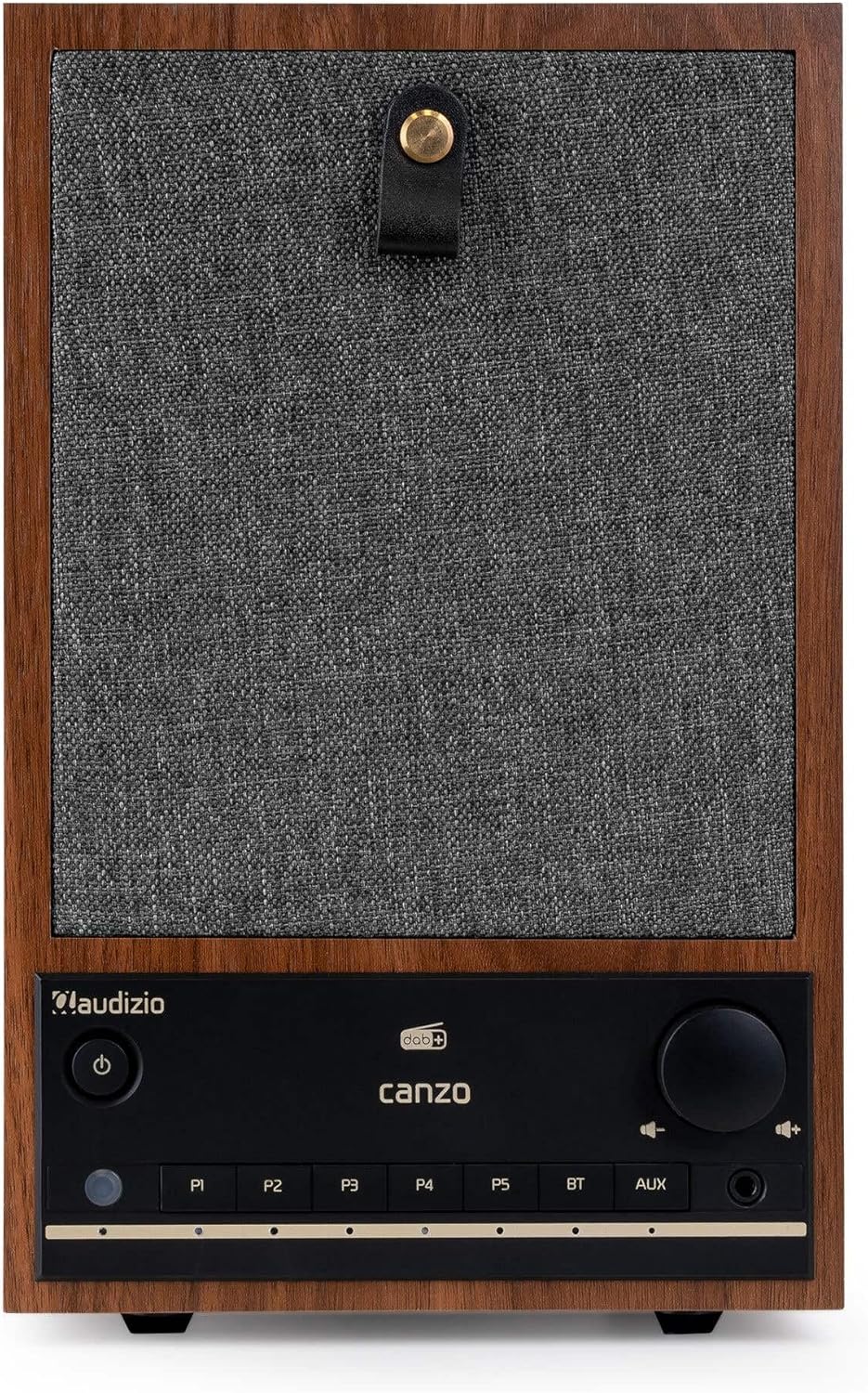
Rycina 2.1: Przód view of the Audizio Canzo DAB+ Internet Radio in walnut finish.

Rycina 2.2: Przód view with speaker grille removed, highlighting the speaker, display, and control panel.
3. Co znajduje się w pudełku
Ostrożnie rozpakuj pudełko i upewnij się, że znajdują się w nim wszystkie elementy:
- Audizio Canzo DAB+ Internet Radio
- Zasilacz
- Zdalne sterowanie
- Szybki przewodnik
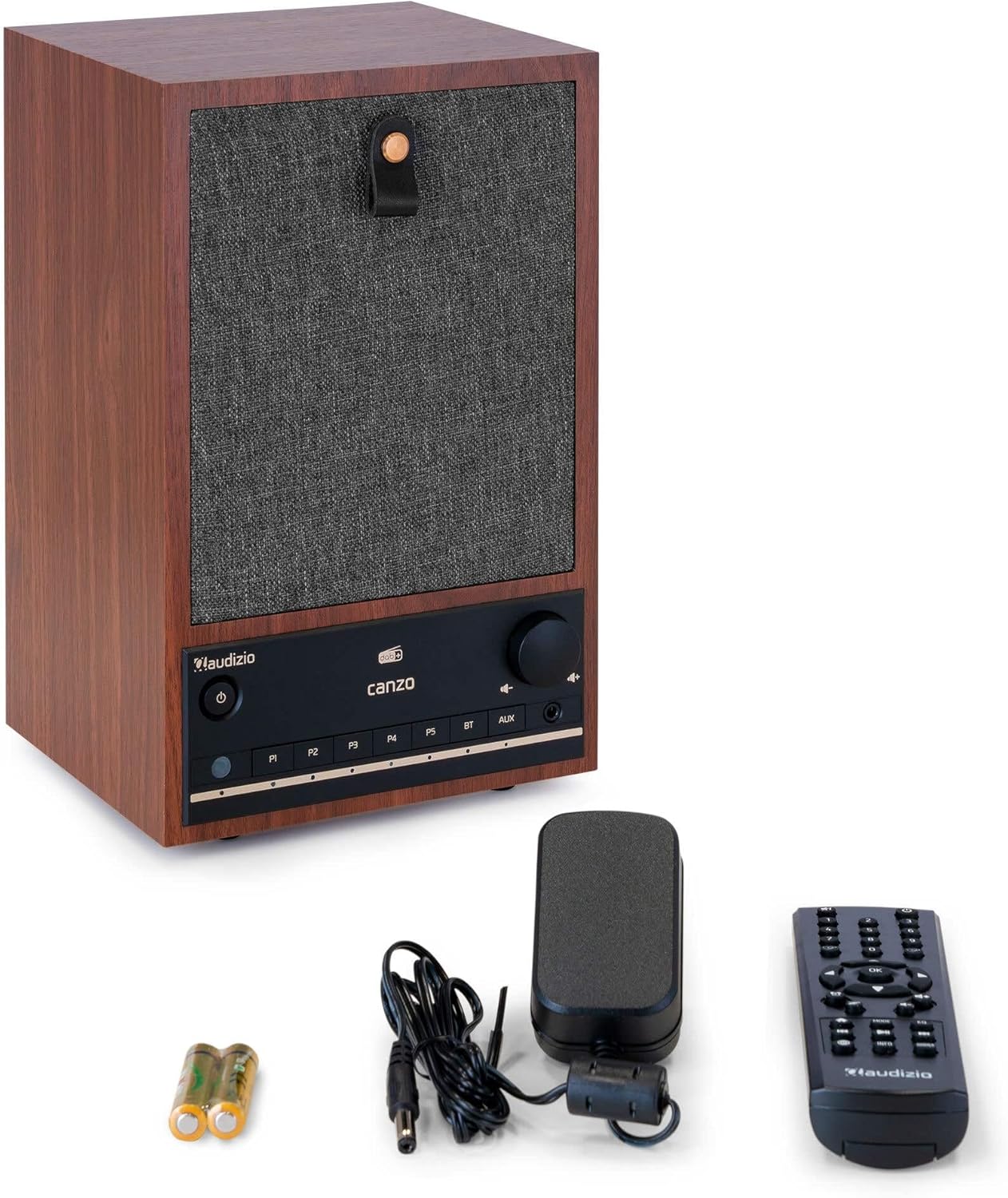
Figure 3.1: Audizio Canzo radio with its accessories.
4. Konfiguracja
4.1 Podłączanie zasilania
- Insert the DC plug of the power adapter into the DC WEJŚCIE port on the back of the radio.
- Plug the power adapter into a standard wall outlet (220V).
- Odwróć WŁ./WYŁ. switch on the back of the unit to the ON pozycja.
4.2 Podłączenie anteny
For optimal DAB+ and FM reception, extend the telescopic antenna located on the back of the unit. Adjust its position for the best signal.

Figure 4.1: Rear panel with power input, audio ports, USB, LAN, and antenna.
4.3 Pierwsze włączenie zasilania i konfiguracja sieci
- Naciśnij Moc button on the front panel or remote control to turn on the radio.
- The display will show the Audizio logo and then guide you through the initial setup wizard.
- Wybierz preferowany język.
- The radio will prompt you to connect to a network. Choose Wi-Fi or Sieć lokalna.
- Dla Wi-Fi: Select your Wi-Fi network from the list and enter the password using the navigation buttons and OK przycisk.
- For LAN: Podłącz kabel Ethernet do routera Sieć lokalna port on the back of the radio. The connection should be established automatically.
- Once connected, the radio will update the time and date automatically.
5. Instrukcja obsługi
5.1 Podstawowe sterowanie
The front panel features a power button, preset buttons (P1-P5), Bluetooth (BT) and AUX input buttons, a volume knob, and navigation controls. The remote control provides full access to all functions.
5.2 Wybór trybu
Naciśnij TRYB button on the radio or remote control to cycle through available modes: Internet Radio, DAB+, FM, Bluetooth, AUX, and USB Playback.
5.3 Radio internetowe
- Wybierać Radio internetowe tryb.
- Użyj przycisków nawigacyjnych, aby przeglądać stacje według lokalizacji, gatunku lub wyszukiwania.
- Naciskać OK aby wybrać stację.
- Aby zapisać stację jako ustawienie wstępne, naciśnij i przytrzymaj jeden z przycisków P1-P5 buttons until the display confirms.
Radio 5.4 DAB+
- Wybierać DAB+ tryb.
- Radio automatycznie przeskanuje dostępne stacje DAB+.
- Use the navigation buttons to scroll through the list of found stations.
- Naciskać OK aby wybrać stację.
- Aby zapisać stację jako ustawienie wstępne, naciśnij i przytrzymaj jeden z przycisków P1-P5 pikolak.
5.5 Radio FM
- Wybierać FM tryb.
- Naciśnij i przytrzymaj Skandować button (usually on the remote or via menu) to auto-scan for FM stations.
- Use the navigation buttons to tune manually or select from scanned stations.
- Aby zapisać stację jako ustawienie wstępne, naciśnij i przytrzymaj jeden z przycisków P1-P5 pikolak.
5.6 Odtwarzanie Bluetooth
- Wybierać Bluetooth mode. The radio will enter pairing mode, indicated on the display.
- Na smartfonie lub tablecie włącz Bluetooth i wyszukaj dostępne urządzenia.
- Select "Audizio Canzo" from the list to pair.
- Po sparowaniu możesz odtwarzać dźwięk ze swojego urządzenia przez radio.
5.7 Wejście AUX
- Podłącz zewnętrzne urządzenie audio (np. odtwarzacz MP3) do AUX IN portu z tyłu radia za pomocą kabla audio 3.5 mm.
- Wybierać AUX tryb.
- Audio from the connected device will now play through the radio.
5.8 Odtwarzanie USB
- Włóż dysk flash USB zawierający dźwięk files do ODTWARZANIE USB port on the back of the radio.
- Wybierać USB tryb.
- Użyj przycisków nawigacyjnych, aby przeglądać i wybierać pliki audio files do odtwarzania.
5.9 Budzik i timer snu
- Alarm: Access the Alarm settings via the menu. Set up to two alarms with desired time, source (buzzer, radio), and volume.
- Wyłącznik czasowy: Access the Sleep Timer settings via the menu. Set a duration (e.g., 15, 30, 60 minutes) after which the radio will automatically turn off.
- Drzemka: Gdy zabrzmi alarm, naciśnij przycisk Drzemka button on the remote or radio to temporarily silence it.
6. Konserwacja
6.1 Czyszczenie
To clean the radio, use a soft, dry, lint-free cloth. Do not use abrasive cleaners, waxes, or solvents as they may damage the finish or internal components.
6.2 Przechowywanie
Jeśli urządzenie będzie przechowywane przez dłuższy czas, należy odłączyć je od gniazdka zasilania i przechowywać w chłodnym, suchym miejscu, z dala od bezpośredniego światła słonecznego i ekstremalnych temperatur.
7. Rozwiązywanie Problemów
| Problem | Możliwa przyczyna | Rozwiązanie |
|---|---|---|
| Brak zasilania | Zasilacz nie jest podłączony; przełącznik WŁ./WYŁ. jest wyłączony. | Ensure power adapter is securely connected and ON/OFF switch is ON. |
| Brak dźwięku | Volume too low; incorrect source selected; headphones connected. | Zwiększ głośność, wybierz właściwy tryb wprowadzania, odłącz słuchawki. |
| Nie można połączyć się z siecią Wi-Fi | Nieprawidłowe hasło; router jest za daleko; problem z siecią. | Verify Wi-Fi password; move radio closer to router; restart router. |
| Słaby odbiór DAB+/FM | Antena nie jest wysunięta; obszar o słabym sygnale. | Fully extend and adjust the telescopic antenna; try repositioning the radio. |
| Pilot nie działa | Batteries depleted; obstruction between remote and radio. | Replace remote control batteries; ensure clear line of sight to the radio's sensor. |
8. Specyfikacje
| Funkcja | Specyfikacja |
|---|---|
| Numer modelu | Canzo |
| Wymiary produktu | Wymiary 22.5 x 20.5 x 34 cm |
| Waga przedmiotu | 2.9 kilograma |
| Kolor | Orzech włoski |
| Rozmiar ekranu | 2.4 cali |
| Technologia łączności | Aux, Bluetooth, Wi-Fi, LAN |
| Wersja Bluetooth | 5.3 |
| Obsługiwane pasma radiowe | DAB+, FM, radio internetowe |
| Źródło zasilania | Corded Electric (220 Volt) |
| Cechy specjalne | Integrated Clock, Sleep Timer, Alarm, Remote Control, Preset Stations |
| Kompatybilne urządzenia | Smartphone, Tablet, Headphones, MP3 Player, USB Storage Device |
9. Gwarancja i wsparcie
Aby uzyskać informacje o gwarancji i pomocy technicznej, zapoznaj się z kartą gwarancyjną dołączoną do produktu lub skontaktuj się ze sprzedawcą. Zachowaj dowód zakupu na wypadek roszczeń gwarancyjnych.


