
1. Wprowadzenie
Dziękujemy za zakupasing the Greadio CD-W16 Multifunction Portable CD Player. This device offers a comprehensive audio experience with multiple playback options including CD, cassette, FM radio, Bluetooth 5.1, USB, AUX, and TF/SD card. Designed for ease of use and portability, it features a rechargeable battery, remote control, and high-quality stereo sound. Please read this manual carefully to ensure proper operation and to fully enjoy all the features of your new audio system.
2. Informacje dotyczące bezpieczeństwa
- Aby uniknąć pożaru lub porażenia prądem, nie wystawiaj urządzenia na działanie deszczu i wilgoci.
- Nie otwierać casing. Serwisowanie powierzać wyłącznie wykwalifikowanemu personelowi.
- Unikać umieszczania urządzenia w pobliżu źródeł ciepła lub w bezpośrednim świetle słonecznym.
- Należy używać wyłącznie wskazanego zasilacza i kabli.
- Przechowywać w miejscu niedostępnym dla dzieci.
3. Zawartość opakowania
- Greadio CD-W16 CD Radio Cassette Player x 1
- Kabel AUX x 1
- Kabel typu C x 1
- Pilot zdalnego sterowania x 1
- Instrukcja obsługi x 1
4. Koniec produktuview
The Greadio CD-W16 is a versatile audio system designed for various listening preferences. It combines classic and modern features in a compact, portable design.
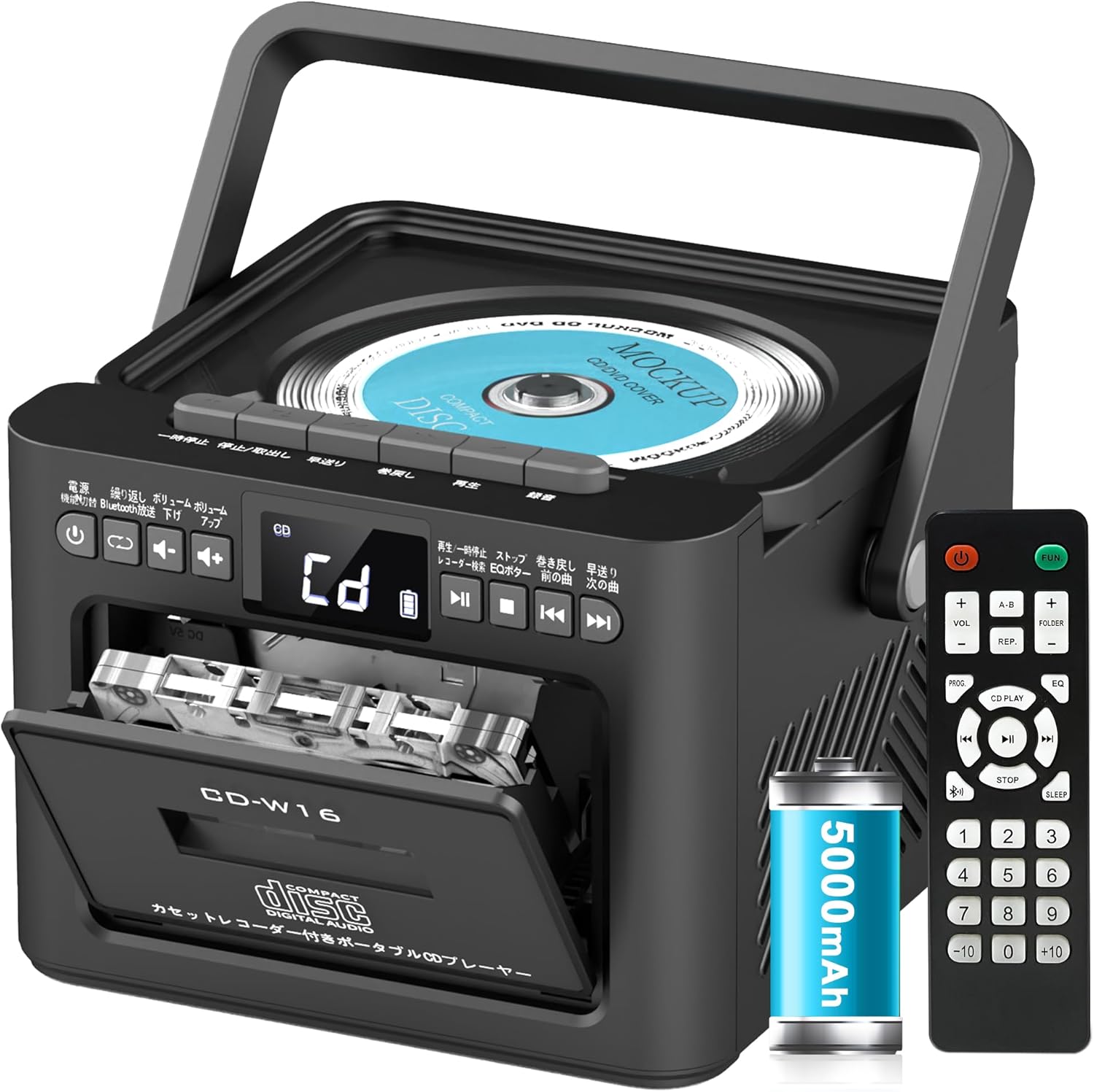
Główne cechy obejmują:
- CD Player (CD, CD-R, CD-RW compatible)
- Odtwarzacz i rejestrator kaset
- Radio FM (76-108MHz)
- Bluetooth 5.1 (nadajnik i odbiornik)
- Odtwarzanie USB
- Wejście AUX
- TF/SD Card Playback
- Akumulator 5000 XNUMX mAh
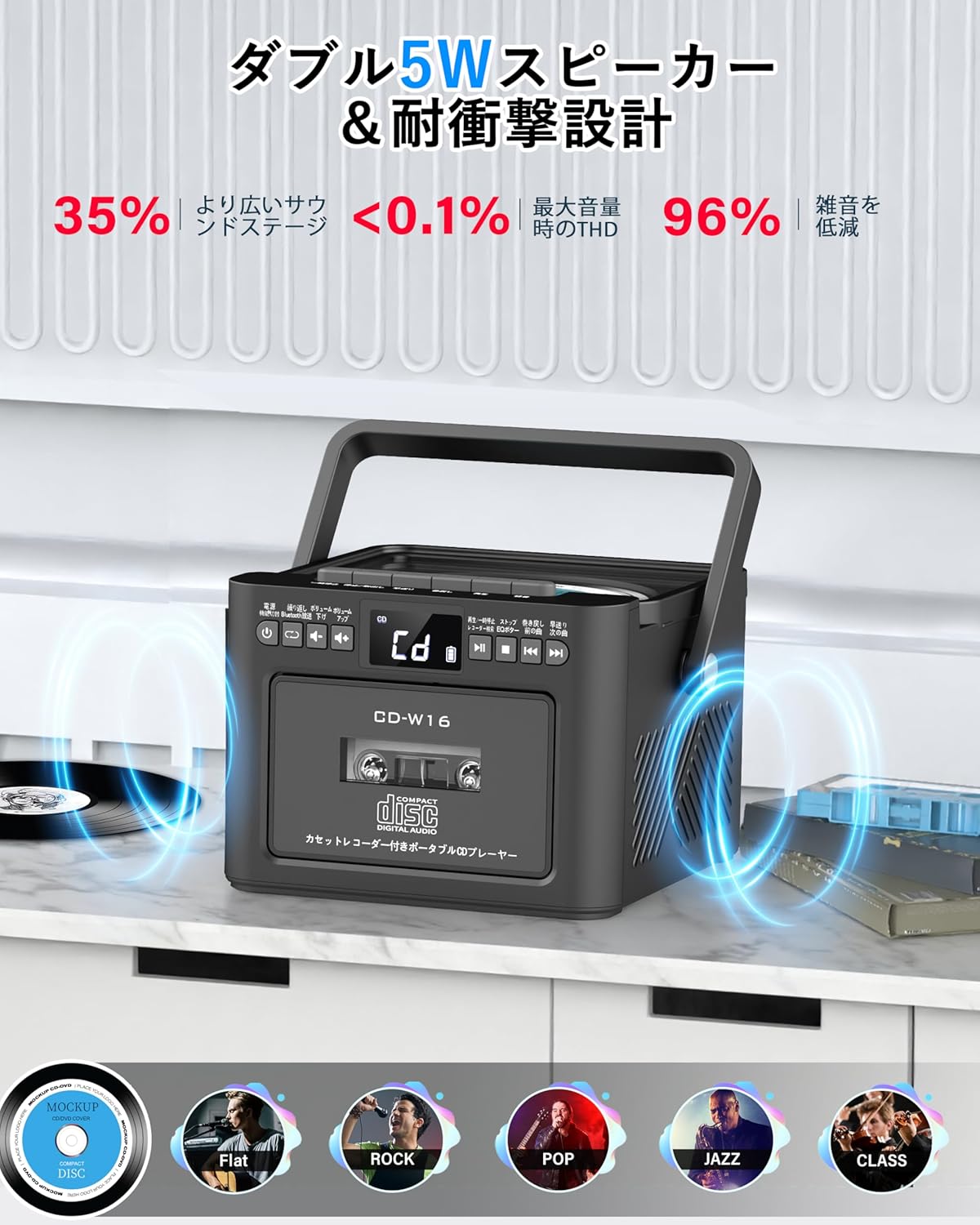
- Dwa głośniki stereo 5W
- Zdalne sterowanie
- Timer snu
- 5 Tryby dźwięku EQ

5. Konfiguracja
5.1. Ładowanie akumulatora
The Greadio CD-W16 is equipped with a built-in 5000mAh rechargeable battery. To charge the device:
- Connect the provided Type-C cable to the charging port on the unit.
- Connect the other end of the Type-C cable to a 5V/2A USB power adapter (not included).
- The charging indicator will illuminate. A full charge takes approximately 3 hours and provides up to 16 hours of playback.

5.2. Włączanie/wyłączanie zasilania
To power on or off the CD player:
- Naciśnij i przytrzymaj Przycisk zasilania on the unit or the remote control for 2 seconds.
- Alternatywnie naciśnij krótko Przycisk zasilania on the remote control to toggle the CD player on/off.
6. Instrukcja obsługi
6.1. General Controls (Remote Control)
The remote control provides convenient access to all functions. Refer to the video below for a demonstration of remote control operations.
- Włączanie/wyłączanie: Naciśnij krótko Przycisk zasilania.
- Wybór trybu funkcji: Naciśnij krótko FUNKCJA przycisk to cycle through CD, Bluetooth, Radio, Cassette, AUX, USB, and TF/SD card modes.
- Regulacja głośności: Krótkie naciśnięcie Objętość + or TOM- pikolak.
- Nawigacja po ścieżce: Krótkie naciśnięcie NEXT (>>|) for the next track or PREV (|<<) dla poprzedniego utworu.
- Szybkie przewijanie do przodu/do tyłu: Długie naciśnięcie NEXT (>>|) for fast forward or PREV (|<<) for rewind.
- Bezpośredni wybór utworu: In CD mode, input 0-9 on the remote to quickly skip to the desired track.
- Tryb korektora: Naciśnij krótko Przycisk EQ to cycle through NORMAL, ROCK, POP, JAZZ, and CLASS sound modes.
- Tryb powtarzania: Naciśnij krótko przycisk REP to cycle through repeat options (ONE, FOLDER, ALL, SHUFFLE, OFF).
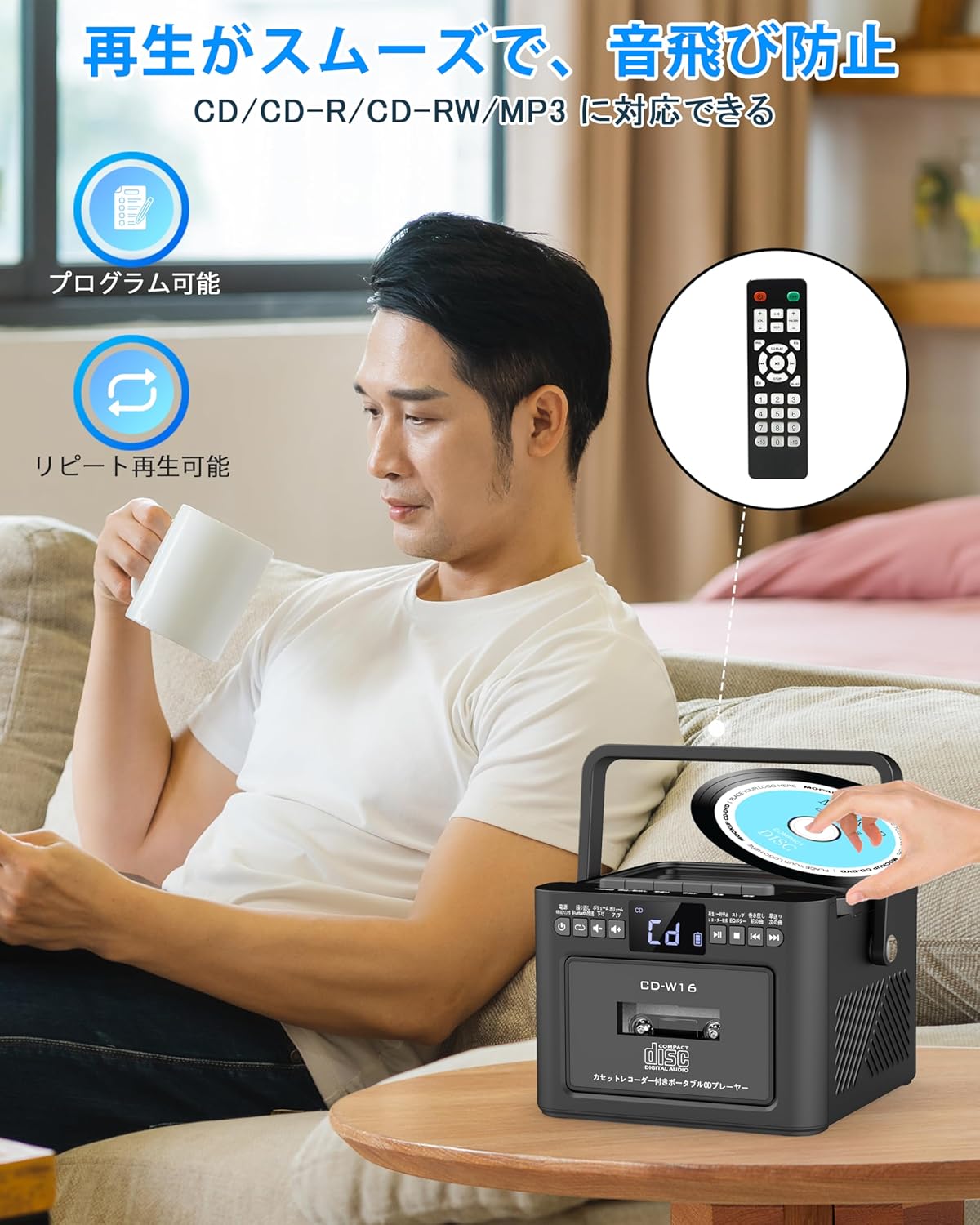
6.2. Odtwarzanie płyt CD
- Upewnij się, że urządzenie jest włączone.
- Naciśnij krótko FUNKCJA przycisk to select CD mode. The display will show "CD".
- Open the CD compartment lid by gently lifting it.
- Place a CD (CD, CD-R, CD-RW compatible) onto the spindle with the label side facing up.
- Zamknij pokrywę komory CD. Płyta CD zacznie się odtwarzać automatycznie.
- Użyj Odtwórz/Pauza (||) button for temporary stop/resume.
- Używać NEXT (>>|) I PREV (|<<) przyciski do nawigacji po utworach.
6.3. Cassette Playback & Recording
- Naciśnij krótko FUNKCJA przycisk to select Tape mode. The display will show "TAPE".
- Naciśnij STOP/EJ. button to open the cassette compartment.
- Insert a cassette tape into the compartment and close the lid.
- Naciśnij przycisk GRAJ to start cassette playback.
- To fast forward or rewind, long press the FFWD or FREW odpowiednio przyciski.
- To stop playback, short press the STOP/EJ. button.
Nagrywanie na kasetach:
To record audio from other modes (CD, FM Radio, USB, AUX, TF/SD) onto a blank cassette:
- Insert a blank cassette into the cassette compartment.
- Select the desired source mode (e.g., CD, FM Radio).
- Naciśnij jednocześnie GRAĆ I NAGR. (nagranie) buttons. Recording will begin.
- Naciśnij STOP/EJ. button aby zatrzymać nagrywanie.

6.4. Obsługa radia FM
- Naciśnij krótko FUNKCJA przycisk to select FM Radio mode. The display will show the FM frequency.
- Aby uzyskać lepszy odbiór, wysuń antenę teleskopową.
Auto Scan & Preset Stations:
- Naciśnij i przytrzymaj Przycisk SKANUJ to automatically scan and save available FM stations. The unit can store up to 30 preset stations.
- Naciśnij krótko Przycisk SKANUJ to recall preset stations (P01, P02, etc.).
Strojenie ręczne:
- Naciśnij krótko NEXT (>>|) or PREV (|<<) buttons to manually tune to the desired frequency.

6.5. Obsługa Bluetooth
The Greadio CD-W16 supports Bluetooth 5.1 for both transmitting and receiving audio.
Tryb nadajnika Bluetooth:
To transmit audio from the CD player to a Bluetooth speaker or headphones:
- Naciśnij i przytrzymaj Przycisk Bluetooth on the unit or remote to activate Bluetooth transmission mode. The display will show "BT".
- Ensure your Bluetooth receiving device (speaker, headphones) is in pairing mode.
- The CD-W16 will automatically search for nearby Bluetooth devices. Once found, it will connect.

Tryb odbiornika Bluetooth:
To play audio from your smartphone or other Bluetooth device through the CD player's speakers:
- Naciśnij krótko FUNKCJA przycisk to select Bluetooth mode. The display will show "BLUE".
- Włącz Bluetooth na swoim smartfonie lub urządzeniu Bluetooth i wyszukaj dostępne urządzenia.
- Select "CD-W16" from the list to connect.
- Once connected, you can play music from your device, and the audio will output through the CD-W16 speakers.
6.6. USB & TF/SD Card Playback
The unit supports playback from USB drives and TF/SD cards (up to 32GB, not included).
- Naciśnij krótko FUNKCJA przycisk to select USB mode or TF/SD card mode. The display will show "USB" or "TF" respectively.
- Insert your USB drive into the USB port or your TF/SD card into the card slot.
- The unit will automatically detect and begin playing MP3 audio files.
- Użyj NEXT (>>|) I PREV (|<<) przyciski do nawigacji po utworach.

6.7. Wejście AUX
To play audio from an external device via AUX cable:
- Naciśnij krótko FUNKCJA przycisk to select AUX mode. The display will show "LINE".
- Connect one end of the provided AUX cable to the AUX port on the CD-W16.
- Connect the other end to the audio output of your external device (e.g., smartphone, MP3 player).
- Play audio on your external device, and it will be output through the CD-W16 speakers.
6.8. Wyłącznik czasowy
The sleep timer allows you to set a duration after which the unit will automatically power off.
- Naciśnij krótko Przycisk UŚPIENIA on the remote control. The display will show the current sleep timer setting (e.g., 10, 20, 30 minutes).
- Użyj NEXT (>>|) or PREV (|<<) buttons to adjust the sleep timer duration (10-120 minutes).
- Naciśnij krótko Przycisk UŚPIENIA ponownie, aby potwierdzić ustawienie.

6.9. Tryby dźwięku EQ
Customize your audio experience with five different EQ sound modes.
- Naciśnij krótko Przycisk EQ on the unit or remote control to cycle through the available modes: NORMAL, ROCK, POP, JAZZ, and CLASS.
7. Konserwacja
7.1. Czyszczenie
- Przetrzyj urządzenie miękką, suchą ściereczką. Nie używaj środków czyszczących o właściwościach ściernych ani rozpuszczalników.
- Do czyszczenia soczewek CD należy używać specjalnego środka do czyszczenia soczewek CD.
- Keep the cassette head clean to ensure optimal playback and recording quality.
7.2. Przechowywanie
- Przechowywać urządzenie w chłodnym, suchym miejscu, z dala od bezpośredniego światła słonecznego i ekstremalnych temperatur.
- Remove batteries from the remote control if not used for extended periods.
8. Rozwiązywanie Problemów
| Problem | Możliwa przyczyna | Rozwiązanie |
|---|---|---|
| Brak zasilania | Battery depleted or power cable not connected. | Charge the unit or ensure the power cable is securely connected. |
| Płyta CD nie odtwarza się | CD inserted incorrectly, dirty, scratched, or incompatible format. | Reinsert CD correctly, clean the CD, try a different CD. Ensure it's CD/CD-R/CD-RW. |
| Kaseta nie odtwarza/nie nagrywa | Cassette inserted incorrectly, tape damaged, or dirty head. | Reinsert cassette, try a different tape, clean the cassette head. |
| Słaby odbiór radia FM | Antena nie jest wysunięta lub sygnał jest słaby. | Fully extend the telescopic antenna. Try repositioning the unit. |
| Bluetooth nie łączy się | Device not in pairing mode, too far, or already connected to another device. | Ensure both devices are in pairing mode and within range. Disconnect from other devices. |
| USB/TF/SD card not recognized | Card/drive not inserted correctly, incompatible format, or damaged. | Reinsert, ensure files are MP3 format, try a different card/drive. |
9. Specyfikacje
- Marka: Greadio
- Model: CD-W16
- Technologia łączności: AUX, Bluetooth, USB
- Kolor: Czarny
- Typ głośnika: Stereofoniczny
- Źródło zasilania: Zasilany bateryjnie
- Zgodne urządzenia: Smartfony, tablety, komputery
- Cotage: 5 W (Dual 5W speakers)
- Obsługiwane formaty audio: Płyta CD/CD-R/CD-RW
- Liczba głośników: 2
- Tryb wyjścia audio: Stereofoniczny
- Pojemność baterii: 5000mAh
- Czas ładowania: Około 3 godzin
- Czas odtwarzania: Do 16 godzin
- Zakres częstotliwości FM: 76-108MHz
10. Gwarancja i pomoc techniczna
This product comes with a 1-year manufacturer's warranty. For any issues or support inquiries, please contact Greadio customer service.