
1. Wprowadzenie
This manual provides essential instructions for the safe and efficient operation of your WONNIE W-1011 10.5-inch Portable DVD Player. Please read this manual thoroughly before using the device and retain it for future reference.
1.1 Zawartość pudełka
- One WONNIE W-1011 10.5-inch Portable DVD Player
Ważna uwaga: This product includes only the portable DVD player. Connecting cables, power adapters, and other accessories are not included and must be acquired separately if needed.
2. Informacje dotyczące bezpieczeństwa
Aby zapewnić bezpieczną obsługę i zapobiec uszkodzeniom, należy przestrzegać następujących środków ostrożności:
- Nie wystawiaj urządzenia na działanie deszczu, wilgoci ani ekstremalnych temperatur.
- Unikaj pozostawiania urządzenia w pobliżu źródeł ciepła lub w bezpośrednim świetle słonecznym przez dłuższy czas.
- Nie próbuj demontować ani modyfikować urządzenia. Wszelkie prace serwisowe zlecaj wykwalifikowanemu personelowi.
- Use only compatible power adapters and accessories (not included) to prevent damage.
- Trzymaj urządzenie z dala od silnych pól magnetycznych.
- Podczas użytkowania należy zapewnić odpowiednią wentylację, aby zapobiec przegrzaniu.
3. Koniec produktuview
The WONNIE W-1011 is a compact and portable DVD player designed for personal entertainment. It features a 10.5-inch screen and various connectivity options.
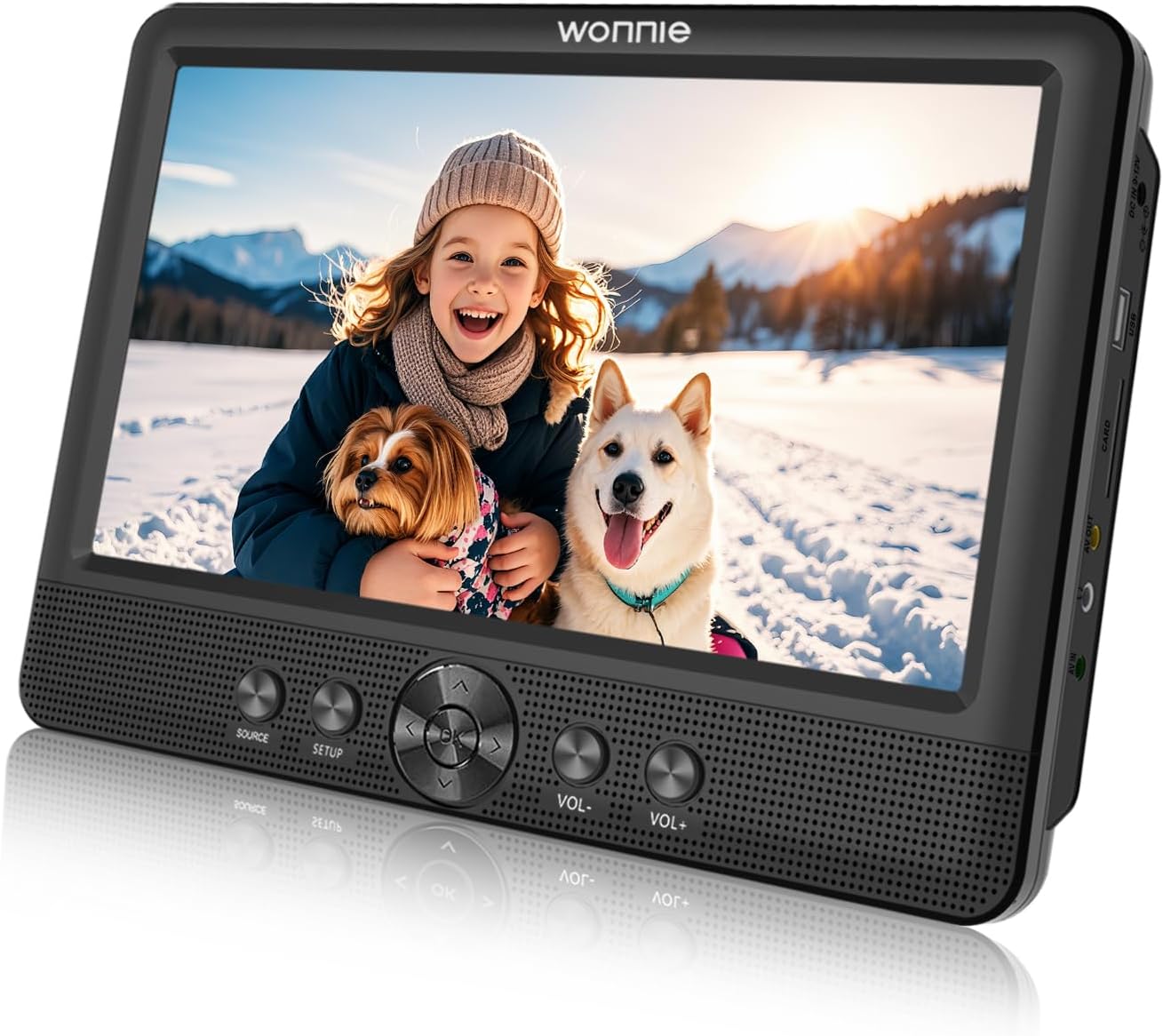
This image displays the WONNIE W-1011 10.5-inch Portable DVD Player. The screen shows a vibrant image of a smiling child holding a small dog, with a larger dog beside them, all in a snowy outdoor setting. The player itself is black with control buttons (SOURCE, SETUP, navigation, VOL-, VOL+) located below the screen and various ports (DC IN, USB, CARD, AV OUT, AV IN, Headphone) on the right side.
3.1 Elementy sterujące i porty
Zapoznaj się z przyciskami i portami swojego urządzenia:
- ŹRÓDŁO: Selects input source (e.g., DVD, USB, SD Card, AV IN).
- USTAWIAĆ: Dostęp do menu ustawień systemowych.
- Przyciski nawigacyjne (w górę, w dół, w lewo, w prawo, OK): Służy do nawigacji po menu i dokonywania wyborów.
- GŁOŚNOŚĆ- / GŁOŚNOŚĆ+: Dostosowuje poziom głośności.
- Wejście prądu stałego 9-12 V: Power input port (power adapter not included).
- USB: Umożliwia podłączenie dysków flash USB w celu odtwarzania multimediów.
- KARTA: Inserts SD/MMC cards for media playback.
- Wyjście AV: Connects to an external display or audio system.
- Wejście AV: Connects to an external audio/video source.
- Gniazdo słuchawkowe: Umożliwia podłączenie słuchawek w celu prywatnego słuchania.
4. Konfiguracja
4.1 Zasilanie urządzenia
- Ensure the device is fully charged or connected to a power source. The device includes a Lithium Polymer battery.
- Connect a compatible 9-12V DC power adapter (not included) to the 'DC IN' port on the side of the player and then to a power outlet.
- Press the power button (location not specified in provided data, typically on the side or top) to turn on the device.
4.2 Wkładanie nośników
- DVD/CD: Open the disc tray, carefully place the disc with the label side facing up, and close the tray.
- Dysk USB: Insert a USB flash drive into the 'USB' port.
- Karta SD/MMC: Insert an SD or MMC card into the 'CARD' slot until it clicks into place.
5. Instrukcja obsługi
5.1 Podstawowe odtwarzanie
- Turn on the DVD player.
- Włóż wybrany nośnik (DVD, CD, USB lub kartę SD).
- Naciśnij ŹRÓDŁO button repeatedly to select the correct input source (e.g., DVD, USB, CARD, AV IN).
- For disc media, playback should begin automatically. For USB/SD, navigate to your desired file using the navigation buttons and press OK grać.
5.2 Regulacja głośności
Użyj TOM- I Objętość + buttons located below the screen to decrease or increase the audio volume, respectively.
5.3 Ustawienia systemowe
Naciśnij ORGANIZOWAĆ COŚ button to access the system settings menu. Use the navigation buttons to browse options and OK to confirm selections. Settings may include video, audio, language, and time configurations.
5.4 Podłączanie do urządzeń zewnętrznych
- Wyjście AV: To display content on a larger screen, connect an AV cable (not included) from the player's AV OUT port to the AV IN ports of an external display (e.g., TV).
- Wejście AV: To play content from an external source (e.g., game console, camcorder) on the DVD player's screen, connect an AV cable (not included) from the external source's AV OUT to the player's AV IN port. Select 'AV IN' as the source.
6. Konserwacja
6.1 Czyszczenie
- Przetrzyj zewnętrzną część odtwarzacza miękką, suchą ściereczką.
- Do czyszczenia ekranu należy używać miękkiej, niepozostawiającej włókien ściereczki przeznaczonej specjalnie do ekranów urządzeń elektronicznych. Nie należy używać środków czyszczących o właściwościach ściernych ani rozpuszczalników.
- Keep the disc tray and lens clean. Use a specialized disc cleaning kit if necessary.
6.2 Przechowywanie
When not in use, store the DVD player in a cool, dry place away from direct sunlight and extreme temperatures.
7. Rozwiązywanie Problemów
If you encounter issues with your WONNIE W-1011, refer to the following common problems and solutions:
| Problem | Możliwe rozwiązanie |
|---|---|
| Urządzenie nie włącza się. | Ensure the battery is charged or a compatible power adapter (not included) is connected and functioning. |
| Nie wykryto dysku. | Check if the disc is inserted correctly (label side up) and is clean. Ensure the disc type is supported (DVD, CD, VCD, SVCD). Blu-Ray discs are not supported. |
| Brak dźwięku. | Adjust the volume using VOL+ button. Check if headphones are connected. Verify audio settings in the SETUP menu. |
| Brak zdjęcia. | Ensure the correct SOURCE is selected. If connected to an external display, check the AV cable connection and the external display's input selection. |
| Karta USB/SD nie została rozpoznana. | Ensure the USB drive or SD card is properly inserted. Check if the file format is supported (e.g., MP3 for audio, MPEG-2 for video). |
8. Specyfikacje
| Funkcja | Szczegół |
|---|---|
| Marka | WONNIE |
| Nazwa modelu | W-1011 |
| Rozmiar ekranu | 10.5 inches (Visible diagonal: 11" / 27 cm) |
| Kolor | Czarny |
| Waga przedmiotu | 2.07 funta |
| Wymiary opakowania | 11.78 x 11.74 x 1.81 cala |
| Baterie | 1 bateria litowo-polimerowa (w zestawie) |
| Obsługiwany typ nośnika | DVD, DVD+R, DVD-R, DVD+RW, DVD-RW, CD, CD+R, CD-R, CD+RW, CD-RW, VCD, SVCD (Blu-Ray not Supported) |
| Typ złącza | RCA |
| Technologia łączności | USB, Headphone, AV IN, AV OUT |
| Tryb wyjścia audio | Stereofoniczny |
| Obsługiwany format audio | MP3 |
| Kodowanie wideo | MPEG-2 |
9. Gwarancja i wsparcie
For warranty information and technical support, please refer to the documentation provided with your purchase or contact WONNIE customer service directly. Contact details can typically be found on the manufacturer's official webna stronie internetowej lub u sprzedawcy.