
Wstęp
This manual provides detailed instructions for the installation, operation, maintenance, and troubleshooting of your eufy 4K NVR Security Camera System S4 Max. Please read this manual thoroughly before using the product to ensure proper setup and optimal performance.
Co jest w pudełku
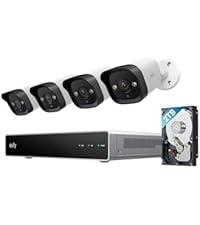
The eufy 4K NVR Security Camera System S4 Max package includes the following components:
- 1 x Network Video Recorder S4
- 4 x PoE Cam S4
- 4 x 59ft/18m Ethernet Cable, 1 x 3.3ft/1m Ethernet Cable, 1 x HDMI Cable
- 1 x Power Adapter, 1 x USB Mouse, 4 x Waterproof Cover Pack
- 4 x Mounting Bracket, 4 x Screw Pack, 1 x Quick Start Guide

The image displays the complete eufy 4K NVR Security Camera System S4 Max package, featuring the Network Video Recorder (NVR), four PoE Bullet-PTZ cameras, and a 2TB Hard Disk Drive. Essential accessories like Ethernet cables, power adapter, USB mouse, waterproof covers, mounting brackets, and screw packs are also included.
Konfiguracja i instalacja
Zanim zaczniesz
Ensure you have all necessary components and tools. Refer to the "What's in the Box" section for a complete list.
Choosing the Perfect Location
Select a location that provides optimal coverage for your desired monitoring area. Consider both the camera's field of view and the routing of the Ethernet cable.

This diagram illustrates recommended camera placement on the exterior of a house. For optimal coverage, install the camera 7-10 feet (2-3 meters) above the ground. This height helps capture a broad view while maintaining detail.

The image demonstrates the versatile mounting options for the eufy cameras, including wall, corner, and ceiling mounts. Each option provides different perspectives, such as full yard view, front yard, side yard, outside driveway, and inside garage, allowing for tailored surveillance.
Montaż kamery
- Przygotuj powierzchnię montażową: Use the provided positioning sticker as a template to mark screw positions. Drill holes as marked. For indoor wiring, drill an additional cable hole.
- Insert Screw Anchors: If mounting onto a non-wooden surface, insert the screw anchors into the drilled holes.
- Zamontuj podstawę montażową: Przymocuj podstawę montażową do ściany za pomocą dołączonych śrub.
- Zainstaluj kamerę: Screw the camera onto the mounting base and lock the spring screws to secure it.
This official video from eufy Home provides a comprehensive guide on setting up and installing your PoE Cam S4. It covers preparing the installation site, choosing the optimal location, mounting the camera securely, connecting it to the NVR, and adjusting the camera's field of view for effective surveillance.
Łączenie z NVR
Ensure the Ethernet cable is securely connected to the NVR. If the cable connector is exposed outside, route the cable through the cable notch and ensure the connector is positioned downward to prevent water intrusion. Install the waterproof cover.

The image displays the rear panel of the eufy Network Video Recorder, highlighting the various ports for connectivity. This includes multiple Ethernet ports for camera connections, USB ports for peripherals, and video output ports for display.
Adjusting the Camera's Field of View
Rotate the camera to the optimal angle. Use the eufy app to check the camera's view i dokonać niezbędnych korekt.

This image shows a smartphone screen with the eufy app open, displaying live feeds from multiple security cameras. Users can monitor different areas simultaneously and adjust camera settings directly from the app.
Obsługa systemu
16 MP Triple-Lens Bullet-PTZ Camera
The system features a unique triple-lens design. The upper 4K wide-angle camera provides a 122° fixed view, while the lower 2K PTZ camera offers 8× auto-zoom and 360° pan for comprehensive coverage.

This image provides a close-up of the eufy 2-in-1 Bullet-PTZ PoE Camera, detailing its dual functionality. The upper section features a 4K UHD Bullet Cam with a 122° field of view, while the lower section houses a Dual 2K PTZ Cam capable of 360° pan and 70° tilt, offering comprehensive surveillance.
Live Cross-Cam Tracking
All cameras work in sync to track movement in real-time. When a subject moves out of one camera's range, another camera seamlessly takes over, ensuring continuous, uninterrupted coverage.

The image illustrates the Live Cross-Cam Tracking feature, where multiple eufy cameras work together to provide seamless surveillance. As a person moves across the monitored area, the system intelligently switches tracking between cameras to maintain continuous coverage without blind spots.
Local AI Agent
The system incorporates a local AI agent powered by 6T/8-Core processing for instant analysis and genuine threat identification. This allows for customized no-go zones and alerts, ensuring tailored responses to detected events.

This image highlights the local AI agent integrated into the eufy NVR, showcasing its advanced processing capabilities with 6T computing power and an 8-core processor. This local AI enables real-time analysis for proactive security, identifying threats directly on the device.
Auto-Framing and Group Tracking
When the bullet camera detects a subject, the PTZ camera automatically locks on and tracks them, providing sharp, centered close-ups from up to 164 ft away. Auto-zoom keeps moving subjects framed until they exit the view.

The image demonstrates the Auto-Framing and Group Tracking features. The camera automatically zooms in and keeps moving subjects centered in the frame, even from distances up to 164 feet, ensuring clear and continuous monitoring of individuals or groups.
Smart Video Search
Instead of manually scrolling through hours of footage, use keywords to instantly find specific events or recordings.

This image illustrates the Smart Video Search function, allowing users to quickly locate specific video segments by searching with keywords. This eliminates the need to manually review extensive footage, streamlining the process of finding relevant events.
Nagrywanie i przechowywanie 24/7
The system includes a pre-installed 2 TB HDD for continuous 24/7 recording, expandable up to 16 TB.

The image highlights the storage capabilities of the eufy NVR, which comes with a pre-installed 2TB hard drive. It also emphasizes the system's expandability, allowing users to upgrade storage up to 16TB for extended 24/7 recording.
Wizja nocna
The cameras offer multiple modes for ultra-clear night vision, including Streetlight Vision, Spotlight Vision, and Infrared Vision, ensuring visibility up to 65 feet in low-light conditions.

This image compares the various night vision capabilities of the eufy cameras, including Human Vision, Starlight Color Night Vision for low-light color, Infrared Night Vision for crisp black-and-white, and Spotlight Color Night Vision for achieving colorful images at night.
Dwukierunkowa rozmowa
Engage in crystal-clear, distraction-free two-way communication thanks to AI noise reduction.

The image depicts the two-way talk feature, showing a child and an adult communicating through the eufy camera system. This highlights the ability to interact verbally with individuals near the camera, enhancing security and convenience.
Konserwacja
Czyszczenie
Regularnie czyść obiektywy i obudowę aparatu miękką, miękką szmatką.amp Ściereczką usuń kurz i zanieczyszczenia. Unikaj środków czyszczących o działaniu ściernym.
Aktualizacje oprogramowania układowego
Ensure your eufy app is updated to the latest version (V5.0.71 or above) to receive smooth operation and access to new features. Firmware updates for the NVR and cameras are typically managed through the eufy app.
Odporność na warunki atmosferyczne
The cameras are IP65 weatherproof, designed to withstand various weather conditions. Ensure all connections are properly sealed, especially the waterproof cover for exposed Ethernet cables.
This image shows a eufy camera mounted outdoors during rainfall, illustrating its robust IP65 weatherproofing. This feature ensures reliable operation and durability in various environmental conditions.
Rozwiązywanie problemów
Typowe problemy i rozwiązania
- Brak powiadomień: If you are not receiving notifications, ensure your eufy app is up to date and check the notification settings within the app. Also, verify that the NVR and cameras have a stable internet connection.
- Kamera offline: Check the Ethernet cable connection to both the camera and the NVR. Ensure the NVR is powered on and functioning correctly. Restarting the NVR may resolve connectivity issues.
- Słaba jakość obrazu: Upewnij się, że obiektyw aparatu jest czysty. Sprawdź, czy w polu widzenia aparatu nie ma żadnych przeszkód. view. Verify that the camera is installed at the recommended height (7-10 ft) for optimal coverage.
- PTZ Tracking Issues: Ensure there are no significant obstructions (e.g., dense foliage) that might temporarily block the camera's view and disrupt tracking. Adjust the camera's position if necessary.
Specyfikacje
Szczegóły techniczne
| Funkcja | Szczegół |
|---|---|
| Technologia łączności | Przewodowy |
| Rozdzielczość przechwytywania wideo | 4K UHD |
| Funkcja specjalna | AI-powered, PTZ Control, Two-Way Audio |
| Liczba kanałów | 16 |
| Pojemność pamięci masowej | 2 TB |
| Kolor | white + black + silver |
| Źródło zasilania | Elektryczny przewodowy |
| Wymiary przedmiotu Dł. x Szer. x Wys. | 13.5 x 7.13 x 17.42 cala |
| System operacyjny | App Operating System:Android、IOS, Web Operating System:Windows、macOS |
| Zalecane zastosowania produktu | Plenerowy |
| Kompatybilne urządzenia | Laptopy, komputery osobiste, smartfony, telewizory, tablety |
| Format sygnału | Cyfrowy |
| Inne funkcje aparatu | Przód, tył |
| Technologia słabego oświetlenia | Streetlight Vision, Spotlight Vision, Infrared Vision |
| Zakres noktowizora | 65 stóp |
| Szybkość klatek | 15 klatek na sekundę/20 klatek na sekundę |
| Tryb nagrywania | 24*7 Recording, Motion Recording, Schedule Recording |
| Technologia czujnika optycznego | CMOS |
| Łączna liczba portów USB | 3 |
| Interfejs sprzętowy | Sieć Ethernetowa |
| Typ soczewki | Fixed + Zoom |
| Wejście wideo | RJ45 |
| Viewing kąt | 122 stopni |
Gwarancja i wsparcie
Informacje o gwarancji
Your eufy product is covered by a 3-year after-sales support. Please refer to the official eufy webAby zapoznać się z pełnymi warunkami gwarancji, odwiedź witrynę lub dokumentację zakupu.
Skontaktuj się z pomocą techniczną
For any questions or technical assistance, please feel free to contact eufy support at support@eufy.com.