
1. Wprowadzenie
This manual provides detailed instructions for the installation, operation, and maintenance of your JOYING Double Din Car Stereo. This advanced head unit features a 10.1-inch Android 13 system with 8GB RAM and 128GB storage, offering a comprehensive in-car entertainment and navigation experience. Key functionalities include CarPlay, Android Auto, Mirror Link, AM/FM radio, and Bluetooth connectivity.
Please read this manual thoroughly before using the product to ensure proper operation and to maximize your enjoyment of its features. Keep this manual for future reference.
2. Zawartość opakowania
Sprawdź, czy wszystkie wymienione poniżej elementy znajdują się w Twojej paczce. Jeśli brakuje któregokolwiek z nich lub jest on uszkodzony, skontaktuj się z obsługą klienta.
- 10.1" Radio Unit (1)
- Double Din Cage (1)
- Left & Right Bracket (1 set)
- Reinforced Shims (1 set)
- Instrukcja instalacji (1)
- WiFi Antenna (1)
- Antena GPS (1)
- 4G Antenna (2)
- Mikrofon zewnętrzny (1)
- Kabel USB (2)
- AR Cable (1)
- Screen Ribbon Cable (1)
- ISO Cable (1)
- Instrukcja obsługi (1)

Rysunek 2.1: Rear panel connections and included accessories for the JOYING Double Din Car Stereo. This image displays the various ports on the back of the head unit, including USB, HDMI, optical, coaxial, and antenna inputs, alongside a clear layout of all components provided in the box, such as mounting brackets, cables, and antennas.
3. Funkcje produktu
3.1. Manual Rotation Display

Rysunek 3.1: The 10.1-inch display of the JOYING car stereo can be manually rotated 90 degrees, allowing for both landscape and portrait viewing modes to suit user preference or application requirements.
The display can be manually rotated 90 degrees to switch between landscape and portrait orientations, providing flexibility for navigation, media consumption, and other applications.
3.2. High-Quality Audio Output

Rysunek 3.2: This image highlights the advanced audio capabilities of the head unit, featuring a TDA7851 DSP chip, a 48-band graphic equalizer for precise sound tuning, and a powerful 4x50W maximum output. It also shows support for external amplifiers via fiber optical and SPDIF coaxial digital outputs, along with 4 audio outputs, 1 SUB output, and a center channel output.
Equipped with a TDA7851 DSP chip and a 48-band graphic equalizer, this unit delivers high-fidelity audio. It provides 4x50W maximum output power and supports external amplifiers via Optical Fiber and Coaxial Digital Output for superior sound quality.
3.3. Split-Screen Multitasking

Rysunek 3.3: The split-screen multitasking feature allows users to run two applications simultaneously, such as watching a video on YouTube while navigating with a map application. The image provides a step-by-step guide on how to activate split-screen mode using the recent apps icon.
The split-screen function allows you to run two applications simultaneously, such as navigation and media playback, enhancing convenience and usability.
3.4. Wyjście HDMI
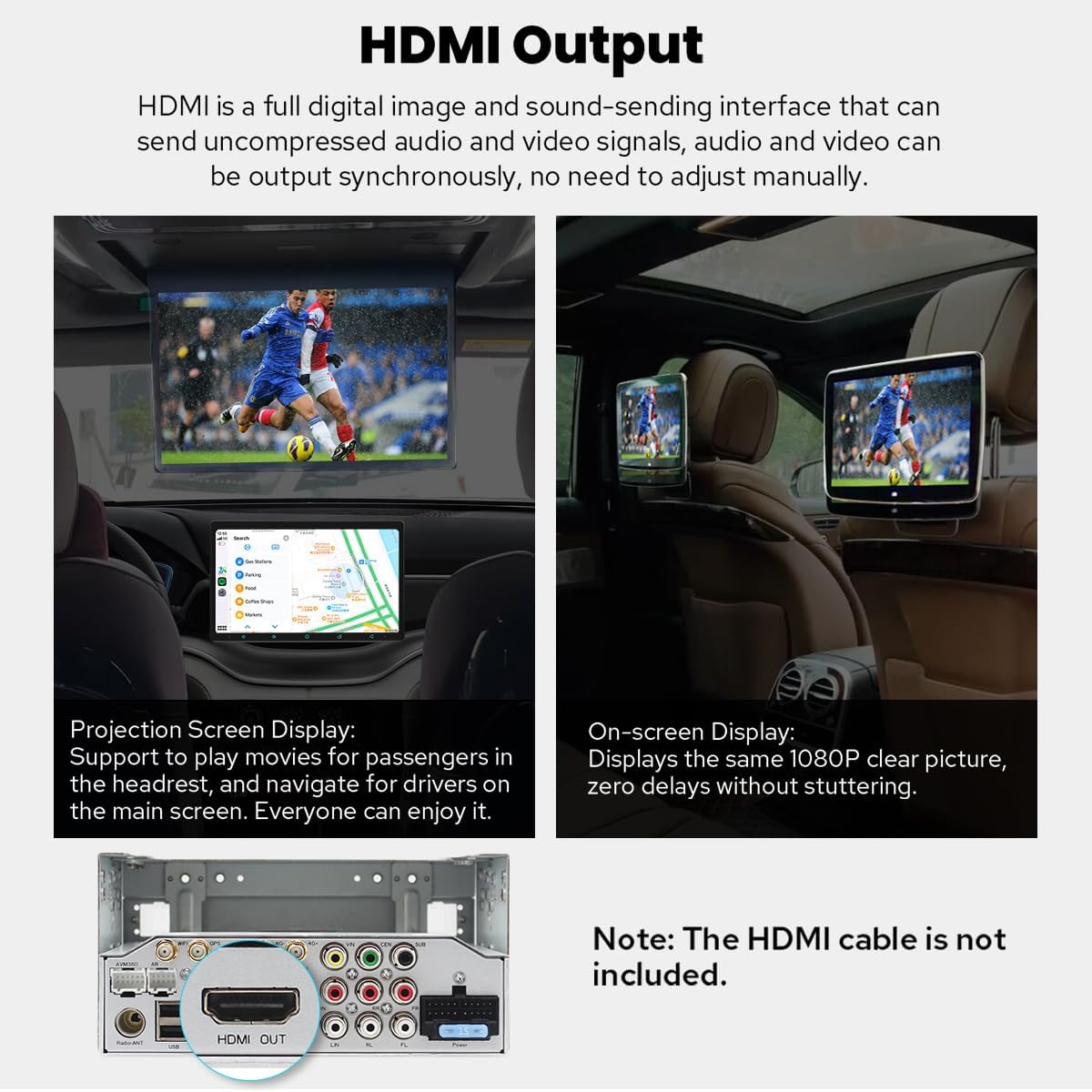
Rysunek 3.4: The HDMI output port enables the main screen content to be projected onto external displays, such as headrest monitors, providing entertainment for rear-seat passengers. The output delivers a 1080P clear picture without stuttering. Note: HDMI cable is not included.
The HDMI output allows for uncompressed audio and video signals to be sent to external displays, such as rear-seat monitors, providing synchronized content for passengers. The HDMI cable is not included.
3.5. Wbudowany CarPlay i Android Auto

Rysunek 3.5: This image displays the seamless integration of Apple CarPlay and Android Auto, allowing users to connect their smartphones via USB or Bluetooth to access navigation, make calls, and play music directly on the car stereo's larger screen.
Connect your mobile phone via USB cable or Bluetooth to utilize CarPlay and Android Auto, sharing your phone's apps for navigation, calls, and music on the larger screen.
3.6 Ulepszony system chłodzenia

Rysunek 3.6: The upgraded cooling system features a dual heat sink design and an active cooling fan to ensure superior heat dissipation, improved temperature control, and enhanced performance stability. The system can automatically activate the fan when CPU temperature or radio volume exceeds a set warning value.
The unit features a dual heat sink design and an active cooling fan for superior heat dissipation, improved temperature control, and enhanced performance stability. The fan automatically activates if the CPU temperature or radio's volume exceeds a set warning value.
3.7. Upgraded WiFi Signal

Rysunek 3.7: An independent WiFi antenna is included to ensure stable signal quality and provide fast, smooth internet access. The image shows the antenna and its connection port on the rear of the head unit, supporting 802.11a/b/g/n/AC standards across 2.4GHz/5GHz spectral bands.
An independent WiFi antenna ensures stable signal quality and provides fast, smooth internet access, supporting 802.11a/b/g/n/AC standards across 2.4GHz/5GHz bands.
3.8 Inne godne uwagi cechy
- Szybki rozruch: Starts up in 2 seconds after the first boot (initial boot takes 30-40 seconds).
- Wbudowany moduł 4G: Insert a SIM card for internet access (does not support phone calls or SMS).
- Nawigacja GPS: Precise positioning with included GPS antenna, supports offline maps and synchronization with phone map data via CarPlay/Android Auto.
- Radio AM/FM: Standard radio functionality.
- Rozmowa w trybie głośnomówiącym: Bluetooth connectivity for safe calling.
- Obraz w obrazie (PiP): Allows a small video window to overlay other applications.
- 3 porty USB: Multiple connectivity options for external devices.
- Gniazdo kart Micro SD: Dodatkowa przestrzeń do przechowywania.
- Spersonalizowane ustawienia: Customizable car boot logo, wallpapers, changeable button colors, and adjustable screen brightness.
4. Konfiguracja i instalacja
Installation of the JOYING Double Din Car Stereo requires technical knowledge and may involve modifying your vehicle's dashboard. It is highly recommended to have the unit installed by a professional car audio technician.
4.1. Zagadnienia do rozważenia przed instalacją
- Zgodność pojazdu: Ensure your vehicle has a double din slot (178 x 102mm inner size).
- Wiązka przewodów: You may need a special ISO harness, amplifier adapter, or CANbus decoder depending on your car's make and model.
- Factory Components: This unit does not support factory car GPS antenna, back-up rear camera, Bluetooth, USB, or microphone.
- Akcesoria: Only JOYING accessories are supported. DVR, OBDII scanner, reverse camera, TPMS, and steering wheel controller are not included and must be ordered separately if desired.
4.2. Basic Installation Steps (Refer to the included Installation Manual for detailed instructions)
- Odłącz akumulator: Przed rozpoczęciem jakichkolwiek prac elektrycznych należy zawsze odłączyć ujemny zacisk akumulatora pojazdu.
- Wyjmij starą jednostkę główną: Carefully remove your existing car stereo and dashboard trim.
- Podłącz okablowanie: Connect the ISO cable, GPS antenna, WiFi antenna, 4G antennas, and external microphone to the corresponding ports on the JOYING unit. Ensure all connections are secure.
- Montowanie: Install the double din cage and brackets. Secure the JOYING unit into the dashboard opening.
- Funkcjonalność testu: Before fully reassembling the dashboard, reconnect the battery and test the unit's basic functions (power, audio, touch screen, radio).
- Montaż końcowy: Po potwierdzeniu poprawności działania zamontuj ponownie element wykończeniowy deski rozdzielczej.
5. Instrukcja obsługi
5.1. Włączanie/wyłączanie i podstawowe sterowanie
- Włączanie: The unit will automatically power on when the car ignition is turned on. The first boot takes 30-40 seconds; subsequent boots are typically within 2 seconds.
- Wyłączone: The unit will power off with the car ignition. A long press on the power button (if available) may put it into standby or fully shut down.
- Regulacja głośności: Reguluj głośność za pomocą elementów sterujących na ekranie lub na kierownicy (jeśli jest podłączona i skonfigurowana).
5.2. Nawigacja
The unit comes with pre-installed navigation capabilities. You can use online maps (e.g., Google Maps) with an internet connection (via WiFi or 4G SIM) or download offline maps for use without internet. CarPlay and Android Auto also allow you to synchronize your phone's navigation apps.
5.3. CarPlay i Android Auto
To use CarPlay or Android Auto, connect your compatible smartphone via a USB cable to one of the unit's USB ports or wirelessly via Bluetooth (for supported devices). Follow the on-screen prompts to establish the connection. This allows access to phone features like navigation, music, and messaging directly from the head unit.
5.4. Ustawienia dźwięku
Access the audio settings menu to customize your sound experience. The 48-band graphic equalizer allows for precise frequency adjustments. The built-in DSP (Digital Signal Processor) provides advanced sound optimization options. If an external amplifier is connected via optical or coaxial output, ensure the settings are configured correctly for optimal sound.
5.5. Funkcja podzielonego ekranu
To activate split-screen multitasking:
- Tap the recent apps icon (usually a square or three vertical lines).
- Find the app you want to run in split-screen, then tap the split-screen icon (often two rectangles) next to its title.
- Select the second app from the recent apps list to fill the other half of the screen.
5.6. Connectivity (4G & WiFi)
- 4G: Insert a compatible SIM card into the designated slot for mobile data access. Note that this module is for data only and does not support voice calls or SMS.
- Wi-Fi: Connect to available WiFi networks via the settings menu. The independent WiFi antenna ensures a stable connection for online services.
5.7. Personalizacja
Navigate to the settings menu to customize various aspects of the unit:
- Car Boot Logo: Select a custom logo to display when the unit starts up.
- Tapety: Choose from pre-installed wallpapers or upload your own.
- Kolor przycisku: Adjust the color of the physical or on-screen buttons.
- Jasność ekranu: Manually adjust the display brightness for optimal viewwarunków.
6. Konserwacja
To ensure the longevity and optimal performance of your JOYING Car Stereo, follow these maintenance guidelines:
- Czyszczenie ekranu: Delikatnie przetrzyj ekran miękką, niepozostawiającą włókien ściereczką. W przypadku uporczywych plam delikatnie przetrzyj.ampPrzetrzyj ściereczkę wodą lub środkiem do czyszczenia ekranów. Unikaj silnych środków chemicznych i materiałów ściernych.
- Aktualizacje oprogramowania: Periodically check for software updates from the JOYING official website or through the unit's system settings. Keeping the software updated ensures the best performance and access to new features.
- Warunki środowiskowe: Unikaj wystawiania urządzenia na działanie ekstremalnych temperatur, długotrwałego bezpośredniego światła słonecznego i nadmiernej wilgoci.
- Kontrola połączenia: Occasionally check all cable connections at the rear of the unit to ensure they are secure and free from corrosion.
7. Rozwiązywanie Problemów
If you encounter issues with your JOYING Car Stereo, refer to the following common problems and solutions:
| Problem | Możliwa przyczyna | Rozwiązanie |
|---|---|---|
| Urządzenie nie włącza się | Luźne połączenie zasilania, przepalony bezpiecznik, problem z akumulatorem pojazdu. | Sprawdź kable zasilające i połączenia. Sprawdź bezpieczniki pojazdu. Upewnij się, że akumulator jest naładowany. |
| Brak dźwięku | Zbyt niska głośność, wyciszenie włączone, odłączone przewody głośników, nieprawidłowe ustawienia dźwięku. | Increase volume. Check if mute is active. Verify speaker wire connections. Adjust audio output settings. |
| Utracony lub niedokładny sygnał GPS | GPS antenna not properly connected or obstructed, unit in an area with poor satellite reception. | Upewnij się, że antena GPS jest bezpiecznie podłączona i ma wolną przestrzeń. view nieba. Przenieś się na otwartą przestrzeń. |
| Bluetooth nie łączy się | Bluetooth off on unit or phone, device not in pairing mode, interference. | Ensure Bluetooth is enabled on both devices. Put phone in pairing mode. Delete previous pairings and try again. |
| Ekran dotykowy nie reaguje | Błąd oprogramowania, problem z kalibracją ekranu, uszkodzenie fizyczne. | Restart the unit. Perform a factory reset (data will be lost). If issue persists, contact support. |
| CarPlay/Android Auto nie uruchamia się | Nieprawidłowy kabel USB, brak kompatybilności telefonu, problem z oprogramowaniem. | Use a high-quality USB data cable. Ensure your phone's OS is updated. Check phone settings for CarPlay/Android Auto permissions. |
If the problem persists after attempting these solutions, please contact JOYING customer support for further assistance.
8. Specyfikacje
Detailed technical specifications for the JOYING Double Din Car Stereo (Model: JY-UTS10N8-MR):
| Funkcja | Szczegół |
|---|---|
| Numer modelu | JY-UTS10N8-MR |
| System operacyjny | Android 13 |
| Rozmiar wyświetlacza | 10.1 Inches (Manual Rotation) |
| BARAN | 8 GB |
| Pamięć wewnętrzna | 128 GB |
| Tryb wyjścia audio | Stereofoniczny |
| Konfiguracja kanału dźwięku przestrzennego | 5.1 |
| Maksymalna moc wyjściowa | 4 x 50W |
| Układ DSP | TDA7851 |
| Wyrównywacz | 48-pasmowy korektor graficzny |
| Technologia łączności | Bluetooth, Ethernet, HDMI, USB, Wi-Fi, 4G |
| Standard WiFi | 802.11a/b/g/n/AC (2.4GHz/5GHz) |
| 4G Module Support | FDD-LTE: B2/B4/B5/B7/B12/B13/B14/B17/B25/B26/B38/B66/B71; TDD-LTE: B41 |
| Typ złącza | Coaxial, Optical, USB, HDMI |
| Wszystkie porty HDMI | 1 (wyjście) |
| Porty USB | 3 |
| Kompatybilne urządzenia | Amplifier, Camera, Smartphone, Speaker |
| Obsługa kodowania wideo | H264/H265/MP4/AVI/MKV/FLV |
| Waga przedmiotu | 2.65 funta |
| Wymiary produktu | 5.91 x 7.99 x 4.72 cala |
9. Akcesoria opcjonalne
Enhance your JOYING Car Stereo experience with these optional accessories (not included in the package):

Rysunek 9.1: This image displays various optional accessories that can be purchased separately to expand the functionality of the JOYING car stereo. These include an OBD2 scanner for vehicle diagnostics, an AR Front Camera for recording the road, and an AR Rear Camera for assistance with reversing.
- Skaner OBD2: Connects via Bluetooth to retrieve real-time data and trouble codes from your vehicle computer.
- Przednia kamera AR: Automatycznie rejestruje drogę przed pojazdem podczas jazdy.
- Tylna kamera AR: Automatyczne przełączanie na bieg wsteczny podczas cofania samochodu.
10. Informacje o gwarancji
The JOYING Double Din Car Stereo (Model: JY-UTS10N8-MR) comes with a 2-letnia gwarancja od daty zakupu. Niniejsza gwarancja obejmuje wady produkcyjne i usterki powstałe w wyniku normalnego użytkowania. Nie obejmuje ona uszkodzeń spowodowanych nieprawidłową instalacją, niewłaściwym użytkowaniem, wypadkami, nieautoryzowanymi naprawami ani normalnym zużyciem.
Please retain your proof of purchase for warranty claims. For detailed warranty terms and conditions, refer to the warranty card included in your package or contact JOYING customer support.
11. Wsparcie
For technical assistance, troubleshooting, or warranty inquiries, please contact JOYING customer support through the following channels:
- Wsparcie online: Visit the official JOYING webwitryna z odpowiedziami na często zadawane pytania, artykułami pomocy i formularzami kontaktowymi.
- Wsparcie e-mailowe: Zapoznaj się z opakowaniem produktu lub oficjalnym webstrona zawierająca adres e-mail działu obsługi klienta.
- Sklep Amazon: Możesz również odwiedzić JOYING Store on Amazon aby uzyskać informacje o produkcie i możliwości kontaktu ze sprzedawcą.
When contacting support, please have your product model number (JY-UTS10N8-MR) and proof of purchase readily available.