
1. Koniec produktuview
The Casio Baby-G BGD10K-6 is a versatile digital watch designed for durability and customizable style. It features a unique 2-in-1 design allowing the watch module to be detached from its band and used with an included silicone holder, transforming it into a charm. This model incorporates Y2K-inspired aesthetics with pixel animations on the display and is built to withstand daily use with 100-meter water resistance and shock resistance.
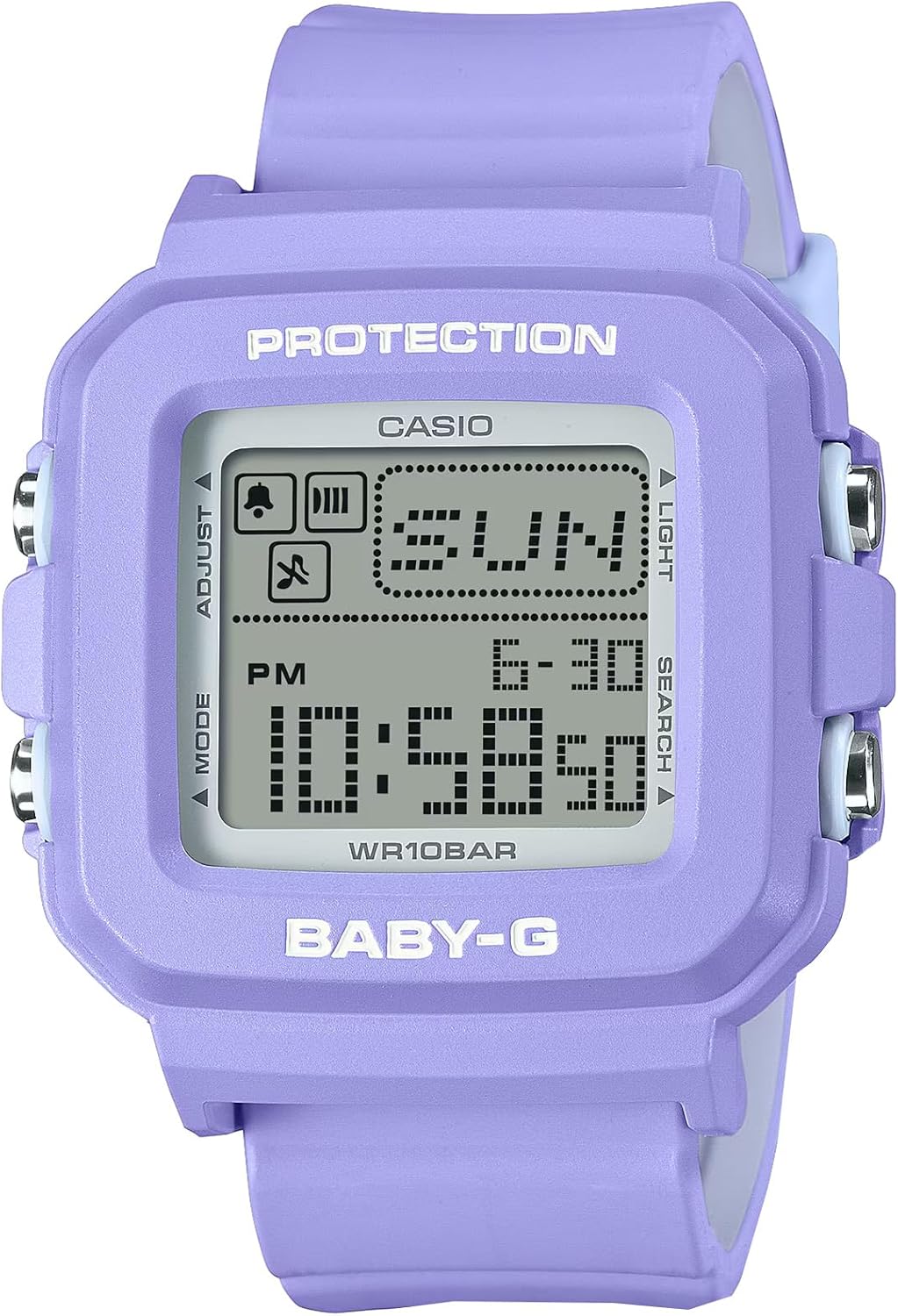
Rycina 1: Przód view of the Casio Baby-G BGD10K-6 digital watch, highlighting its display and button labels.
2. Konfiguracja
2.1 Konfiguracja początkowa
- Rozpakowywanie: Carefully remove the watch and all accessories from the packaging. Verify that all components, including the watch module, band, and silicone holder, are present.
- Włączanie: The watch is typically powered on from the factory. If the display is blank, ensure it is exposed to light for a period to charge the solar cell (if applicable, though not specified as solar, it's a common Casio feature) or check battery status.
- Wybór strefy czasowej: Before setting the time, select your home city (time zone). This is usually done by holding the "Adjust" button until the city code flashes, then using the "Search" or "Light" buttons to navigate and "Mode" to confirm.
- Ustawienie godziny i daty:
- W trybie pomiaru czasu naciśnij i przytrzymaj REGULOWAĆ Naciskaj przycisk, aż sekundy zaczną migać, wskazując ekran ustawień.
- Naciśnij TRYB przycisk, aby przełączać się między ustawieniami: Sekundy → Godzina → Minuta → Rok → Miesiąc → Dzień.
- Użyj ŚWIATŁO or SZUKAJ przyciski do zmiany migającej wartości.
- Po wprowadzeniu wszystkich prawidłowych ustawień naciśnij przycisk REGULOWAĆ przycisk, aby opuścić ekran ustawień.
- Noszenie zegarka: Attach the watch module to the band or insert it into the silicone holder as desired. Ensure the band is securely fastened to your wrist, or the holder is clipped to your bag.
3. Instrukcja obsługi
3.1 Funkcje przycisków
- Przycisk ADJUST (lewy górny róg): Służy do wchodzenia i wychodzenia z trybów ustawień oraz do potwierdzania ustawień.
- Przycisk MODE (lewy dolny róg): Przełącza między różnymi trybami zegarka (pomiar czasu, czas światowy, stoper, odliczanie, alarm).
- Przycisk ŚWIATŁO (prawy górny róg): Activates the Super Illuminator LED backlight for display illumination. Also used to increase values during setting.
- Przycisk SZUKAJ (prawy dolny róg): Used to decrease values during setting or to search for specific data in certain modes.
3.2 Tryb pomiaru czasu
This is the default mode, displaying the current time, date, and day of the week. Pixel animations may appear periodically on the display.
3.3 Tryb czasu światowego
Pozwala na view the current time in 29 different time zones (48 cities) around the world. Press the SZUKAJ button to cycle through different city codes.
3.4 Tryb stopera
Pomiar czasu upływu, czasów międzyczasów i dwóch finiszów.
- Naciskać TRYB to navigate to Stopwatch Mode.
- Naciskać SZUKAJ aby uruchomić/zatrzymać stoper.
- Naciskać REGULOWAĆ aby zresetować stoper.
3.5 Tryb odliczania czasu
Functions as a 24-hour countdown timer.
- Naciskać TRYB to navigate to Countdown Timer Mode.
- Trzymać REGULOWAĆ aby ustawić czas odliczania.
- Naciskać SZUKAJ aby uruchomić/zatrzymać timer.
3.6 Tryb alarmu
Zegarek posiada 5 alarmów dziennych i budzik.urlsygnał czasu y.
- Naciskać TRYB aby przejść do trybu alarmu.
- Używać SZUKAJ aby wybrać alarm (AL1, AL2 itd.) luburlsygnał czasu y (SIG).
- Trzymać REGULOWAĆ aby ustawić godzinę alarmu.
- Naciskać REGULOWAĆ aby włączyć/wyłączyć alarmy.
4. Główne cechy
- Customizable 2-in-1 Design: The watch features a detachable bezel and band, allowing the core module to be transformed into a wearable charm using the included silicone holder with a strap. This provides flexibility in how the timepiece is worn and displayed.
- Y2K-Inspired Aesthetics: The design incorporates pop-casual colorways and retro pixel-art animations, such as a dog or cat, that appear on the display. These animations cycle in 30-second intervals, adding a nostalgic and playful element reminiscent of early 2000s fashion.
- 100M Water Resistance & Shock Resistant: Engineered for durability, the watch is resistant to shocks and can withstand water pressure up to 100 meters. This makes it suitable for everyday wear, including swimming and showering, but not for deep-sea diving.
- World Time & 24-Hour Timer: Equipped with a World Time function covering 29 time zones, enabling users to easily check times globally. It also includes a 24-hour countdown timer, stopwatch, and 5 daily alarms for comprehensive time management.
- Super Illuminator LED: The display is equipped with a bright LED backlight, ensuring clear visibility in low-light conditions. The backlight features a 2-second afterglow for extended illumination after activation.
5. Konserwacja
5.1 Czyszczenie
Przetrzyj kopertę i pasek zegarka miękką, suchą ściereczką. W przypadku uporczywych zabrudzeń użyj miękkiej ściereczki.ampened with water and a mild neutral detergent, then wipe dry. Avoid using volatile agents like thinner, gasoline, or alcohol, as they may damage the resin components.
5.2 Środki ostrożności dotyczące wodoodporności
While the watch is 100M water resistant, avoid operating buttons underwater. After exposure to saltwater, rinse the watch with fresh water and wipe it dry. Do not expose the watch to hot water or steam, as this can compromise the water resistance seals.
5.3 Wymiana baterii
The watch uses a long-life battery. When the display becomes dim or functions become erratic, it indicates low battery power. Battery replacement should be performed by a qualified technician or an authorized Casio service center to ensure proper sealing and water resistance.
5.4 Przechowywanie
Jeśli zegarek nie jest używany przez dłuższy czas, należy go przechowywać w chłodnym, suchym miejscu, z dala od bezpośredniego światła słonecznego i ekstremalnych temperatur. Unikaj przechowywania go w pobliżu silnych pól magnetycznych.
6. Rozwiązywanie Problemów
- Wyświetlacz jest pusty lub przyciemniony:
Ensure the watch is not in Power Saving mode (if applicable). If the display remains dim, the battery may be low. Contact a service center for battery replacement.
- Czas jest nieprawidłowy:
Check if the home city (time zone) setting is correct. Re-adjust the time and date settings as described in Section 2.1.
- Przyciski nie reagują:
Ensure the watch is not in a frozen state. Try pressing all buttons firmly. If the issue persists, a reset may be required (consult a service center), or the battery may be critically low.
- Wewnątrz zegarka pojawia się woda:
This indicates a breach in the water resistance. Immediately stop using the watch and take it to an authorized service center for inspection and repair to prevent further damage.
7. Specyfikacje
| Funkcja | Szczegół |
|---|---|
| Numer modelu | BGD10K-6 |
| Producent | Kasio |
| Odporność na wodę | 100 metrów (10 BAR) |
| Odporność na wstrząsy | Tak |
| Typ wyświetlacza | Digital with Pixel Animation |
| Timekeeping Features | Hour, Minute, Second, PM, Month, Date, Day |
| Czas światowy | 29 stref czasowych (48 miast + UTC) |
| Stoper | 1/100 sekundy, zakres pomiaru: 23:59'59.99'' |
| Odliczanie czasu | Measuring unit: 1 second, countdown range: 24 hours |
| Alarmy | 5 codziennych alarmów, hourlsygnał czasu y |
| Oświetlenie | Super Illuminator LED backlight with afterglow |
| Wymiary opakowania | 3.94 x 3.5 x 3.41 cala |
| Waga przedmiotu | 1.16 uncji |
| Data pierwszej dostępności | 23 kwietnia 2025 r. |
8. Gwarancja i wsparcie
This Casio product is covered by a manufacturer's warranty against defects in materials and workmanship. The specific terms and duration of the warranty may vary by region. Please refer to the warranty card included with your purchase for detailed information.
For technical support, service, or warranty claims, please contact Casio customer service or visit their official webZachowaj dowód zakupu w celu potwierdzenia gwarancji.
You can find more information and support resources by visiting the official Casio website or contacting their customer service department.


