
VERTU Quantum Flip Alligator Series
VERTU Quantum Flip Alligator Series Android Smartphone User Manual
Model: Quantum Flip Alligator Series
Brand: VERTU
1. Wprowadzenie
Welcome to the VERTU Quantum Flip Alligator Series Android Smartphone user manual. This guide provides essential information to help you set up, operate, maintain, and troubleshoot your new device. The VERTU Quantum Flip combines cutting-edge technology with luxurious design, featuring a foldable display, advanced AI capabilities, and robust security features.
2. Co znajduje się w pudełku
Przed przystąpieniem do konfiguracji upewnij się, że wszystkie elementy są obecne:
- VERTU Quantum Flip Alligator Series Smartphone
- Kabel ładujący USB-C
- Zasilacz (65 W)
- Narzędzie do wyjmowania karty SIM
- Szybki przewodnik
- Karta gwarancyjna
3. Przewodnik konfiguracji
3.1 Ładowanie urządzenia
Before first use, fully charge your VERTU Quantum Flip. Connect the USB-C cable to the phone's charging port and the other end to the 65W power adapter. Plug the adapter into a wall outlet. The device supports 65W fast charging for rapid power replenishment.
3.2 Wkładanie karty SIM
- Znajdź tackę na kartę SIM znajdującą się z boku telefonu.
- Włóż narzędzie do wyjmowania karty SIM do małego otworu obok tacki i delikatnie naciśnij, aż tacka wyskoczy.
- Umieść kartę(y) Nano-SIM w tacce, złotymi stykami skierowanymi w dół.
- Ostrożnie włóż tackę z powrotem do telefonu, aż zatrzaśnie się na swoim miejscu.
3.3 Włączanie/wyłączanie
To power on, press and hold the Power button until the VERTU logo appears. To power off, press and hold the Power button, then select 'Power off' from the options on the screen.
4. Obsługa smartfona
4.1 Funkcjonalność podwójnego wyświetlacza
Your VERTU Quantum Flip features a 6.9-inch FHD+ OLED main display and a 3-inch external OLED screen. The external screen allows for quick glances at notifications, time, and other essential information without unfolding the device. Certain applications and features can be accessed directly from the external display for enhanced efficiency.

Image: The VERTU Quantum Flip smartphone, folded, highlighting its compact form factor and the distinctive navy blue alligator leather finish on the lower half of the device. The upper half shows the camera module and a sleek black surface.
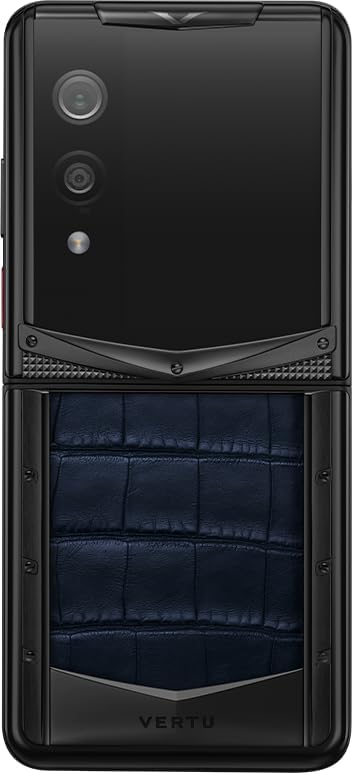
Image: The VERTU Quantum Flip smartphone in its unfolded position, viewed from the rear. The image clearly displays the dual camera setup and flash on the upper section, along with the textured navy blue alligator leather on the lower section, emphasizing the premium materials.
4.2 Quantum Security System
The device is equipped with MetaSpace 2.0 quantum security architecture, providing encrypted calls, secure storage, and multi-system isolation (Work / Social / Private). This system ensures your data and communications remain private and protected.

Image: A stylized depiction of the Snapdragon 8 Gen 4 chip, highlighted against a light background. This image represents the advanced processing power and quantum encryption capabilities integrated into the smartphone's core.
4.3 Funkcje aparatu
The VERTU Quantum Flip features a 50MP rear camera with Optical Image Stabilization (OIS) and a 32MP front camera, utilizing an OV50E sensor and AI portrait engine. These features enable high-quality photo and video capture, even in challenging lighting conditions.
4.4 Real-Time Call Translation
Benefit from real-time call translation supporting over 45 languages. This feature enhances global communication by providing instant translation during phone calls.

Image: The VERTU Quantum Flip smartphone unfolded, displaying its real-time call translation feature. The screen shows a conversation being translated between English and Chinese, demonstrating the device's capability to facilitate multilingual communication.
4.5 AI Smart Assistant
Utilize the integrated AI smart assistant for various tasks, including scheduling, information retrieval, and device control, enhancing your daily productivity.

Obraz: Zbliżenie view of the VERTU Quantum Flip's external display, shown illuminated. This image highlights the functionality of the secondary screen, which can be used for quick access to information or AI-powered features.
5. Konserwacja i pielęgnacja
To ensure the longevity and optimal performance of your VERTU Quantum Flip, follow these maintenance guidelines:
- Czyszczenie: Do czyszczenia ekranu i obudowy używaj miękkiej, niepozostawiającej włókien ściereczki. Unikaj materiałów ściernych i silnych środków chemicznych.
- Pielęgnacja zawiasów: The Quantum King Kong Folding Hinge is designed for durability. Avoid applying excessive force or inserting objects into the hinge mechanism.
- Temperatura: Operate the device within recommended temperature ranges. The phone is designed to function in extreme temperatures down to -30°C, but prolonged exposure to extreme heat or cold should be avoided.
- Wodoodporność: To urządzenie nie jest wodoodporne. Unikaj kontaktu z płynami.

Image: A detailed close-up of the VERTU Quantum Flip's folding hinge mechanism. The image emphasizes the intricate design and robust construction of the 'Quantum King Kong Folding Hinge', a key component of the phone's foldable design.
6. Rozwiązywanie Problemów
This section addresses common issues you might encounter with your VERTU Quantum Flip.
| Problem | Możliwa przyczyna | Rozwiązanie |
|---|---|---|
| Urządzenie nie włącza się | Niski poziom baterii; Awaria oprogramowania | Ładuj urządzenie przez co najmniej 30 minut. Wykonaj wymuszony restart, przytrzymując przycisk zasilania przez 10–15 sekund. |
| Ekran nie reaguje | Tymczasowy błąd oprogramowania; zakłócenia ze strony osłony ekranu | Restart the device. Ensure screen protector is correctly applied and not damaged. |
| Słaba jakość połączeń | Weak network signal; Microphone/speaker obstruction | Move to an area with better signal. Clean microphone and speaker grilles. |
| Bateria szybko się rozładowuje | Background apps; High screen brightness; Network issues | Close unused apps. Reduce screen brightness. Check network settings. |
7. Specyfikacje
Detailed technical specifications for the VERTU Quantum Flip Alligator Series Android Smartphone:
- Model: Quantum Flip Alligator Series
- Edytor: Snapdragon 8 Gen 4 (3nm)
- Główny wyświetlacz: 6.9 Inches FHD+ OLED, 120Hz Refresh Rate, 1920x1080 Pixels
- Wyświetlacz zewnętrzny: 3-calowy wyświetlacz OLED
- BARAN: 16 GB
- Składowanie: 1024 GB (1 TB)
- Kamera tylna: 50 MP z OIS
- Przednia kamera: 32MP
- Bateria: 4300mAh
- Ładowanie: 65W USB-C 3.1 Fast Charging
- Bezpieczeństwo: MetaSpace 2.0 Quantum Security Architecture
- Przybory: Aerospace-grade titanium, diamond-hard ceramic, Italian leather
- Kolor: Navy Blue Luxury Alligator Leather

Image: The VERTU Quantum Flip smartphone, folded, with its external screen displaying a high battery percentage (90%). This image highlights the device's strong battery performance and efficient power management.
8. Gwarancja i wsparcie
Your VERTU Quantum Flip Alligator Series Android Smartphone comes with a manufacturer's warranty. Please refer to the included Warranty Card for specific terms and conditions, including coverage period and limitations. For technical support, service, or warranty claims, please contact VERTU customer service through the official channels provided in your product documentation or on the VERTU webstrona.
For international orders, please note that import fees (taxes/duties) are the buyer's responsibility per destination country laws.
Ask a question about this manual
Ask about setup, troubleshooting, compatibility, parts, safety, or missing instructions. Manuals+ will review the question and use this page’s manual context to help answer it.