
HUAWEI RTS-AL00
Instrukcja obsługi smartwatcha HUAWEI WATCH 5
Model: RTS-AL00
1. Wprowadzenie
This user manual provides comprehensive instructions for the safe and efficient use of your HUAWEI WATCH 5 Smartwatch. Please read this manual thoroughly before using the device to ensure optimal performance and to prevent damage. Keep this manual for future reference.
2. Koniec produktuview
The HUAWEI WATCH 5 is a sophisticated smartwatch designed with premium materials and advanced health monitoring capabilities. It combines futuristic technology with a streamlined form factor.
2.1. Projekt i materiały
The 46mm model features an aerospace-grade titanium alloy case, while the 42mm model utilizes 904L stainless steel. Both models incorporate curved sapphire glass and an LTPO2.0 AMOLED display, ensuring durability and a vibrant visual experience.

Figure 2.1: HUAWEI WATCH 5 Smartwatch (Black model).

Rysunek 2.2: Szczegółowy view of the curved sapphire glass and case materials (titanium and 904L stainless steel).
2.2. Główne cechy
- Multi-sensing HUAWEI X-TAP: Integrates ECG, PPG, and pressure sensors for fast and highly accurate measurements.
- Real-time Fingertip Blood Oxygen Level Measurement: Obtain accurate SpO2 readings by simply tapping the HUAWEI X-TAP sensor for approximately 10 seconds.
- Stabilna łączność: Supports eSIM for calls without a smartphone and features Wi-Fi 6 for consistent connectivity.
- Two Battery Modes: Offers a standard mode for full functionality and a power-saving mode for extended use, easily switchable.
- Easy Gesture Operation: Intuitive smart gestures powered by a high-performance NPU enable touch-free control.
- Pro-level Workout Modes: Supports over 100 workout modes, including specialized activities like golf and freediving.
3. Konfiguracja
Before using your HUAWEI WATCH 5, please follow these initial setup steps.
3.1. Installing the HUAWEI Health App
To fully utilize your HUAWEI WATCH 5, you must install the dedicated HUAWEI Health app on your smartphone. The app is compatible with both iOS and Android devices.
- Dla urządzeń z systemem iOS: Szukaj "HUAWEI Health" on the App Store or scan the QR code provided on the product packaging with your smartphone to download from the Apple App Store.
- Dla urządzeń z systemem Android: Scan the QR code on the product packaging to download from HUAWEI App Gallery, then proceed with the installation.

Figure 3.1: HUAWEI Health app interface, compatible with iOS and Android.
3.2. Parowanie początkowe
After installing the HUAWEI Health app, open it and follow the on-screen instructions to pair your HUAWEI WATCH 5 with your smartphone. Ensure Bluetooth is enabled on both devices. For detailed pairing instructions, refer to the "Wearable Product Pairing Guide" available on the HUAWEI support webstrona.
4. Instrukcja obsługi
This section details the various functions and operations of your HUAWEI WATCH 5.
4.1. Monitorowanie stanu zdrowia
The HUAWEI WATCH 5 offers advanced health monitoring features through its integrated HUAWEI X-TAP sensor.
- Multi-sensing HUAWEI X-TAP: This sensor combines ECG, PPG, and pressure measurements to provide comprehensive health data.
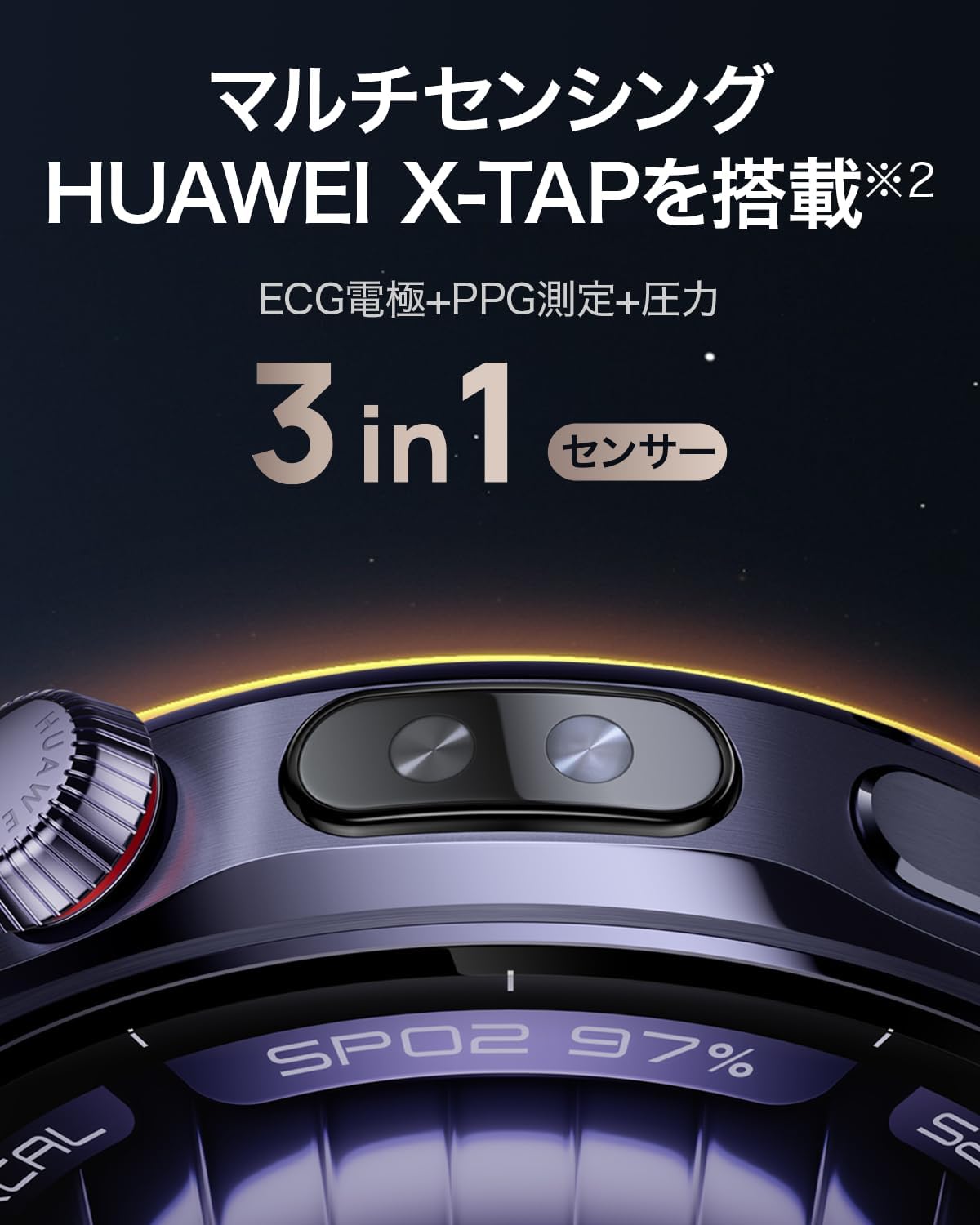
Figure 4.1: The HUAWEI X-TAP sensor for multi-sensing health data.
- One-touch Healthcare Check: Obtain a report including 8 major indicators such as ECG, HRV, heart rate, and blood oxygen level.

Rysunek 4.2: Example of a Health Glance report on the watch and smartphone app.
- ECG Function: The watch supports ECG measurements. Simply touch the sensor for approximately 30 seconds to collect electrical signals from your heart for analysis.

Figure 4.3: Performing an ECG measurement with the HUAWEI WATCH 5.
- Real-time Fingertip Blood Oxygen Level Measurement: Tap the HUAWEI X-TAP sensor for about 10 seconds to get an accurate blood oxygen level reading.

Figure 4.4: Real-time blood oxygen level measurement display.
4.2. Inteligentna obsługa gestów
The watch features intuitive smart gestures for touch-free operation, powered by a high-performance NPU.
- Podwójne wciśnięcie: Tap your thumb and index finger together twice to confirm an option.
- Double Slide: Slide your thumb along your index finger twice to switch options.

Rysunek 4.5: Examples of smart gesture operations.
4.3. Tryby treningu
The HUAWEI WATCH 5 supports over 100 workout modes, including professional-level sports like golf and freediving, to help you track and improve your fitness.

Figure 4.6: Diverse workout modes available on the HUAWEI WATCH 5.
4.4. eSIM Connectivity
With eSIM service, you can make and receive calls directly from your HUAWEI WATCH 5 without needing your smartphone nearby, ensuring stable connectivity throughout the day.

Figure 4.7: Making a call using the eSIM feature on HUAWEI WATCH 5.
5. Zarządzanie baterią
The HUAWEI WATCH 5 offers two battery modes to optimize usage based on your needs.
- Tryb standardowy: Allows you to use all your favorite functions and features.
- Tryb oszczędzania energii: Extends battery life by optimizing certain functions.
You can easily switch between these two modes in just a few seconds through the watch settings.
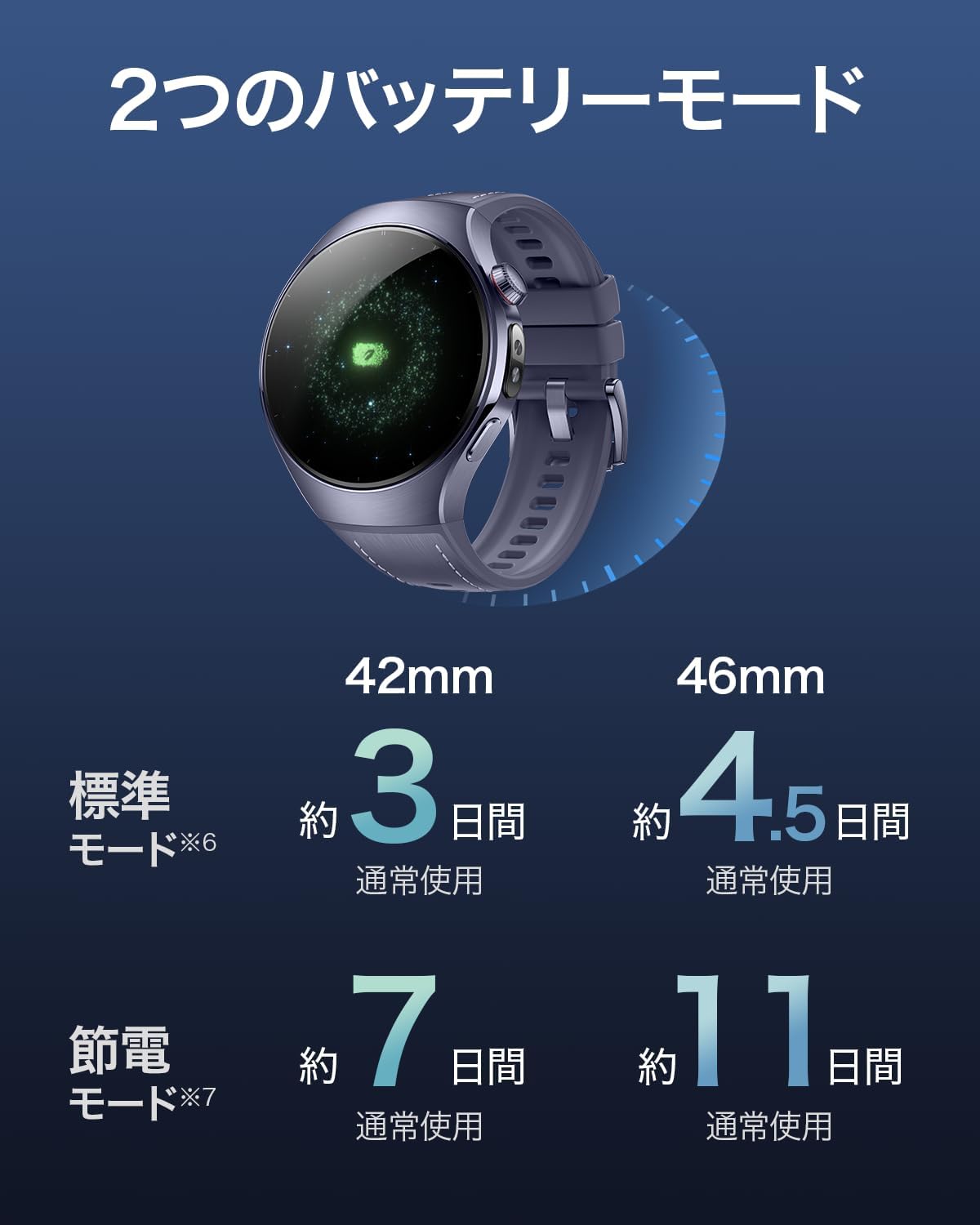
Figure 5.1: Battery life estimates for 42mm and 46mm models in standard and power-saving modes.
6. Pielęgnacja i konserwacja
Proper care and maintenance will ensure the longevity and optimal performance of your HUAWEI WATCH 5.
- Czyszczenie: Regularnie czyść zegarek i pasek miękką, miękką szmatką.amp płótno. Unikaj stosowania ostrych chemikaliów lub materiałów ściernych.
- Wyczerpujący: Ensure the watch is worn correctly on your wrist for accurate sensor readings and comfort. Avoid wearing it too tightly or too loosely.
- Składowanie: Jeśli zegarek nie będzie używany przez dłuższy czas, należy przechowywać go w chłodnym, suchym miejscu, z dala od bezpośredniego światła słonecznego i ekstremalnych temperatur.
- Wodoodporność: Refer to the product specifications for the water resistance rating and avoid exposing the watch to conditions beyond its specified limits.
For more detailed guidelines on correct wearing, cleaning, and maintenance, please refer to the "Tips for Mastering Your Wearable" guide available on the HUAWEI support webstrona.
7. Rozwiązywanie Problemów
If you encounter any issues with your HUAWEI WATCH 5, please refer to the following common troubleshooting tips.
- Zegarek się nie włącza: Ensure the watch is fully charged. Connect it to the charging cradle and a power source.
- Nie można sparować ze smartfonem: Ensure Bluetooth is enabled on both devices. Make sure the HUAWEI Health app is installed and updated. Try restarting both the watch and the smartphone.
- Niedokładne odczyty czujnika: Upewnij się, że zegarek ściśle przylega do nadgarstka, nie jest za luźny ani za ciasny. Wyczyść obszar czujnika z tyłu zegarka.
- Problemy z łącznością aplikacji: Check your smartphone's internet connection. Ensure the HUAWEI Health app has all necessary permissions enabled in your phone's settings.
- Krótka żywotność baterii: Review your usage patterns. Consider switching to power-saving mode. Disable unnecessary features or notifications.
If the issue persists, please contact HUAWEI Customer Support for further assistance.
8. Specyfikacje
Detailed technical specifications for the HUAWEI WATCH 5 (Model: RTS-AL00).
| Funkcja | Specyfikacja |
|---|---|
| System operacyjny | System operacyjny Harmony |
| Waga produktu | 330 gramów |
| Wymiary opakowania | 13 x 11.9 x 6.7 cm; 330 g |
| Bateria | 1 12V type battery (included) |
| Numer modelu produktu | RTS-AL00 |
| Technologia łączności | Bluetooth, Wi-Fi, Cellular |
| GPS | GPS built-in |
| Cechy specjalne | Activity tracker, Daily workout memory, Voice call, Gesture control, Notification |
| Inne funkcje wyświetlacza | Bezprzewodowy |
| Wejście interfejsu ludzkiego | Ekran dotykowy |
| Kolor | Czarny |
| Zawartość pudełka | USB cable with charging cradle, Smartwatch setup guide & after-sales service information |
| Data pierwszej dostępności na Amazon.co.jp | 2025/5/27 |
| Wsparcie językowe | Japanese, English, Korean, Multiple languages, Chinese |
| Pojemność pamięci masowej | 32 GB |
| Standard komunikacji bezprzewodowej | Bluetooth, 802.11ax |
9. Gwarancja i wsparcie
HUAWEI provides warranty coverage for your product and offers customer support.
9.1. Gwarancja na produkt
Huawei guarantees the main unit of this product for 1 year from the customer's purchase date. The included charger is guaranteed for 6 months, and the USB cable for 3 months.
This product does not include a physical product warranty card. Please keep the delivery note issued by Amazon at the time of product purchase carefully and present it when requesting warranty repair.
Product warranty applies to products purchased from carts where the seller and shipper are Amazon.co.jp. For products sold by other sellers or businesses, specifications may differ even for the same model number, so please contact each seller directly.
9.2. Obsługa klienta
For any inquiries or support needs, you can contact HUAWEI Customer Support:
E-mail: Wsparcie.jp@huawei.com
Ask a question about this manual
Ask about setup, troubleshooting, compatibility, parts, safety, or missing instructions. Manuals+ will review the question and use this page’s manual context to help answer it.