
FULODE V18
FULODE V18 Digital Mixer User Manual
Professional 8-Channel Compact Audio Mixing Console
Model: V18
Produkt ponadview
The FULODE V18 Digital Mixer is a versatile 8-channel compact audio mixing console designed for a wide range of applications, including live performances, studio recording, podcasting, and DJing. It features 16 built-in DSP effects, a professional 6-band EQ, USB connectivity, Bluetooth, and PC debugging capabilities, offering comprehensive sound control and flexibility.
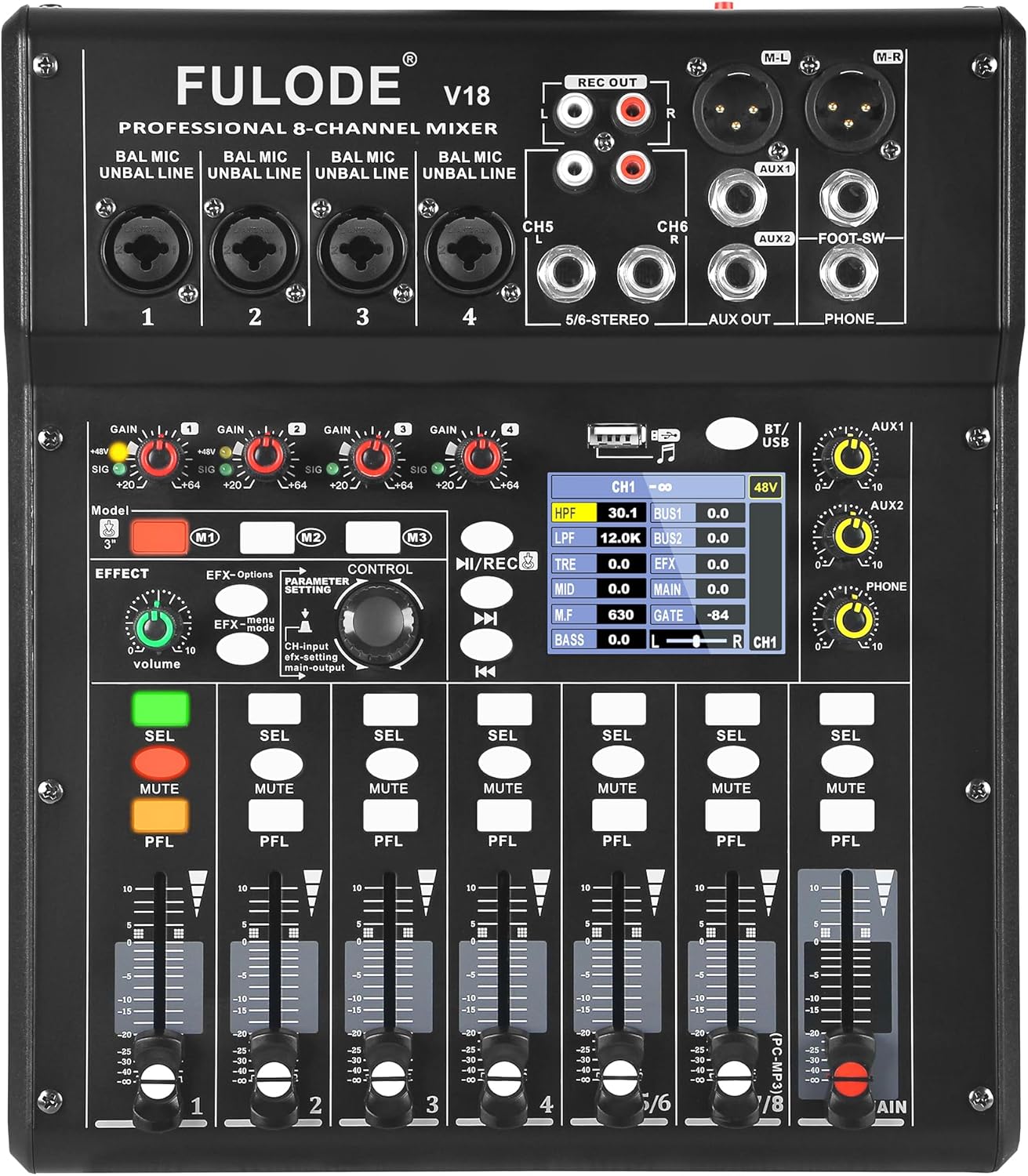
Rycina 1: Przód view of the FULODE V18 Digital Mixer, showcasing jego elementów sterujących i wyświetlacza.
Główne cechy:
- 16 efektów DSP: Customizable sound with adjustable parameters for precise audio shaping.
- 4-Band EQ per Channel + 6-Band Master EQ: Advanced tone shaping with High-Pass Filter (HPF) and Low-Pass Filter (LPF) for clear highs, rich mids, and solid lows.
- USB Mixer with PC Tuning Software: Connect to a computer for precise sound tuning and real-time parameter control, with 3 recallable custom presets.
- Bluetooth Streaming & USB/MP3 Playback: Supports Bluetooth 5.0 for wireless streaming and direct music playback from USB flash drives.
- Wejście optyczne: High-fidelity, interference-free digital audio signal input.
- Zasilanie fantomowe 48 V: Independent phantom power on channels 1 & 2 for condenser microphones.
- Channel Mute & Footswitch Control: Dedicated mute buttons per channel and footswitch support for hands-free effect switching.
Przewodnik po konfiguracji
Follow these steps for initial setup of your FULODE V18 Digital Mixer:
- Rozpakowywanie: Carefully remove all components from the packaging. Verify that all items listed in the "What's Included" section are present.
- Podłączenie zasilania: Connect the provided power adapter to the DC 12V/5A input on the rear panel of the mixer. Plug the adapter into a suitable power outlet.
- Włączanie: Press the "POWER ON" button located on the rear panel to turn on the mixer. The 2.8" TFT display will illuminate, showing the welcome screen.
- Połączenia wejściowe:
- Microphones/Line Inputs (Channels 1-4): Use XLR or 1/4" TRS cables to connect microphones or line-level instruments to the respective input jacks.
- Stereo Inputs (Channels 5/6 - 7/8): Use 1/4" TRS or RCA cables for stereo line-level devices.
- Wejście optyczne: Connect digital audio sources via the optical input for high-fidelity sound.
- Połączenia wyjściowe:
- Main Output (M-L/M-R): Connect to your main PA system or studio monitors using XLR cables.
- AUX Outputs (AUX1/AUX2): Connect to external effects processors or monitor systems.
- Headphone Output (PHONE): Podłącz słuchawki w celu monitorowania.
- NAGRANIE WYJŚCIA: Connect to a recording device using RCA cables.

Figure 2: Product dimensions and included accessories, including USB cable, optical cable, and power line.
Wideo 1: Overview of the FULODE V18 Digital Mixer's features and connectivity, including power-on sequence and various input/output options. This video demonstrates the physical connections and initial boot-up of the device.
Instrukcja obsługi
Channel Controls and EQ
Each input channel (1-8) features individual gain control, a 4-band equalizer, and a channel fader for precise level adjustment. The main output also includes a powerful 6-band EQ for overall sound shaping.
- Gain Control: Adjust the input sensitivity for each channel to prevent clipping or ensure sufficient signal.
- 4-Band Channel EQ: Use the dedicated knobs to adjust High-Pass Filter (HPF), Low-Pass Filter (LPF), Treble, Mid, and Bass frequencies for individual channels.
- Suwaki kanałów: Control the volume level of each channel sent to the main mix.
- Przycisk wyciszenia: Instantly silence a channel.
- Przycisk PFL (nasłuchiwanie przed tłumikiem): Allows you to monitor the channel's signal before the fader, useful for setting gain levels.

Figure 3: Visual representation of the 4-band professional EQ, Pro-Grade HPF/LPF, Multi-Bus Routing, and Smart Noise Gate features.
DSP Effects and Presets
The V18 mixer includes 16 professional DSP effect presets. You can select and adjust parameters for each effect to customize your sound.
- Pokrętło efektów: Rotate to select from the 16 built-in effects.
- Ustawienia parametrów: Use the control knob to adjust specific parameters of the selected effect, such as delay time or reverb decay.
- Preset Mode Shortcut (M1, M2, M3): Save up to 3 customized presets for quick recall during performances or recording sessions.
- Sterowanie przełącznikiem nożnym: Connect an optional footswitch to the "FOOT-SW" jack for hands-free effect switching, ideal for solo performers.

Figure 4: The mixer's display showing the selection and adjustment of 16 built-in effect presets.
Łączność USB i Bluetooth
The mixer offers versatile playback options via USB and Bluetooth.
- Odtwarzanie z USB: Aby odtwarzać pliki MP3, włóż dysk flash USB do portu USB files directly. Use the transport controls (play/pause, next/previous) on the mixer to navigate tracks.
- Strumieniowanie Bluetooth: Activate Bluetooth on the mixer and pair with your mobile device (phone, tablet, or MP3 player) to stream audio wirelessly.
- PC Debugging/Tuning: Connect the mixer to your computer via the USB 2.0 port. Use the dedicated PC tuning software for ultra-precise sound adjustments and real-time parameter control.

Figure 5: Illustration of the built-in Bluetooth feature for wireless audio streaming.

Rysunek 6: Koniecview of versatile audio inputs including USB drive, USB 2.0 for computer connection, and optical input.
Figure 7: The mixer connected to a computer, demonstrating the PC tuning software for precise adjustments and recallable modes.
Moc fantomowa
Channels 1 and 2 provide independent 48V phantom power, essential for operating condenser microphones. Activate phantom power only when using condenser microphones that require it. Ensure other devices are disconnected or phantom power is off before connecting non-phantom powered equipment to avoid damage.

Figure 8: The 48V phantom power switch and channel mute button, crucial for microphone compatibility and live control.
Konserwacja
Proper maintenance ensures the longevity and optimal performance of your FULODE V18 Digital Mixer:
- Czyszczenie: Use a soft, dry cloth to wipe the surface of the mixer. For stubborn dirt, a slightly damp Można użyć ściereczki, a następnie wytrzeć do sucha. Unikać środków czyszczących o działaniu ściernym, rozpuszczalników i wosków.
- Ochrona przed kurzem: Trzymaj mikser przykryty, gdy go nie używasz, aby zapobiec gromadzeniu się kurzu, zwłaszcza wokół suwaków i pokręteł.
- Warunki środowiskowe: Operate and store the mixer in a dry environment, away from direct sunlight, extreme temperatures, and high humidity.
- Zarządzanie kablami: Zadbaj o to, aby kable były starannie ułożone i nie były naprężone, aby zapobiec uszkodzeniu złączy i portów.
Rozwiązywanie problemów
This section addresses common issues you might encounter with your FULODE V18 Digital Mixer:
| Problem | Możliwa przyczyna | Rozwiązanie |
|---|---|---|
| No sound output from main mix. |
|
|
| Zniekształcony dźwięk. |
|
|
| Brak połączenia Bluetooth. |
|
|
| Mikrofon nie działa (mikrofon pojemnościowy). |
|
|
Specyfikacje
| Funkcja | Szczegół |
|---|---|
| Marka | FULODE |
| Numer modelu | V18 |
| Liczba kanałów | 8 |
| Efekty DSP | 16 built-in, adjustable parameters |
| Wyrównanie | 4-Band EQ per channel, 6-Band Master EQ, HPF/LPF filters |
| Technologia łączności | Bluetooth 5.0, USB 2.0, Optical Input |
| Moc fantomowa | 48V (independent on channels 1 & 2) |
| Wyświetlacz | 2.8" TFT Display |
| Źródło zasilania | Elektryczny przewodowy |
| Tomtage | 110 V (AC) |
| Waga przedmiotu | 5.69 funta |
| Wymiary produktu | 11.45 x 9.72 x 2.59 cala (29.1 x 24.7 x 6.6 cm) |
Gwarancja i wsparcie
FULODE is committed to your satisfaction. This mixer is packed with advanced features to meet professional audio needs. If you have any questions about setup, functions, or performance, our dedicated support team is always ready to help. Please contact us anytime for assistance.
For support, please refer to the contact information provided with your product packaging or visit the official FULODE webstrona.
Ask a question about this manual
Ask about setup, troubleshooting, compatibility, parts, safety, or missing instructions. Manuals+ will review the question and use this page’s manual context to help answer it.