
SVITOO SVITOO Tab 10 GMS Certified 1027C
SVITOO Kids Tablet 10 Inch User Manual
Model: SVITOO Tab 10 GMS Certified 1027C
Wstęp
This manual provides essential instructions for setting up, operating, and maintaining your SVITOO Kids Tablet 10 Inch. Designed for young users, this Android 15 tablet features parental controls, a durable shockproof case, and a vibrant 10-inch HD IPS display. Please read this guide thoroughly to ensure proper use and to maximize your tablet's functionality.
Co jest w pudełku
- SVITOO Kids Tablet 10 Inch
- Protective Cover (Pre-installed)
- Kabel ładujący USB-C
- Instrukcja obsługi
- Pudełko prezentowe
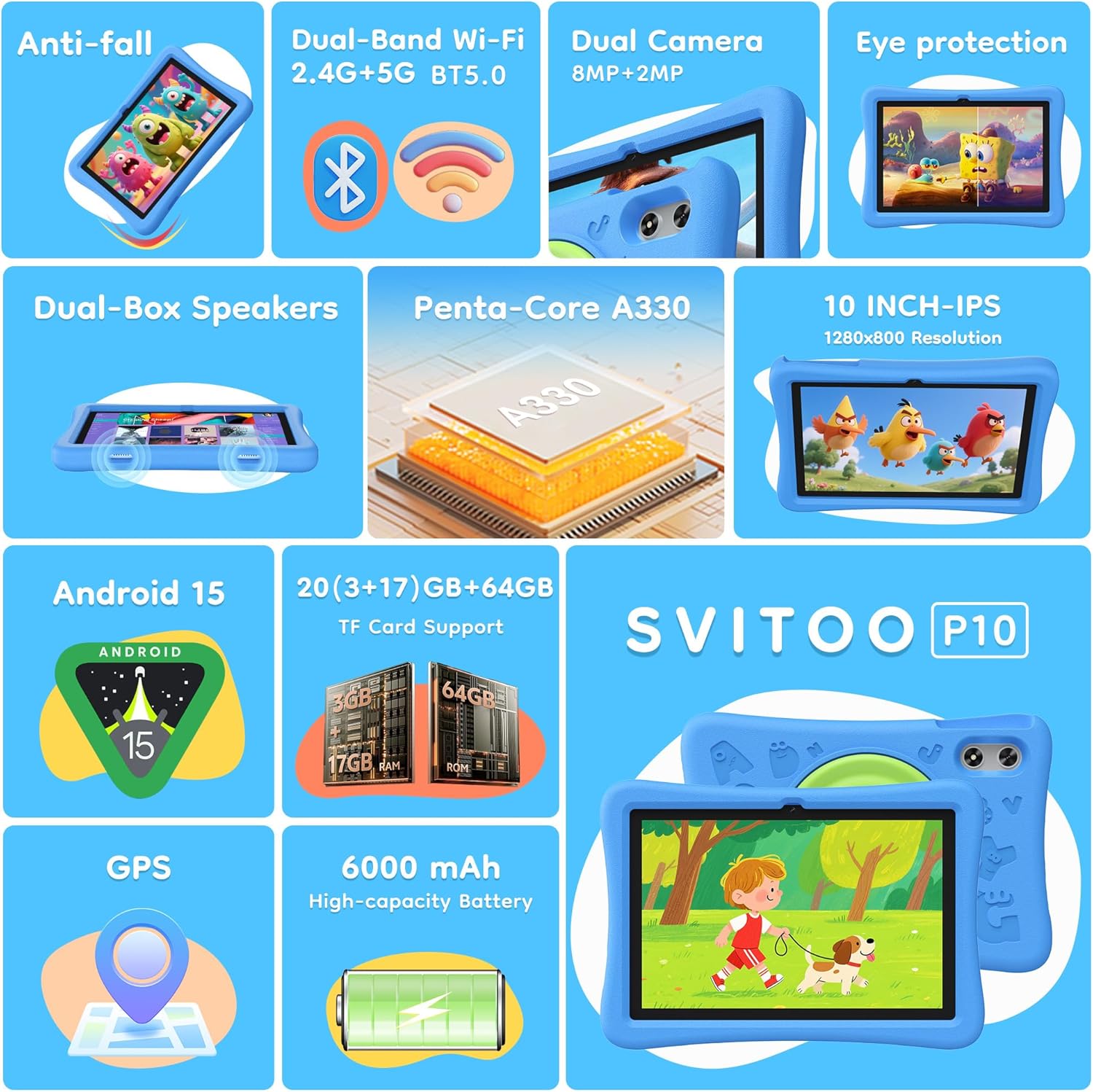
Image: The SVITOO Kids Tablet 10 Inch, shown in its blue protective case, highlighting its robust design suitable for children.
Produkt ponadview
Główne cechy
- System operacyjny: Android 15 with GMS Certification for full Google Play access.
- Wyświetlacz: 10-inch HD IPS (1280 x 800 pixels) touchscreen with eye protection mode.
- Edytor: Unisoc T7200 8-core CPU for smooth performance.
- Pamięć i przechowywanie: 20GB RAM (3GB physical + 17GB virtual) and 64GB internal storage, expandable up to 1TB via microSD card (sold separately).
- Kamery: Tylny aparat 8 MP i przedni aparat 2 MP.
- Łączność: Dual-Band Wi-Fi (2.4/5 GHz) and Bluetooth 5.0.
- Bateria: Akumulator o dużej pojemności 6000 mAh umożliwiający dłuższe użytkowanie.
- Audio: Dual-box speakers and a 3.5mm headphone jack.
- Trwałość: Kid-friendly EVA shockproof case with a 360° rotating handle and 180° rotating stand.
- Kontrola rodzicielska: Advanced settings for screen time limits, content filtering, and app management.
Komponenty tabletu
Zapoznaj się z fizycznymi elementami swojego tabletu:

Obraz: szczegółowy view of the tablet's side and rear, indicating the USB Type-C port, headphone jack, power ON/OFF button, volume controls, speakers, rear camera, and front camera.
- Port USB typu C: Do ładowania i przesyłania danych.
- Gniazdo słuchawkowe (3.5 mm): Do podłączenia przewodowych słuchawek.
- Przycisk włączania/wyłączania zasilania: Aby włączyć/wyłączyć tablet lub przełączyć go w tryb uśpienia.
- Przyciski głośności: Aby dostosować głośność dźwięku.
- Prelegenci: Dual-box speakers for audio output.
- Przednia kamera: Do połączeń wideo i selfie.
- Kamera tylna: Do robienia zdjęć i nagrywania filmów.
- Gniazdo kart microSD: Located under a protective flap, for storage expansion.

Image: The tablet's protective case featuring a versatile 360-degree rotating handle that also functions as a 180-degree rotating stand, allowing for various viewkąty.
Przewodnik po konfiguracji
- Naładuj tablet: Przed pierwszym użyciem należy całkowicie naładować tablet za pomocą dołączonego kabla USB-C i kompatybilnego zasilacza.
- Włączanie: Press and hold the Power ON/OFF button until the screen lights up.
- Początkowe ustawienia: Postępuj zgodnie z instrukcjami wyświetlanymi na ekranie, aby wybrać swój język, połączyć się z siecią Wi-Fi i skonfigurować konto Google.
- Google Kids Space / Parental Controls: During setup, you will have the option to configure Google Kids Space or other parental control settings. It is highly recommended to set these up immediately to ensure a safe environment for your child.
- Zainstaluj aplikacje: Once setup is complete, you can download age-appropriate apps and games from the Google Play Store.
Instrukcja obsługi
Podstawowa nawigacja
- Ekran główny: Przesuń palcem w lewo lub w prawo, aby uzyskać dostęp do różnych stron aplikacji.
- Szuflada aplikacji: Przesuń palcem w górę od dołu ekranu do view wszystkie zainstalowane aplikacje.
- Powiadomienia i szybkie ustawienia: Swipe down from the top of the screen to access notifications and quick settings like Wi-Fi, Bluetooth, and screen brightness.
- Wstecz, Strona główna, Ostatnie aplikacje: Use the navigation buttons at the bottom of the screen to go back, return to the home screen, or view ostatnio otwarte aplikacje.
Ładowanie tabletu
Connect the USB-C charging cable to the tablet's USB-C port and the other end to a power adapter. The battery icon on the screen will indicate charging status. A full charge provides approximately 12 hours of mixed use.

Image: The tablet connected to a charger, displaying a battery icon with 99% charge, illustrating the charging process and battery life features like Night Mode and Energy Saving.
Tryb ochrony oczu
To reduce eye strain, especially during prolonged use, activate the Eye Protection Mode (often called Night Mode or Reading Mode) from the quick settings panel or display settings. This mode adjusts screen colors to warmer tones.
Kontrola rodzicielska
The SVITOO Kids Tablet features robust parental controls to help manage your child's digital experience. These controls are integrated with Android 15 and Google Family Link.

Image: A family using the tablet, with an overlay showing various parental control options such as setting screen time limits, blocking harmful apps/websites, approving app downloads, and tracking child's location.
Konfigurowanie kontroli rodzicielskiej:
- Ustawienia dostępu: Idź do Ustawienia > Cyfrowa równowaga i kontrola rodzicielska or search for "Family Link" in your app drawer.
- Ustaw limity czasu spędzanego przed ekranem: Define daily limits for tablet usage to encourage balanced screen time.
- Filtrowanie treści: Zablokuj dostęp do nieodpowiednich webwitryny i aplikacje.
- App Approvals: Require parental approval for new app downloads or in-app purchases.
- Śledzenie lokalizacji: Monitor your child's device location (if enabled and configured).
For detailed instructions on Google Family Link, please refer to Google's official support documentation.
Konserwacja
- Czyszczenie: Do czyszczenia ekranu i obudowy tabletu używaj miękkiej, niepozostawiającej włókien ściereczki. Unikaj środków czyszczących o właściwościach ściernych i rozpuszczalników.
- Pielęgnacja baterii: Aby przedłużyć żywotność baterii, unikaj częstego całkowitego rozładowywania tabletu. Ładuj go regularnie i unikaj narażania na działanie ekstremalnych temperatur.
- Aktualizacje oprogramowania: Keep the tablet's operating system and apps updated to ensure optimal performance and security.
- Składowanie: Przechowuj tablet w chłodnym i suchym miejscu, z dala od bezpośredniego światła słonecznego, gdy nie jest używany.
- Etui ochronne: The included EVA shockproof case provides protection against drops and bumps. Ensure it is properly fitted at all times.
Rozwiązywanie problemów
| Problem | Rozwiązanie |
|---|---|
| Tablet nie włącza się. | Ensure the tablet is fully charged. Connect it to a charger for at least 30 minutes, then try powering it on again. |
| Ekran nie reaguje. | Perform a force restart by holding the Power ON/OFF button for 10-15 seconds. If the issue persists, contact support. |
| Problemy z połączeniem Wi-Fi. | Check if other devices can connect to the Wi-Fi network. Restart your router and the tablet. Forget the network and reconnect. |
| Aplikacje się zawieszają lub działają wolno. | Close background apps. Clear app cache (Settings > Apps > [App Name] > Storage > Clear Cache). Ensure sufficient storage space is available. Restart the tablet. |
| Bateria szybko się rozładowuje. | Zmniejsz jasność ekranu. Zamknij nieużywane aplikacje. Wyłącz Wi-Fi/Bluetooth, gdy z nich nie korzystasz. Sprawdź zużycie baterii w ustawieniach, aby zidentyfikować energochłonne aplikacje. |
Specyfikacje
| Funkcja | Szczegół |
|---|---|
| Nazwa modelu | SVITOO Tab 10 GMS Certified 1027C |
| System operacyjny | Android 15 |
| Rozmiar ekranu | 10 cali |
| Rozdzielczość ekranu | 1280 x 800 pikseli (HD IPS) |
| Edytor | 1.8 GHz (Unisoc T7200 8-core CPU) |
| BARAN | 20 GB (3 GB pamięci fizycznej + 17 GB pamięci wirtualnej) |
| Pamięć wewnętrzna | 64 GB |
| Możliwość rozbudowy pamięci masowej | Up to 1TB via MicroSD (sold separately) |
| Koprocesor graficzny | Mali-G57 processor Imagination Tech |
| Typ bezprzewodowy | 802.11a/b/g/n/ac (Dual-Band 2.4/5 GHz) |
| Bluetooth | Bluetooth 5.0 |
| Pojemność baterii | 6000mAh |
| Średnia żywotność baterii | 12 godzin |
| Przednia kamera | 2 megapiksela |
| Kamera tylna | 8 megapiksela |
| Waga przedmiotu | 2.44 funta |
| Wymiary produktu | 9.7 x 6.4 x 0.4 cala |
Gwarancja i wsparcie
Your SVITOO Kids Tablet comes with a 1-Year Manufacturer Protection. This warranty covers manufacturing defects under normal use. It does not cover damage caused by misuse, accidents, natural disasters, or unauthorized modifications.
For technical support, warranty claims, or any questions regarding your product, please contact SVITOO customer service through your Amazon order page. Look for the "Contact Us" option next to your order details.
Prosimy zachować dowód zakupu w celach gwarancyjnych.