
Wstęp
This manual provides detailed instructions for the installation, operation, and maintenance of your JOYING Single Din Touchscreen Car Stereo, model JY-UTS08N8-R. Please read this manual thoroughly before using the product to ensure proper functionality and to prevent damage.

Figure 1: JOYING Single Din Touchscreen Car Stereo (JY-UTS08N8-R)
Organizować coś
1. Rozpakowanie i sprawdzenie komponentów
Carefully unpack the unit and verify that all components are present. The package should include:
- 10.1" radio unit
- Single Din Cage
- Tuleja montażowa
- Lewy i prawy nawias
- Plastic Trim Out
- Extraction Keys
- Instrukcja instalacji
- Antena WiFi (x1)
- Antena GPS (x1)
- Antena 4G (x2)
- Mikrofon zewnętrzny (x1)
- Kable USB (x2)
- Kabel AR (x1)
- Taśma ekranująca (x1)
- Kabel ISO (x1)
- Instrukcja obsługi (ten dokument)

Rysunek 2: Dołączone komponenty
2. Instalacja fizyczna
Installation may require an installation frame kit, special ISO harness, amplifier adapter, or CANbus decoder depending on your vehicle's specific requirements. Refer to the included Instrukcja instalacji for detailed steps. The unit features an upgraded installation structure allowing adjustment of left and right bracket positions for optimal fit in various car center consoles.

Figure 3: Installation Structure Adjustment
3. Okablowanie i połączenia
Connect the provided cables to the corresponding ports on the rear of the head unit and to your vehicle's wiring harness. Ensure all connections are secure. The unit features various input/output ports including USB, HDMI, Optical, Coaxial, and RCA for audio and video.
- Kabel ISO: Łączy się z główną wiązką zasilania pojazdu i wiązką głośników.
- Antena GPS: Connect for satellite navigation functionality.
- Antena WiFi: Connect for stable wireless internet access.
- 4G Antennas: Connect for mobile data access via SIM card.
- Mikrofon zewnętrzny: Połącz się, aby uzyskać lepszą jakość połączeń i poleceń głosowych.
- Kable USB: For connecting external devices or media.
- Wyjście HDMI: For connecting external displays (e.g., headrest monitors).
- Wyjście cyfrowe światłowodowe i koncentryczne: For direct connection to external amplifiers with digital inputs for enhanced sound quality.

Figure 4: Rear Port Layout
4. 4G Module Setup
Insert a compatible SIM card into the designated slot for internet access. The unit supports FDD-LTE: B2/B4/B5/B7/B12/B13/B14/B17/B25/B26/B38/B66/B71 and TDD-LTE: B41. Note that the 4G module is for internet access only and does not support phone calls or SMS directly from the unit.
Instrukcja obsługi
1. Initial Boot and Fast Boot
The first boot-up may take approximately 30-40 seconds. Subsequent power-ons will utilize the fast boot feature, allowing the unit to start and enter the user interface within 2 seconds after the car key is turned.
2. Nawigacja (GPS)
The unit includes precise GPS engines and an antenna for accurate positioning and real-time navigation. You can download offline maps for use in areas without internet connectivity. Mobile phone map data can also be synchronized to the head unit via Apple CarPlay or Android Auto.
3. Apple CarPlay i Android Auto
Connect your mobile phone via USB cable or Bluetooth to access Apple CarPlay or Android Auto. This allows you to use phone applications for navigation, make calls, and stream music directly on the car stereo's display.

Rysunek 5: Interfejs Apple CarPlay i Android Auto
4. Split-Screen Multitasking
The unit supports split-screen functionality, allowing you to run two applications simultaneously. For exampno, możesz view navigation on one side and media playback on the other. To activate, tap the recent apps icon, find the app you want to split, click its icon, and select the split-screen option. Then choose a second app from recent apps.

Rysunek 6: Wielozadaniowość na podzielonym ekranie
5. Funkcje audio
The unit features a TDA7851 DSP chip and a 48-band graphic equalizer for high-quality sound. It provides 4 audio outputs and 1 subwoofer output. Support for aftermarket amplifiers is available via Fiber Optical or SPDIF Coaxial outputs.

Figure 7: High-Quality Sound Features
6. Wyjście HDMI
The HDMI output allows for a full digital image and sound signal to external displays. This supports projection screen displays for passengers or on-screen displays with 1080P clarity without stuttering. Note that the HDMI cable is not included.

Figure 8: HDMI Output Functionality
7. Sterowanie z kierownicy (SWC)
The unit supports steering wheel controls for easy switching of songs, radio channels, and volume adjustment. If your car has a CAN system, an extra CANbus cable may be required to retain this feature.

Rysunek 9: Sterowanie z kierownicy
8. Inne funkcje
The unit includes AM/FM radio, hands-free calling, Picture-in-Picture (PiP) mode, 3 USB ports, a Micro SD card slot, and a 4G SIM card slot.

Figure 10: Additional Features Overview
9. Personalized Settings
Customize your user experience with options for changing the car boot logo, setting custom wallpapers, adjusting button light colors, and controlling screen brightness.
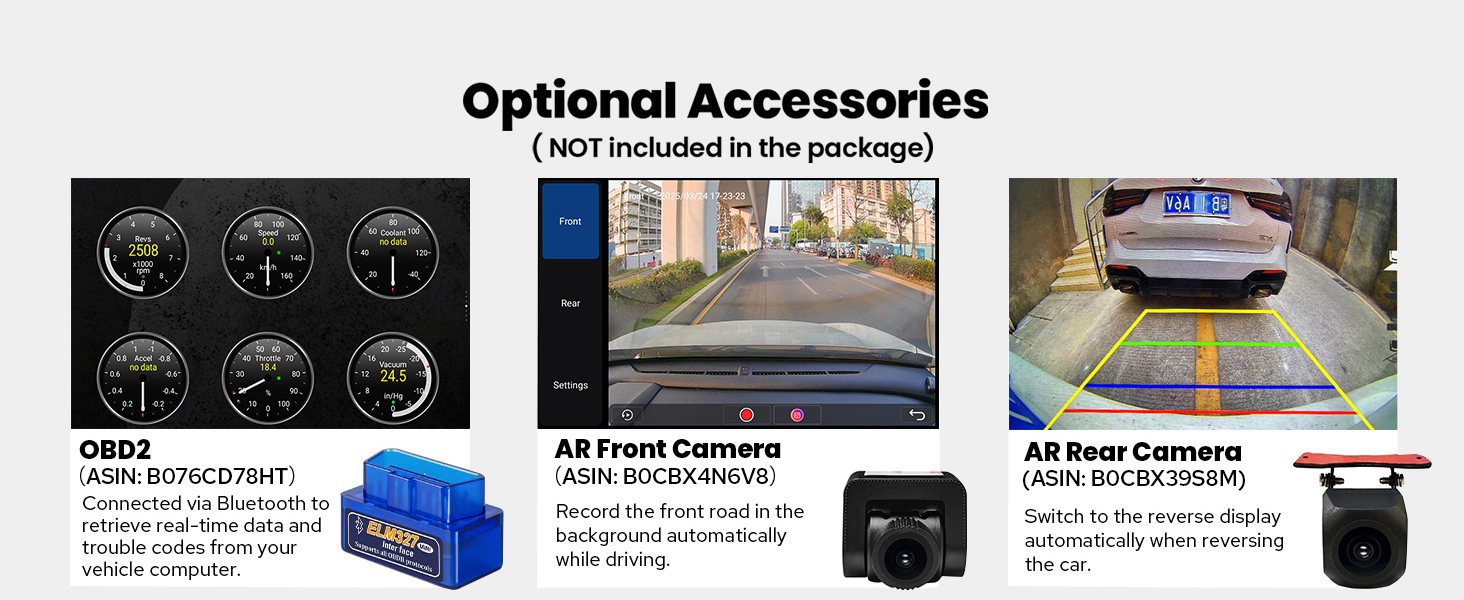
Figure 11: Personalized Settings
Konserwacja
Aby zapewnić długowieczność i optymalną pracę radia samochodowego JOYING, należy przestrzegać poniższych wskazówek dotyczących konserwacji:
- Czyszczenie ekranu: Użyj miękkiej, niestrzępiącej się ściereczki, lekko wyczyśćampPrzemyj wodą lub specjalnym środkiem do czyszczenia ekranów przeznaczonym do urządzeń elektronicznych. Unikaj agresywnych środków chemicznych i materiałów ściernych.
- Czyszczenie urządzenia: Wipe the exterior of the unit with a dry, soft cloth. Ensure no liquids enter the unit.
- Aktualizacje oprogramowania: Okresowo sprawdzaj producenta website for available software updates to improve performance and add new features. Follow the provided instructions carefully when performing updates.
- Kontrola temperatury: The unit features a dual heat sink design and a cooling fan. Ensure proper ventilation around the unit to prevent overheating. The system can be configured to automatically activate the fan if the CPU temperature or radio volume exceeds a set warning value.

Figure 12: Upgraded Cooling System

Figure 13: Independent WiFi Antenna
Rozwiązywanie problemów
If you encounter issues with your JOYING car stereo, refer to the following common problems and solutions:
- Brak zasilania: Ensure all power cables are correctly connected and the vehicle's fuse is intact.
- Brak dźwięku: Check speaker connections, amplifier connections (if applicable), and volume settings. Verify that the audio output mode is correctly configured.
- Utrata sygnału GPS: Upewnij się, że antena GPS jest prawidłowo zainstalowana i ma zapewnioną przejrzystość. view nieba. Unikaj umieszczania go pod metalowymi przedmiotami.
- Problemy z łącznością Bluetooth/Wi-Fi: Ensure Bluetooth/Wi-Fi is enabled on both the head unit and the connected device. Try restarting both devices.
- Brak reakcji ekranu dotykowego: Perform a soft reset of the unit (refer to the Installation Manual for specific instructions). If the issue persists, contact support.
- Brak połączenia CarPlay/Android Auto: Ensure your phone's operating system is up to date and try a different USB cable. Verify that the feature is enabled on the head unit.
For persistent issues, consult the detailed troubleshooting section in the Installation Manual or contact JOYING customer support.
Specyfikacje
| Funkcja | Specyfikacja |
|---|---|
| Marka | RADOŚĆ |
| Nazwa modelu | UTS08N8 |
| Numer modelu | JY-UTS08N8-R |
| Rozmiar ekranu | 10.1 cali |
| System operacyjny | Android |
| Pojemność pamięci masowej | 128 GB |
| Typ ekranu dotykowego | Pojemnościowy |
| Typ wyświetlacza | PROWADZONY |
| Technologia łączności | Bluetooth, Ethernet, HDMI, USB, Wi-Fi |
| Protokół łączności | Bluetooth, WiFi |
| Cechy specjalne | Android Auto, Apple CarPlay, DSP, RCA, RDS |
| Tryb wyjścia audio | Stereofoniczny |
| Obsługiwany system nawigacji satelitarnej | BeiDou, GLONASS, GPS |
| Typ mapy | Ameryka Północna |
| Kompatybilne urządzenia | Amplifier, Aparat, Głośnik |
| Metoda kontroli | Aplikacja, dotyk, głos |
| Waga przedmiotu | 1200 gram |
Akcesoria opcjonalne
The following accessories are not included in the standard package but can be ordered separately to enhance your car stereo experience:
- Skaner OBD2: Connects via Bluetooth to retrieve real-time data and trouble codes from your vehicle computer.
- Przednia kamera AR: Automatycznie rejestruje drogę przed pojazdem podczas jazdy.
- Tylna kamera AR: Switches to reverse display automatically when reversing the car.
- DAB+ Digital Radio Adapter
- DVR (cyfrowy rejestrator wideo)
- TPMS (System monitorowania ciśnienia w oponach)
Rysunek 14: Akcesoria opcjonalne
Gwarancja i wsparcie
Your JOYING Single Din Touchscreen Radio (JY-UTS08N8-R) comes with a 2-letnia gwarancja od daty zakupu. Niniejsza gwarancja obejmuje wady produkcyjne i usterki powstałe podczas normalnego użytkowania.
For warranty claims, technical assistance, or any questions regarding your product, please contact JOYING customer support through the retailer where the product was purchased or visit the official JOYING webwitryna zawierająca informacje kontaktowe pomocy technicznej.
Zachowaj dowód zakupu w celu potwierdzenia gwarancji.