
Wstęp
This manual provides comprehensive instructions for the OMAIC EN2Q36H replacement remote control, designed for Hisense Smart TVs. It covers essential information regarding setup, operation, and maintenance to ensure optimal performance and user experience. This remote offers a direct replacement solution without the need for complex programming.
Organizować coś
The OMAIC EN2Q36H remote control is designed for immediate use with compatible Hisense Smart TVs. No programming or pairing is required.
Instalacja baterii
- Znajdź komorę baterii z tyłu pilota.
- Aby otworzyć pokrywę baterii, przesuń ją w dół lub w kierunku wskazanym strzałką.
- Insert two AAA alkaline batteries (not included), ensuring the positive (+) and negative (-) terminals align correctly with the markings inside the compartment.
- Załóż pokrywę baterii, wsuwając ją z powrotem na miejsce, aż do zatrzaśnięcia.
Once batteries are installed, the remote is ready to operate your Hisense Smart TV.

Instrukcja obsługi
This remote control utilizes infrared (IR) technology for communication with your Hisense Smart TV. Ensure a clear line of sight between the remote and the TV's IR receiver for optimal performance.
Główne cechy
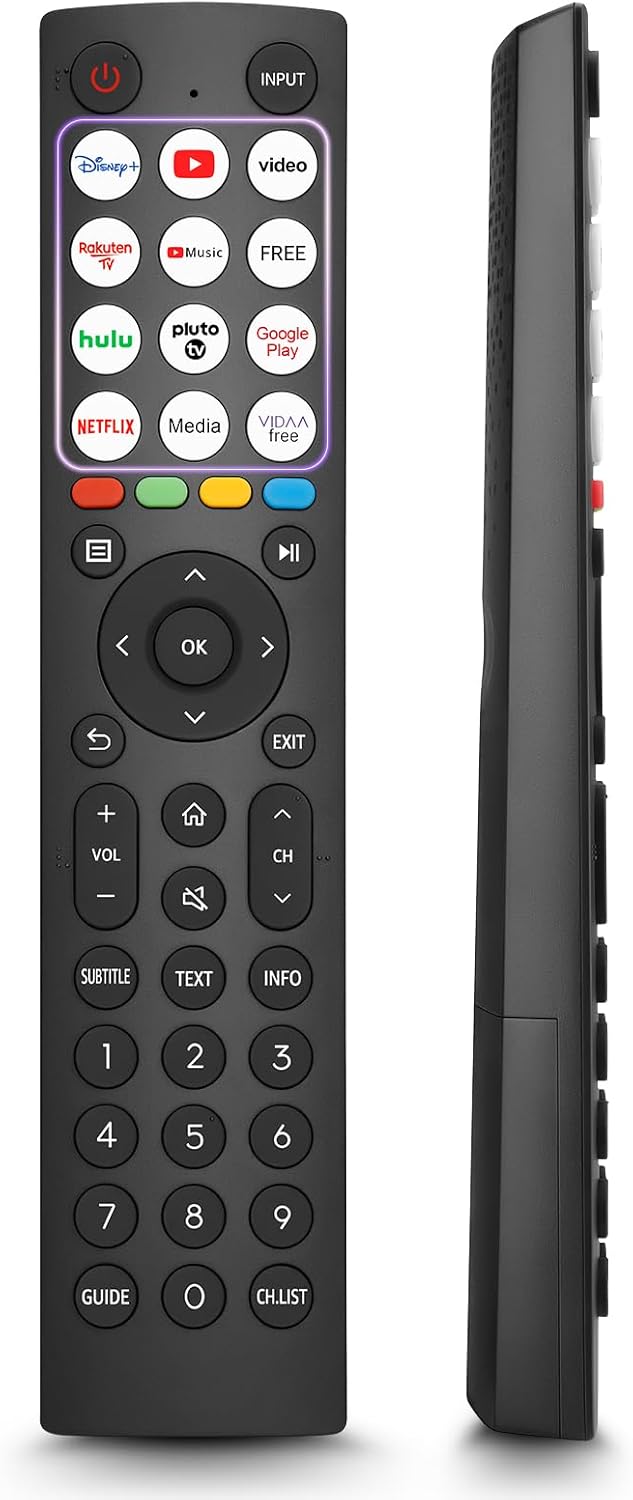
- 12 Shortcut Buttons: Quickly access popular streaming services and applications with dedicated buttons.
- Strong IR Signal: Provides a longer transmission distance and quick response without noticeable delay.
- Trwała konstrukcja: Made from high-quality ABS and silicone materials for extended lifespan.

Funkcje przycisków
Familiarize yourself with the functions of each button on your OMAIC EN2Q36H remote control:
| Przycisk | Funkcjonować |
|---|---|
| MOC | Switches the TV on or into standby mode. |
| WEJŚCIE | Wybiera źródła wejściowe (HDMI, AV itp.). |
| APP Buttons | Quick access buttons for specific applications (e.g., Disney+, Netflix, YouTube). |
| MENU | Displays the Quick Setup menu. |
| Sterowanie multimediami | Buttons for Play, Pause, Stop, Fast Forward, Rewind. |
| Nawigacja (góra/dół/lewo/prawo) | Navigates on-screen menus and adjusts system settings. |
| OK | Confirms selection in on-screen menus. |
| Z POWROTEM | Powrót do poprzedniego menu. |
| EXIT | Wyjście z bieżącego menu. |
| GŁOŚNOŚĆ +/- | Dostosowuje poziom głośności. |
| DOM | Enters the Home screen. |
| NIEMY | Wycisza lub przywraca dźwięk telewizora. |
| CH ^/objętość | Przełącza kanały. |
| NAPISY | Activates or deactivates subtitle mode. |
| TEKST | Turns teletext function on and off. |
| INFORMACJE | Wyświetla bieżące informacje o programie. |
| NUMBER Buttons (0-9) | Direct channel selection or number input. |
| PRZEWODNIK | Displays the Electronic Programme Guide (DTV input). |
| LISTA KANAŁÓW | Displays the Channel List on the screen. |

Compatible Hisense TV Models
The OMAIC EN2Q36H replacement remote control is compatible with the following Hisense VIDAA 4K HDTV Smart TV series:
- 32A4K, 40A4K, 43A4K
- 32A5KQ, 40A5KQ
- 43A6K, 50A6K, 55A6K, 58A6K, 65A6K, 70A6K, 75A6K, 85A6K
- 55U6KQ, 65U6KQ
- 43A7KQ, 50A7KQ, 55A7KQ, 65A7KQ, 75A7KQ
- 43E7KQ, 50E7KQ, 55E7KQ, 65E7KQ, 75E7KQ
Konserwacja
Aby zapewnić długowieczność i prawidłowe działanie pilota, należy przestrzegać poniższych wskazówek dotyczących konserwacji:
- Czyszczenie: Use a soft, dry cloth to clean the remote. Avoid using liquid cleaners or abrasive materials, as they may damage the surface or internal components.
- Wymiana baterii: Replace batteries when the remote's response becomes sluggish or stops working. Always replace both batteries at the same time with new ones of the same type (AAA alkaline).
- Składowanie: Przechowuj pilota w chłodnym i suchym miejscu, z dala od bezpośredniego światła słonecznego, ekstremalnych temperatur i wysokiej wilgotności.
- Unikaj kropli: Chroń pilota przed uderzeniami, gdyż upuszczenie go może uszkodzić wewnętrzne obwody.
Rozwiązywanie problemów
Jeśli masz problemy z pilotem, zapoznaj się z poniższymi krokami rozwiązywania problemów:
| Problem | Możliwa przyczyna | Rozwiązanie |
|---|---|---|
| Pilot nie odpowiada | Baterie rozładowane lub nieprawidłowo włożone. | Wymień baterie na nowe baterie alkaliczne AAA, zwracając uwagę na prawidłową biegunowość. |
| Pilot nie odpowiada | Przeszkoda między pilotem a telewizorem. | Ensure a clear line of sight to the TV's IR receiver. Remove any objects blocking the path. |
| Pilot nie odpowiada | Pilot jest zbyt daleko od telewizora. | Move closer to the TV. The remote has an extended range, but extreme distances may affect performance. |
| Przyciski są lepkie lub nie reagują | Brud lub zanieczyszczenia pod przyciskami. | Gently clean around the buttons with a soft, dry cloth. Avoid liquids. |
| Niektóre funkcje nie działają | TV model incompatibility (rare). | Verify your Hisense TV model is listed in the 'Compatible Hisense TV Models' section. |
Specyfikacje
| Funkcja | Szczegół |
|---|---|
| Nazwa modelu | EN2Q36H |
| Marka | OMAIK |
| Kompatybilne urządzenia | Hisense Smart TVs |
| Technologia łączności | Podczerwieni (IR) |
| Liczba przycisków | 48 |
| Typ sterowania | Sterowanie przyciskami |
| Cechy specjalne | Universal, Comfortable |
| Kolor | Czarny |
| Opis baterii | AAA (Alkaline) |
| Supported Devices (Max) | 1 |
| Wymiary produktu (w przybliżeniu) | Wymiary 34.7 x 24.7 x 2.2 cm |
| Waga produktu (w przybliżeniu) | 80 gramów |

Gwarancja i wsparcie
OMAIC is committed to the quality and compatibility of its replacement remote controls. We provide professional after-sales support to ensure customer satisfaction.
If you have any questions or concerns regarding your OMAIC EN2Q36H remote control or your order, please contact us directly. Our support team aims to respond to inquiries within 12 working hours.