
GTRACING 114vc07
Instrukcja obsługi biurka gamingowego GTRACING model 114vc07
Kompleksowy przewodnik dotyczący montażu, obsługi i konserwacji.
1. Wprowadzenie
Thank you for choosing the GTRACING Gaming Desk. This manual provides essential information for the safe and efficient assembly, operation, and maintenance of your new desk. Please read these instructions carefully before beginning assembly and retain them for future reference.
2. Ważne informacje dotyczące bezpieczeństwa
Always assemble the desk according to the provided instructions. Be cautious when moving the desk, as it can be heavy and may pose a risk of injury if not handled properly.
- Przed użyciem upewnij się, że wszystkie połączenia są zabezpieczone.
- Do not overload the desk or monitor stand beyond the recommended weight capacity (300 lbs).
- Trzymaj płyny z dala od elementów elektrycznych (gniazdek elektrycznych, portów USB, świateł LED).
- Children should not climb on or play with the desk.
- Materiały opakowaniowe należy utylizować w sposób odpowiedzialny.
3. Zawartość opakowania
Verify that all components are present before assembly. If any parts are missing or damaged, please contact GTRACING customer support.
- Desk components (desktop panels, legs, monitor stand parts)
- Zintegrowana listwa zasilająca (2 gniazda AC, 2 porty USB)
- Taśma świetlna LED
- Extended mouse pad
- Haczyki na słuchawki (x2)
- Sprzęt montażowy (śruby, nakrętki itp.)
- Narzędzia montażowe
- Instrukcja obsługi
4. Instrukcja montażu
Assembly is required. Please follow the detailed step-by-step instructions provided in the separate assembly guide included with your package. All necessary tools are included.
- Rozpakuj wszystkie komponenty i sprawdź je na liście zawartości opakowania.
- Zidentyfikuj cały sprzęt i narzędzia.
- Assemble the desk frame and legs.
- Zamontuj panele biurka.
- Zainstaluj podstawkę pod monitor.
- Mount the integrated power strip.
- Attach the LED light strip.
- Install the headphone hooks.
- Place the extended mouse pad.

Image: All components of the GTRACING Gaming Desk laid out, ready for assembly. This includes the desktop pieces, legs, monitor stand, and various hardware.

Image: A fully assembled GTRACING Gaming Desk, showcasing the monitor stand, LED lighting, and carbon fiber texture.
5. Instrukcja obsługi
5.1. System oświetlenia LED
The GTRACING Gaming Desk features an integrated LED light strip to enhance your gaming or work environment. The LED lights offer 16 color changes and 6 dynamic modes.
- Connect the LED light strip to the designated power source.
- Use the included remote control to power on/off, change colors, and select dynamic modes.
- Aby zapewnić optymalną funkcjonalność, sprawdź, czy w pilocie znajduje się sprawna bateria i czy jest on skierowany w stronę odbiornika LED.
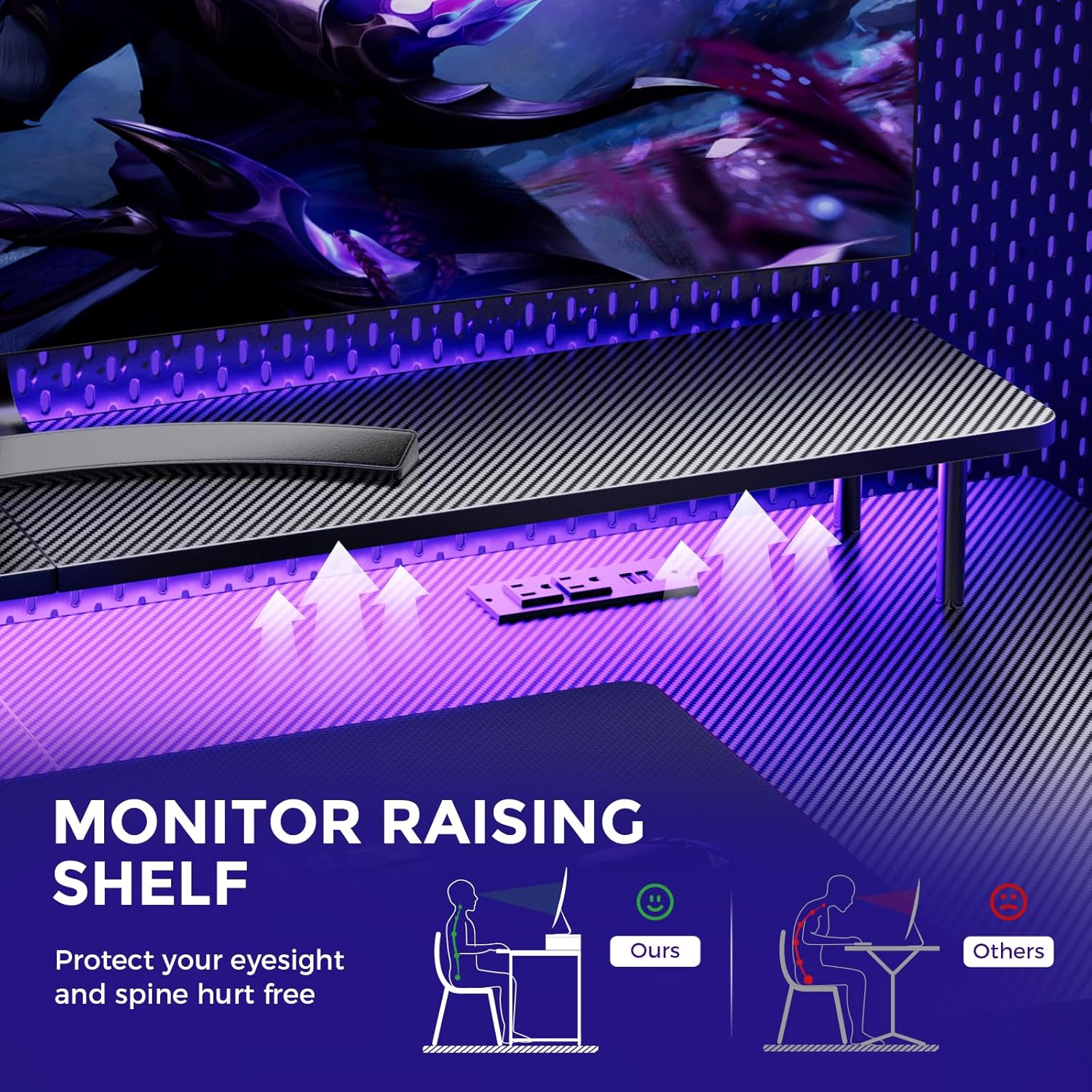
Image: A hand holding a remote control, demonstrating the control over the RGB LED light strip installed beneath the monitor stand of the desk.
Video: An official product video demonstrating the GTRACING 55 Inch Gaming Desk with LED Lights, showcasing its features and aesthetic appeal in a gaming setup.
5.2. Integrated Power Outlets & USB Ports
The desk includes a built-in power strip with 2 AC outlets (120V/12A) and 2 USB charging ports (5V/2A) for convenient device charging and power supply.
- Podłącz główny przewód zasilający biurka do gniazdka ściennego.
- W razie potrzeby podłącz urządzenia do gniazdek prądu zmiennego lub portów USB.
- Avoid exceeding the maximum power rating of the outlets.

Obraz: Zbliżenie view of the recessed power strip on the desk, showing two AC outlets and two USB charging ports in use, charging a phone and earbuds.
5.3. Ergonomiczna podstawka pod monitor
The raised monitor stand positions your screen at eye level, promoting better posture and reducing neck strain during extended use. It also provides additional storage space.

Image: A diagram comparing correct ergonomic posture achieved with the monitor stand to incorrect posture without it, highlighting benefits for eyesight and spine.
6. Konserwacja
- Czyszczenie: Przetrzyj powierzchnię z włókna węglowego miękką,amp szmatką. Unikaj ostrych środków chemicznych, które mogą uszkodzić wykończenie.
- Sprzęt komputerowy: Periodically check all screws and bolts to ensure they remain tight. Tighten if necessary.
- Elementy elektryczne: Keep the power outlets and USB ports free from dust and debris. Do not attempt to repair electrical components yourself.
7. Rozwiązywanie Problemów
7.1. LED Lights Not Working or Remote Not Responding
- Sprawdź połączenie zasilania: Ensure the LED light strip is securely plugged into the power source and the desk's main power cord is connected to a live wall outlet.
- Zdalna bateria: Verify that the remote control has a fresh battery and is inserted correctly.
- Linia wzroku: Ensure there is a clear line of sight between the remote control and the LED receiver. Obstructions can block the signal.
- Sterowanie ręczne: If the remote is unresponsive, check if there's a manual button on the LED controller itself to cycle through modes or power on/off.
7.2. Niestabilność biurka
- Dokręć sprzęt: Sprawdź ponownie i dokręć wszystkie śruby i nakrętki montażowe.
- Pozioma powierzchnia: Upewnij się, że biurko jest ustawione na płaskiej i równej powierzchni.
8. Specyfikacje
| Funkcja | Szczegół |
|---|---|
| Marka | ŚLEDZENIE GTR |
| Numer modelu | 114vc07 |
| Wymiary produktu | 24" gł. x 55" szer. x 30" wys. |
| Kolor | Czarny węgiel |
| Najlepszy rodzaj materiału | Włókno węglowe |
| Materiał bazowy | Stal nierdzewna |
| Maksymalna zalecana waga | 300 funtów |
| Zintegrowana listwa zasilająca | 2 gniazda prądu zmiennego (120 V/12 A), 2 porty USB (5 V/2 A) |
| Cechy specjalne | Built-In USB Outlet, Ergonomic, Monitor Stand, LED Lights, Headphone Hook |
| Wymagany montaż | Tak (narzędzia w zestawie) |

Image: A detailed diagram illustrating the dimensions of the GTRACING Gaming Desk, including the main desktop and the monitor stand.
9. Gwarancja i obsługa klienta
GTRACING is committed to providing high-quality products and customer satisfaction. For any questions, concerns, or missing parts, please contact our customer service team.
- Free Replacement/Refund: W ciągu 30 dni od zakupu.
- Free Replacement/Repair: Within 1 year of purchase.
- Informacje kontaktowe:
- E-mail: info@gtracing.com
- Phone: 1-888-660-5669 (9:00-5:30 PST Mon-Fri)
- Webstrona: www.gtracing.com

Image: GTRACING customer service representatives ready to assist with product inquiries and support.
Powiązane dokumenty - 114vc07
 |
Instrukcja montażu biurka komputerowego w kształcie litery L Wrought Studio EHCM1441 Kompleksowa instrukcja montażu biurka komputerowego w kształcie litery L Wrought Studio EHCM1441. W tym przewodniku znajdziesz szczegółową listę części, spis elementów montażowych oraz instrukcje krok po kroku, które pomogą Ci złożyć nowe biurko do domowego biura z szufladami, oświetleniem LED, gniazdkiem elektrycznym i podstawą pod monitor. |
 |
Wrought Studio Nellie 59" Computer Desk User Manual User manual for the Wrought Studio Nellie 59" computer desk, detailing assembly, parts, safety, and customer support for optimal setup and use. |
 |
Instrukcja montażu i instalacji biurka gamingowego w kształcie litery L HDIR1009 Instrukcja krok po kroku instalacji i montażu biurka gamingowego HDIR1009 o przekątnej 51 cali w kształcie litery L z podstawą pod monitor i oświetleniem LED. Zawiera listę części, instrukcję montażu oraz instrukcje montażu do biura domowego lub do gier. |
 |
Instrukcja obsługi i montażu biurka gamingowego MOTPK Kompleksowa instrukcja obsługi i montażu biurka gamingowego MOTPK. Zawiera zawartość opakowania, środki ostrożności, listę części, instrukcję montażu krok po kroku oraz wskazówki dotyczące rozwiązywania problemów. |
 |
Instrukcja montażu i obsługi biurka elektrycznego EUREKA ERGONOMIC 60" w kształcie litery L Kompleksowy przewodnik montażu i obsługi 60-calowego elektrycznego biurka stojącego EUREKA ERGONOMIC w kształcie litery L. Zawiera listę części, osprzęt, instrukcje montażu krok po kroku, procedury obsługi i wskazówki dotyczące rozwiązywania problemów. |
 |
Instrukcja montażu biurka gamingowego Jojoka w kształcie litery L Kompleksowa instrukcja montażu biurka gamingowego Jojoka w kształcie litery L. Zawiera instrukcje krok po kroku, szczegółową listę części i ważne informacje dotyczące bezpieczeństwa w przypadku konfiguracji domowych i biurowych oraz do gier. |
Ask a question about this manual
Ask about setup, troubleshooting, compatibility, parts, safety, or missing instructions. Manuals+ will review the question and use this page’s manual context to help answer it.