
1. Wprowadzenie
This manual provides essential information for the safe and efficient operation, maintenance, and troubleshooting of your ECOVACS DEEBOT T30C OMNI Robot Vacuum Cleaner. Please read this manual thoroughly before using the product and retain it for future reference.
The DEEBOT T30C OMNI is an advanced robotic vacuum and mop system designed to provide comprehensive floor cleaning. It features powerful suction, intelligent navigation, and an all-in-one OMNI station for automated maintenance.
2. Informacje dotyczące bezpieczeństwa
Zawsze przestrzegaj podstawowych zasad bezpieczeństwa podczas korzystania z urządzeń elektrycznych.
- Nie pozwalaj dzieciom bawić się robotem.
- Upewnij się, że moc voltage odpowiada etykiecie znamionowej.
- Do not use the robot in wet environments or near flammable materials.
- Trzymaj włosy, luźne ubrania, palce i inne części ciała z dala od otworów i ruchomych części.
- Do not operate the robot if it is damaged.
- Unplug the OMNI station before cleaning or maintenance.
- Używaj wyłącznie osprzętu i akcesoriów określonych przez producenta.
- Nie używaj robota do podnoszenia dużych i ostrych przedmiotów ani materiałów palących się/dymiących.
- Store the robot and OMNI station indoors in a cool, dry place.
For detailed safety guidelines, refer to the full safety section in the official ECOVACS user guide.
3. Składniki produktu
The ECOVACS DEEBOT T30C OMNI system includes the robot vacuum cleaner and the OMNI all-in-one station.

Opis obrazu: A black ECOVACS DEEBOT T30C OMNI robot vacuum cleaner is positioned next to its matching black OMNI all-in-one station. The robot is round with control buttons on top, and the station features two large tanks on top for clean and dirty water, along with a compartment for automatic dust emptying and mop washing.
3.1. DEEBOT Robot
- Main Unit (Robot)
- Main Brush (ZeroTangle 3.0)
- Side Brushes (ARClean anti-tangle)
- Kosz na śmieci
- Water Tank (internal, auto-refill)
- OZMO Turbo 2.0 Mopping Pads
- Sensors (TrueMapping 2.0, anti-drop, obstacle avoidance)
3.2. OMNI Station
- Zbiornik na czystą wodę (4 l)
- Zbiornik na brudną wodę
- Dust Bag (for auto-emptying)
- Taca do mycia mopa
- Kontakty ładowania
- Dozownik roztworu czyszczącego
4. Konfiguracja i instalacja
4.1. Rozpakowywanie
Ostrożnie wyjmij wszystkie elementy z opakowania. Zachowaj opakowanie do transportu lub przechowywania w przyszłości.
4.2. OMNI Station Placement
Place the OMNI station on a hard, level surface against a wall, ensuring at least 0.5 meters of clear space on both sides and 1.5 meters in front. Avoid placing it near stairs or heat sources.
4.3. Podłączenie zasilania
Connect the power cord to the OMNI station and plug it into a wall outlet.
4.4. Water Tanks and Cleaning Solution
Fill the clean water tank with tap water. The station automatically dispenses cleaning solution.
4.5. Initial Robot Charging
Place the DEEBOT onto the OMNI station. Ensure the charging contacts align. The robot will begin charging. For first use, fully charge the robot.
4.6. ECOVACS HOME App Setup
Download the ECOVACS HOME app from your mobile device's app store.
Follow the in-app instructions to add your DEEBOT T30C OMNI. This involves connecting the robot to your Wi-Fi network and performing initial mapping.

Opis obrazu: A smartphone screen displaying the ECOVACS HOME app interface, showing various control options for the DEEBOT T30C OMNI, including cleaning modes, suction power, water flow, and mapping features. This image illustrates the intuitive controls available through the app.
5. Instrukcja obsługi
5.1. Rozpoczęcie cyklu czyszczenia
Cykl czyszczenia można rozpocząć na kilka sposobów:
- ECOVACS HOME App: Tap "Auto Clean" or select specific cleaning modes (e.g., Area Clean, Custom Clean, Scheduled Clean).
- Przycisk robota: Press the Auto Mode button on the robot.
5.2. Tryby i funkcje czyszczenia
5.2.1. Suction Power and ZeroTangle 3.0
The DEEBOT T30C OMNI features a powerful 20,000 Pa suction and ZeroTangle 3.0 technology.

Opis obrazu: An illustration showing the DEEBOT T30C OMNI robot vacuum cleaner on a floor, with visual effects indicating powerful 20,000 Pa suction. Below, two diagrams illustrate the anti-tangle side brush (ARClean) and the cyclonic main brush (ZeroTangle 3.0), designed to prevent hair entanglement.
5.2.2. OZMO Turbo 2.0 Mopping System
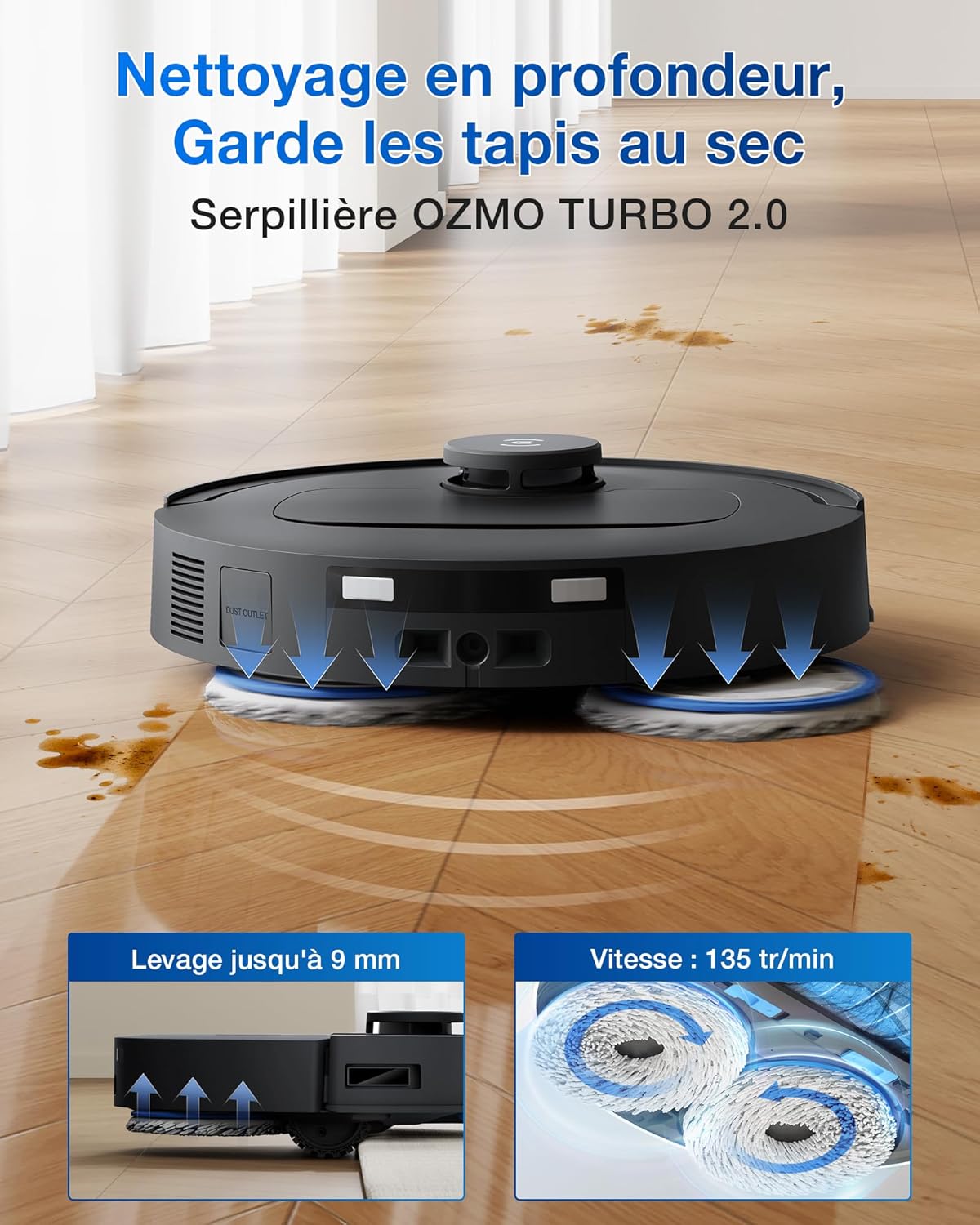
The OZMO Turbo 2.0 system uses two rotating mopping pads and applies downward pressure for effective stain removal. It also features 75°C hot water washing for the mop pads.

Opis obrazu: The DEEBOT T30C OMNI robot vacuum cleaner is shown actively mopping a hard floor with visible dirt marks. Arrows indicate water flow and pressure from the two rotating mop pads. Insets highlight the mop lifting capability (up to 9mm) and the rotation speed (135 RPM) of the OZMO Turbo 2.0 system.
5.2.3. TruEdge 2.0 Adaptive Wet Mopping
TruEdge 2.0 allows the mop to extend and clean closer to edges and corners, ensuring comprehensive coverage.
Opis obrazu: The DEEBOT T30C OMNI robot vacuum cleaner is depicted cleaning along a wall and around furniture legs, demonstrating its TruEdge 2.0 technology for 100% edge and corner coverage. The image highlights the robot's ability to reach tight spaces.
5.2.4. TrueMapping 2.0 Navigation
The robot uses TrueMapping 2.0 for fast and accurate mapping, obstacle avoidance, and efficient path planning. It can map up to 96 square meters in 8 minutes.

Opis obrazu: An illustration showing the DEEBOT T30C OMNI robot vacuum cleaner navigating a room, with visual cues for TrueMapping 2.0 technology indicating its ability to quickly map and plan routes. Another part of the image shows the robot detecting and avoiding common household objects like books, demonstrating precise obstacle avoidance.
5.2.5. Pielęgnacja dywanów
The "Carpet First" function ensures carpets are vacuumed with dry mop pads to prevent wetting. The robot automatically recognizes carpet types and adjusts cleaning modes (e.g., "Vacuum Only", "No-Go Zone", "Passage Only", "As on the Floor").

Opis obrazu: This image illustrates the DEEBOT T30C OMNI's advanced carpet care features. It shows the robot transitioning from a hard floor to a carpet, highlighting its 20mm threshold crossing capability. Insets also show the anti-drop sensor for stairs and the 5200mAh battery, emphasizing its suitability for large homes.
6. Konserwacja
Regular maintenance ensures optimal performance and extends the lifespan of your DEEBOT T30C OMNI.
6.1. Konserwacja stacji OMNI
6.1.1. Automatyczne samoczyszczenie
The OMNI station features automatic self-cleaning of the base with bidirectional scraping strips.

Opis obrazu: Zbliżenie view of the OMNI station's base, showing the internal mechanism for automatic self-cleaning. The image highlights the bidirectional scraping strips that clean the station's bottom while the mop pads are washed, ensuring the base remains clean.
6.1.2. Water Tanks
Empty the dirty water tank after each cleaning cycle. Refill the clean water tank as needed. The station has a 4L water tank capacity and automatic small reservoir refilling.
6.1.3. Worek na kurz
The OMNI station automatically empties the robot's dustbin into a disposable dust bag. Replace the dust bag when full.
6.2. Robot Maintenance
6.2.1. Main Brush (ZeroTangle 3.0)
Despite its anti-tangle design, periodically check the main brush for any entangled hair or debris. Use the cleaning tool provided to remove any buildup.
6.2.2. Szczotki boczne
Check side brushes for wear or damage. Replace if necessary. Remove any entangled hair.
6.2.3. Mopping Pads
The OMNI station washes and 45°C hot air dries the mopping pads. Periodically remove and hand wash the pads if heavily soiled. Replace pads when they show significant wear.
6.2.4. Czujniki
Wipe all sensors (anti-drop, obstacle avoidance) with a clean, dry cloth to ensure proper function.
6.2.5. Styki do ładowania
Clean the charging contacts on both the robot and the OMNI station with a dry cloth.
7. Rozwiązywanie Problemów
This section addresses common issues you might encounter. For more complex problems, refer to the ECOVACS HOME app or contact customer support.
| Problem | Możliwa przyczyna | Rozwiązanie |
|---|---|---|
| Robot does not start/charge | Not properly docked; power cord unplugged; battery low. | Ensure robot is correctly docked. Check power connection to OMNI station. Allow robot to charge fully. |
| Słaba wydajność czyszczenia | Dust bin full; brushes tangled; mop pads dirty/worn; suction power too low. | Empty dust bin. Clean main and side brushes. Wash/replace mop pads. Increase suction power via app. |
| Robot często się zacina | Obstacles on floor; mapping issues; sensors dirty. | Clear floor of cables, small objects. Redo mapping if necessary. Clean all sensors. |
| OMNI station not performing auto-emptying/washing | Dust bag full; water tanks empty/full (dirty); station base dirty. | Replace dust bag. Empty dirty water tank, refill clean water tank. Clean station base. |
8. Specyfikacje
- Marka: ECOVACS
- Model: T30C OMNI Black
- Moc ssania: 20,000 Pa
- Mopping System: OZMO Turbo 2.0 (135 RPM, 7N downward pressure)
- Mycie mopa: 75°C Hot Water
- Suszenie mopa: 45°C Hot Air
- Nawigacja: TrueMapping 2.0
- Czyszczenie krawędzi: TruEdge 2.0
- Technologia zapobiegająca plątaniu się: ZeroTangle 3.0 (Main Brush), ARClean (Side Brush)
- OMNI Station Water Tank Capacity: 4 litra (czysta woda)
- Pojemność baterii: 5200 mAh
- Threshold Crossing Capability: 20 mm
- Wymiary (produkt): Wymiary 35 x 47.7 x 53.3 cm
- Waga (produktu): 11.6 kilograma
- Typ sterowania: App Control (ECOVACS HOME), Smart Home Integration (Google Home, Amazon Alexa)
9. Gwarancja i wsparcie
For warranty information, please refer to the warranty card included with your product or visit the official ECOVACS webstrona.
For technical support, troubleshooting assistance, or to order replacement parts, please contact ECOVACS customer service. Contact details can typically be found on the ECOVACS webna stronie lub w aplikacji ECOVACS HOME.
Zasoby internetowe:
- Official ECOVACS Webstrona: www.ecovacs.com
- ECOVACS HOME App: Available on iOS App Store and Android Google Play Store.


