
1. Wprowadzenie
This manual provides detailed instructions for the installation, operation, and maintenance of your JOYING JY-UTD14N4 12.95-inch Android 13 Car Stereo. Please read this manual thoroughly before using the product to ensure proper function and safety. Keep this manual for future reference.

Image 1.1: The JOYING 12.95-inch Android 13 Car Stereo main unit, showcasindzięki dużemu wyświetlaczowi i interfejsowi użytkownika.
2. Co znajduje się w pudełku
Ostrożnie rozpakuj zawartość i upewnij się, że wszystkie elementy są obecne:
- 12.95" radio x1
- Double Din Cage x1
- Left & Right Bracket x1
- Reinforced Shims x1
- Plastic Trim Out x1
- Instrukcja instalacji x1
- Antena Wi-Fi x1
- Antena GPS x1
- Antena 4G x2
- Zewnętrzny mikrofon x1
- Kabel USB x2
- Kabel AR x1
- Taśma ekranująca x1
- ISO Cable x1
- Instrukcja obsługi x1

Obraz 2.1: Koniecview of all accessories and components included with the JOYING JY-UTD14N4 car stereo.
3. Główne cechy
- Szybki rozruch: The unit starts up and enters the user interface in approximately 2 seconds after the car key is inserted. Initial boot-up may take 30-40 seconds.
- Wyjście cyfrowe światłowodowe i koncentryczne: Provides direct connection to external amplifiers with Optical Fiber or Coaxial Digital Input for enhanced sound quality.
- Wbudowany moduł 4G: Supports SIM card insertion for internet access (data only, no calls or SMS). Compatible with FDD-LTE: B2/B4/B5/B7/B12/B13/B14/B17/B25/B26/B38/B66/B71 and TDD-LTE: B41.
- Nawigacja GPS: Equipped with precise GPS engines and an antenna for accurate positioning and faster real-time navigation. Supports offline maps by downloading data to the stereo. Mobile phone map data can be synchronized via CarPlay/Android Auto.
- Android Auto & Apple CarPlay: Connect your mobile phone via USB cable or Bluetooth to access phone apps, navigation, calls, and music on the larger screen.
- Sterowanie z kierownicy (SWC): Supports steering wheel controls for easy song switching, radio channel adjustment, and volume control. Note: Vehicles with a CAN system may require an additional CANbus cable.
- Wielozadaniowość na podzielonym ekranie: Allows running two applications simultaneously on the screen, such as navigation and media playback.
- Wyjście HDMI: Full digital image and sound interface for uncompressed audio and video signals. Supports projection screen display for passengers and on-screen display with 1080P clarity. HDMI cable not included.
- Spersonalizowane ustawienia: Customize car boot logo, wallpapers, and adjustable screen brightness.
- Upgraded Cooling System: Dual heat sink design for superior heat dissipation and improved temperature control. Features a warning value setting for volume or CPU temperature to prevent overheating.
- Upgraded WiFi Signal: Independent WiFi antenna ensures stable signal quality and fast internet access (802.11a/b/g/n/AC, 2.4GHz/5GHz).

Image 3.1: The Android Auto interface displayed on the JOYING car stereo.

Image 3.2: The Apple CarPlay interface displayed on the JOYING car stereo.

Image 3.3: Demonstration of the split-screen multitasking feature, showing navigation and video playback simultaneously.

Image 3.4: Illustration of the HDMI output feature, allowing connection to external monitors for passenger entertainment.
4. Instalacja
Installation of the JOYING JY-UTD14N4 car stereo requires careful attention to wiring and mounting. It is recommended to consult a professional for installation if you are unfamiliar with car audio systems.
4.1 Ogólne uwagi dotyczące instalacji
- You may need an installation frame kit with an inner size of 178 x 102mm, a special ISO harness, an amplifier adapter, or a CANbus decoder depending on your car's specific situation.
- The unit does not support factory car GPS antenna, backup rear camera, Bluetooth, USB, or microphone. Only JOYING accessories are supported.
- Optional accessories like DVR, OBDII scanner, reverse camera, TPMS, and steering wheel controller are not included and can be ordered separately.
4.2 Installation Structure and Adjustment
The fixing position of the left and right brackets can be extended or telescoped to achieve the best fixing position according to your car's center console, adapting to a wider range of vehicles. If your car is a Hyundai or Kia brand, contact customer support for a different bracket.

Image 4.1: Diagram illustrating the adjustable installation structure, allowing for flexible positioning within the car's dashboard.
4.3 Przewodnik wideo po instalacji
Video 4.1: This video demonstrates the installation process of a 13-inch Android car stereo frame, including how to adjust the screen's position. While the video shows a 13-inch unit, the installation principles and adjustment mechanisms are similar for the 12.95-inch model.
5. Instrukcja obsługi
5.1 Nauka sterowania kierownicą
To configure your steering wheel controls with the car stereo, follow these steps:
- Open the "SW Learning" application on the head unit.
- Click "Start" within the app.
- Press a button on your steering wheel (e.g., Previous song).
- Select the corresponding function on the head unit's screen.
- Repeat for all desired steering wheel buttons (Next song, Volume +, Volume -, Mode switch).
- Click "End" to complete the setting.
Video 5.1: This video demonstrates the process of learning and configuring steering wheel controls on the Android car stereo. It shows how to map physical buttons to functions on the head unit.
5.2 Ustawienia spersonalizowane
Customize your stereo's appearance and functionality:
- Car Boot Logo: Select a custom logo to display during startup.
- Customizable Wallpapers: Choose from various pre-installed wallpapers or upload your own.
- Regulowana jasność ekranu: Modify the screen brightness for optimal visibility in different lighting conditions.

Image 5.1: The personalized settings menu, showing options for car boot logo, wallpapers, and screen brightness adjustment.
6. Specyfikacje
| Funkcja | Specyfikacja |
|---|---|
| Waga przedmiotu | 2.65 funta |
| Wymiary opakowania | 12.2 x 7.87 x 5.91 cala |
| Numer modelu przedmiotu | JY-UTD14N4 |
| Rozmiar wyświetlacza | 12.95 cali |
| System operacyjny | Android 13 |
| Cechy specjalne | Android Auto, Apple CarPlay, RCA, RDS, Spotify, Optical Fiber and Coaxial Digital Output, Built-in 4G Module, GPS Navigation, Fast Boot, Split-screen Multitasking, HDMI Output, Personalized Settings, Upgraded Cooling System, Upgraded WiFi Signal |
| Technologia łączności | Bluetooth, Ethernet, HDMI, USB, Wi-Fi |
| Typ mapy | Ameryka Północna |
| Tryb wyjścia audio | Stereofoniczny |
| Typ montażu | Montaż na desce rozdzielczej |
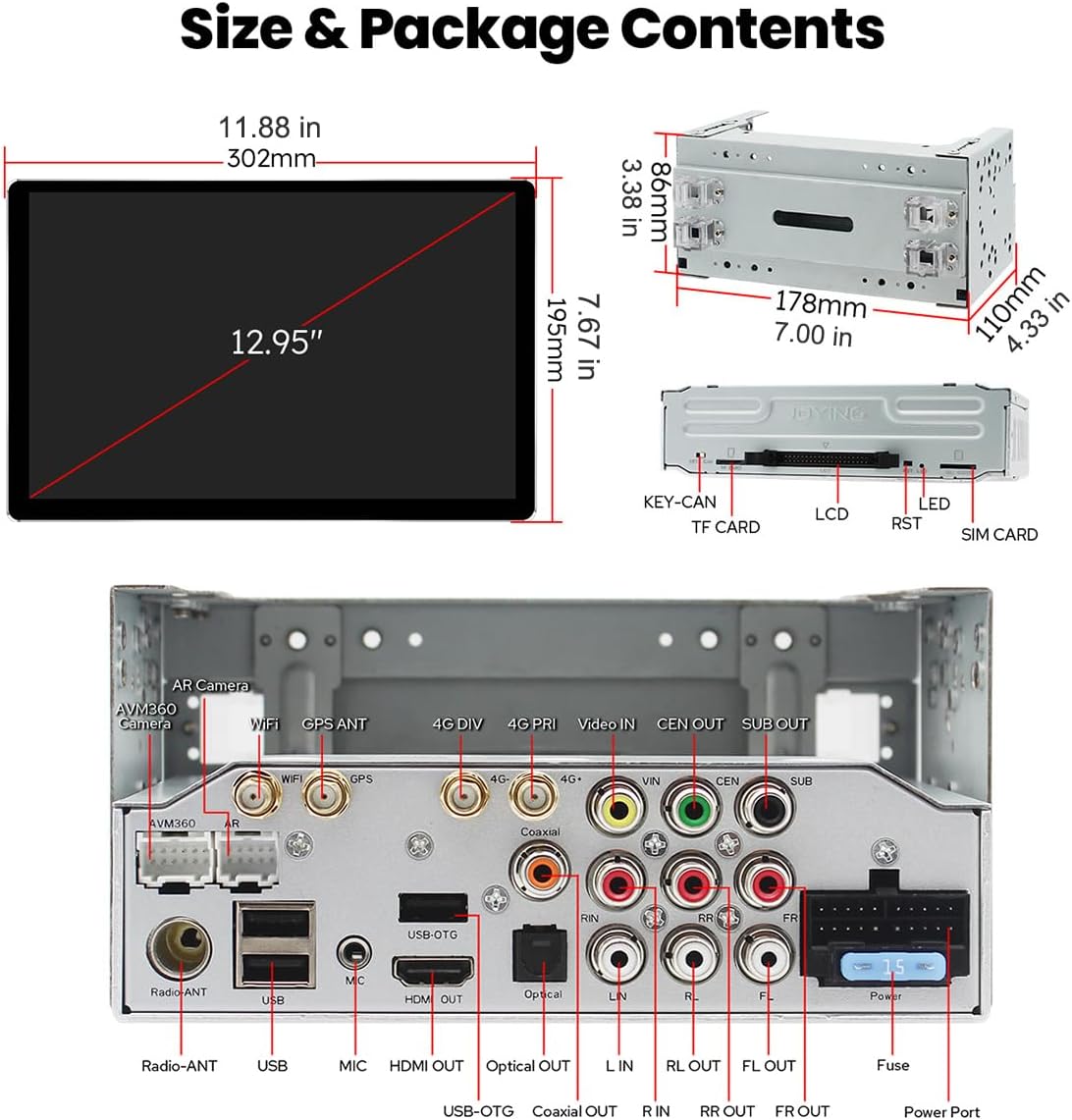
Image 6.1: Detailed diagram illustrating the dimensions of the 12.95-inch display and the various input/output ports on the main unit.
7. Rozwiązywanie Problemów
If you encounter issues with your JOYING car stereo, consider the following general troubleshooting steps:
- Brak zasilania: Sprawdź wszystkie połączenia zasilania i bezpieczniki. Upewnij się, że zapłon samochodu jest włączony.
- Brak dźwięku: Sprawdź połączenia głośników, poziomy głośności i wybrane źródło dźwięku. Sprawdź amppołączenia liniowe, jeśli dotyczy.
- Brak reakcji ekranu dotykowego: Try restarting the unit. If the issue persists, a factory reset might be necessary (consult the full installation manual for specific steps).
- Problemy z sygnałem GPS: Upewnij się, że antena GPS jest prawidłowo zainstalowana i ma zapewnioną przejrzystość. view nieba. Sprawdź połączenie antenowe.
- Problemy z łącznością Bluetooth/Wi-Fi: Ensure the antennas are connected. Restart the unit and your mobile device. Check network settings.
- Sterowanie na kierownicy nie działa: Re-perform the SW Learning process as described in Section 5.1. Verify CANbus connection if required for your vehicle.
For more specific issues, refer to the comprehensive installation manual included in your package or contact JOYING customer support.
8. Konserwacja
Proper maintenance ensures the longevity and optimal performance of your car stereo:
- Czyszczenie ekranu: Use a soft, lint-free cloth to gently wipe the touchscreen. Avoid abrasive cleaners or harsh chemicals that can damage the display.
- Aktualizacje oprogramowania: Periodically check for software updates from JOYING to ensure you have the latest features and bug fixes. Follow the instructions provided with the update.
- Kontrola temperatury: The unit has an upgraded cooling system. Ensure proper ventilation around the unit to prevent overheating, especially during prolonged use or in hot climates.
- Kontrola połączenia: Od czasu do czasu należy sprawdzać wszystkie połączenia przewodów, aby mieć pewność, że są solidne i nie są skorodowane.
9. Gwarancja i wsparcie
Your JOYING JY-UTD14N4 car stereo comes with a 2-letnia gwarancja. Zachowaj dowód zakupu na wypadek roszczeń gwarancyjnych.
For technical support, warranty inquiries, or questions regarding accessories, please contact JOYING customer service through their official channels or the retailer where you purchased the product.