
1. Wprowadzenie
This manual provides comprehensive instructions for the WiMiUS K13 4K Google TV Projector. Designed for a superior visual experience, this projector integrates advanced features for both entertainment and professional use. Key functionalities include native 1080p resolution with 4K support, 1500 ANSI lumens brightness, automatic focus and keystone correction, and an integrated Google TV system for seamless access to a wide range of applications.
Please read this manual thoroughly before operating the device to ensure proper usage and to maximize its performance and longevity.
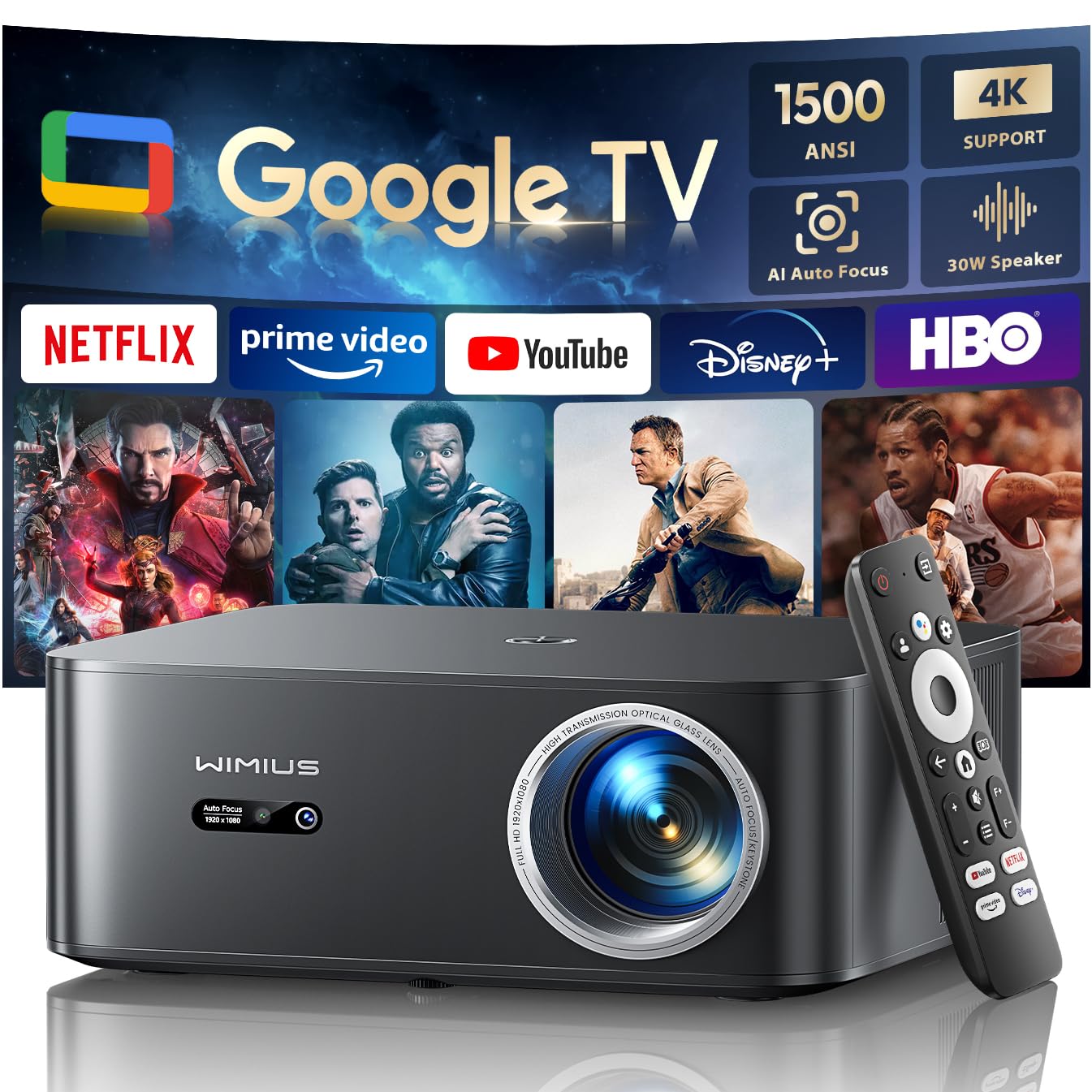
Figure 1: WiMiUS K13 4K Google TV Projector
2. Przewodnik konfiguracji
2.1 Rozpakowanie i zawartość opakowania
Ostrożnie wyjmij wszystkie elementy z opakowania. Sprawdź, czy wszystkie elementy są obecne:
- Projektor WiMiUS K13
- Pilot zdalnego sterowania (baterie AAA nie są dołączone)
- Kabel zasilający
- Kabel HDMI
- Instrukcja obsługi
2.2 Umieszczenie
Position the projector on a stable, flat surface. For optimal image quality, ensure the projector lens is perpendicular to the projection surface. Recommended projection distance is 2.5 to 3 meters for a large screen size.
- Montaż na blacie: Place the projector on a table or stand.
- Montaż na suficie/ścianie: The projector features M5 screw holes for compatible ceiling or wall mounts. Ensure the mount is securely installed and can support the projector's weight.
- Montaż na statywie: The K13 projector does not have dedicated tripod mounting holes. Use a tripod equipped with a tray to support the projector.
2.3 Połączenie zasilania
Connect the power cable to the projector's power input port, then plug the other end into a power outlet. The power indicator light will illuminate.
2.4 Pierwsze włączenie i podstawowa konfiguracja
Press the power button on the projector or remote control to turn on the device. Upon first use, follow the on-screen prompts to:
- Wybierz preferowany język.
- Connect to a Wi-Fi network (2.4G or 5G) for internet access.
- Log in with your Google account to access Google TV features and applications.
2.5 Automatyczne ustawianie ostrości i korekcja trapezowa
The WiMiUS K13 projector is equipped with automatic focus and keystone correction. After powering on or moving the projector, it will automatically adjust the image to achieve a clear, rectangular display. Manual adjustments are also available in the settings menu if needed.
3. Instrukcja obsługi
3.1 Remote Control and Google Voice Assistant
Use the provided remote control to navigate the Google TV interface. The remote includes dedicated buttons for popular streaming services like Netflix, Prime Video, YouTube, and Disney+. Utilize the integrated Google Voice Assistant by pressing the microphone button on the remote and speaking commands to search for content, adjust volume, or launch applications.
3.2 Google TV and Application Usage
The projector runs on an officially certified Android 11.0 Google TV system, providing access to over 10,000 applications from the Google Play Store. Navigate through the home screen to find installed apps or download new ones. Ensure a stable internet connection for optimal streaming performance.
3.3 Kopiowanie ekranu
The projector supports wireless screen mirroring from various devices:
- AirPlay (urządzenia iOS): Connect your iOS device and the projector to the same Wi-Fi network. Select the AirPlay option on your iOS device and choose the projector from the list of available devices.
- Miracast (urządzenia z systemem Android/Windows): Enable Miracast or Screen Mirroring on your Android or Windows device. Select the projector from the detected devices.
3.4 Podłączanie urządzeń zewnętrznych
The WiMiUS K13 offers multiple connectivity options:
- Porty HDMI: Connect gaming consoles, laptops, Blu-ray players, or other HDMI-enabled devices. Select the corresponding HDMI input from the projector's source menu.
- Porty USB: Włóż dyski USB, aby odtwarzać multimedia files (videos, photos, documents like PPT, Excel, Word).
- Wyjście audio 3.5 mm: Podłącz zewnętrzne słuchawki lub głośniki przez gniazdo audio.
3.5 Wyjście audio
The projector features integrated 20W speakers for clear audio. For enhanced sound, you can connect external audio systems:
- Bluetooth 5.2: Połącz z głośnikami lub słuchawkami Bluetooth, aby uzyskać bezprzewodowy dźwięk.
- Łuk HDMI: Connect to a soundbar or AV receiver that supports HDMI ARC for simplified audio setup and control.
3.6 Funkcja zoomu
Adjust the screen size from 50% to 100% using the digital zoom function in the settings menu. This allows you to resize the image without physically moving the projector.

Figure 2: Outdoor movie experience with the WiMiUS K13 Projector

Figure 3: Outdoor sports viewing with the WiMiUS K13 Projector
4. Konserwacja
4.1 Czyszczenie soczewek
Gently clean the projector lens with a soft, lint-free cloth or a lens cleaning brush. Avoid using abrasive materials or harsh chemicals, which can damage the lens coating.
4.2 Ventilation Care
Ensure the projector's ventilation openings are clear and unobstructed to prevent overheating. Regularly check for dust accumulation and clean as necessary using a soft brush or compressed air.
4.3 Przechowywanie
Jeśli projektor nie jest używany przez dłuższy czas, należy go przechowywać w chłodnym, suchym i wolnym od kurzu miejscu. Aby zapobiec uszkodzeniom, należy używać oryginalnego opakowania lub etui ochronnego.
5. Rozwiązywanie Problemów
If you encounter issues with your WiMiUS K13 projector, refer to the following common problems and solutions:
| Problem | Możliwa przyczyna | Rozwiązanie |
|---|---|---|
| Obraz nie jest wyświetlany | Power cable disconnected, incorrect input source, device not powered on. | Check power connection, ensure projector is on, select correct HDMI/USB input. |
| Obraz jest rozmazany | Out of focus, lens dirty, projector moved. | Allow auto-focus to adjust, clean the lens, manually adjust focus if needed. |
| Obraz jest zniekształcony (kształt trapezu) | Projektor nie jest ustawiony prostopadle do ekranu. | Allow auto-keystone correction to adjust, manually adjust keystone in settings. |
| Brak dźwięku | Volume too low, incorrect audio output selected, external device audio issue. | Increase volume, check audio output settings (internal, Bluetooth, HDMI ARC), verify external device audio. |
| Nie można połączyć się z siecią Wi-Fi/Bluetooth | Nieprawidłowe hasło, poza zasięgiem, problem z siecią. | Verify password, move closer to router/device, restart projector and router/device. |
| Pilot nie odpowiada | Niski poziom baterii, przeszkoda, niesparowany pilot. | Wymień baterie, usuń przeszkody i w razie potrzeby ponownie sparuj pilota. |
6. Specyfikacje
Detailed technical specifications for the WiMiUS K13 Projector:
| Funkcja | Szczegół |
|---|---|
| Marka | WiMiUS |
| Numer modelu przedmiotu | K13 |
| Kolor | Czarny |
| Typ produktu | Projektor przenośny |
| Rozdzielczość wyświetlacza | 1920 x 1080 (natywna rozdzielczość Full HD) |
| Maksymalna rozdzielczość wyświetlacza | 4096 x 2160 pikseli (obsługa 4K) |
| Typ wyświetlacza | LCD |
| Jasność | 1500 ANSI Lumen |
| Technologia łączności | HDMI, USB, 3.5mm Audio, Wi-Fi (6), Bluetooth (5.2) |
| Cechy specjalne | Digital Keystone Correction, Built-in Speaker, Auto Focus, Built-in Wi-Fi, Google TV |
| Kompatybilne urządzenia | Tablet, Laptop, Game Console, Speaker, Smartphone, Television |
| Zalecane zastosowania produktu | Home Cinema, Video Games, Professional, Education |
| Wymiary produktu | 28Dł. x 24.2Sz. x 10.8Wys. centymetrów |
| Współczynnik kształtu | Przenośny |
| Typ montażu | Table Mount (M5 screw holes for ceiling/wall mount) |
7. Gwarancja i wsparcie
WiMiUS is committed to providing excellent customer service and support for your K13 projector:
- Obsługa klienta: 24/7 support is available for any inquiries or assistance you may need.
- Polityka zwrotów: Enjoy a 1-year refund policy from the date of purchase.
- Zakres naprawy: The projector is covered by a 3-year repair warranty.
- Wsparcie techniczne: Zapewniamy dożywotnie wsparcie techniczne dla Twojego produktu.
For any questions or support requests regarding your WiMiUS K13 projector, please contact our customer service team via email. We are dedicated to providing a prompt and satisfactory solution.