
Wstęp
Welcome to your MENDUNER Earbud Translator. This manual provides detailed instructions for the proper use and care of your device. Please read it thoroughly before operation to ensure optimal performance and longevity.
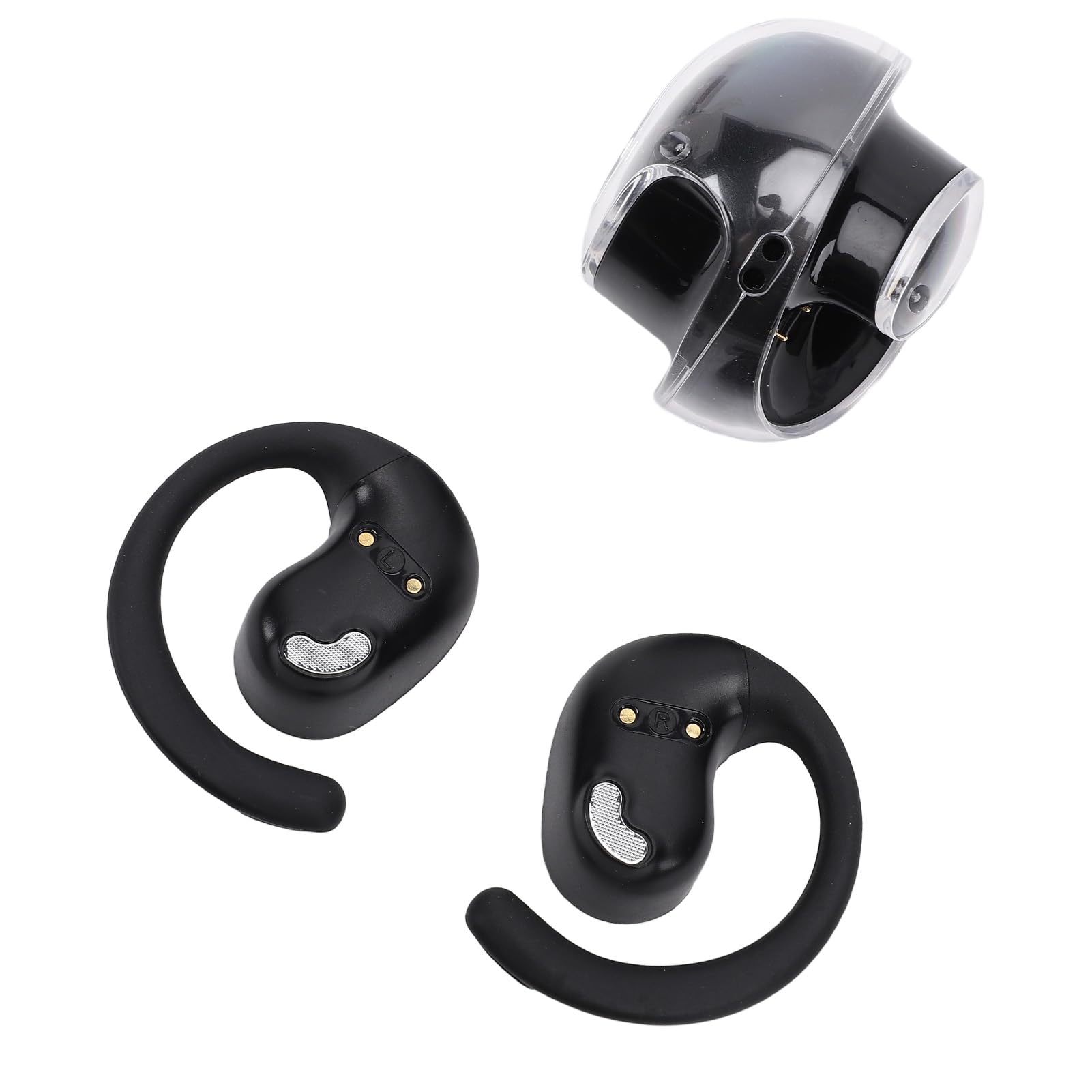
The MENDUNER Earbud Translator offers real-time language translation, music playback, and call functions, supporting 144 languages. It features 5.4 wireless technology for stable connections and a comfortable ergonomic design, making it ideal for travel, social interaction, and learning.
Zawartość opakowania
Sprawdź, czy w opakowaniu znajdują się wszystkie elementy:
- 1 x etui ładujące
- 2 x Language Earbuds (Left and Right)
- 1 x Smycz
- 1 x kabel danych

Specyfikacje
| Funkcja | Szczegół |
|---|---|
| Typ przedmiotu | Słuchawki douszne z funkcją tłumaczenia języka |
| Tworzywo | PC, ABS |
| Przybliżona waga | 86.00g / 3.03 uncji |
| Single Earbud Battery | LiPo Battery, 40mAh (Included) |
| Etui ładujące Bateria | LiPo Battery, 300mAh (Included) |
| Format odtwarzania | Single Ear or Double Ear |
| Metoda działania | Sterowanie dotykowe |
| Odległość połączenia | 10 do 15 metrów |
| Wsparcie językowe online | 144 Languages (e.g., African, Albanian, Amharic, Arabic) |
| Numer modelu | MENDUNER76zb8wh2sp-11 |
| Marka | MENDUNER |
| Kolor | Czarny i srebrny |
Organizować coś
Ładowanie urządzenia
Przed pierwszym użyciem należy w pełni naładować słuchawki douszne i etui ładujące.
- Place both earbuds into the charging case. Ensure they are correctly seated to make contact with the charging pins.
- Connect the provided data cable to the charging case and a compatible USB power source (e.g., computer USB port, USB wall adapter).
- The indicator lights on the charging case and/or earbuds will show charging status. Refer to the app for detailed battery levels.
Parowanie z urządzeniem
- Upewnij się, że słuchawki są naładowane i wyjmij je z etui ładującego. Automatycznie przejdą w tryb parowania.
- On your smartphone or tablet, enable 5.4 (Bluetooth) and search for available devices.
- Select "MENDUNER Translator" (or similar name) from the list of found devices to pair.
- Once paired, a confirmation sound or indicator light will signal a successful connection.
Instalacja aplikacji
Download and install the dedicated MENDUNER translator application from your device's app store. This app is essential for accessing translation features and managing settings.
Instrukcja obsługi
Włączanie/wyłączanie zasilania
The earbuds typically power on automatically when removed from the charging case and power off when placed back in the case. Manual power control may be available via touch controls (refer to app for customization).
Translation Mode
- Open the MENDUNER translator app on your paired device.
- Select the desired source and target languages from the app interface (supports 144 languages).
- Activate the real-time translation function within the app.
- Speak into the earbud's microphone. The translated audio will be played through the other earbud or your paired device.
- For two-way conversation, the other person can speak, and their words will be translated and played back to you.
Odtwarzanie muzyki
After pairing, the earbuds can be used for music playback. Use your paired device's media controls or the earbud's touch controls (if configured) to play, pause, skip tracks, and adjust volume.
Odbieranie połączeń
When a call comes in, you can answer it using the earbud's touch controls (if configured) or directly from your paired smartphone. Audio will be routed through the earbuds.

Konserwacja
Proper maintenance ensures the longevity and optimal performance of your MENDUNER Earbud Translator.
- Czyszczenie: Regularly wipe the earbuds and charging case with a soft, dry, lint-free cloth. Avoid using abrasive materials, solvents, or harsh chemicals.
- Składowanie: Gdy nie używasz słuchawek, przechowuj je w etui ładującym, aby je chronić i utrzymać naładowanie. Przechowuj w chłodnym, suchym miejscu, z dala od bezpośredniego światła słonecznego i ekstremalnych temperatur.
- Pielęgnacja baterii: Aby przedłużyć żywotność baterii, unikaj częstego całkowitego rozładowywania słuchawek i etui ładującego. Ładuj je regularnie, nawet jeśli nie są używane regularnie.
- Wodoodporność: Słuchawki douszne nie są wodoodporne. Unikaj narażenia na działanie wody, potu i wysokiej wilgotności.

Rozwiązywanie problemów
If you encounter issues with your MENDUNER Earbud Translator, refer to the following common solutions:
| Problem | Możliwa przyczyna | Rozwiązanie |
|---|---|---|
| Słuchawki douszne nie parują się | Not in pairing mode, low battery, Bluetooth off | Ensure earbuds are out of case and charged. Turn Bluetooth off and on on your device. Restart both devices. |
| Brak dźwięku | Volume too low, not connected, app issue | Increase volume on your device. Re-pair earbuds. Check app settings. |
| Tłumaczenie nie działa | Internet connection, incorrect language settings, app error | Ensure stable internet connection. Verify language selections in the app. Restart the app. |
| Problem z ładowaniem | Loose connection, dirty pins, faulty cable | Ensure earbuds are correctly seated. Clean charging pins. Try a different USB cable or power source. |
| Poor connection/range | Obstacles, interference, distance | Reduce distance between earbuds and paired device. Avoid physical obstructions. |

Informacje o gwarancji
MENDUNER products are typically covered by a limited manufacturer's warranty. Please refer to the warranty card included in your product packaging or visit the official MENDUNER webSzczegółowe warunki i zasady znajdziesz na stronie. Zachowaj dowód zakupu na wypadek roszczeń gwarancyjnych.
Note: Information regarding specific warranty duration or coverage was not provided in the product details.
Wsparcie
For further assistance, technical support, or inquiries, please contact MENDUNER customer service.
- Wsparcie online: Visit the official MENDUNER webwitryna z odpowiedziami na często zadawane pytania, artykułami pomocy i formularzami kontaktowymi.
- Wsparcie e-mailowe: Refer to your product packaging or the MENDUNER webwitryna zawierająca adresy e-mail obsługi klienta.
- Wsparcie telefoniczne: Check the MENDUNER webodwiedź witrynę, aby sprawdzić dostępne numery telefonów pomocy technicznej w Twoim regionie.
When contacting support, please have your model number (MENDUNER76zb8wh2sp-11) and proof of purchase ready.