
1. Wprowadzenie
Thank you for choosing the Joying 7 Inch Double Din Car Stereo. This manual provides detailed instructions for the installation, operation, and maintenance of your new car audio receiver. Please read this manual thoroughly before use to ensure proper functionality and to maximize your user experience. Keep this manual for future reference.
2. Informacje dotyczące bezpieczeństwa
- Zawsze priorytetem jest bezpieczna jazda. Nie obsługuj urządzenia w sposób odwracający uwagę od drogi.
- Upewnij się, że wszystkie przewody są prawidłowo podłączone, aby zapobiec zwarciom lub uszkodzeniom układu elektrycznego pojazdu.
- Jeśli nie jesteś pewien któregokolwiek kroku, skonsultuj się ze specjalistą w sprawie instalacji.
- Unikaj wystawiania urządzenia na działanie ekstremalnych temperatur, długotrwałego bezpośredniego światła słonecznego i nadmiernej wilgoci.
- Nie należy podejmować prób demontażu ani modyfikacji urządzenia. Może to spowodować unieważnienie gwarancji i uszkodzenie.
3. Zawartość opakowania
Sprawdź, czy w przesyłce znajdują się wszystkie elementy wymienione poniżej:
- 7" Radio x 1
- Double Din Cage x 1
- Left & Right Bracket x 1
- Reinforced Shims x 1
- Instrukcja obsługi x 1
- Instrukcja instalacji x 1
- Antena WiFi x 1
- Antena GPS x 1
- Antena 4G x 2
- External Mic x 1
- Kabel USB x 2
- AR Cable x 1
- Screen Ribbon Cable x 1
- ISO Cable x 1

Obraz: Ponadview of all included package contents.
4. Koniec produktuview
4.1 Panel przedni
The front panel features a 7-inch IPS touchscreen display for intuitive control and an integrated volume knob for easy audio adjustments. The Android 13 operating system provides a user-friendly interface for various applications.

Obraz: Przód view of the car stereo unit.
4.2 Panel tylny i złącza
The rear panel provides various input and output ports for comprehensive connectivity with your vehicle's systems and external devices.
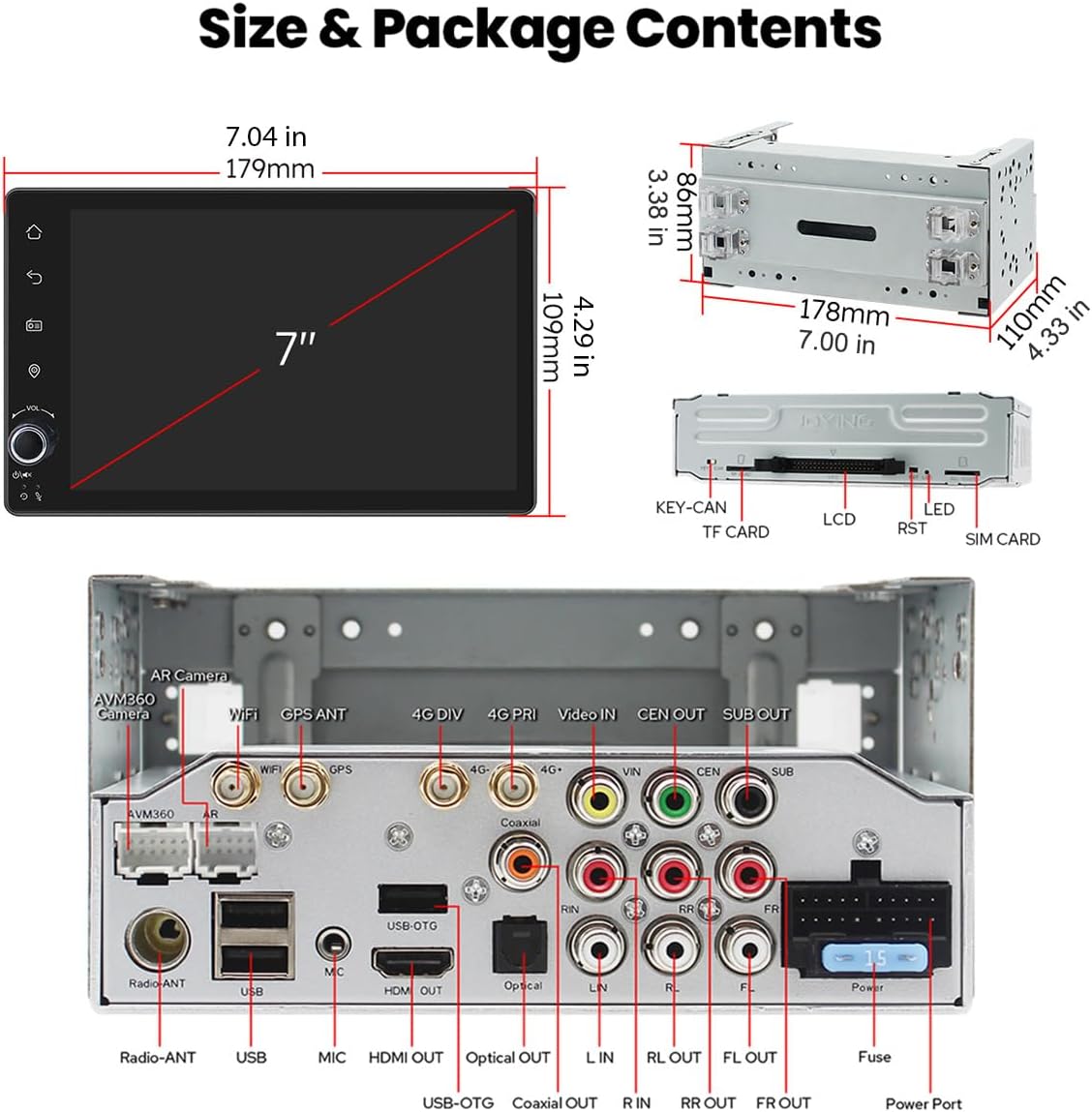
Image: Rear panel connections including USB, HDMI, Optical, Coaxial, and antenna ports.
4.3 Wymiary
The unit is designed to fit standard double din openings. Refer to the diagram for precise measurements.
Ilustracja: Wymiary produktu do planowania instalacji.
5. Konfiguracja i instalacja
Proper installation is crucial for optimal performance. It is recommended to consult a professional installer if you are unfamiliar with car audio system wiring.
5.1 Ogólne uwagi dotyczące instalacji
- An installation frame kit with an inner size of 178 x 102mm may be required.
- A special ISO harness, amplifier adapter, or CANbus decoder might be necessary depending on your car's specific configuration.
- This unit does not support factory car GPS antennas, backup cameras, Bluetooth, USB, or microphones. Only Joying accessories are compatible.
5.2 Installation Structure
The left and right brackets are adjustable, allowing for extension or telescoping to achieve the best fixing position within your car's center console. This design adapts to a wider range of vehicles.

Image: Adjustable installation brackets for flexible fitting.
Notatka: If your car is a Hyundai or Kia brand, please contact Joying for a different bracket.
5.3 Układ chłodzenia
The unit features a dual heat sink design for superior heat dissipation, improved temperature control, and enhanced performance stability. You can set a warning value for CPU temperature or radio volume. If these values are exceeded, the fan will automatically activate to prevent overheating.

Obraz: Wewnętrzny view of the upgraded cooling system.
5.4 antena WiFi
An independent WiFi antenna ensures stable signal quality and provides fast, smooth internet access. It supports 802.11a/b/g/n/AC standards with 2.4GHz/5GHz spectral bands.

Image: Dedicated WiFi antenna for improved connectivity.
6. Instrukcja obsługi
6.1 Pierwsze uruchomienie
After the first power-on, the system will take approximately 30-40 seconds to boot. Subsequent boot-ups will be significantly faster, entering the user interface in about 2 seconds once the car key is turned.
Interfejs użytkownika 6.2
The unit runs on Android 13, offering a customizable and intuitive interface. Navigate through apps and settings using the touchscreen.
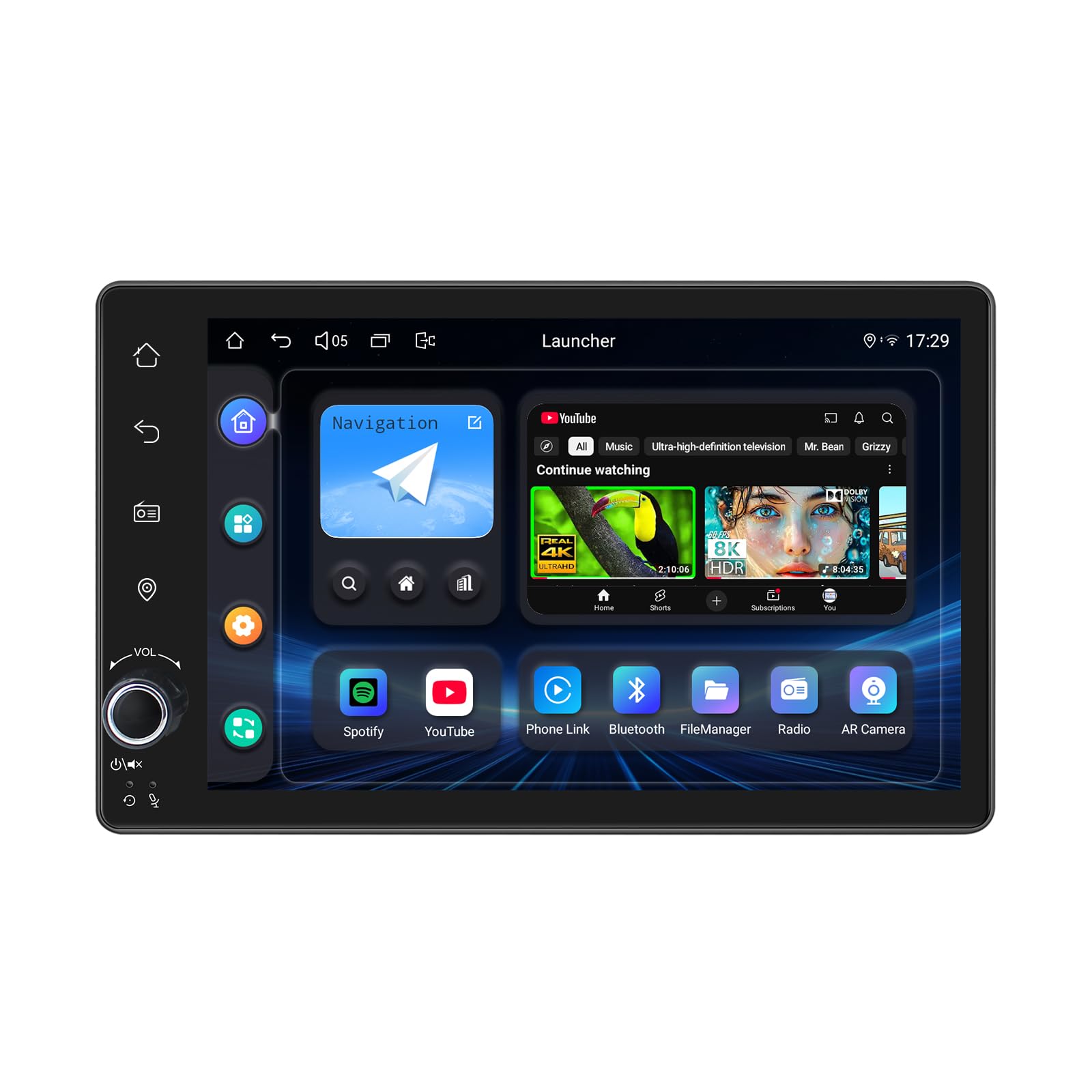
Image: Android 13 user interface with various application icons.
6.3 CarPlay i Android Auto
Connect your mobile phone via USB cable or Bluetooth to utilize Apple CarPlay or Android Auto. This allows you to access phone apps, navigation, make calls, and listen to music directly on the car stereo's screen.

Obraz: integracja CarPlay i Android Auto.
6.4 Nawigacja GPS
The unit includes precise GPS engines and an antenna for accurate positioning and real-time navigation. It supports offline maps; you can download map data for specific areas and use it without an internet connection. Mobile phone map data can also be synchronized via CarPlay/Android Auto.
6.5 Funkcje audio
Experience high-quality sound with the built-in TDA7851 DSP chip and 48-band graphic equalizer. The unit provides 4x50W maximum output power and supports aftermarket amplifiers with 4 audio outputs and 1 subwoofer output. For ultimate sound quality, utilize the optical fiber or coaxial digital output if your external amplifier to obsługuje.

Image: High-quality sound features and ampwsparcie lifier.
6.6 Built-in 4G Module
Insert a SIM card into the dedicated slot for internet access. The module supports FDD-LTE (B2/B4/B5/B7/B12/B13/B14/B17/B25/B26/B38/B66/B71) and TDD-LTE (B41) types. Note that it does not support making phone calls or sending SMS messages.
6.7 Sterowanie z kierownicy (SWC)
The unit supports steering wheel controls, allowing you to switch songs, change radio channels, and adjust volume safely while driving. For vehicles with a CAN system, an additional CANbus cable may be required to enable this feature.

Obraz: Funkcjonalność sterowania z kierownicy.
6.8 Rozmowy w trybie głośnomówiącym
Utilize Bluetooth connectivity for hands-free calling, enhancing safety and convenience while driving.
7. Zaawansowane funkcje
7.1 Wielozadaniowość na podzielonym ekranie
The split-screen feature allows you to run two applications simultaneously on the display. To activate, tap the recent apps icon, find the desired app, and tap the split-screen button. The first app will display on the left, and you can select a second app from recent applications for the right side.
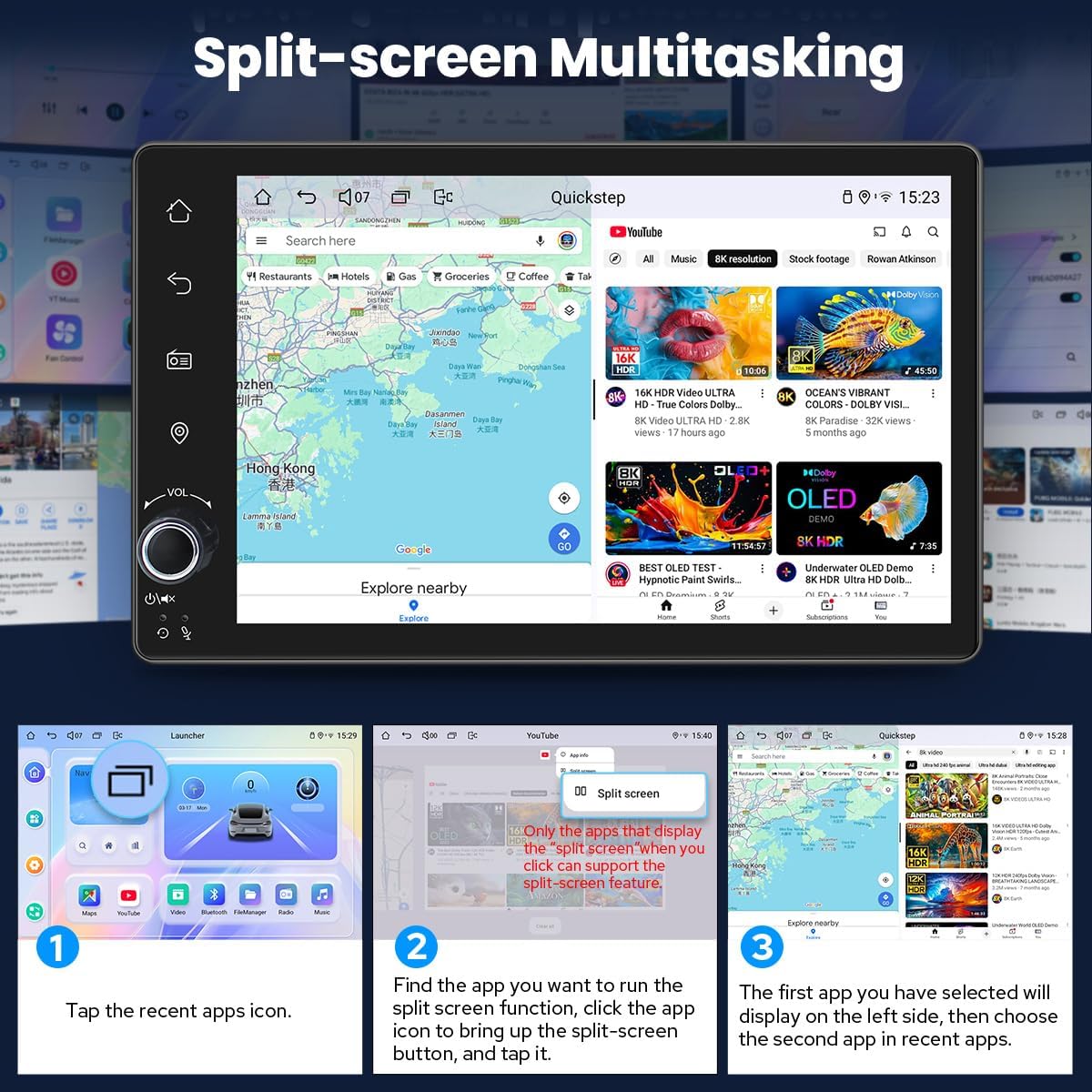
Image: Split-screen functionality for running two apps concurrently.
7.2 wyjście HDMI
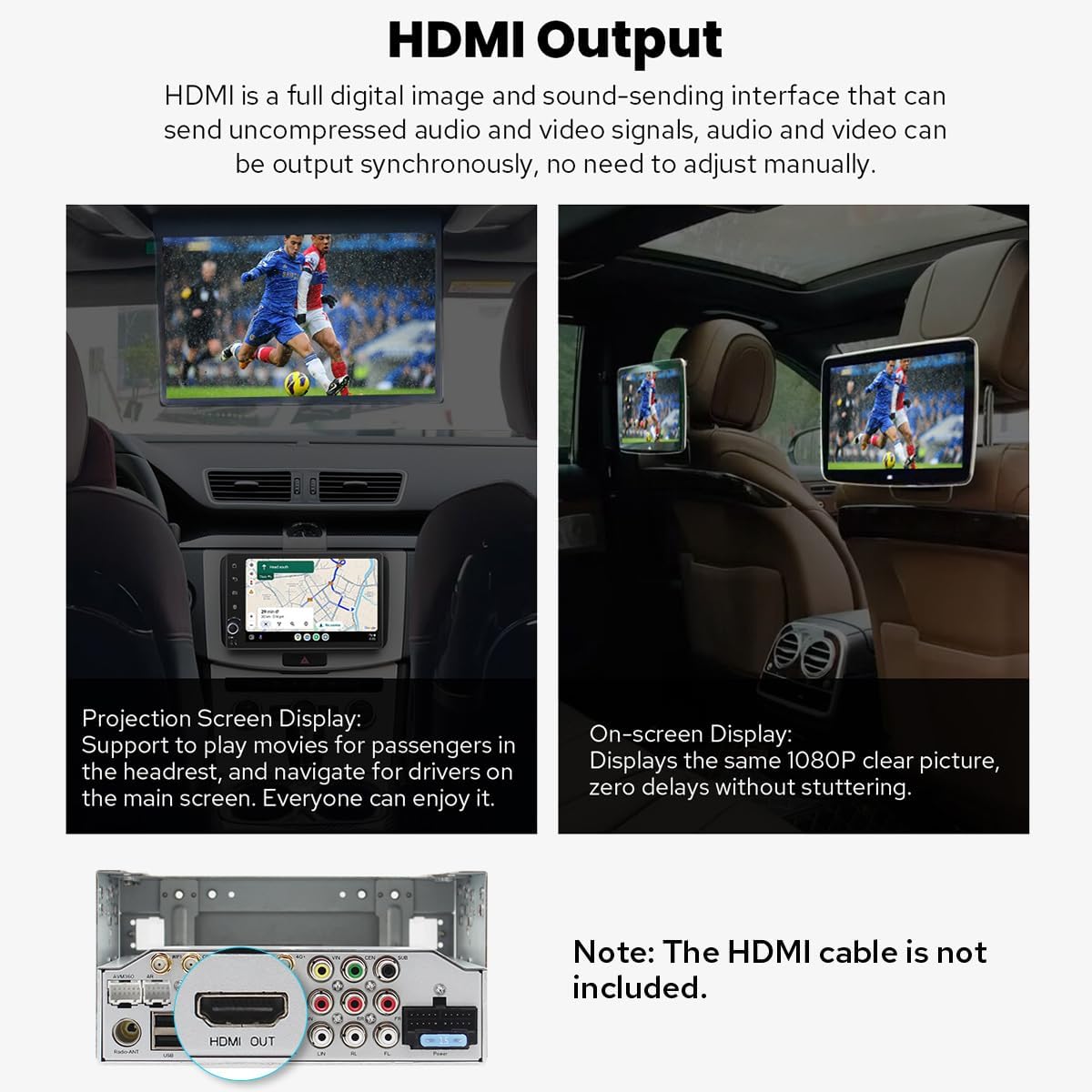
The HDMI output provides a full digital image and sound-sending interface, allowing you to output uncompressed audio and video signals synchronously to external displays without manual adjustment. This is ideal for projection screen displays for passengers or on-screen displays with 1080p clarity and zero delays.
Image: HDMI output port and its application for external displays.
Notatka: Kabel HDMI nie jest dołączony.
7.3 Ustawienia spersonalizowane
Customize your stereo's appearance and functionality:
- Car Boot Logo: Set a custom logo to display during startup.
- Customizable Wallpapers: Wybierz spośród różnych tapet lub prześlij swoją własną.
- Changeable Button Color: Adjust the color of the physical buttons to match your vehicle's interior lighting.
- Regulowana jasność ekranu: Optimize display visibility for different lighting conditions.
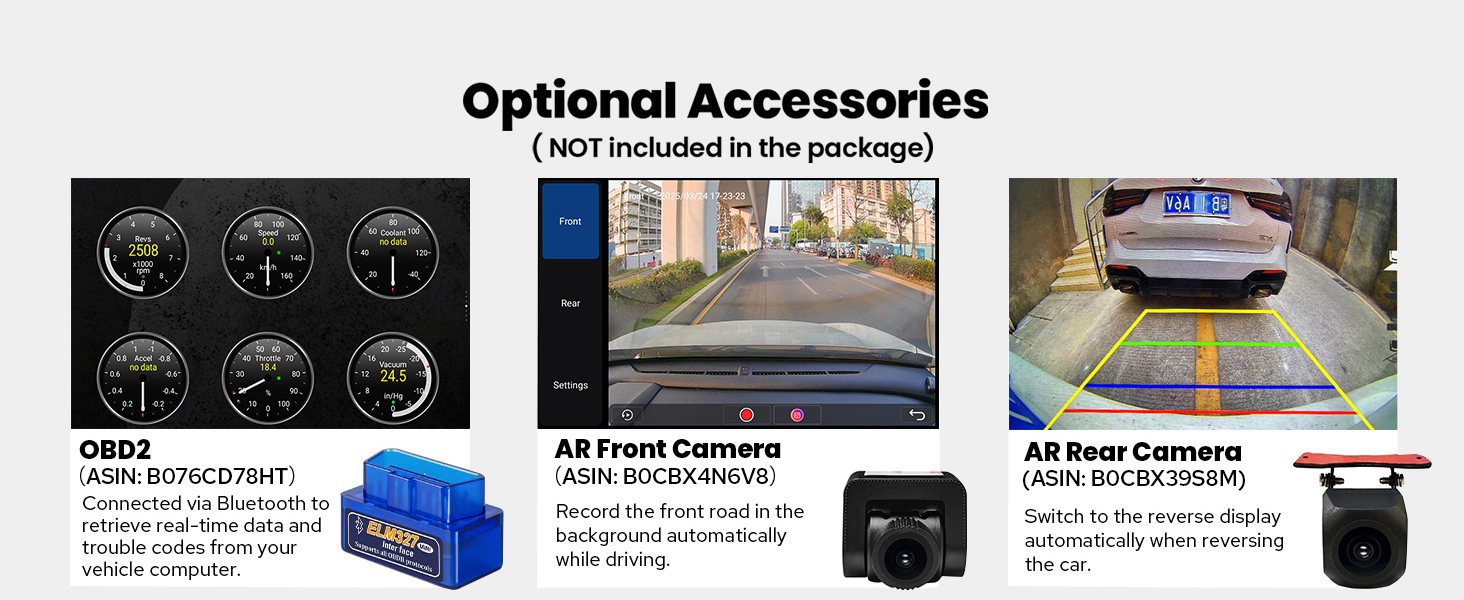
Image: Options for personalizing the car stereo's interface.
8. Konserwacja
- Czyszczenie ekranu: Delikatnie przetrzyj ekran dotykowy miękką, niepozostawiającą włókien ściereczką. Unikaj środków czyszczących o działaniu ściernym i rozpuszczalników.
- Aktualizacje oprogramowania: Periodically check the Joying official webodwiedź witrynę lub skontaktuj się z pomocą techniczną, aby uzyskać informacje o dostępnych aktualizacjach oprogramowania i zapewnić sobie optymalną wydajność oraz dostęp do nowych funkcji.
- Opieka ogólna: Utrzymuj urządzenie w czystości, bez kurzu i zanieczyszczeń. Zapewnij odpowiednią wentylację wokół urządzenia, aby zapobiec przegrzaniu.
9. Rozwiązywanie Problemów
| Problem | Możliwa przyczyna | Rozwiązanie |
|---|---|---|
| Urządzenie nie włącza się. | Nieprawidłowe okablowanie; Przepalony bezpiecznik; Problem z zasilaniem. | Check power connections and fuse. Ensure proper grounding. Consult installation manual. |
| Brak dźwięku. | Speaker wires disconnected; Volume too low; Ampproblem z lifierem. | Verify speaker connections. Increase volume. Check external amplifier status if used. |
| Sygnał GPS jest słaby lub niedokładny. | Nieprawidłowo zainstalowana lub zasłonięta antena GPS. | Upewnij się, że antena GPS ma czyste pole widzenia view nieba i jest bezpiecznie podłączony. |
| Problemy z połączeniem Bluetooth. | Device not in pairing mode; Interference; Software glitch. | Ensure both devices are in pairing mode. Restart both devices. Clear Bluetooth cache on phone. |
| Niska wydajność lub zawieszanie się. | Zbyt wiele uruchomionych aplikacji; Mało pamięci; Problem z oprogramowaniem. | Close unnecessary applications. Clear cache. Perform a system reset if necessary (data will be lost). |
For further assistance, please refer to the detailed installation manual or contact Joying customer support.
10. Specyfikacje
- Wymiary produktu: 5.91 x 7.99 x 4.72 cala
- Waga przedmiotu: 2.65 funta
- Numer modelu przedmiotu: JY-UTD03N4-B
- Technologia łączności: Bluetooth, Ethernet, HDMI, USB, Wi-Fi
- Rodzaj kontrolera: Android
- Cechy szczególne: Android Auto, Apple CarPlay, DSP, korektor graficzny, RDS
- Zgodne urządzenia: Amplifier, Aparat, Głośnik
- Całkowita liczba portów HDMI: 1
- Typ złącza: Koncentryczny, optyczny
- Tryb wyjścia audio: Stereofoniczny
- Konfiguracja kanałów dźwięku przestrzennego: 5.1
- Obsługa kodowania wideo: H264/H265/MP4/AVI/MKV/FLV
11. Optional Accessories (Not Included)
Enhance your car stereo's functionality with these compatible Joying accessories:
- Skaner OBD2: Connects via Bluetooth to retrieve real-time vehicle data and trouble codes.
- Przednia kamera AR: Automatycznie rejestruje drogę przed pojazdem podczas jazdy.
- Tylna kamera AR: Provides a reverse display when backing up the car.

Image: Optional accessories for extended functionality.
12. Gwarancja i wsparcie
For warranty information, technical support, or any inquiries regarding your Joying car stereo, please refer to the warranty card included with your product or visit the official Joying website. You may also contact Joying customer service directly for assistance.