
1. Wprowadzenie
Dziękujemy za zakupasing the JVC XS-N1154B Bluetooth Speaker. This manual provides essential information for the safe and efficient operation of your device. Please read it thoroughly before use and retain it for future reference.
2. Informacje dotyczące bezpieczeństwa
- Nie wystawiaj głośnika na działanie ekstremalnych temperatur, bezpośredniego światła słonecznego i wysokiej wilgotności.
- Unikaj upuszczania głośnika i narażania go na silne uderzenia.
- Nie próbuj demontować ani modyfikować głośnika. Spowoduje to unieważnienie gwarancji.
- Trzymaj głośnik z dala od wody i innych płynów, mimo że jest wodoodporny, aby zapobiec uszkodzeniu jego wewnętrznych podzespołów.
- Należy używać wyłącznie wskazanego kabla ładującego i zasilacza.
- Czyść głośnik miękką, suchą ściereczką. Nie używaj środków czyszczących o właściwościach ściernych ani rozpuszczalników.
3. Zawartość opakowania
Sprawdź, czy w przesyłce znajdują się wszystkie elementy:
- JVC XS-N1154B Bluetooth Speaker
- Kabel ładujący
- Instrukcja obsługi
- Pilot zdalnego sterowania (jeśli jest dołączony)
4. Koniec produktuview
Zapoznaj się z podzespołami i elementami sterującymi głośnika.
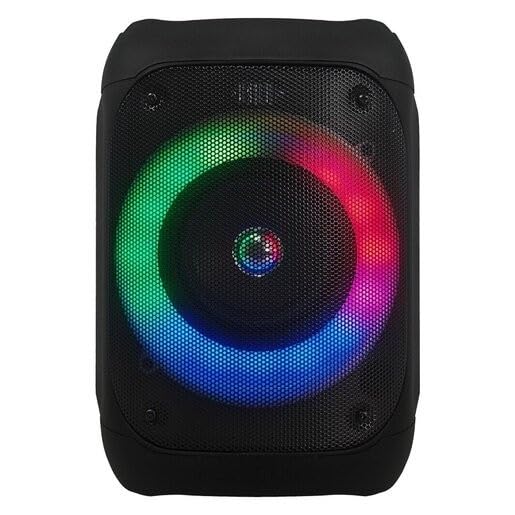
Rysunek 1: Przód view of the JVC XS-N1154B Bluetooth Speaker, showcasing the speaker grille and integrated music-activated LED lights.
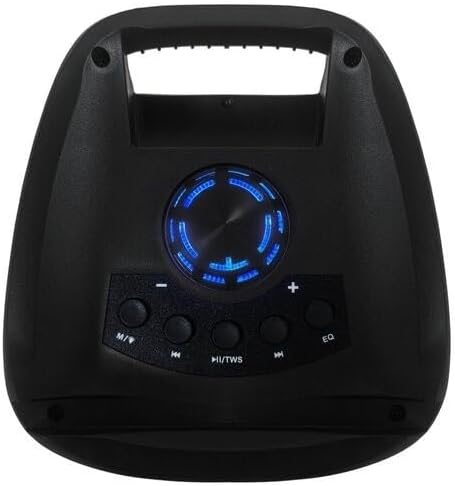
Rysunek 2: Szczyt view of the JVC XS-N1154B Bluetooth Speaker, displaying the control panel with various buttons and the volume knob.
Funkcje panelu sterowania:
- Przycisk zasilania: Włącza lub wyłącza głośnik.
- Przycisk trybu (M): Switches between Bluetooth, USB, SD Card, and FM Radio modes.
- Play/Pause (►||) / TWS Button: Plays or pauses audio. Long press for TWS (True Wireless Stereo) pairing.
- Previous Track (◀◀) Button: Skips to the previous track or tunes down in FM mode.
- Next Track (►►) Button: Skips to the next track or tunes up in FM mode.
- Przycisk korektora: Przełącza między ustawieniami korektora.
- Pokrętło głośności: Rotates to adjust the volume level.
5. Konfiguracja
5.1 Ładowanie głośnika
- Podłącz kabel ładujący do portu ładowania głośnika.
- Plug the other end of the cable into a suitable USB power adapter (not included) or a powered USB port.
- Podczas ładowania zaświeci się kontrolka ładowania, zazwyczaj na czerwono.
- Once fully charged, the indicator light may change color (e.g., turn off or turn blue/green). Disconnect the speaker from the power source.
5.2 Włączanie/wyłączanie
- Włączanie: Press and hold the Power button until the speaker powers on and you hear an audible prompt.
- Aby wyłączyć: Press and hold the Power button again until the speaker powers off.
6. Instrukcja obsługi
6.1 parowanie Bluetooth
- Ensure the speaker is powered on and in Bluetooth mode. If not, press the Mode (M) button to switch to Bluetooth mode. The speaker will indicate it is ready for pairing (e.g., a blinking LED or audible prompt).
- Na swoim urządzeniu mobilnym (smartfonie, tablecie, laptopie) włącz Bluetooth i wyszukaj dostępne urządzenia.
- Select "JVC XS-N1154B" from the list of devices.
- Po sparowaniu głośnik wyda dźwięk potwierdzający, a kontrolka Bluetooth zacznie świecić światłem ciągłym.
- Teraz możesz odtwarzać dźwięk ze swojego urządzenia przez głośnik.
6.2 Odtwarzanie z USB/karty SD
- Insert a USB flash drive or an SD card (with supported audio files) into the corresponding port on the speaker.
- The speaker will automatically switch to USB or SD card mode and begin playing audio. If not, press the Mode (M) button to select the correct input.
- Use the Previous Track (◀◀), Next Track (►►), and Play/Pause (►||) buttons to control playback.
6.3 Obsługa radia FM
- Press the Mode (M) button to switch to FM Radio mode.
- To auto-scan and save available stations, press and hold the Play/Pause (►||) button. The speaker will scan and store stations automatically.
- Use the Previous Track (◀◀) and Next Track (►►) buttons to navigate between saved FM stations.
6.4 trybów oświetlenia LED
The speaker features music-activated LED lights. These lights typically synchronize with the audio playback. There may be an additional button or a combination of buttons to cycle through different light modes or to turn them off. Refer to the remote control section for specific controls if available.
6.5 Regulacja głośności
Rotate the Volume Knob on the top panel clockwise to increase volume and counter-clockwise to decrease volume.
6.6 Korzystanie z pilota zdalnego sterowania
If your package includes a remote control, it provides convenient access to various functions:
- Moc: Włącz/Wyłącz
- Tryb: Switch input sources (Bluetooth, USB, SD, FM)
- Głośność +/-: Dostosuj głośność
- Odtwórz/Pauza: Sterowanie odtwarzaniem
- Poprzednie Następne: Skip tracks/stations
- EQ: Change equalizer presets
- PROWADZONY: Control LED light modes (if applicable)
7. Konserwacja
7.1 Czyszczenie
Wipe the speaker's exterior with a soft, dry, lint-free cloth. Do not use liquid cleaners, sprays, or solvents, as these may damage the finish or internal components. Ensure all ports are dry before use, especially given its waterproof nature.
7.2 Przechowywanie
When not in use for extended periods, store the speaker in a cool, dry place, away from direct sunlight and extreme temperatures. It is recommended to charge the battery periodically to maintain its lifespan.
8. Rozwiązywanie Problemów
| Problem | Możliwa przyczyna | Rozwiązanie |
|---|---|---|
| Głośnik nie włącza się. | Bateria jest rozładowana. | Naładuj głośnik całkowicie. |
| Brak dźwięku. | Volume is too low or muted. Device not paired correctly. | Increase volume. Re-pair Bluetooth device. Check audio source. |
| Parowanie Bluetooth nie powiodło się. | Głośnik nie jest w trybie parowania. Urządzenie jest zbyt daleko. Zakłócenia. | Upewnij się, że głośnik jest w trybie parowania Bluetooth. Przybliż urządzenie. Wyłącz inne urządzenia Bluetooth. |
| Karta USB/SD nie jest obsługiwana. | Błędny file format. Karta/napęd nie zostały prawidłowo włożone. | Zapewnij dźwięk files are in a supported format. Reinsert the USB drive/SD card. Press Mode button to select correct input. |
| Odbiór radia FM jest słaby. | Słaby sygnał. | Przenieś głośnik w miejsce, gdzie odbiór jest lepszy. |
9. Specyfikacje
- Model: XS-N1154B
- Marka: JVC
- Łączność: Bluetooth, USB, karta SD
- Radio: Cyfrowe radio FM
- Moc wyjściowa: 4 watów
- Tryb wyjścia audio: Stereofoniczny
- Metoda sterowania: Zdalny
- Tworzywo: Plastikowy
- Wodoodporny: Tak
- Źródło zasilania: Zasilany bateryjnie
- Wymiary: Około 18.6 cm gł. x 18.9 szer. x 25.5 wys.
- Waga: Około 1.2 kg
- Zgodne urządzenia: Laptopa, smartfona
10. Gwarancja i wsparcie
10.1 Informacje o gwarancji
This JVC XS-N1154B Bluetooth Speaker comes with a 1 rok gwarancji od daty zakupu. Niniejsza gwarancja obejmuje wady produkcyjne i wykonawcze wynikające z normalnego użytkowania. Nie obejmuje uszkodzeń spowodowanych niewłaściwym użytkowaniem, wypadkami, nieautoryzowanymi modyfikacjami ani normalnym zużyciem.
10.2 Obsługa klienta
For technical assistance, warranty claims, or further inquiries, please contact JVC customer support through their official website or the retailer where the product was purchased. Please have your product model number (XS-N1154B) and proof of purchase ready when contacting support.