
1. Wprowadzenie
Dziękujemy za zakupasing the JVC XS-N3214PB Portable Bluetooth Party Speaker. This manual provides important information regarding the setup, operation, and maintenance of your speaker. Please read it thoroughly before using the product to ensure proper function and to maximize your listening experience. Keep this manual for future reference.
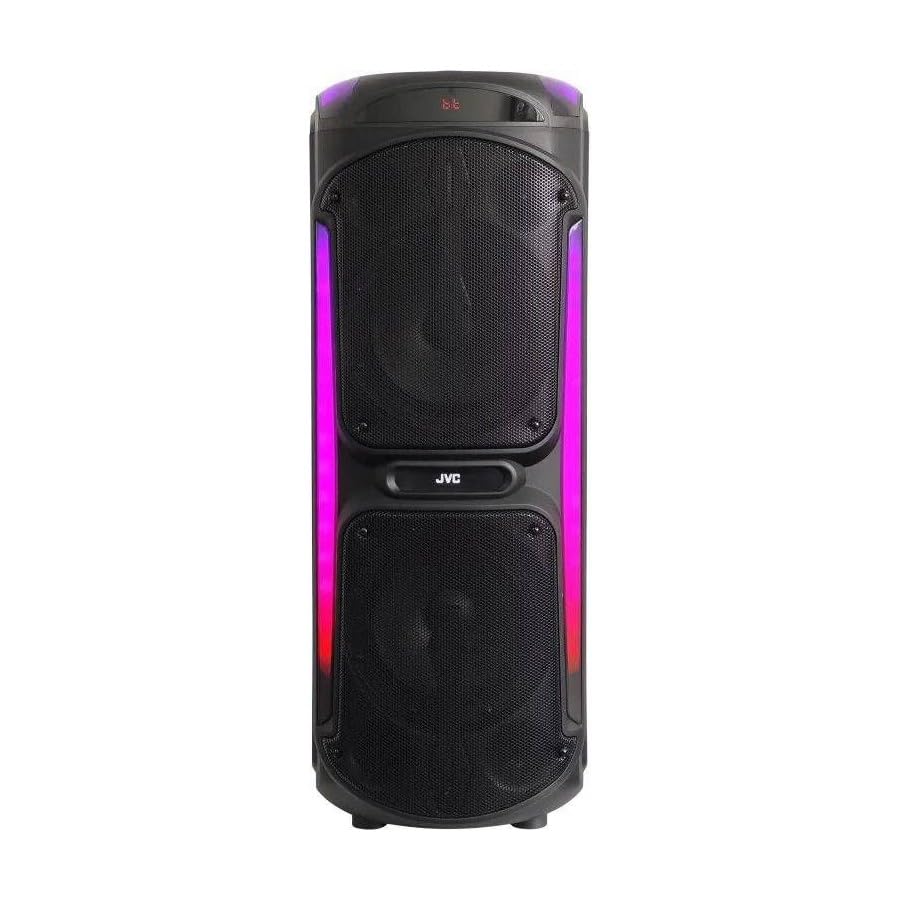
Image: The JVC XS-N3214PB Portable Bluetooth Party Speaker, shown with two microphones, highlighting its versatile connectivity options including Bluetooth, FM Radio, MP3 playback, AUX input, and USB input. The speaker features integrated LED lighting.
2. Informacje dotyczące bezpieczeństwa
Aby zapewnić bezpieczną obsługę i zapobiec uszkodzeniom, należy przestrzegać następujących środków ostrożności:
- Nie wystawiaj głośnika na działanie wody, wilgoci ani ekstremalnych temperatur.
- Nie próbuj demontować ani modyfikować głośnika. Wszelkie prace serwisowe powierzaj wykwalifikowanemu personelowi.
- Trzymaj głośnik z dala od źródeł ciepła, bezpośredniego światła słonecznego i materiałów łatwopalnych.
- Należy używać wyłącznie wskazanego adaptera ładowania.
- Unikaj umieszczania ciężkich przedmiotów na głośniku.
- Czyść głośnik miękką, suchą ściereczką. Nie używaj płynnych środków czyszczących ani aerozoli.
- Podczas użytkowania głośnika należy zapewnić mu odpowiednią wentylację.
3. Zawartość opakowania
Sprawdź, czy w opakowaniu znajdują się wszystkie elementy:
- JVC XS-N3214PB Portable Bluetooth Party Speaker (1 unit)
- Power Adapter/Charging Cable (1 unit)
- Pilot zdalnego sterowania (1 szt.)
- Instrukcja obsługi (ten dokument)
- (Optional: Microphone, if included with your specific purchase)
4. Koniec produktuview
4.1. Funkcje
- Powerful 800W Audio Output
- Łączność bezprzewodowa Bluetooth
- Wbudowany akumulator zapewniający mobilność
- Integrated LED Party Lights
- Tuner radiowy FM
- Odtwarzanie USB
- Wejście AUX
- Microphone Input for Karaoke
- Obsługa za pomocą pilota
- Deep Bass Performance
4.2. Elementy sterujące i porty
Familiarize yourself with the speaker's control panel and connection ports. (Refer to diagrams in the full printed manual for exact locations).
- Przycisk zasilania: Włącza/wyłącza głośnik.
- Przycisk trybu: Przełącza między trybami Bluetooth, FM, USB i AUX.
- Regulacja głośności: Reguluje główną głośność.
- Przycisk Odtwórz/Pauza: Steruje odtwarzaniem multimediów.
- Przyciski poprzedniego/następnego utworu: Umożliwia nawigację pomiędzy utworami lub stacjami FM.
- Przycisk światła LED: Włącza i wyłącza efekty świetlne LED.
- Regulacja głośności/echa mikrofonu: Dostosowuje wejście mikrofonowe i efekt echa.
- Port USB: Do odtwarzania z dysku USB.
- Wejście AUX (3.5 mm): Do podłączania zewnętrznych urządzeń audio.
- Wejście mikrofonowe (6.35 mm): Do podłączenia przewodowego mikrofonu.
- Port DC IN: Do podłączenia zasilacza w celu naładowania głośnika.
5. Konfiguracja
5.1. Ładowanie głośnika
- Connect the power adapter to the DC IN port on the speaker.
- Podłącz drugi koniec zasilacza do gniazdka ściennego.
- The charging indicator light will illuminate (color may vary) to show the speaker is charging.
- Allow approximately 4-6 hours for a full charge. The indicator light may change or turn off when fully charged.
- Disconnect the power adapter once charging is complete or when using the speaker on battery power.
5.2. Włączanie/wyłączanie zasilania
- Włączanie: Press and hold the Power button for a few seconds until the display illuminates.
- Aby wyłączyć: Press and hold the Power button again for a few seconds until the display turns off.
6. Instrukcja obsługi
6.1. Parowanie Bluetooth
- Power on the speaker. It will automatically enter Bluetooth pairing mode, indicated by a flashing Bluetooth icon or voice prompt.
- Na swoim urządzeniu mobilnym (smartfonie, tablecie itp.) włącz Bluetooth i wyszukaj dostępne urządzenia.
- Select "JVC XS-N3214PB" from the list of devices.
- Once paired, the speaker will confirm with an audible tone or a solid Bluetooth icon.
- Teraz możesz odtwarzać dźwięk ze swojego urządzenia przez głośnik.
6.2.Radio FM
- Press the Mode button until "FM" is displayed.
- Naciśnij przycisk Odtwarzaj/Pauza, aby automatycznie przeskanować i zapisać dostępne stacje FM.
- Użyj przycisków Poprzedni/Następny utwór, aby poruszać się pomiędzy zapisanymi stacjami.
6.3. Odtwarzanie USB
- Włóż dysk flash USB (sformatowany w systemie FAT32) zawierający dźwięk w formacie MP3 files do portu USB.
- The speaker will automatically switch to USB mode and begin playing the first track. If not, press the Mode button to select USB.
- Do sterowania odtwarzaniem służą przyciski Odtwórz/Pauza i Poprzedni/Następny utwór.
6.4. Wejście AUX
- Podłącz jeden koniec kabla audio 3.5 mm (nie ma go w zestawie) do portu AUX IN w głośniku.
- Podłącz drugi koniec kabla do wyjścia audio w urządzeniu zewnętrznym (np. odtwarzaczu MP3, laptopie).
- Press the Mode button until "AUX" is displayed.
- Steruj odtwarzaniem i głośnością z urządzenia zewnętrznego.
6.5. Funkcja mikrofonu i karaoke
- Connect a wired microphone (not included) to the Microphone Input port.
- Adjust the microphone volume and echo effect using the dedicated controls on the speaker.
- Play music via Bluetooth, USB, or AUX, and sing along through the microphone.
6.6. Oświetlenie imprezowe LED
Press the LED Light button to cycle through different lighting modes or to turn the lights off.
6.7. Pilot zdalnego sterowania
The included remote control allows for convenient operation of the speaker from a distance. Functions include power on/off, mode selection, volume adjustment, track control, and LED light control. Ensure the remote control has working batteries and is pointed towards the speaker's sensor.
7. Konserwacja
- Czyszczenie: Wipe the speaker's exterior with a soft, dry, lint-free cloth. Do not use abrasive cleaners, waxes, or solvents.
- Składowanie: If storing the speaker for an extended period, ensure it is fully charged, then power it off. Store in a cool, dry place away from direct sunlight. Recharge the battery every few months to maintain its lifespan.
- Pielęgnacja baterii: To prolong battery life, avoid fully discharging the speaker frequently. Charge it before the battery is completely depleted.
8. Rozwiązywanie Problemów
| Problem | Możliwa przyczyna | Rozwiązanie |
|---|---|---|
| Głośnik nie włącza się. | Akumulator jest rozładowany. Kabel zasilający nie jest podłączony. | Charge the speaker. Ensure power cable is securely connected to both speaker and outlet. |
| Brak dźwięku. | Volume is too low. Incorrect mode selected. Device not paired (Bluetooth). AUX cable loose. | Increase volume on speaker and source device. Press Mode button to select correct input. Re-pair Bluetooth device. Check AUX cable connection. |
| Nie można sparować urządzenia Bluetooth. | Głośnik nie jest w trybie parowania. Urządzenie jest za daleko. Zakłócenia. | Upewnij się, że głośnik jest w trybie Bluetooth i miga. Przysuń urządzenie bliżej głośnika. Wyłącz inne urządzenia Bluetooth. |
| Odtwarzanie USB nie działa. | USB drive not formatted correctly (FAT32). Unsupported file format. USB drive faulty. | Ensure USB drive is FAT32 and contains MP3 files. Wypróbuj inny dysk USB. |
| Pilot nie działa. | Batteries depleted. Obstruction between remote and speaker. | Replace remote control batteries. Ensure clear line of sight to speaker's IR sensor. |
9. Specyfikacje
| Numer modelu | XS-N3214PB |
| Marka | JVC |
| Moc wyjściowa | 800 W (szczyt) |
| Łączność | Bluetooth, USB, AUX (3.5mm), FM Radio, Microphone Input (6.35mm) |
| Tryb wyjścia audio | Stereofoniczny |
| Tworzywo | Plastikowy |
| Typ montażu | Stały podłogowe |
| Metoda kontroli | Pilot, przycisk |
| Wymiary (gł. x szer. x wys.) | 35D x 31W x 94H centymetrów |
| Zawarte komponenty | 1 x JVC XS-N3214PB 800W Party Portable Bluetooth Speaker, Power Adapter, Remote Control, User Manual |
10. Gwarancja i wsparcie
10.1. Informacje o gwarancji
This JVC XS-N3214PB speaker comes with a 1 rok gwarancji od daty zakupu. Niniejsza gwarancja obejmuje wady produkcyjne i wykonawcze przy normalnym użytkowaniu. Nie obejmuje uszkodzeń spowodowanych niewłaściwym użytkowaniem, wypadkami, nieautoryzowanymi modyfikacjami ani normalnym zużyciem. Prosimy zachować dowód zakupu na potrzeby roszczeń gwarancyjnych.
10.2. Obsługa klienta
For technical assistance, warranty claims, or product inquiries, please contact JVC customer support through the retailer where the product was purchased or visit the official JVC webwitryna zawierająca dane kontaktowe dotyczące Twojego regionu.