
1. Wprowadzenie
This manual provides detailed instructions for the installation, operation, and maintenance of your UNITOPSCI 2G+64G Android Car Stereo Radio. Please read this manual thoroughly before installation and use to ensure proper function and safety.
The UNITOPSCI 2G+64G Android Car Stereo Radio is an advanced in-dash multimedia system featuring a 7-inch capacitive touchscreen, Android 13 operating system, 2GB RAM, and 64GB ROM. It integrates wireless CarPlay, Android Auto, GPS navigation, Bluetooth, FM/RDS radio, and supports a backup camera and steering wheel controls.
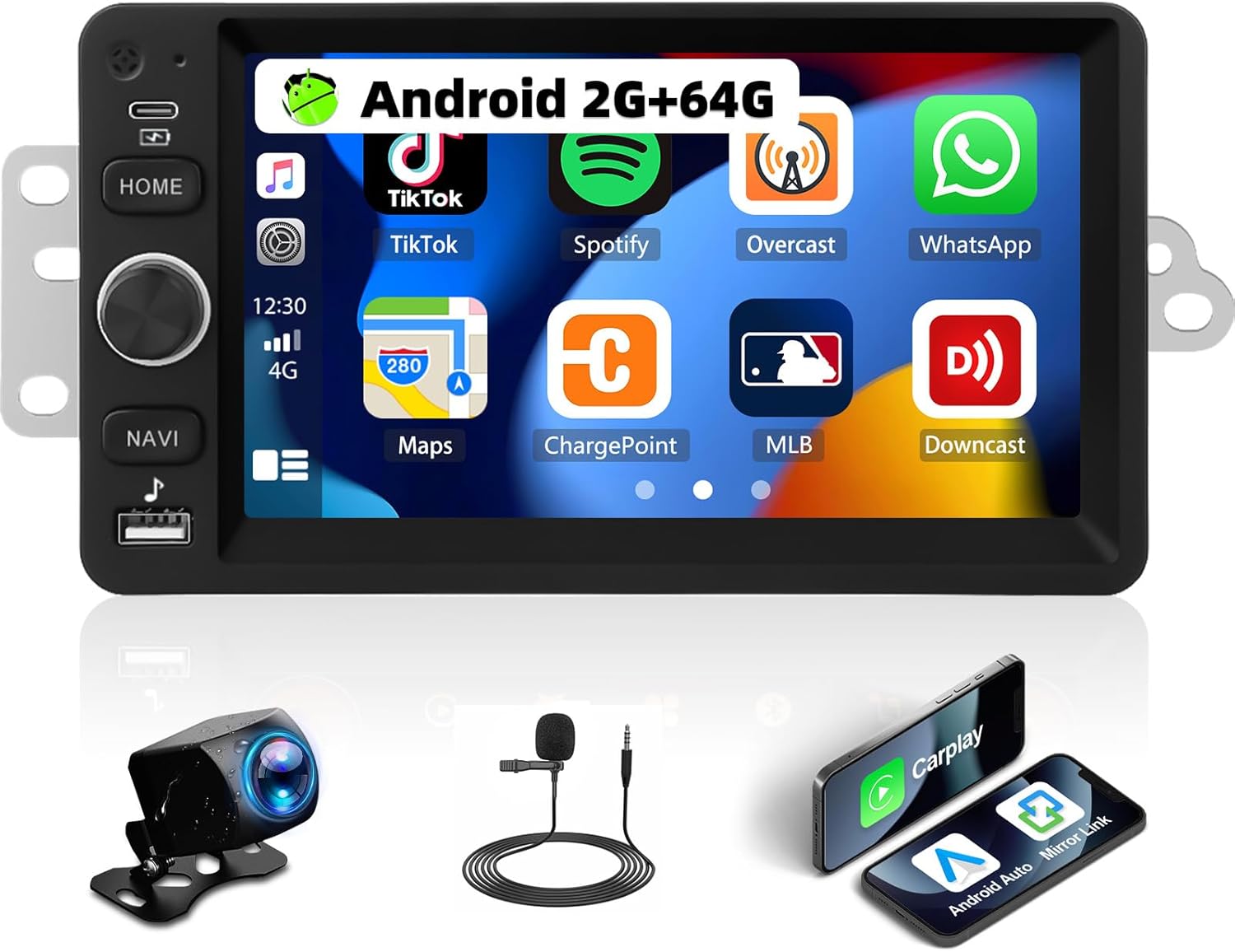
Image 1.1: UNITOPSCI 2G+64G Android Car Stereo Radio and included components.
2. Zgodność pojazdu
This Android car stereo is designed to fit specific vehicle models. Please verify your vehicle's compatibility before proceeding with installation.
- Chevy Chevrolet: Silverado, SSR, Tahoe (2003-2006)
- GMC: Siera, Yukon (2003-2006)
- Hummer: (2003-2006)
It is recommended to measure the size and shape of your original radio in the car's center console to confirm fitment.

Image 2.1: Visual comparison of a vehicle's dashboard before and after installing the UNITOPSCI car stereo.

Image 2.2: Detailed list of compatible Chevrolet, GMC, Hummer, Isuzu, Oldsmobile, Saturn, Pontiac, Buick, and Cadillac models and their respective years.
Special Note for Bose Audio System Owners:
If your vehicle is factory-equipped with a Bose premium audio system, a high-end wiring harness and a Bose-specific CANBUS decoder are required for proper function of all features, including the audio system and steering wheel controls. Consult with a professional or the manufacturer for accessory recommendations if unsure.
3. Konfiguracja i instalacja
3.1. Zawartość opakowania
Sprawdź, czy w opakowaniu znajdują się wszystkie komponenty:
- Jednostka stereo samochodowego z systemem Android
- Przewody zasilające)
- Kabel RCA
- Kabel wejściowy kamery tylnej
- Kamera
- Antena GPS
- Pudełko Canbusa
- Kable USB
- Small Horn (External Microphone)
- Adapter anteny
- Radio Antenna
- Instrukcja obsługi

Image 3.1: Illustration of all items included in the product package.
3.2. Schemat połączeń
Refer to the following diagrams for correct wiring connections. Incorrect wiring can damage the unit or vehicle electronics.

Image 3.2: Comprehensive wiring diagram illustrating connections for power, RCA, USB, camera, GPS, and CANBUS.
- Przewód zasilający: Podłącz do zasilania pojazdu (ACC, B+, GND).
- Kabel RCA: For audio output (FR OUT, FL OUT, RR OUT, RL OUT, SUBWOOFER) and auxiliary input (AUX IN L/R), video output (VIDEO OUT), and camera input (CVBS IN).
- Kabel USB: Do podłączania urządzeń USB.
- Kabel wejściowy kamery tylnej: Connects the backup camera.
- Antena GPS: Zamontuj w miejscu z wolnym dostępem view nieba w celu optymalnego odbioru sygnału.
- Skrzynka Canbus: Connect for vehicle data communication, especially for steering wheel controls and vehicle information.
- Antena radiowa: Podłącz, aby odbierać radio FM/AM.
Ważne uwagi dotyczące instalacji:
- Upewnij się, że wszystkie połączenia są solidne, aby zapobiec sporadycznym problemom.
- If your vehicle does not provide an Ignition (IGN) wire, a manual switch may be required to power the unit.
- For vehicles with complex wiring or premium sound systems, professional installation is recommended.
4. Instrukcja obsługi
4.1. Podstawowa obsługa
- Włączanie/wyłączanie: Press and hold the power button (usually labeled HOME or a dedicated power icon) to turn the unit on or off. A short press typically mutes or returns to the home screen.
- Regulacja głośności: Use the physical knob or on-screen controls to adjust the audio volume.
- Ekran dotykowy: The 7-inch capacitive touchscreen responds to touch gestures for navigation and control.
4.2. Bezprzewodowy CarPlay i Android Auto
Connect your smartphone wirelessly to access navigation, music, calls, and messages through the car stereo interface.
- Upewnij się, że w smartfonie są włączone Bluetooth i Wi-Fi.
- W samochodowym radiu wybierz aplikację CarPlay lub Android Auto.
- Postępuj zgodnie z instrukcjami wyświetlanymi na ekranie, aby sparować urządzenie.
- Voice control functions (Siri for CarPlay, Google Assistant for Android Auto) are supported.

Image 4.1: Demonstrates the user interfaces for Wireless CarPlay, Android Auto, and Mirror Link functionality.
4.3. Łącze lustrzane
Mirror your smartphone screen to the car stereo display for video and map viewing.
- Kompatybilny z urządzeniami z systemem Android i iOS.
- Access the Mirror Link application on the stereo and follow the pairing instructions.
4.4. WiFi and GPS Navigation
The unit features built-in WiFi and GPS for online and offline navigation.
- Wi-Fi: Connect to a Wi-Fi hotspot to access online functions such as streaming videos (YouTube), online TV, music, and downloading applications.
- GPS: Preloaded with free offline maps. Connect to Wi-Fi to download updated maps via applications like Here WeGo. Supports online real-time navigation.

Image 4.2: Displays the interfaces for WiFi connectivity, GPS navigation, FM/RDS radio, and the audio equalizer settings.
4.5. Bluetooth
Włącz funkcję rozmów bez użycia rąk i strumieniowego przesyłania dźwięku przez Bluetooth.
- Sparuj telefon z systemem stereo za pomocą ustawień Bluetooth.
- Supports hands-free calling, Bluetooth audio streaming, and automatic phone book download.
- An external microphone can be added for improved call quality.
4.6. Radio FM/RDS
Enjoy radio broadcasts with 18 preset stations.
- Tune to your preferred FM stations.
- System RDS (Radio Data System) dostarcza dodatkowych informacji, takich jak nazwa stacji i tytuł utworu, jeśli są dostępne.
4.7. Ustawienia korektora dźwięku
Dostosuj wrażenia dźwiękowe za pomocą wbudowanego korektora.
- Adjust various frequency bands to match your audio preferences.
- Pre-set EQ modes may also be available.
4.8. Funkcjonalność podzielonego ekranu
Display two applications simultaneously on the screen.
- Na przykładampnp. korzystaj z nawigacji po jednej stronie i odtwarzania muzyki po drugiej.
- Łatwe przełączanie się między aplikacjami.

Image 4.3: Illustrates the Bluetooth interface, split-screen mode, various UI themes, and the clarity of the HD touchscreen.
4.9. Kamera cofania
The system supports a backup camera for safer parking.
- Automatically switches to the clear reversing image when the vehicle is in reverse.
- The included camera features a 170-degree wide viewing angle, night vision, and is waterproof.

Image 4.4: Shows the clear reversing image from the backup camera and the interface for setting up steering wheel controls.
4.10. Sterowanie z kierownicy (SWC)
Configure your vehicle's steering wheel buttons to control the stereo functions.
- Access the SWC settings menu on the stereo.
- Follow the on-screen instructions to map functions (e.g., volume, track skip, mode) to your steering wheel buttons.
4.11. Wyjście wideo
Share video content with rear-seat passengers.
- The unit can work with a headrest monitor to display the same video content.
- A USB video output box may be required (not included).

Image 4.5: Depicts the video output feature, allowing rear-seat passengers to view content on separate monitors.
4.12. Wiele motywów interfejsu użytkownika
Personalize the stereo's appearance with various user interface themes.
- Choose from 26 available UI themes to match your preference.
5. Konserwacja
Aby zapewnić długą żywotność i optymalną pracę radia samochodowego, należy przestrzegać poniższych wskazówek dotyczących konserwacji:
- Czyszczenie: Do czyszczenia ekranu dotykowego i obudowy urządzenia używaj miękkiej, suchej ściereczki. Unikaj środków czyszczących o właściwościach ściernych i rozpuszczalników.
- Aktualizacje oprogramowania: Periodically check for and install software updates provided by UNITOPSCI to enhance features and improve stability.
- Warunki środowiskowe: Unikaj wystawiania urządzenia na działanie ekstremalnych temperatur, długotrwałego bezpośredniego światła słonecznego i nadmiernej wilgoci.
- Zarządzanie kablami: Upewnij się, że wszystkie kable są prawidłowo poprowadzone i zabezpieczone, aby zapobiec uszkodzeniom spowodowanym przez wibracje lub zaczepianie.
6. Rozwiązywanie Problemów
If you encounter issues with your UNITOPSCI car stereo, refer to the following common problems and solutions:
6.1. Brak zasilania
- Sprawdź połączenia zasilania: Ensure the power cable is securely connected to the vehicle's power supply (ACC, B+, GND).
- Bezpiecznik pojazdu: Inspect the vehicle's fuse box for any blown fuses related to the radio or accessory power.
- Przewód zapłonowy: If your vehicle lacks a dedicated IGN wire, verify that any custom wiring for ignition is correctly implemented.
6.2. Brak dźwięku
- Połączenia głośnikowe: Verify that all speaker wires are correctly connected to the stereo and the vehicle's speaker harness.
- Poziom głośności: Sprawdź, czy głośność nie jest wyciszona lub ustawiona na bardzo niskim poziomie.
- System Bose: If your vehicle has a Bose audio system, confirm that the correct wiring harness and CANBUS decoder are installed.
- Źródło dźwięku: Check if the correct audio source (e.g., Radio, Bluetooth, CarPlay) is selected.
6.3. Sterowanie na kierownicy nie działa
- Połączenie CANBUS: Ensure the CANBUS box is correctly connected and configured in the stereo's settings.
- SWC Learning: Re-perform the steering wheel control learning process in the stereo's settings menu.
- Zgodność pojazdu: Confirm that your vehicle's steering wheel control system is compatible with the stereo's CANBUS.
6.4. Problemy z sygnałem GPS
- Umiejscowienie anteny: Upewnij się, że antena GPS jest zamontowana w miejscu, gdzie nie ma przeszkód. view nieba.
- Połączenie antenowe: Check that the GPS antenna is securely connected to the stereo.
- Dane mapy: Verify that offline maps are downloaded and up-to-date, or that a stable internet connection is available for online maps.
6.5. Ekran dotykowy nie reaguje
- Uruchom ponownie jednostkę: Spróbuj ponownie uruchomić radio samochodowe.
- Czysty ekran: Upewnij się, że ekran jest czysty i wolny od zanieczyszczeń i wilgoci.
W przypadku powtarzających się problemów prosimy o kontakt z obsługą klienta.
7. Specyfikacje
| Funkcja | Szczegół |
|---|---|
| Model | 2G+64G Android Car Stereo |
| System operacyjny | Android 13 |
| BARAN | 2 GB |
| ROM | 64 GB |
| Rozmiar wyświetlacza | 7 cali |
| Rozdzielczość wyświetlacza | 1024*600 |
| Technologia łączności | Bluetooth, WiFi |
| Cechy specjalne | Wireless CarPlay, Android Auto, Mirror Link, Built-in GPS, FM/RDS Radio, EQ Audio, Split Screen, Backup Camera Support, Steering Wheel Control |
| Tryb wyjścia audio | Stereofoniczny |
| Typ montażu | Montaż na desce rozdzielczej |
| Waga przedmiotu | 0.634 uncji |
| Wymiary opakowania | 13.54 x 9.06 x 4.25 cala |
8. Informacje o gwarancji
The UNITOPSCI 2G+64G Android Car Stereo Radio comes with a 1-letnia gwarancja from the date of purchase. Additionally, a replacement is available within 24 months for eligible issues.
This warranty covers manufacturing defects and malfunctions under normal use. It does not cover damage caused by improper installation, misuse, accidents, unauthorized repairs, or external factors.
Proszę zachować dowód zakupu na potrzeby roszczeń gwarancyjnych.
9. Obsługa klienta
For any questions, technical assistance, or warranty claims, please contact UNITOPSCI customer support:
- E-mail: UNITOPSCI@126.com
- Czas reakcji: Quick responses typically within 16 hours.
- Wsparcie posprzedażowe: Zapewniamy dożywotnią obsługę posprzedażową i wsparcie techniczne.
- Zwroty: 60-day no-worry return policy.