
1. Wprowadzenie
Thank you for choosing the DEDRA MC0932 Mini Laser Distance Meter. This compact and precise device is designed for quick and accurate distance measurements in various indoor applications. Please read this manual carefully before using the device to ensure safe and proper operation.
1.1 Informacje dotyczące bezpieczeństwa
OSTRZEŻENIE: Promieniowanie laserowe
- This device emits Class II laser radiation. Do not stare directly into the laser beam or direct it towards other people's eyes.
- Nie należy demontować ani modyfikować urządzenia. Nieautoryzowane modyfikacje mogą spowodować narażenie na niebezpieczne promieniowanie laserowe.
- Przechowywać urządzenie w miejscu niedostępnym dla dzieci.
- Używaj wyłącznie baterii określonych w specyfikacji. Nie mieszaj starych i nowych baterii ani różnych typów baterii.
- Aby zapobiec wyciekowi baterii, wyjmij je, jeśli urządzenie nie będzie używane przez dłuższy czas.
2. Zawartość opakowania
Ostrożnie rozpakuj pudełko i sprawdź, czy wszystkie wymienione poniżej elementy są obecne i w dobrym stanie:
- DEDRA MC0932 Mini Laser Distance Meter
- Etui ochronne
- Pasek na nadgarstek
- Baterie AAA (2x)

Image: The DEDRA MC0932 Mini Laser Distance Meter, its protective pouch, wrist strap, and two AAA batteries.
3. Koniec produktuview
3.1 Układ urządzenia
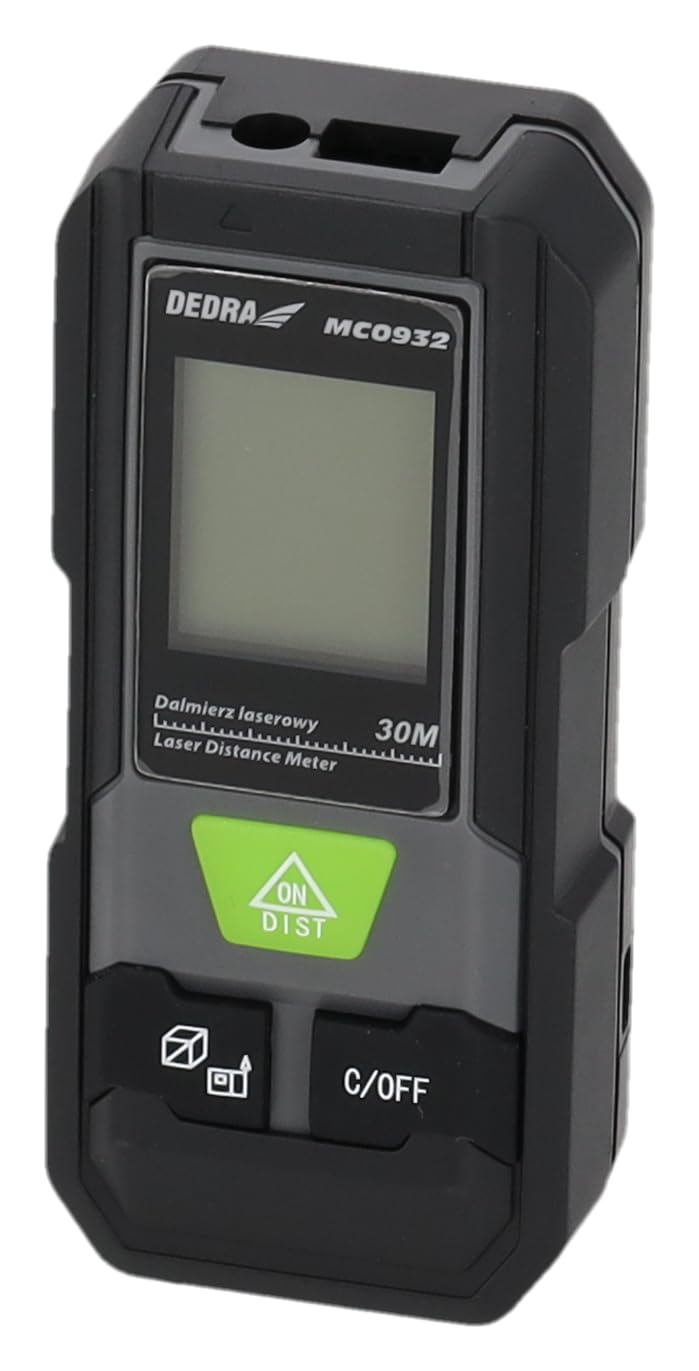
Obraz: Przód view of the DEDRA MC0932 showing the display and control buttons.
- Soczewka z emisją lasera
- Soczewka odbioru lasera
- Ekran wyświetlacza
- ON / DIST Button (Power On / Single Measurement / Continuous Measurement)
- C / OFF Button (Clear / Power Off)
- Function / Unit Button (Mode Selection / Unit Switching)
- Reference Point Button (Front/Rear Edge Measurement)

Obraz: Tył view of the DEDRA MC0932, highlighting the battery compartment.
- Komora baterii
4. Konfiguracja
4.1 Instalacja baterii
- Znajdź pokrywę komory baterii z tyłu urządzenia.
- Aby otworzyć komorę, przesuń pokrywę w dół.
- Włóż dwie (2) baterie AAA, zwracając uwagę na prawidłową biegunowość (+/-), zgodnie ze wskazaniami wewnątrz komory.
- Zamknij pokrywę komory baterii, wsuwając ją z powrotem na miejsce, aż do zatrzaśnięcia.
5. Instrukcja obsługi
5.1 Włączanie/wyłączanie zasilania
- Włączanie: Naciśnij WŁ./ODLEG button once. The laser will activate, and the display will light up.
- Aby wyłączyć: Naciśnij i przytrzymaj WYŁĄCZONY Naciśnij przycisk przez około 2 sekundy. Urządzenie wyłączy się automatycznie po 180 sekundach bezczynności.
5.2 Pojedynczy pomiar odległości
- Turn on the device by pressing WŁ./ODLEG. The laser will activate.
- Skieruj wiązkę lasera na punkt docelowy.
- Naciśnij WŁ./ODLEG button again. The measurement will be taken and displayed on the screen.
5.3 Pomiar ciągły (śledzenie)
- Włącz urządzenie.
- Naciśnij i przytrzymaj WŁ./ODLEG Naciśnij przycisk przez około 2 sekundy. Urządzenie przejdzie w tryb pomiaru ciągłego, wyświetlając odległość w czasie rzeczywistym podczas przesuwania urządzenia.
- To stop continuous measurement, press the WYŁĄCZONY button once. The last measured value will remain on the display.
5.4 Pomiar powierzchni
- Włącz urządzenie.
- Naciśnij Function / Unit button repeatedly until the area icon (a square with 'm²' or 'ft²') appears on the display.
- Zmierz pierwszy bok (np. długość) naciskając WŁ./ODLEG.
- Zmierz drugą stronę (np. szerokość) naciskając WŁ./ODLEG Ponownie.
- Urządzenie automatycznie obliczy i wyświetli powierzchnię.
5.5 Pomiar objętości
- Włącz urządzenie.
- Naciśnij Function / Unit button repeatedly until the volume icon (a cube with 'm³' or 'ft³') appears on the display.
- Zmierz pierwszy bok (np. długość) naciskając WŁ./ODLEG.
- Zmierz drugą stronę (np. szerokość) naciskając WŁ./ODLEG Ponownie.
- Measure the third side (e.g., height) by pressing WŁ./ODLEG trzeci raz.
- Urządzenie automatycznie obliczy i wyświetli głośność.
5.6 Przełączanie jednostek
To change the measurement unit (meters, feet, inches), press and hold the Function / Unit button for approximately 2 seconds. The unit will cycle through m, ft, and in.
5.7 Ustawienie punktu odniesienia
The device can measure from its front edge or its rear edge. To switch the reference point, press the Punkt odniesienia button. An icon on the display will indicate whether the measurement is taken from the front or rear of the device.
6. Konserwacja
6.1 Czyszczenie
- Użyj miękkiego, damp ściereczka do czyszczenia urządzenia casing. Nie należy używać środków czyszczących o właściwościach ściernych ani rozpuszczalników.
- Gently wipe the laser lenses with a clean, lint-free cloth. Avoid touching the lenses with your fingers.
6.2 Przechowywanie
- Przechowuj urządzenie w ochronnym etui, w chłodnym i suchym miejscu, z dala od bezpośredniego światła słonecznego i ekstremalnych temperatur.
- Remove the batteries if the device will not be used for an extended period (e.g., more than one month) to prevent battery leakage and damage.
6.3 Wymiana baterii
When the low battery indicator appears on the display, replace both AAA batteries with new ones following the instructions in Section 4.1.
7. Rozwiązywanie Problemów
| Problem | Możliwa przyczyna | Rozwiązanie |
|---|---|---|
| Urządzenie nie włącza się | Baterie są rozładowane lub nieprawidłowo włożone. | Wymień baterie lub sprawdź biegunowość. |
| Na wyświetlaczu pojawia się komunikat „Błąd” | Laser path is obstructed, target surface is too reflective/absorbent, or measurement range exceeded. | Ensure clear laser path, use a target plate if necessary, ensure target is within 0.03m-30m range. |
| Niedokładne pomiary | Lenses are dirty, device is unstable, or environmental interference. | Clean lenses, ensure device is stable during measurement, avoid strong light sources. |
| Wyświetlacz jest przyciemniony lub migocze | Niski poziom naładowania baterii. | Wymień baterie. |
8. Specyfikacje
| Zakres pomiaru | 0.03 m - 30 m |
| Dokładność pomiaru | ±2 mm |
| Jednostki miary | m / stopy / cale |
| Klasa laserowa | Klasa II |
| Typ lasera | 635 nm, <1 mW |
| Automatyczne wyłączanie lasera | 30 sekund |
| Automatyczne wyłączanie urządzenia | 180 sekund |
| Typ baterii | 2 x AAA (zalecane alkaliczne) |
| Temperatura pracy | 0°C do 40°C (32°F do 104°F) |
| Temperatura przechowywania | -20°C do 60°C (-4°F do 140°F) |
| Wymiary (w przybliżeniu) | 100 × 35 × 20 mm (3.9 × 1.4 × 0.8 cala) |
| Waga (z bateriami) | 200 g (7.05 uncji) |
| Stopień ochrony IP | IP54 (ochrona przed kurzem i zachlapaniem) |
9. Gwarancja i wsparcie
DEDRA products are manufactured to high-quality standards. For warranty information, please refer to the warranty card included with your purchase or contact your local DEDRA dealer or the seller directly. For technical support or service inquiries, please reach out to the point of purchase or the official DEDRA customer service channels.