
1. Wprowadzenie
Thank you for choosing the TNICER T4X Motorcycle Intercom. This device is designed to enhance your riding experience by providing clear communication, music playback, and navigation audio while on the road. Featuring advanced ENC (Environmental Noise Cancellation) technology, Bluetooth 5.2 connectivity, and IP67 waterproof rating, the T4X ensures reliable performance in various conditions. Please read this manual thoroughly before use to ensure proper operation and to maximize the product's potential.
2. Informacje dotyczące bezpieczeństwa
- Zawsze priorytetem jest bezpieczeństwo na drodze. Nie używaj urządzenia w sposób, który odwraca Twoją uwagę od jazdy.
- Przed jazdą sprawdź, czy urządzenie jest solidnie zamontowane na kasku.
- Dostosuj głośność do poziomu, który pozwala usłyszeć dźwięki ruchu ulicznego. Nadmierna głośność może uszkodzić słuch i zaburzyć koncentrację.
- Nie należy podejmować prób demontażu ani modyfikacji urządzenia. Może to spowodować unieważnienie gwarancji i uszkodzenie.
- Keep the device away from extreme temperatures, open flames, and corrosive substances.
- Zutylizuj baterie zgodnie z lokalnymi przepisami.
3. Zawartość opakowania
Sprawdź, czy w przesyłce znajdują się wszystkie elementy:
- T4X Main Unit
- Hard Microphone & Speaker Set
- Soft Microphone
- Instrukcja obsługi (po japońsku)
- Kabel ładujący USB-C
- 3M Adhesive Pads (for main unit and speakers)
- Rigid Mic Fixed Velcro
- Podstawa wspornika montażowego
- Round Velcro (for speakers)
- Speaker Foam Pads
- metalowy klips
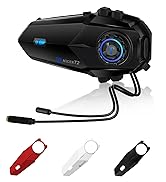
Image: All components included in the TNICER T4X package, laid out for identification.
4. Koniec produktuview
The TNICER T4X features a sleek design with intuitive controls. Familiarize yourself with the main unit's buttons and ports:
- Przycisk zasilania/interkomu: Służy do włączania/wyłączania zasilania, inicjowania/kończenia połączeń interkomowych.
- Przycisk zwiększania głośności: Increases volume, navigates menus.
- Przycisk zmniejszania głośności: Decreases volume, navigates menus.
- Przycisk wielofunkcyjny: Controls music playback, phone calls, and voice assistant.
- Port ładowania: Port USB-C do ładowania.
- Port zestawu słuchawkowego: Umożliwia podłączenie głośników i mikrofonu.

Obraz: Przód view of the TNICER T4X main unit, highlighting its buttons and indicator light.
5. Konfiguracja
5.1. Ładowanie urządzenia
Before first use, fully charge the T4X unit.
- Connect the provided USB-C charging cable to the T4X charging port.
- Drugi koniec kabla podłącz do zasilacza USB (nie ma go w zestawie) lub do portu USB komputera.
- Wskaźnik LED będzie pokazywał stan ładowania (np. czerwony oznacza ładowanie, niebieski oznacza pełne naładowanie).
- Pełne naładowanie trwa około 1.5 godzin.

Image: The TNICER T4X unit connected to a USB-C charging cable, illustrating its 1000mAh battery capacity and usage times (40 hours talk/music, 1.5 hours charge, 600 hours standby).
5.2. Montaż kasku
Choose between the metal clip or adhesive mount for securing the T4X to your helmet.
- Montaż jednostki interkomowej:
- Metalowy klips: Slide the metal clip between the helmet shell and inner padding. Secure the T4X main unit to the clip.
- Mocowanie samoprzylepne: Clean the desired area on the helmet surface. Attach the 3M adhesive pad to the mounting bracket base, then firmly press the base onto the helmet. Secure the T4X main unit to the bracket.
- Instalacja głośników:
- Attach the round Velcro pads to the inside of your helmet, aligning them with your ears.
- Attach the speakers to the Velcro pads. Ensure speakers are positioned directly over your ears for optimal sound.
- Instalacja mikrofonu:
- Twardy mikrofon: Suitable for open-face or modular helmets. Attach the hard mic to the helmet's chin bar using the rigid mic fixed Velcro. Position it close to your mouth.
- Miękki mikrofon: Suitable for full-face helmets. Route the soft mic inside the helmet, positioning it near your mouth.
- Podłącz zestaw słuchawkowy: Plug the speaker and microphone cable into the headset port on the T4X main unit. Ensure it is firmly inserted.
6. Instrukcja obsługi
6.1. Włączanie/wyłączanie zasilania
- Włączanie: Press and hold the Power/Intercom Button for approximately 3 seconds until the LED indicator lights up and you hear a voice prompt.
- Wyłączone: Press and hold the Power/Intercom Button for approximately 3 seconds until the LED indicator turns off and you hear a voice prompt.
6.2. Regulacja głośności
- Zwiększ głośność: Press the Volume Up Button.
- Zmniejsz głośność: Press the Volume Down Button.
6.3. Bluetooth Pairing (Smartphone)
- Ensure the T4X is powered off.
- Press and hold the Power/Intercom Button for approximately 5-7 seconds until the LED indicator flashes red and blue alternately, indicating pairing mode.
- On your smartphone, enable Bluetooth and search for new devices.
- Select "TNICER T4X" from the list of available devices.
- Po sparowaniu dioda LED zacznie powoli migać na niebiesko, a Ty usłyszysz potwierdzający komunikat głosowy.
6.4. Intercom Pairing (Multi-Unit)
The T4X supports one-touch automatic pairing for up to 8 riders within a 1000m range.

Image: A visual representation of multiple T4X units automatically pairing for group communication over a bridge, illustrating the one-touch pairing feature for up to 8 devices.
- Ensure all T4X units are powered off.
- On the first unit (Unit A), press and hold the Power/Intercom Button for 5-7 seconds to enter pairing mode (red and blue flashing).
- On the second unit (Unit B), press and hold the Power/Intercom Button for 5-7 seconds to enter pairing mode.
- Briefly press the Power/Intercom Button on Unit A. It will search for Unit B. Once connected, both units will flash blue slowly.
- To add more units (Unit C, D, etc.), repeat steps 2-4, pairing each new unit to an already connected unit.
- Automatyczne ponowne połączenie: If communication is interrupted due to distance or obstacles, the T4X will automatically reconnect when units are back within range.
6.5. Komunikacja interkomowa
- Uruchom interkom: Briefly press the Power/Intercom Button on any paired unit.
- Zakończ interkom: Briefly press the Power/Intercom Button again.
6.6. Funkcje telefonu
- Odbierz połączenie: Naciśnij krótko przycisk wielofunkcyjny.
- Zakończ połączenie: Naciśnij krótko przycisk wielofunkcyjny podczas połączenia.
- Odrzuć połączenie: W przypadku połączenia przychodzącego naciśnij i przytrzymaj przycisk wielofunkcyjny przez 2 sekundy.
- Ponowne wybieranie ostatniego numeru: Naciśnij dwukrotnie przycisk wielofunkcyjny.
6.7. Odtwarzanie muzyki
- Odtwórz/Pauza: Naciśnij krótko przycisk wielofunkcyjny.
- Następny utwór: Press the Volume Up Button for 2 seconds.
- Poprzedni utwór: Press the Volume Down Button for 2 seconds.
- Udostępnianie muzyki: While playing music, briefly press the Multi-function Button and Volume Up Button simultaneously to share music with a connected intercom unit.
6.8.Radio FM

Image: A rider on a motorcycle, with graphics indicating FM radio functionality (76.0MHz to 108.0MHz) and voice command support (Siri, Google Assistant).
- Włączanie/wyłączanie FM: Press and hold the Volume Down Button for 2 seconds.
- Skanuj kanały: Briefly press the Multi-function Button while FM is on.
- Zmień kanał: Press the Volume Up or Volume Down Button briefly.
6.9. Asystent głosowy
- Aktywuj asystenta głosowego: Double-press the Volume Up Button. This will activate your smartphone's voice assistant (e.g., Siri, Google Assistant).
6.10. Sound Adjustment (Equalizer)
The T4X offers three sound profiles:

Image: A motorcycle rider with a helmet, overlaid with a graphic showing three distinct sound profiles: Bass Boost, Mid-range Boost, and Treble Boost, indicating customizable audio experience.
- Switch Sound Modes: Triple-press the Multi-function Button to cycle through Bass Boost, Mid-range Boost, and Treble Boost.
6.11. Ambient Sound Reception
This feature allows you to hear your surroundings without removing your helmet.
- Activate/Deactivate Ambient Sound: Press and hold the Volume Up Button for 2 seconds.
7. Konserwacja
- Czyszczenie: Przetrzyj urządzenie miękką, damp płótno. Nie używaj ostrych środków chemicznych ani ściernych środków czyszczących.
- Składowanie: Przechowuj urządzenie w chłodnym i suchym miejscu, gdy nie jest używane. Unikaj bezpośredniego światła słonecznego i ekstremalnych temperatur.
- Pielęgnacja baterii: Aby zapewnić optymalną żywotność baterii, ładuj urządzenie co najmniej raz na trzy miesiące, jeśli nie używasz go regularnie.
8. Rozwiązywanie Problemów
8.1. No Sound from Earphones or Microphone
If you experience issues with audio output or input:
- Rozwiązanie 1: Ensure the cable connector is fully inserted into the main unit's jack. The earphone jack may be tight, requiring firm insertion.
- Rozwiązanie 2: Try unplugging and re-plugging the earphone cable several times to ensure a secure connection.
- Rozwiązanie 3: Check if the volume is turned up on both the intercom and your connected smartphone.
- Rozwiązanie 4: Test with another headset if available to rule out a faulty headset.
8.2. Interkom nie łączy się
- Ensure both units are in pairing mode (red and blue flashing) before initiating pairing.
- Make sure units are within the 1000m communication range.
- Try resetting both units to factory settings (refer to the full manual for specific steps) and re-pairing.
8.3. Urządzenie się nie włącza
- Upewnij się, że akumulator jest naładowany. Podłącz ładowarkę i sprawdź wskaźnik LED.
- If the device is completely unresponsive, try a hard reset by holding the Power/Intercom button for an extended period (e.g., 10-15 seconds).
9. Specyfikacje
| Funkcja | Szczegół |
|---|---|
| Numer modelu | T4X |
| Wersja Bluetooth | 5.2 |
| Redukcja szumów | ENC (redukcja hałasu otoczenia) |
| Maksymalna liczba użytkowników interkomu | 8 jeźdźców |
| Max Intercom Range | 1000 metrów |
| Pojemność baterii | Polimer litowy 1000 mAh |
| Czas odtwarzania muzyki | Do 40 godzin |
| Czas rozmowy | Do 40 godzin |
| Czas czuwania | Do 700 godzin |
| Czas ładowania | Około 1.5 godzin |
| Stopień wodoodporności | IP67 |
| Waga | 44 gramów |
| Wymiary (pakiet) | Wymiary 20.5 x 10.9 x 8.9 cm |
| Gniazdo słuchawkowe | Mini USB |
| Kolor | Biały/Czarny |
10. Gwarancja i wsparcie
10.1. Informacje o gwarancji
The TNICER T4X comes with a standard manufacturer's warranty. Please retain your proof of purchase for warranty claims. The warranty covers defects in materials and workmanship under normal use. It does not cover damage caused by misuse, accidents, unauthorized modifications, or natural disasters.
10.2. Obsługa klienta
For any questions, issues, or support needs regarding your TNICER T4X intercom, please contact our customer service team. You can typically find contact information on the product packaging or the official TNICER webstrona.
If purchased through Amazon, you can also contact the seller directly:
- Go to "Your Account" > "Your Orders".
- Find your order for the TNICER T4X.
- Click "Contact Seller" to send a message.
Alternatively, you may contact us via email at: tnicerservice@tognicer.com (Please include your order number in the email).