
1. Wprowadzenie
Dziękujemy za zakupasing the MONODEAL T23 3-Speed Turntable. This manual provides essential information for the safe and correct operation of your device. Please read it thoroughly before use and retain it for future reference.
2. Informacje dotyczące bezpieczeństwa
- Aby uniknąć pożaru lub porażenia prądem, nie wystawiaj urządzenia na działanie deszczu i wilgoci.
- Nie otwieraj szafki. Zleć naprawę wyłącznie wykwalifikowanemu personelowi.
- Ensure the power adapter matches your local power supply.
- Place the unit on a stable, level surface away from direct sunlight, heat sources, and excessive dust or vibration.
- Przechowywać w miejscu niedostępnym dla dzieci.
3. Zawartość opakowania
Sprawdź, czy w opakowaniu znajdują się wszystkie elementy:
- 1 x MONODEAL T23 Record Player
- 1 x przewód zasilający 5 V 1.5 A
- 1 x Instrukcja obsługi (ten dokument)
4. Koniec produktuview
Familiarize yourself with the various parts and controls of your MONODEAL T23 Turntable.

Rysunek 4.1: Góra i tył View of the MONODEAL T23 Turntable with labeled components including Power Switch, Headphone Jack, Mode button, LED Light, USB Port, Power Adapter Input, RCA Output Jacks, 45 RPM Fixator, Tone Arm Raise Lever, Auto Stop Switch, LP Speed Switch, and Stylus.
- Przełącznik zasilania/pokrętło głośności: Włącza/wyłącza urządzenie i reguluje głośność.
- Gniazdo słuchawkowe: Do prywatnego słuchania przez słuchawki.
- Przycisk trybu: Switches between different input modes (e.g., Phono, Bluetooth, USB).
- Światło LED: Wskazuje stan zasilania i trybu.
- Port USB: Do odtwarzania przez USB.
- Wejście zasilacza: Connects to the provided 5V 1.5A power cord.
- Gniazda wyjściowe RCA (L/P): Łączy się z zewnętrznym ampgłośniki lub aktywne głośniki.
- 45 RPM Fixator: Adapter for 7-inch records with large center holes.
- Dźwignia podnoszenia ramienia gramofonu: Lifts and lowers the tone arm gently.
- Wyłącznik automatycznego zatrzymania: Włącza lub wyłącza funkcję automatycznego zatrzymywania.
- Przełącznik prędkości LP: Wybiera prędkość odtwarzania (33, 45 lub 78 obr./min).
- Rysik: The needle that reads the grooves of the record.
5. Konfiguracja
- Rozpakowywanie: Ostrożnie wyjmij gramofon z opakowania. Zachowaj opakowanie do transportu lub przechowywania w przyszłości.
- Umieszczenie: Place the turntable on a stable, level surface. Ensure there is adequate ventilation around the unit.
- Podłączenie zasilania: Connect the provided 5V 1.5A power cord to the DC IN port on the back of the turntable and then plug it into a wall outlet.
- Osłona przeciwpyłowa: The transparent dust cover can be opened or closed to protect the platter and stylus when not in use.
6. Instrukcja obsługi
6.1 Odtwarzanie płyt winylowych
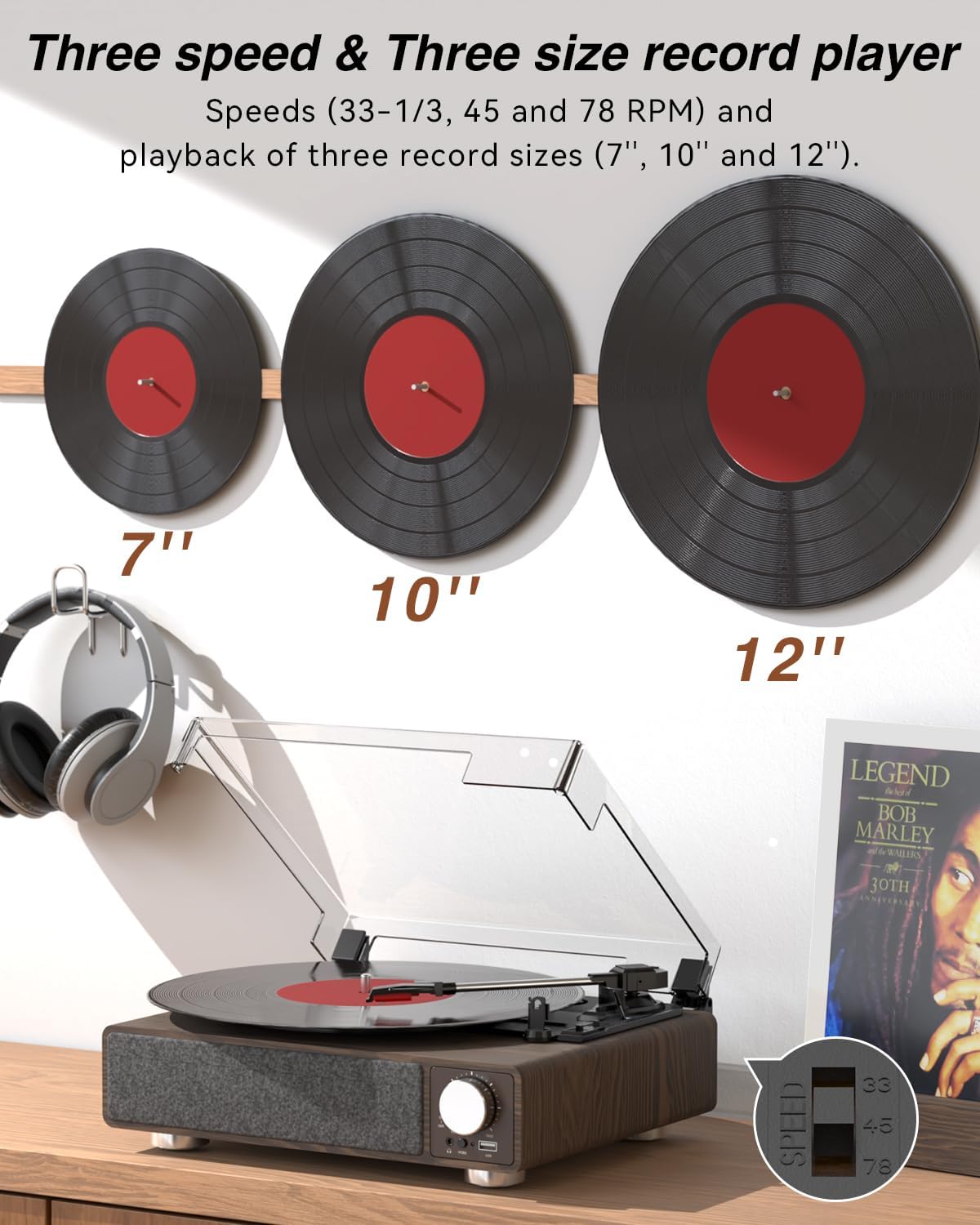
Rysunek 6.1: The MONODEAL T23 Turntable supports 3 speeds and 3 record sizes.
- Turn the Power Switch/Volume Knob clockwise to turn on the unit.
- Podnieś osłonę przeciwpyłową.
- Place a vinyl record on the turntable platter. If playing a 7-inch record with a large center hole, place the 45 RPM fixator on the spindle first.
- Select the appropriate speed (33, 45, or 78 RPM) using the LP Speed Switch, matching the record you are playing.
- Push the Tone Arm Raise Lever up to lift the tone arm.
- Manually move the tone arm over the desired starting track of the record.
- Push the Tone Arm Raise Lever down to gently lower the tone arm onto the record. Playback will begin.
- Adjust the volume using the Power Switch/Volume Knob.
- Funkcja automatycznego zatrzymania: If the Auto Stop Switch is set to ON, the turntable will automatically stop rotating when the record finishes playing. If set to OFF, it will continue to rotate.
- To stop playback, lift the tone arm using the lever and return it to the tone arm rest. Turn the Power Switch/Volume Knob counter-clockwise to turn off the unit.
6.2 Bluetooth Transmission (BT OUT)
This feature allows you to stream audio from the turntable to external Bluetooth speakers or headphones.

Rysunek 6.2: Bluetooth transmission from the turntable to external devices.
- Ensure the turntable is powered on and in Phono mode (playing a record).
- Press and hold the Mode button until the LED indicator flashes blue, indicating Bluetooth transmission pairing mode.
- Place your Bluetooth speaker or headphones in pairing mode.
- The turntable will automatically search for and connect to the nearest Bluetooth device. Once connected, the LED indicator will turn solid blue.
- Audio from the record will now play through your connected Bluetooth device.
6.3 Bluetooth Reception (BT IN)
This feature allows you to stream audio from your mobile device (phone, tablet) to the turntable's built-in speakers.
Rysunek 6.3: Bluetooth reception by the turntable from a smartphone.
- Włącz gramofon.
- Press the Mode button repeatedly until the LED indicator flashes blue, indicating Bluetooth reception pairing mode.
- On your mobile device, enable Bluetooth and search for available devices. Select "MONODEAL T23" from the list.
- Po podłączeniu wskaźnik LED zacznie świecić na niebiesko.
- Play audio on your mobile device, and it will sound through the turntable's speakers. Adjust volume using the turntable's volume knob or your mobile device.
6.4 Odtwarzanie USB
The turntable supports playing audio files z dysku flash USB.
- Włóż pamięć USB do portu USB znajdującego się z przodu gramofonu.
- Press the Mode button to switch to USB mode. The LED indicator will change to reflect USB mode.
- The turntable will automatically begin playing audio files from the USB drive. Use the control buttons (if available, or refer to the specific model's USB control instructions) to navigate tracks.
6.5 wyjść RCA
Podłącz gramofon do zewnętrznego ampwzmacniacz lub głośniki aktywne dla uzyskania lepszego dźwięku.

Rysunek 6.4: RCA output for external speakers and headphone jack for private listening.
- Ensure the turntable and your external audio system are turned off.
- Connect an RCA cable (not included) to the RCA Output Jacks (L/R) on the back of the turntable.
- Podłącz drugi koniec kabla RCA do odpowiedniego wejścia audio w swoim urządzeniu. ampgłośniki lub aktywne głośniki.
- Włącz gramofon i zewnętrzny system audio.
- Play a record as described in Section 6.1. Audio will be routed through your external system. Adjust volume on both devices as needed.
Gniazdo słuchawkowe 6.6
For private listening, connect headphones to the 3.5mm headphone jack on the front of the unit.
- Plug your 3.5mm headphones into the Headphone Jack.
- Adjust the volume using the Power Switch/Volume Knob.
7. Konserwacja
7.1 Czyszczenie gramofonu
- Przetrzyj zewnętrzną część urządzenia miękką, suchą ściereczką. Nie używaj środków czyszczących o właściwościach ściernych ani rozpuszczalników.
- Aby zapobiec gromadzeniu się kurzu, gdy nie używasz urządzenia, trzymaj pokrywę zamkniętą.
7.2 Pielęgnacja rysika
- Obchodź się z rysikiem z najwyższą ostrożnością. Unikaj dotykania końcówki rysika palcami.
- Czyść igłę okresowo miękką szczoteczką, delikatnie przesuwając ją od tyłu do przodu.
- A worn stylus can damage records and degrade sound quality. Replace the stylus when signs of wear appear (e.g., distorted sound, skipping).
7.3 Opieka nad dokumentacją
- Always hold records by their edges or center label.
- Przechowuj płyty w pozycji pionowej w koszulkach, w chłodnym i suchym miejscu.
- Regularnie czyść płyty specjalną szczoteczką lub środkiem do czyszczenia płyt, aby usunąć kurz i ładunki elektrostatyczne.
8. Rozwiązywanie Problemów
| Problem | Możliwa przyczyna | Rozwiązanie |
|---|---|---|
| Brak zasilania | Power cord not connected; Power outlet not working; Unit not turned on. | Ensure power cord is securely connected; Try a different outlet; Turn the Power Switch/Volume Knob clockwise. |
| Brak dźwięku z wbudowanych głośników | Volume too low; RCA output connected; Bluetooth transmission active. | Increase volume; Disconnect RCA cables if not using external speakers; Ensure Bluetooth transmission is off if you want sound from built-in speakers. |
| Dźwięk zniekształcony lub przeskakujący | Record dirty or damaged; Stylus dirty or worn; Turntable not level; Excessive vibration. | Clean record; Clean or replace stylus; Place turntable on a stable, level surface; Ensure turntable is away from sources of vibration. |
| Parowanie Bluetooth nie powiodło się | Device too far; Device not in pairing mode; Interference. | Move devices closer; Ensure both devices are in pairing mode; Turn off other Bluetooth devices nearby. |
| Auto stop not working | Auto Stop Switch is OFF. | Set the Auto Stop Switch to ON. Note: Some records may stop prematurely or not at all due to variations in groove patterns. |
9. Specyfikacje
| Funkcja | Specyfikacja |
|---|---|
| Nazwa modelu | T23 |
| Marka | MONODEAL |
| Wymiary produktu | 11.81 x 9.84 x 4.31 cala (30 x 25 x 11 cm) |
| Waga przedmiotu | 5.77 funtów (2.62 kg) |
| Tworzywo | Drewno |
| Prędkości odtwarzania | 33-1/3, 45, 78 obr./min |
| Obsługiwane rozmiary rekordów | 7", 10", 12" |
| Łączność | Bluetooth (Reception & Transmission), USB, RCA Output, Headphone Jack |
| Źródło zasilania | Przewodowy elektryczny (5V 1.5A) |
| Cechy specjalne | Built-in Stereo Speakers, Auto Stop, Belt-Drive System |
10. Gwarancja i wsparcie
MONODEAL products are designed and manufactured to the highest quality standards. For warranty information and technical support, please refer to the warranty card included with your purchase or visit the official MONODEAL website. Please have your model number (T23) and purchase date available when contacting support.