Wstęp
This manual provides detailed instructions for the operation, maintenance, and troubleshooting of your 4K Action Camera. Please read this manual thoroughly before using the product to ensure proper function and safety.
Produkt ponadview
The 4K Action Camera is a versatile 4K Ultra HD action camera designed for capturing high-quality video and photos in various environments, including underwater. It features WiFi connectivity for remote control and easy sharing.
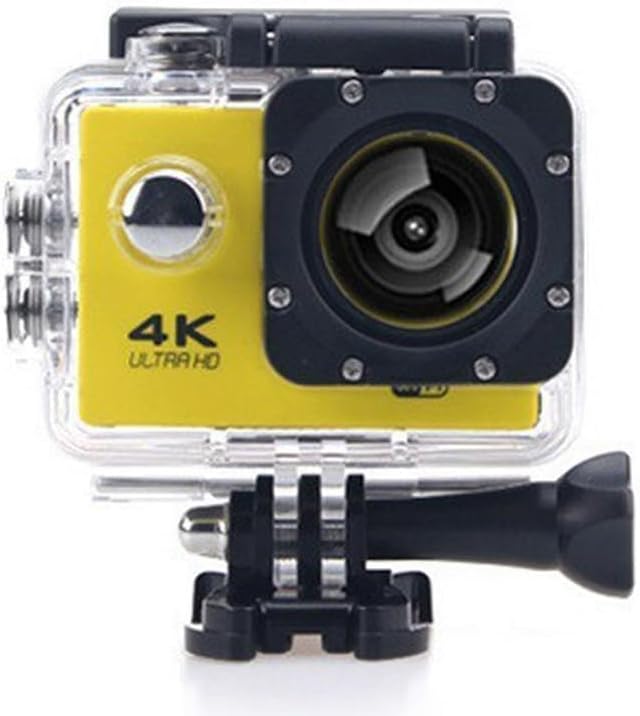
Rycina 1: Przód view of the Yellow 4K Action Camera in its transparent waterproof housing, displaying the lens, '4K ULTRA HD' branding, and control buttons.
Główne cechy:
- 4K Ultra HD Video Recording
- Waterproof up to 30 meters (98 feet) with included housing
- Built-in WiFi for smartphone control
- Obiektyw szerokokątny
- Kompaktowa i trwała konstrukcja
Zawartość opakowania:
- Akcja Aparat
- Wodoodporna obudowa
- Kabel USB
- Akcesoria montażowe
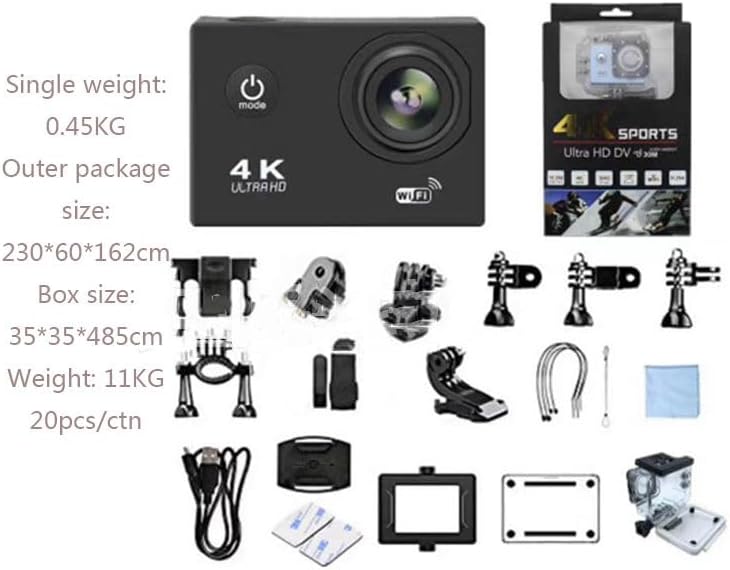
Figure 2: Illustration of the complete package contents, including the camera, waterproof housing, USB cable, and a variety of mounting accessories.
Organizować coś
1. Ładowanie akumulatora
Before first use, fully charge the camera battery. Connect the camera to a USB power source using the provided USB cable. The charging indicator light will illuminate during charging and turn off when fully charged.
2. Wkładanie karty Micro SD
A Micro SD card (not included) is required for recording. Insert the Micro SD card into the designated slot until it clicks into place. Ensure the card is formatted before first use (refer to the Operating section for formatting instructions).
3. Mocowanie obudowy wodoodpornej
For underwater use or protection against dust and impact, place the camera inside the waterproof case. Ensure the case is securely latched and the rubber seal is clean and free of debris to prevent leaks.

Figure 3: The action camera encased in its waterproof housing, partially submerged in water, illustrating its capability for underwater use.
Instrukcja obsługi
1. Włączanie/wyłączanie zasilania
Aby włączyć lub wyłączyć aparat, naciśnij i przytrzymaj przycisk zasilania/trybu (zazwyczaj z przodu lub u góry) przez 3 sekundy.
2. Wybór trybu
Press the Power/Mode button repeatedly to cycle through different modes: Video Recording, Photo Mode, Playback Mode, and Settings Mode.
3 Nagrywanie wideo / robienie zdjęć
- Nagrywanie wideo: In Video Recording mode, press the OK/Shutter button (usually on top) to start recording. Press again to stop.
- Tryb zdjęć: In Photo Mode, press the OK/Shutter button to take a photo.
4. Łączność Wi-Fi
Aby połączyć się przez Wi-Fi:
- Turn on the camera's WiFi function (usually via a dedicated button or through the settings menu). The WiFi indicator light will blink.
- On your smartphone, download and install the dedicated camera app (refer to the product packaging or manufacturer's webwitryna dla nazwy aplikacji).
- Go to your phone's WiFi settings and connect to the camera's WiFi network (SSID and password usually displayed on the camera screen or in the manual).
- Open the camera app on your smartphone to control the camera, preview footagi przeniesienie files.

Figure 4: A smartphone displaying the camera's companion app, illustrating the wireless control and live preview capabilities via WiFi.
5. Formatting Micro SD Card
It is recommended to format the Micro SD card regularly to ensure optimal performance and prevent data corruption.
- Navigate to the Settings menu on the camera.
- Select "Format SD Card" or a similar option.
- Potwierdź czynność. Wszystkie dane na karcie zostaną usunięte.
Konserwacja
Czyszczenie aparatu i obudowy
- Use a soft, lint-free cloth to clean the camera lens and screen.
- After using the waterproof case in saltwater, rinse it with fresh water and allow it to air dry.
- Regularly check the waterproof seal for any debris or damage.
Pielęgnacja baterii
- Kiedy aparat nie jest używany, przechowuj go w chłodnym i suchym miejscu.
- Unikaj wystawiania baterii na działanie ekstremalnych temperatur.
- Jeśli akumulator będzie przechowywany przez dłuższy okres, należy go naładować do około 50% pojemności.
Rozwiązywanie problemów
| Problem | Możliwa przyczyna | Rozwiązanie |
|---|---|---|
| Kamera się nie włącza. | Bateria jest rozładowana. | Całkowicie naładuj baterię. |
| Nie można nagrywać filmów/robić zdjęć. | Nie włożono karty Micro SD lub karta jest pełna/uszkodzona. | Insert a Micro SD card. Format the card or use a new one. |
| Problemy z połączeniem WiFi. | Incorrect WiFi password; camera WiFi not enabled; app issues. | Ensure correct password. Enable camera WiFi. Restart camera and phone app. |
| Słaba jakość obrazu/wideo. | Obiektyw jest brudny, oświetlenie jest niewystarczające, ustawienia są nieprawidłowe. | Clean the lens. Ensure adequate lighting. Adjust resolution settings. |
Specyfikacje
| Funkcja | Szczegół |
|---|---|
| Rozdzielczość wideo | 4K Ultra HD, 1080p |
| Wodoodporna głębokość | Do 30 metrów (98 stóp) z obudową wodoodporną |
| Łączność | WiFi, Wireless |
| Rozmiar ekranu | 2 cali |
| Technologia czujnika fotograficznego | CMOS |
| Składowanie | Micro SD (brak w zestawie) |
| Wymiary | 1.2 x 4 x 3 cala |
| Waga przedmiotu | 1 funt |
| Numer modelu | HK-HW-033 |
Gwarancja i wsparcie
For warranty information and technical support, please refer to the documentation included with your purchase or contact the seller directly. Keep your proof of purchase for warranty claims.
Sprzedający: UTRON GLOBAL


