
1. Wprowadzenie
This manual provides detailed instructions for the assembly, operation, and maintenance of your DEVAISE 55 Inch Electric Standing Desk. Designed for home and office use, this ergonomic desk features adjustable height, an LED touchscreen controller with memory presets, and a headphone hook for convenience. Please read this manual thoroughly before assembly and use to ensure proper function and safety.

Figure 1.1: The DEVAISE 55 Inch Electric Standing Desk, showcasing its spacious white desktop and sturdy frame, equipped with dual monitors, a laptop, and various office accessories.
2. Informacje dotyczące bezpieczeństwa
Aby zapobiec obrażeniom lub uszkodzeniom biurka, należy przestrzegać następujących środków ostrożności:
- Przed użyciem biurka należy sprawdzić, czy wszystkie połączenia są solidne.
- Keep hands, feet, and objects clear of the moving parts (legs, crossbars) during height adjustments.
- Nie przeciążaj biurka. Maksymalne obciążenie wynosi 81.6 kg (180 funtów).
- Do not allow children to operate the desk unsupervised.
- Use the desk only on a flat, stable surface.
- Przed przystąpieniem do czyszczenia lub wykonywania prac konserwacyjnych należy odłączyć zasilanie.
- This product meets CA Prop 65 & federal safety requirements for toxin-free air quality.
3. Zawartość opakowania
Przed rozpoczęciem montażu należy sprawdzić, czy wszystkie elementy są obecne:
- Desktop (55"W x 28"D)
- Nogi biurka (2)
- Stopy (2)
- Skrzynka sterownicza
- LED Touchscreen Controller
- Zaczep na słuchawki
- Cały niezbędny sprzęt (śruby, nakrętki, narzędzia)
- Instrukcja obsługi
4. Instrukcja montażu
The DEVAISE Electric Standing Desk is designed for hassle-free installation with pre-drilled screw holes and labeled parts. Assembly typically takes less than 30 minutes. A Phillips head screwdriver (not included) is required.
- Rozpakuj komponenty: Ostrożnie wyjmij wszystkie części z opakowania i połóż je na czystej, miękkiej powierzchni, aby zapobiec zarysowaniom.
- Złóż ramę biurka: Attach the desk legs to the crossbar and feet using the provided hardware. Ensure all connections are tightened securely.
- Dołącz pulpit: Place the desktop upside down on the soft surface. Align the pre-drilled holes on the desktop with the frame. Secure the desktop to the frame using the provided screws. Note: The desktop may consist of two pieces joined by wooden dowel rods. For added stability, consider applying wood glue to these joints during assembly.
- Install Control Box and Controller: Mount the control box and LED touchscreen controller to the underside of the desktop in the designated areas. Connect all cables according to the wiring diagram in the detailed instructions.
- Zamontuj haczyk na słuchawki: Secure the headphone hook to the desired location on the side of the desk.
- Zarządzanie kablami: Use the included cable ties or clips to manage and secure all power and control cables, preventing tangles and ensuring safe operation.
- Biurko obrotowe pionowe: Korzystając z pomocy innych, ostrożnie odwróć zmontowane biurko do pozycji pionowej i umieść je w wybranym miejscu.

Figure 4.1: Simplified components for quick and easy assembly.
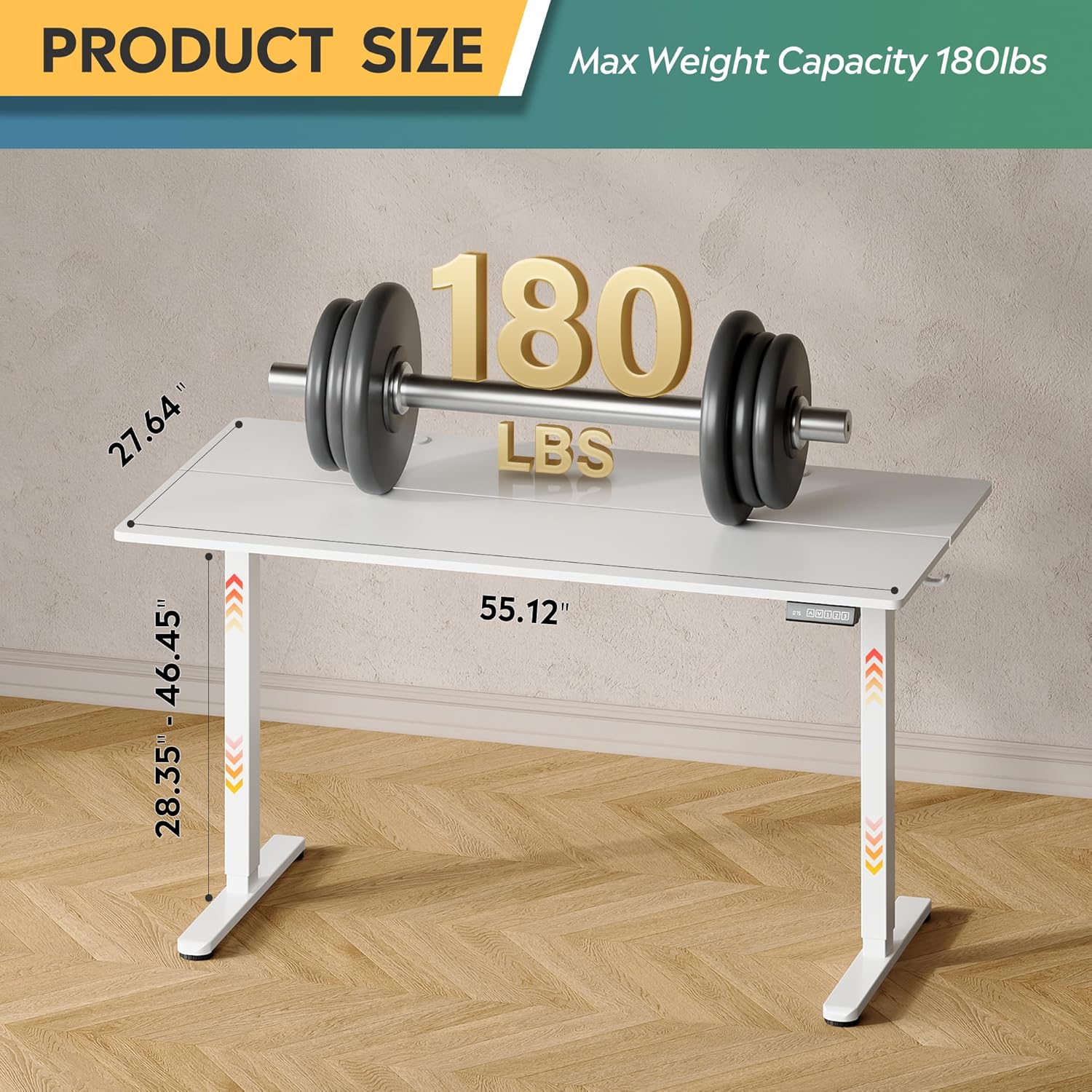
Figure 4.2: Desk dimensions and maximum weight capacity of 180 lbs.
5. Instrukcja obsługi
Your DEVAISE Electric Standing Desk features a tri-motor system for quiet and smooth height adjustments and an intuitive LED touchscreen controller.
5.1. Regulacja wysokości
The desk's height can be adjusted from 28.35 inches (sitting height) to 46.45 inches (standing height).
- Podnieś biurko: Naciśnij i przytrzymaj UP arrow button on the controller. The desk will move upwards. Release the button at your desired height.
- Dolne biurko: Naciśnij i przytrzymaj W DÓŁ arrow button on the controller. The desk will move downwards. Release the button at your desired height.

Figure 5.1: Adjustable height range from 28.35" to 46.45".
5.2. Ustawienia pamięci
The LED touchscreen controller allows you to store and recall up to three personalized height settings.
- Ustaw ustawienie wstępne pamięci:
- Dostosuj wysokość biurka do swoich potrzeb za pomocą przycisków GÓRA/DÓŁ.
- Naciśnij S button (Set). The LED display will flash.
- Naciśnij jeden z przycisków pamięci (1, 2, Lub 3) within 5 seconds. The height is now saved to that button.
- Przywołanie ustawienia pamięci: Wystarczy nacisnąć odpowiedni przycisk pamięci (1, 2, Lub 3). Biurko automatycznie przesunie się na zapisaną wysokość.

Figure 5.2: Multi-function LED touchscreen control panel.
5.3. Cicha praca
The desk's tri-motor system operates at a whisper-quiet level of less than 50dB, ensuring minimal disruption in your workspace.

Figure 5.3: The desk operates quietly, below 50dB.
6. Konserwacja
Regular maintenance will help prolong the life of your DEVAISE Electric Standing Desk:
- Czyszczenie: Przetrzyj blat i ramę miękką szmatką.amp szmatką. Unikaj silnych środków chemicznych i ściernych środków czyszczących.
- Sprawdź połączenia: Okresowo sprawdzaj wszystkie śruby i połączenia, aby upewnić się, że są dobrze dokręcone. W razie potrzeby dokręć je.
- Zarządzanie kablami: Ensure cables are neatly organized and not pinched or stressed.
7. Rozwiązywanie Problemów
Jeśli masz problemy z biurkiem, zapoznaj się z poniższymi typowymi problemami i ich rozwiązaniami:
| Problem | Możliwa przyczyna | Rozwiązanie |
|---|---|---|
| Biurko się nie porusza. | No power; loose connection; motor error. | Check power cord connection. Ensure all cables are securely plugged into the control box and motor. Unplug and replug the power cord to reset. |
| Biurko porusza się nierównomiernie lub wydaje nietypowe dźwięki. | Overload; obstruction; loose components. | Reduce weight on the desk. Check for any obstructions under or around the desk. Ensure all assembly screws are tightened. |
| Wyświetlacz LED pokazuje kod błędu. | Konkretny błąd systemowy. | Refer to the detailed error code list in the full product manual (if available) or contact customer support. Often, a power cycle (unplugging for 30 seconds and replugging) can resolve temporary errors. |
8. Specyfikacje
| Funkcja | Szczegół |
|---|---|
| Numer modelu | ASJZ023-new |
| Wymiary produktu (Gł. x Szer. x Wys.) | 23.62" gł. x 55" szer. x 28.34" wys. |
| Zakres regulacji wysokości | od 28.35" do 46.45" |
| Liczba pozycji wysokości | 3 (ustawienia pamięci) |
| Maksymalna nośność | 180 funtów |
| Waga przedmiotu | 37 funtów |
| Materiał na biurko | Drewno inżynieryjne |
| Materiał bazowy | Iron / Steel |
| Kolor | Biały |
| Poziom hałasu silnika | <50dB |
| Cechy specjalne | Adjustable Height, Electric, Ergonomic, LED Touchscreen, Headphone Hook |
9. Gwarancja i wsparcie
Your DEVAISE Electric Standing Desk comes with a limited warranty. For specific warranty terms and conditions, please refer to the documentation included with your purchase or contact DEVAISE customer support.
9.1. Zwroty
Ten produkt można łatwo zwrócić w ciągu 30 dni. Szczegółowe informacje można znaleźć w polityce zwrotów sprzedawcy.
9.2. Plany ochrony
Optional 2-Year and 3-Year Protection Plans may be available for purchase separately to extend coverage beyond the standard limited warranty.
9.3. Obsługa klienta
If you have any questions regarding assembly, operation, troubleshooting, or product selection, please contact our U.S.-based product support team. Contact information can typically be found on the DEVAISE official webstronie lub na paragonie za zakup.
