
1. Wprowadzenie
This manual provides detailed instructions for the installation, operation, and maintenance of your JOYING Android 13 Double Din Car Radio. Please read this manual thoroughly before using the product to ensure proper function and safety.
2. Co znajduje się w pudełku
W opakowaniu produktu znajdują się następujące elementy:
- 10.1" radio x1
- Double Din Cage x1
- Left & Right Bracket x1
- Reinforced Shims x1
- Plastic Trim Out x1
- Instrukcja instalacji x1
- Antena Wi-Fi x1
- Antena GPS x1
- Antena 4G x2
- Zewnętrzny mikrofon x1
- Kabel USB x2
- Kabel AR x1
- Taśma ekranująca x1
- ISO Cable x1
- Instrukcja obsługi x1
3. Konfiguracja i instalacja
Proper installation is crucial for optimal performance. It is recommended to consult a professional for installation if you are unsure about any steps.
3.1 Ogólne uwagi dotyczące instalacji
- An installation frame kit (inner size 178 x 102mm), special ISO harness, amplifier adapter, or CANbus decoder may be required depending on your car's specific situation. These are not included and may need to be purchased separately.
- This unit does not support factory car GPS antenna, backup rear camera, Bluetooth, USB, or microphone. Only JOYING accessories are supported.
3.2 Montaż jednostki głównej
The fixing position of the left and right brackets can be extended or telescoped to achieve the best fixing position according to your car's center console, adapting to a wider range of vehicles. If your car is a Hyundai or Kia brand, please contact us to get a different bracket.

3.3 połączeń przewodów
Connect all necessary wiring harnesses, including power, speakers, and antennas, according to the provided wiring diagram in the Installation Manual. Ensure all connections are secure to prevent malfunctions.

3.4 Instalacja kamery cofania
For connecting a backup camera, ensure the camera's power and video signals are correctly routed to the head unit. The red wire from the camera should connect to the reverse light's positive (+12V) wire, and the black wire to the reverse light's ground (GND). The reverse trigger wire from the camera should connect to the reverse trigger wire of the car stereo. The backup camera output connects to the backup camera input of the car stereo.
Video 1: Detailed guide on how to connect a backup camera to the car stereo system.
3.5 Akcesoria opcjonalne
The following accessories are not included in the package but can be ordered additionally to enhance your driving experience:
- Skaner OBD2 (ASIN: B076CD78HT): Connects via Bluetooth to retrieve real-time data and trouble codes from your vehicle computer.
- Przednia kamera AR (ASIN: B0CBX4N6V8): Podczas jazdy automatycznie nagrywa drogę przed samochodem.
- Tylna kamera AR (ASIN: B0CBX39S8M): Automatyczne przełączanie na bieg wsteczny podczas cofania samochodu.

4. Instrukcja obsługi
4.1 Podstawowa obsługa
- Szybki rozruch: Once the car key is inserted, the unit starts immediately and enters the user interface in approximately 2 seconds (first boot takes 30-40 seconds).
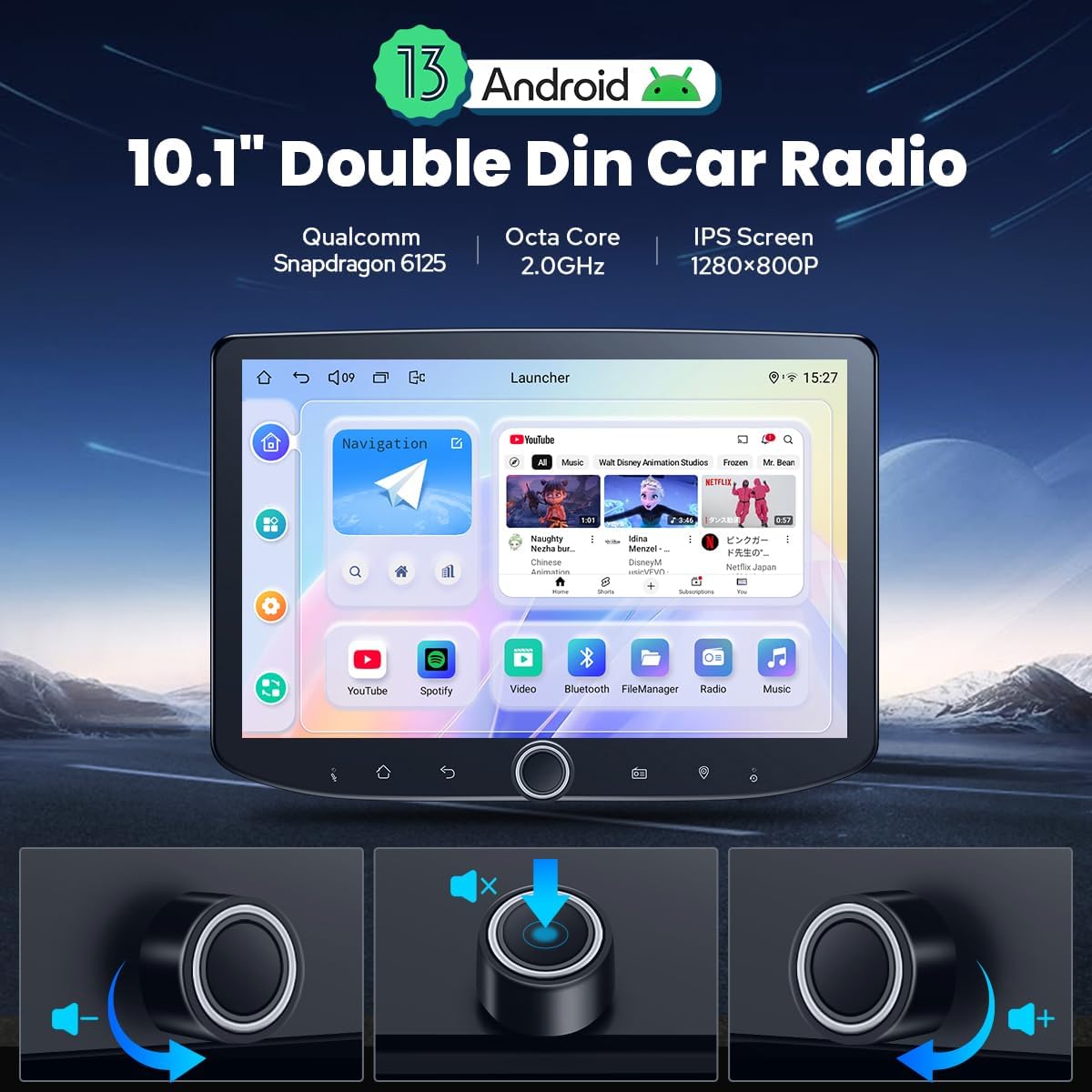
- Pokrętło głośności: Use the physical volume knob for tactile control over audio levels.
- Ekran dotykowy: Navigate the interface using the responsive 10.1-inch 1280x800P touchscreen.
4.2 Łączność
- Bluetooth: Built-in Bluetooth for hands-free calls and audio streaming.
- Wi-Fi: Independent WiFi antenna ensures stable signal quality for fast and smooth internet access (802.11a/b/g/n/AC, 2.4GHz/5GHz).
- Moduł 4G: Insert a SIM card for internet access (supports FDD-LTE: B2/B4/B5/B7/B12/B13/B14/B17/B25/B26/B38/B66/B71; TDD-LTE: B41). Note: Does not support phone calls or SMS.
4.3 Navigation & Media
- Nawigacja GPS: Precise GPS engines with included GPS antenna for accurate positioning and real-time navigation. Supports offline maps and synchronization with mobile phone map data via CarPlay/Android Auto.
- Radio AM/FM: Built-in AM/FM radio tuner.
- Wyjście audio: Optical Fiber and Coaxial Digital Output for high-quality sound with external ampwężownice.
5. Główne cechy
5.1 Wbudowany CarPlay i Android Auto
Connect your mobile phone via USB cable or Bluetooth to share phone apps on the larger screen. This allows for easy access to navigation, phone calls, and music playback.

5.2 Sterowanie z kierownicy
Supports steering wheel control for easy switching of songs, radio channels, and volume adjustment. Note: Cars with a CAN system may require an extra CANbus cable.

5.3 Wielozadaniowość na podzielonym ekranie
Run two applications simultaneously on the screen. Tap the recent apps icon, find the app you want to run in split-screen, click the split-screen button, and then select the second app.

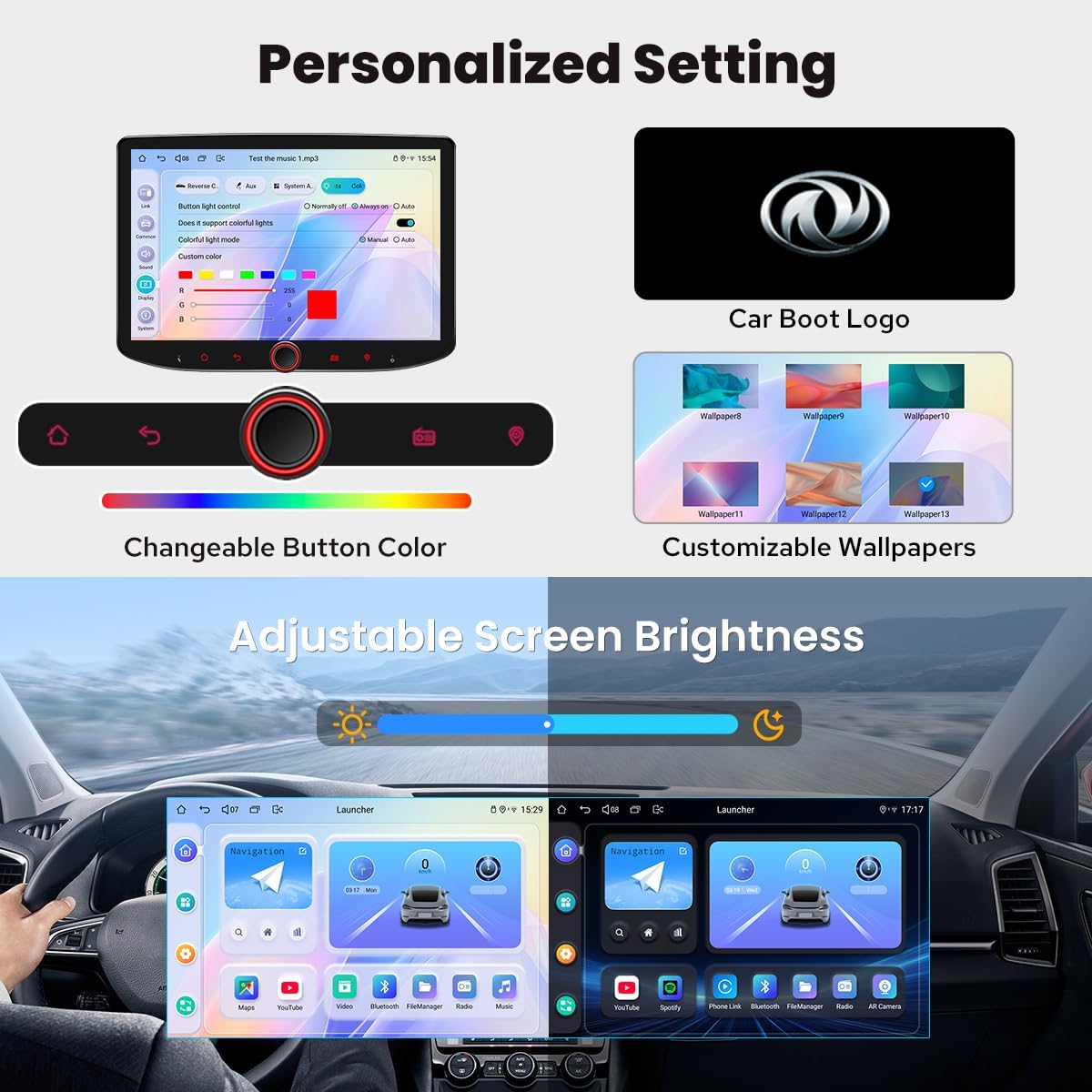
5.4 Ustawienia spersonalizowane
Customize your head unit with changeable button colors, customizable wallpapers, and adjustable screen brightness.
5.5 wyjście HDMI
HDMI output supports projection screen display for passengers in the headrest and on-screen display for drivers on the main screen, providing 1080P clear picture without delays. Note: HDMI cable is not included.
6. Konserwacja
6.1 Układ chłodzenia
The unit features a dual heat sink design for superior heat dissipation and improved temperature control. You can set a warning value for CPU temperature or radio volume; if exceeded, the fan will automatically turn on to prevent overheating.

6.2 Ogólna opieka
- Utrzymuj ekran w czystości, używając miękkiej, suchej ściereczki. Unikaj środków czyszczących o właściwościach ściernych.
- Zapewnij odpowiednią wentylację wokół urządzenia, aby zapobiec przegrzaniu.
7. Rozwiązywanie Problemów
Jeśli napotkasz problemy, wypróbuj poniższe podstawowe kroki rozwiązywania problemów:
- Brak zasilania: Sprawdź wszystkie połączenia zasilania i bezpieczniki. Upewnij się, że zapłon jest włączony.
- Brak dźwięku: Verify speaker connections and volume levels. Check external amppołączenia liniowe, jeśli dotyczy.
- Problemy z sygnałem GPS: Upewnij się, że antena GPS jest prawidłowo zainstalowana i ma zapewnioną przejrzystość. view nieba.
- Brak połączenia CarPlay/Android Auto: Check USB cable connection or Bluetooth pairing. Ensure your phone's software is up to date.
- Ekran nie reaguje: Try restarting the unit. If the issue persists, consult the support section.
8. Specyfikacje
| Waga przedmiotu | 2.65 funta |
| Wymiary produktu | 10.1 x 10.1 x 10.1 cala |
| Numer modelu przedmiotu | JY-UTD10N8-B |
| Rozmiar wyświetlacza | 10.1 cali |
| Polecenie głosowe | Ekran dotykowy |
| Nazwa modelu | UTD10N8 |
| Rozmiar ekranu | 10.1 cali |
| Funkcja specjalna | Android Auto, Apple CarPlay, Built-In Bluetooth, Built-In Wi-Fi, Equalizer |
| Technologia łączności | Bluetooth, Ethernet, HDMI, USB, Wi-Fi |
| Typ mapy | Ameryka Północna |
| Tryb wyjścia audio | Stereofoniczny |
| Typ montażu | Montaż na desce rozdzielczej |
9. Gwarancja i pomoc techniczna
9.1 Informacje o gwarancji
Your JOYING Android 13 Double Din Car Radio comes with a 2 lata gwarancji od daty zakupu. Zachowaj dowód zakupu na wypadek roszczeń gwarancyjnych.
9.2 Obsługa klienta
For technical assistance, troubleshooting beyond this manual, or warranty inquiries, please contact JOYING customer support through their official webwitrynę lub sprzedawcę, u którego zakupiono produkt.