
1. Wprowadzenie
This manual provides detailed instructions for the installation, operation, and maintenance of your Joying JY-UTD80N4-B Android 13 Double Din Car Stereo. This unit integrates advanced features such as Android 13 operating system, Apple CarPlay, Android Auto, GPS navigation, Bluetooth connectivity, and a high-resolution 8-inch display. Please read this manual thoroughly before using the product to ensure proper function and safety.

Obraz 1.1: Przód view of the Joying JY-UTD80N4-B Android 13 Double Din Car Stereo.
2. Konfiguracja i instalacja
2.1. Co znajduje się w pudełku
Przed rozpoczęciem instalacji sprawdź, czy wszystkie komponenty są obecne:
- 8" radio (1 unit)
- Double Din Cage (1 unit)
- Left & Right Bracket (1 set)
- Reinforced Shims (1 set)
- Plastic Trim Out (1 unit)
- Installation Manual (1 unit)
- WiFi Antenna (1 unit)
- GPS Antenna (1 unit)
- 4G Antenna (2 units)
- External Mic (1 unit)
- USB Cable (2 units)
- AR Cable (1 unit)
- Screen Ribbon Cable (1 unit)
- ISO Cable (1 unit)
- Instrukcja obsługi (1 szt.)

Image 2.1: All included components for the Joying JY-UTD80N4-B car stereo.
2.2. Ogólne uwagi dotyczące instalacji
Installation may require an installation frame kit with an inner size of 178 x 102mm, a special ISO harness, an amplifier adapter, or a CANbus decoder, depending on your vehicle's specific requirements. This unit does not support factory car GPS antennas, backup rear cameras, Bluetooth, USB, or microphones. Only JOYING accessories are supported for DVR, OBDII scanner, reverse camera, TPMS, and steering wheel controllers, which are sold separately.
2.3. Installation Structure
The fixing position of the left and right brackets can be extended or telescoped to achieve the best fixing position according to your car's center console, adapting to a wider range of vehicles. If your car is a Hyundai or Kia brand, please contact support for a different bracket.

Image 2.2: Illustration of the upgraded and adjustable installation structure.
2.4. Złącza panelu tylnego
Familiarize yourself with the various ports and connections on the rear panel of the head unit for proper wiring.

Image 2.3: Rear panel connections and overall dimensions of the head unit.
3. Instrukcja obsługi
3.1. Fast Boot Feature
Once the car key is inserted, the unit will start up and enter the user interface in approximately 2 seconds. The initial boot-up may take 30-40 seconds.
3.2. Wbudowany CarPlay i Android Auto
Connect your mobile phone to the car radio via a USB cable or Bluetooth to access phone applications on the larger screen. This allows for navigation, phone calls, and music playback.

Image 3.1: Display of Apple CarPlay and Android Auto interfaces.
3.3. Nawigacja GPS
The unit features precise GPS engines and includes a GPS antenna for accurate positioning and faster real-time navigation. Offline maps are supported in areas where data download is available, allowing for navigation without an internet connection. Mobile phone map data can also be synchronized via CarPlay or Android Auto.
3.4. Built-in 4G Module
Insert a SIM card into the unit for internet access. This feature supports FDD-LTE: B2/B4/B5/B7/B12/B13/B14/B17/B25/B26/B38/B66/B71 and TDD-LTE: B41. Note that this module does not support making phone calls or sending SMS messages.
3.5. High-Quality Audio Features
The unit is equipped with a TDA7851 DSP chip, a 48-band graphic equalizer, and a maximum output power of 4x50W for enhanced sound quality. It supports aftermarket amplifiers with 4 audio outputs, 1 SUB output, Fiber Optical output, SPDIF Coaxial output, and a Center Channel output.

Obraz 3.2: Koniecview of high-quality sound features and aftermarket ampwsparcie lifier.
3.6. Wielozadaniowość na podzielonym ekranie
The unit supports split-screen functionality, allowing two applications to run simultaneously on the display. To use this feature, tap the recent apps icon, find the desired app, click the split-screen button, and then select a second app from the recent apps list.

Image 3.3: Step-by-step guide for using split-screen multitasking.
3.7. Sterowanie z kierownicy
The unit supports steering wheel controls for easy switching of songs, radio channels, and volume adjustment, contributing to a safer driving experience. Vehicles with a CAN system may require an additional CANbus cable to enable this feature.

Image 3.4: Illustration of steering wheel control integration.
3.8. Personalized Settings
Customize your user experience with various settings, including changing the car boot logo, selecting from customizable wallpapers, and adjusting the button colors and screen brightness.

Obraz 3.5: Examples of personalized settings such as boot logo, wallpapers, and button colors.
3.9. Pokrętło głośności
The unit features a physical volume knob for intuitive audio control. Rotate to adjust volume, and press to mute/unmute.

Rysunek 3.6: Szczegółowy view of the volume knob and its functions.
3.10. Wyjście HDMI
The HDMI output provides a full digital image and sound-sending interface, capable of sending uncompressed audio and video signals. Audio and video can be output synchronously without manual adjustment. This allows for projection screen display for passengers or on-screen display with 1080P clarity and zero delay. The HDMI cable is not included.
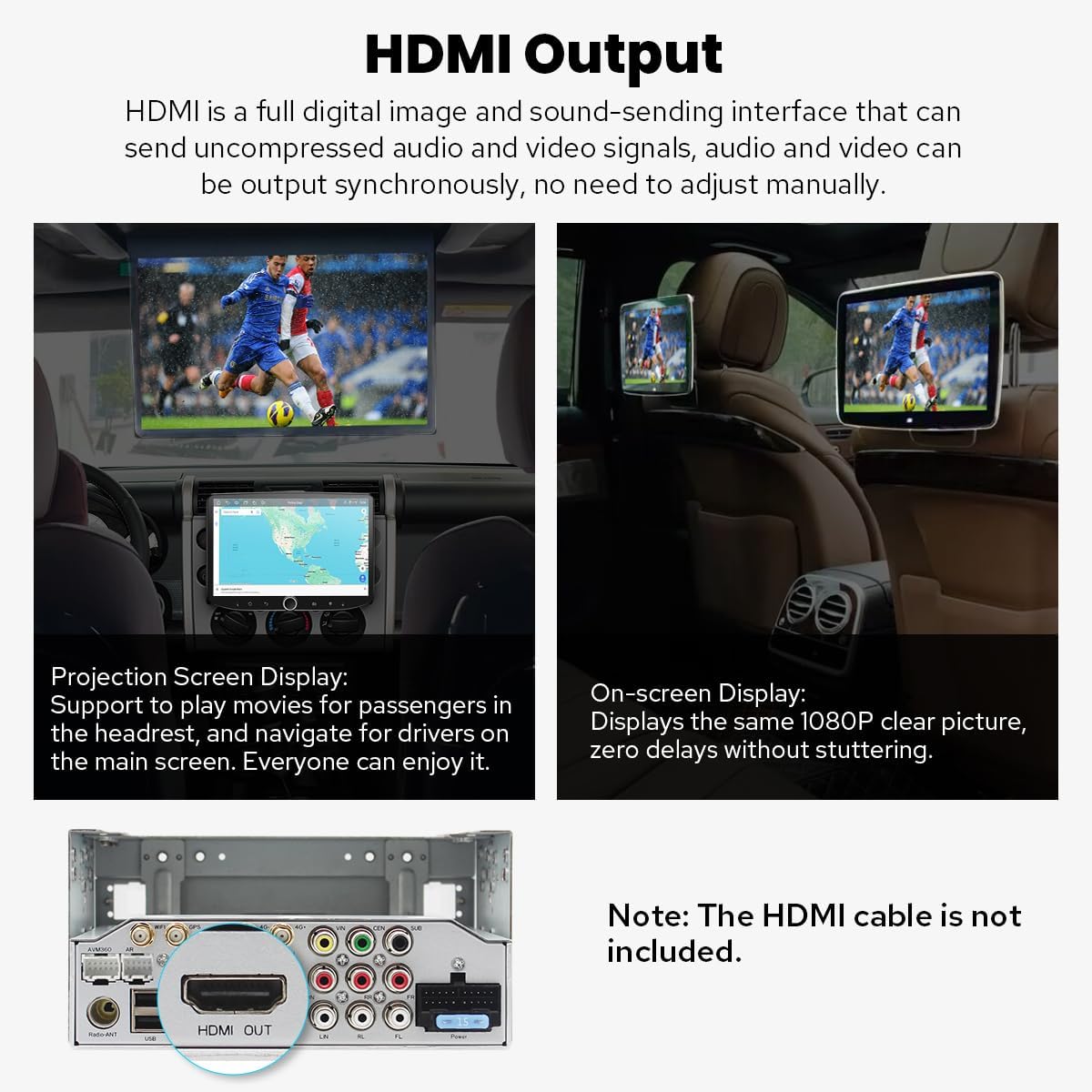
Image 3.7: Demonstration of HDMI output for projection and on-screen displays.
3.11. Inne funkcje
The unit includes additional features such as Picture-in-Picture mode, three USB ports, a Micro SD Card Slot, and a 4G SIM Card Slot.

Image 3.8: Icons representing various features of the car stereo.
4. Konserwacja
4.1. Układ chłodzenia
The unit features a dual heat sink design for superior heat dissipation, improved temperature control, and enhanced performance stability. You can set a warning value for volume or CPU temperature. When the CPU temperature or radio's volume rises and exceeds the warning value, the fan will automatically activate for cooling to prevent overheating.

Image 4.1: Illustration of the upgraded dual heat sink cooling system.
4.2. Ogólna opieka
To maintain the unit's performance and appearance, regularly clean the screen with a soft, dry cloth. Avoid using abrasive cleaners or solvents. Ensure all connections are secure and free from debris.
5. Rozwiązywanie Problemów
If you encounter issues with your Joying car stereo, consider the following general troubleshooting steps:
- Brak zasilania: Sprawdź wszystkie połączenia zasilania i bezpieczniki. Upewnij się, że zapłon samochodu jest włączony.
- Brak dźwięku: Verify speaker connections, volume levels, and audio output settings. Check if the unit is muted.
- Problemy z sygnałem GPS: Upewnij się, że antena GPS jest prawidłowo zainstalowana i ma zapewnioną przejrzystość. view nieba.
- Problemy z łącznością Bluetooth: Upewnij się, że Bluetooth jest włączony zarówno w zestawie stereo, jak i w urządzeniu. Spróbuj rozparować i ponownie sparować urządzenia.
- Brak reakcji ekranu dotykowego: Perform a soft reset by pressing the reset button (if available) or turning off the car's ignition and restarting.
For persistent issues or complex problems, refer to the detailed troubleshooting section in the included Installation Manual or contact Joying customer support.
6. Specyfikacje
| Funkcja | Szczegół |
|---|---|
| Numer modelu | JY-UTD80N4-B |
| System operacyjny | Android 13 |
| Rozmiar wyświetlacza | 8 cali |
| Rozdzielczość wyświetlacza | 1280x800P |
| Pamięć (RAM) | 4 GB |
| Pamięć masowa (ROM) | 64 GB |
| Łączność | Bluetooth, Ethernet, HDMI, USB, Wi-Fi, 4G Module |
| Cechy specjalne | Android Auto, Apple CarPlay, Built-In Bluetooth, Built-In Wi-Fi, Equalizer, Fast Boot, GPS Navigation, AM/FM Radio, Hands-free Call, Picture-in-Picture |
| Tryb wyjścia audio | Stereo, Optical Fiber, Coaxial Digital |
| Typ montażu | Uchwyt do deski rozdzielczej (podwójny DIN) |
| Waga przedmiotu | 2.65 funta |
| Wymiary opakowania | 12.2 x 7.87 x 5.91 cala |
6.1. WiFi Signal
The unit features an independent WiFi antenna to ensure stable signal quality and provide fast, smooth internet access. It supports 802.11a/b/g/n/AC standards and operates on 2.4GHz/5GHz spectral bands.

Image 6.1: Details of the upgraded WiFi signal and antenna.
7. Akcesoria opcjonalne
The following accessories are not included in the package but can be ordered separately to enhance your experience:
- Skaner OBD2: Connects via Bluetooth to retrieve real-time data and trouble codes from your vehicle computer.
- Przednia kamera AR: Automatycznie rejestruje drogę przed pojazdem podczas jazdy.
- Tylna kamera AR: Automatyczne przełączanie na bieg wsteczny podczas cofania samochodu.

Image 7.1: Optional accessories including OBD2, AR Front Camera, and AR Rear Camera.
8. Gwarancja
The Joying JY-UTD80N4-B Android 13 Double Din Car Stereo comes with a 2-letnia gwarancja od daty zakupu. Prosimy zachować dowód zakupu na wypadek roszczeń gwarancyjnych. Gwarancja obejmuje wady produkcyjne i usterki powstałe w wyniku normalnego użytkowania. Nie obejmuje uszkodzeń spowodowanych nieprawidłową instalacją, niewłaściwym użytkowaniem, wypadkami lub nieautoryzowanymi modyfikacjami.
9. Wsparcie
For further assistance, technical support, or warranty inquiries, please contact Joying customer service. Refer to the contact information provided in your product packaging or visit the official Joying webwitryna zawierająca zasoby pomocy.