
SEMIER SM-136
SEMIER SM-136 Cassette Player & Digital Converter User Manual
Modele: SM-136
Wstęp
Dziękujemy za zakupasing the SEMIER SM-136 Cassette Player & Digital Converter. This versatile device allows you to play and record audio cassettes, play music from an SD card, and convert your cherished cassette tapes into digital MP3 files, either directly to an SD card or to your computer using the included software. Please read this manual carefully to ensure proper operation and to maximize your enjoyment of this product.
Co jest w pudełku
- Cassette Recorder Converter x 1
- Karta SD 16 GB x 1
- USB Reader x 1
- Software CD-ROM x 1
- Instrukcja obsługi x 1
- Type-C Charging and Data Cable x 1

Obraz: Wszystkie elementy zawarte w opakowaniu produktu.
Organizować coś
Włączanie urządzenia
The SEMIER SM-136 can be powered by two methods:
- Kabel USB-C: Connect the included USB-C cable to the device's USB-C port and the other end to a USB power adapter (not included) or a computer's USB port.
- Baterie AA: Open the battery compartment on the back of the device and insert four (4) AA batteries (not included), ensuring correct polarity.
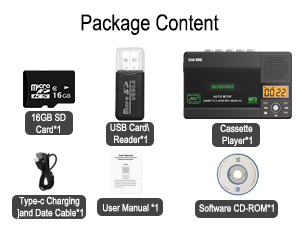
Image: Illustration of inserting AA batteries into the device.
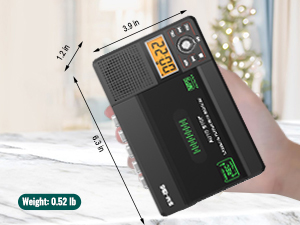
Image: Connecting the USB-C power cable to the device.
Wkładanie kasety magnetofonowej
Gently open the cassette compartment door. Insert your cassette tape with the open edge facing upwards and the tape side facing the device. Close the door firmly until it clicks.

Image: Proper insertion of a cassette tape into the player.
Wkładanie karty SD
Locate the SD card slot on the side of the device. Insert the included 16GB SD card (or another compatible SD card, up to 32GB) into the slot until it clicks into place. Ensure the card is inserted in the correct orientation.

Image: Proper insertion of an SD card into the device's dedicated slot.
Instrukcja obsługi
Odtwarzanie kaset magnetofonowych
- Sprawdź, czy włożona jest kaseta.
- Slide the "TAPE/OFF/Micro SD" switch to the "TAPE" position.
- Naciśnij GRAĆ przycisk (►), aby rozpocząć odtwarzanie.
- Dostosuj głośność za pomocą TOM pokrętło.
- Aby zatrzymać odtwarzanie, naciśnij ZATRZYMYWAĆ SIĘ przycisk (■).
- Użyj Przód (►►) I REW (◄◄) buttons for fast-forward and rewind.
Playing Music from SD Card
- Zapewnij kartę SD z MP3 fileWstawiono s.
- Slide the "TAPE/OFF/Micro SD" switch to the "Micro SD" position. The LCD display will show "SD" and the current track time.
- Naciśnij ODTWÓRZ/PAUZA przycisk (►⏺) aby rozpocząć lub wstrzymać odtwarzanie.
- Użyj POPRZEDNI (◄◄) I NASTĘPNY (►►) służą do nawigacji między utworami.
- Naciśnij ROZPUSTNIK przycisk umożliwiający powtórzenie bieżącego utworu lub wszystkich utworów.
- Naciśnij USUNĄĆ button to delete the current track.
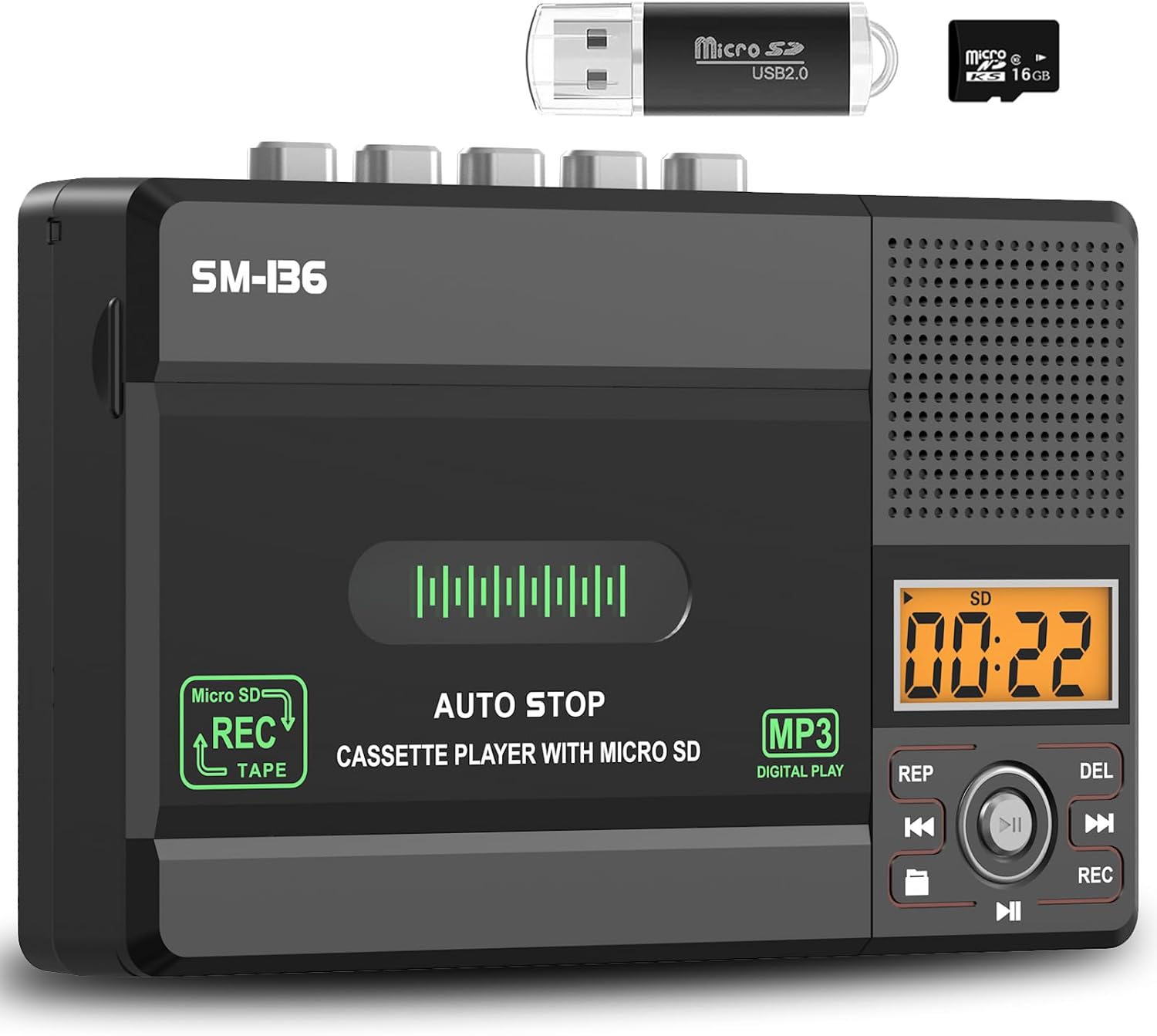
Obraz: Ponadview of the device's control panel and LCD screen.
Recording to Cassette Tape (from built-in microphone)
- Włóż czystą lub nadającą się do nagrywania kasetę.
- Slide the "TAPE/OFF/Micro SD" switch to the "TAPE" position.
- Naciśnij REK button (red button) to begin recording from the built-in microphone.
- Aby zatrzymać nagrywanie, naciśnij ZATRZYMYWAĆ SIĘ przycisk (■).

Image: Demonstrates recording audio to a cassette tape using the built-in microphone.
Converting Cassette to MP3 (to SD Card)
This method allows direct conversion without a computer.
- Włóż kasetę, którą chcesz przekonwertować.
- Insert the 16GB SD card (or another compatible SD card) into the SD card slot.
- Slide the "TAPE/OFF/Micro SD" switch to the "TAPE" position.
- Naciśnij GRAĆ przycisk (►) on the cassette player.
- While the tape is playing, press and hold the REK button (red button) on the digital control panel until the LCD display shows "REC". This will start recording the cassette audio directly to the SD card as an MP3 file.
- Aby zatrzymać nagrywanie, naciśnij REK ponownie lub naciśnij przycisk ZATRZYMYWAĆ SIĘ przycisk (■) on the cassette player.
- The converted MP3 files will be saved on the SD card. You can then play them back on the device by switching to "Micro SD" mode or transfer them to a computer using the included USB reader.

Image: Visual steps for direct cassette to SD card MP3 conversion.
Converting Cassette to MP3 (to Computer via Audacity)
This method requires a computer and the included Audacity software.
- Install Audacity: Insert the included Software CD-ROM into your computer's CD drive and follow the installation instructions for Audacity. Alternatively, you can download the latest version of Audacity from its official webstrona.
- Podłącz urządzenie: Connect the SEMIER SM-136 to your computer using the included USB-C data cable.
- Prepare Audacity: Open Audacity. Ensure the correct input device (usually "USB Audio CODEC" or similar) is selected in Audacity's audio settings.
- Rozpocznij nagrywanie: Insert the cassette tape you wish to convert into the player. Press the GRAĆ przycisk (►) on the cassette player. Then, click the Nagrywać button in Audacity to begin capturing the audio.
- Monitor and Stop: Monitor the audio levels in Audacity. Once the tape has finished playing, click the Zatrzymywać się button in Audacity and the ZATRZYMYWAĆ SIĘ przycisk (■) on the cassette player.
- Export MP3: In Audacity, you can edit the recorded audio (e.g., trim silence, remove noise). Once satisfied, go to File > Eksportuj > Eksportuj jako MP3 to save your digital audio file.

Image: Illustrates connecting the device to a computer and using Audacity for digital conversion.
Konserwacja
- Czyszczenie: Do czyszczenia zewnętrznej części urządzenia należy używać miękkiej, suchej ściereczki. Nie należy używać płynnych środków czyszczących ani materiałów ściernych.
- Czyszczenie głowicy taśmy: Okresowo czyść głowice taśmy i rolki dociskowe delikatnie przecierając je wacikiem.ampnasycone alkoholem izopropylowym, aby zapewnić optymalną jakość dźwięku i zapobiec uszkodzeniu taśmy.
- Składowanie: Przechowywać urządzenie w chłodnym i suchym miejscu, z dala od bezpośredniego światła słonecznego i ekstremalnych temperatur.
- Wyjmowanie baterii: If the device will not be used for an extended period, remove the AA batteries to prevent leakage.
Rozwiązywanie problemów
| Problem | Możliwa przyczyna | Rozwiązanie |
|---|---|---|
| Urządzenie nie włącza się. | No power source; batteries dead or incorrectly inserted; USB-C cable not connected properly. | Check battery polarity and charge; ensure USB-C cable is securely connected to a working power source. |
| No sound during cassette playback. | Volume too low; "TAPE/OFF/Micro SD" switch in wrong position; tape head dirty. | Increase volume; ensure switch is on "TAPE"; clean tape head. |
| Słaba jakość dźwięku podczas odtwarzania/nagrywania. | Brudne głowice taśmy; zużyta taśma; niski poziom naładowania baterii. | Clean tape heads; try a different tape; replace batteries or use USB-C power. |
| SD card not recognized or "No SD" message. | SD card incorrectly inserted; unsupported SD card format/size; faulty SD card. | Reinsert SD card; ensure it's formatted to FAT32 and is 32GB or less; try a different SD card. |
| Nie można nagrywać na kartę SD. | SD card full; SD card write-protected; incorrect recording procedure. | Usuwać files from SD card; check SD card's physical write-protect switch; follow "Converting Cassette to MP3 (to SD Card)" steps carefully. |
| Audacity not detecting device for conversion. | USB-C cable issue; incorrect audio input selected in Audacity; driver issue. | Try a different USB port/cable; ensure "USB Audio CODEC" is selected in Audacity; restart computer and device. |
Specyfikacje
- Model: SM-136
- Funkcje: Cassette Player, Cassette Recorder (via Mic), SD Card MP3 Player, Cassette to MP3 Converter (to SD Card / PC)
- Źródło zasilania: DC 5V (USB-C) or 4 x AA Batteries
- Wyjście głośnika: 2W
- Gniazdo słuchawkowe: 3.5mm Stereo
- Obsługa kart SD: Do 32 GB, w formacie FAT32
- Wymiary: 6.3 x 3.9 x 1.2 cala (16 x 9.9 x 3 cm)
- Waga: 0.52 funta (0.24 kg)

Image: Detailed dimensions and weight of the product.
Gwarancja i wsparcie
SEMIER products are designed for reliability and performance. This product comes with a standard manufacturer's warranty. For detailed warranty information, technical support, or customer service inquiries, please refer to the contact information provided on the product packaging or visit the official SEMIER website. Our dedicated customer support team is available to assist you with any questions or concerns.
Możesz również odwiedzić SEMIER Store on Amazon aby uzyskać więcej informacji i zasobów wsparcia.
Powiązane dokumenty - SM-136
 |
Instrukcja obsługi słuchawek z przewodnictwem kostnym Avantree HS136 Instrukcja obsługi słuchawek Avantree HS136 z przewodnictwem kostnym, obejmująca cały produktview, dołączone akcesoria, ładowanie, podstawowe operacje, wskazania LED, parowanie, przywracanie ustawień fabrycznych, pomoc techniczna i instrukcje dotyczące pielęgnacji. |
 |
Soundmax SM-CCR3056F Car Media Receiver - Instruction Manual User manual for the Soundmax SM-CCR3056F car media receiver, covering installation, operation, troubleshooting, and specifications. Supports USB, microSD, and FM radio. |
 |
INTEGRA MEDIACLAVE 10/30 Media Sterilizer Quick Start Guide Quick start guide for the INTEGRA MEDIACLAVE 10/30 Media Sterilizer, covering setup, operation modes (standard, chocolate agar, autoclave, water bath), dispensing, maintenance, and safety information. Includes manufacturer details and declaration of conformity. |
 |
Soundmax SM-CCR3057F: Instrukcja obsługi odtwarzacza multimedialnego do samochodu Instrukcja obsługi samochodowego odtwarzacza multimedialnego Soundmax SM-CCR3057F zawierająca szczegółowe informacje na temat instalacji, obsługi, funkcji (odtwarzanie USB/microSD, radio FM) i rozwiązywania problemów w pojazdach z instalacją 12 V. |
 |
Guía de Usuario Zegarek Samsung Galaxy: Modelos SM-R860 i SM-R965F Przeglądaj funkcje, konfiguracje i rozwiązania problemów związanych z zegarkiem Samsung Galaxy Watch za pomocą kompletnego przewodnika. Modele Cubre z serii Galaxy Watch4 mają serię Galaxy Watch6. |
 |
Gebruikershandleiding Samsung Galaxy Watch Oficjalna instrukcja obsługi udostępnia podstawowe informacje dotyczące serii zegarków Samsung Galaxy. Ontdek moe uw apparaat instelt, różne funkcje i aplikacje gebruikt, uw gezondheid i activiteiten bijhoudt, a także zintegrowana aplikacja Galaxy Wearable, która umożliwia naadloze ervaring. |