
1. Wprowadzenie
This instruction manual provides essential information for the safe and efficient use of your ApoloSign 32-inch UHD 4K Smart Portable TV Gen2. Please read this manual thoroughly before operating the device and retain it for future reference. This portable smart TV combines a high-resolution display with smart features, offering versatile entertainment and productivity options throughout your home.

Image: The ApoloSign 32-inch Portable TV Gen2 positioned in a modern living room, showcasinze względu na elegancki design i przenośność.
2. Informacje dotyczące bezpieczeństwa
Ogólne środki ostrożności
- Aby uniknąć pożaru lub porażenia prądem, nie wystawiaj urządzenia na działanie deszczu i wilgoci.
- Zapewnij odpowiednią wentylację. Nie blokuj otworów wentylacyjnych.
- Używaj wyłącznie zasilacza dostarczonego z urządzeniem.
- Unikaj umieszczania urządzenia na niestabilnych powierzchniach.
- Nie próbuj samodzielnie demontować ani naprawiać urządzenia. Wszelkie czynności serwisowe zlecaj wykwalifikowanemu personelowi.
Bezpieczeństwo baterii
- The device contains a built-in 15000mAh lithium-ion battery. Do not expose it to excessive heat, direct sunlight, or fire.
- Całkowicie naładuj baterię przed pierwszym użyciem.
- If the battery shows signs of swelling, leakage, or damage, discontinue use immediately and contact support.
- Zutylizuj baterie zgodnie z lokalnymi przepisami.
3. Zawartość opakowania
Sprawdź, czy w opakowaniu znajdują się wszystkie elementy:
- ApoloSign 32-inch UHD 4K Smart Portable TV Gen2 Display
- Rolling Stand Base
- Stand Pole (multiple sections)
- Zasilacz
- Zdalne sterowanie głosem
- 8MP Camera Module
- Assembly Screws and Tools
- Instrukcja obsługi (ten dokument)

Image: The voice remote control, a key accessory for navigating the ApoloSign TV.

Image: The detachable 8MP camera module, designed for video calls and other interactive features.
4. Koniec produktuview
The ApoloSign 32-inch UHD 4K Smart Portable TV Gen2 is a versatile device designed for flexible use across various environments. Its main components include:
- 32-inch UHD 4K Touchscreen: A large, high-resolution display with touch functionality for intuitive interaction.
- Rolling Stand: A sturdy base with smooth wheels for easy movement between rooms.
- Adjustable Screen Mount: Allows for height adjustment, left/right swivel, and tilt for optimal viewkąty w orientacji pionowej i poziomej.
- Integrated 8MP Camera: For video conferencing and other camera-enabled applications.
- Zdalne sterowanie głosowe: Enables hands-free operation and navigation.
- Wbudowana bateria 15000mAh: Provides up to 8 hours of portable use.
- Porty łączności: Includes HDMI, USB 2.0, USB 3.0, Bluetooth 5.3, and Wi-Fi for various connections.
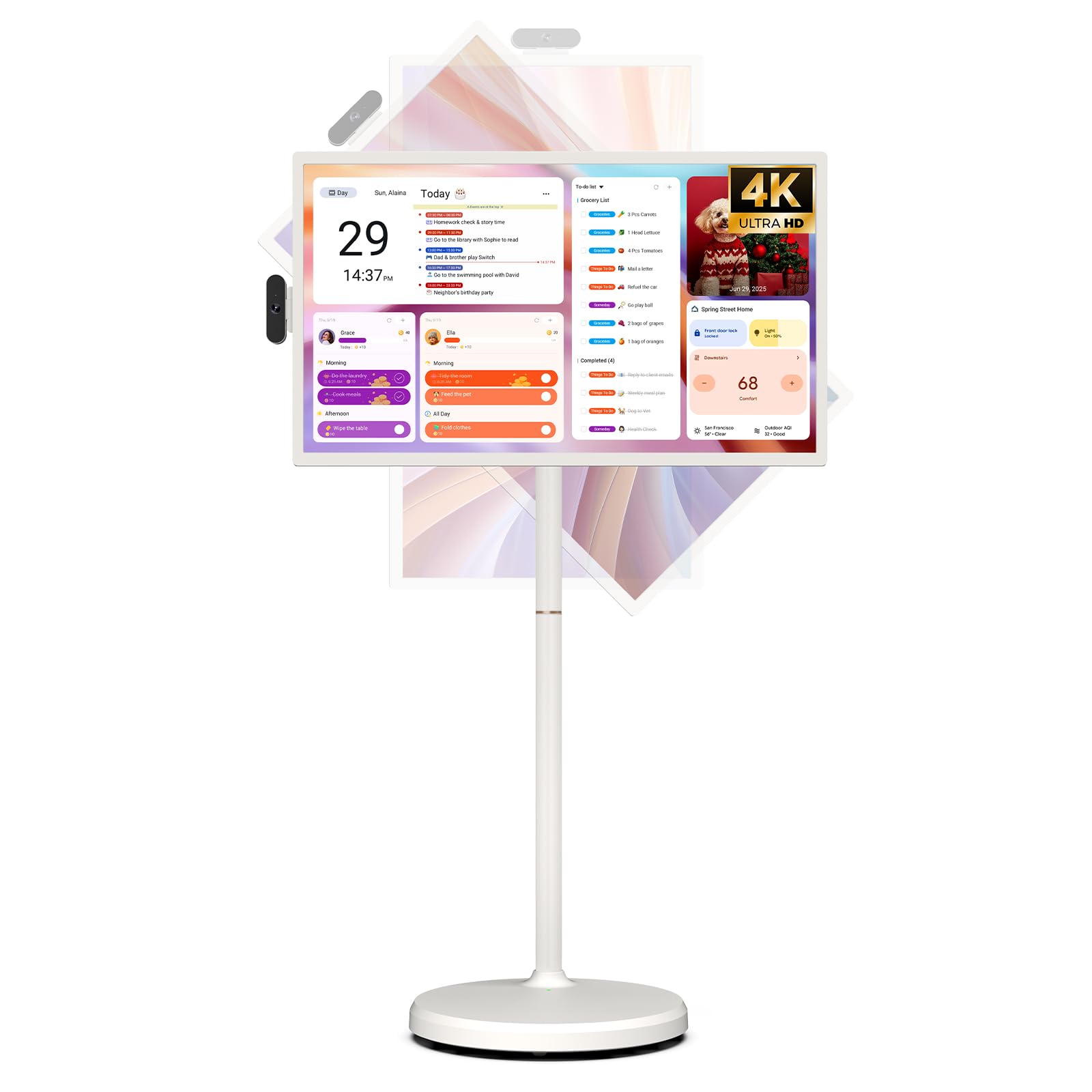
Image: The ApoloSign 32-inch UHD 4K Smart Portable TV Gen2, highlighting its large screen and mobile stand.
5. Konfiguracja
Montaż
- Rozpakuj wszystkie elementy z pudełka.
- Attach the stand pole sections to the rolling base using the provided screws.
- Carefully mount the TV display onto the top of the assembled stand pole, ensuring it clicks securely into place.
- Connect the internal power cable from the stand to the display.
- Attach the 8MP camera module to the designated slot on top of the display.
Pierwsze włączenie i połączenie sieciowe
- Connect the power adapter to the TV and a power outlet. The device will begin charging.
- Press the power button located on the back of the display to turn on the TV.
- Postępuj zgodnie z instrukcjami wyświetlanymi na ekranie, aby wybrać swój język i region.
- Połącz się ze swoją siecią Wi-Fi, wybierając ją z listy i podając hasło.
- Zaloguj się za pomocą konta Google, aby uzyskać dostęp do sklepu Google Play i innych usług.
Parowanie pilota zdalnego sterowania
- Insert batteries into the voice remote control.
- On the TV screen, navigate to Settings > Remotes & Accessories > Add Accessory.
- Press and hold the specified pairing buttons on the remote (refer to remote's mini-guide) until the indicator light blinks.
- Select the remote control from the list on the TV screen to complete pairing.
6. Instrukcja obsługi
Podstawowa nawigacja
- Ekran dotykowy: Tap, swipe, and pinch to navigate menus, open apps, and interact with content.
- Zdalny głos: Use the directional pad and selection buttons for menu navigation. Press the voice button to activate voice commands for searching or launching apps.
Screen Rotation and Adjustment
The screen can be rotated 90 degrees between landscape and portrait modes. It also allows for height adjustment, left/right swivel, and tilting to achieve the desired viewkąt.

Image: Illustrations demonstrating the various ways the ApoloSign TV screen can be adjusted: height, tilt, and rotation.
Apps and Google Play Store
Running on a customized Android 15 OS and Google certified, you can download and install any app available on the Google Play Store. Access streaming services, social media, productivity tools, and games.

Image: The ApoloSign TV screen showing the Android 15 interface with icons for popular apps like Netflix, YouTube, Spotify, and TikTok.
Wireless and Wired Casting
Share content from your mobile phone, tablet, or laptop to the TV screen.
- Przesyłanie bezprzewodowe: Use the built-in MixCast feature or other compatible casting protocols. Ensure your device and the TV are on the same Wi-Fi network.
- Wired Casting: Connect external devices like gaming consoles or laptops via the HDMI port. The TV supports 4K HDMI output.
Video: A demonstration of how to screen mirror a mobile phone, tablet, or laptop to the ApoloSign Smart Portable TV.
Calendar Widget and Screensavers
The interactive desktop calendar widget syncs with Google Calendar, Outlook, and Google Tasks to help manage your schedule. Utilize dynamic screensavers to transform the TV into a digital clock, photo frame, or market billboard.

Image: The ApoloSign TV screen showcasing its digital calendar feature, displaying daily schedules and events.

Image: The ApoloSign TV screen demonstrating different digital screensaver options, including a photo display and a music player interface.
Korzystanie z aparatu
The integrated 8MP camera is ideal for video calls and conferences. Ensure the camera is correctly installed and facing the desired direction.
7. Konserwacja
Czyszczenie
- Zawsze odłączaj urządzenie przed czyszczeniem.
- Użyj miękkiej, niestrzępiącej się ściereczki, lekko wyczyśćampPrzetrzyj wyświetlacz wodą lub płynem do czyszczenia ekranów. Unikaj silnych środków chemicznych.
- Wipe the body of the TV and stand with a dry, soft cloth.
Pielęgnacja baterii
- Aby zapewnić optymalną żywotność baterii, należy unikać częstego całkowitego rozładowywania baterii.
- Przechowuj urządzenie w chłodnym i suchym miejscu, jeśli nie będziesz go używać przez dłuższy czas.
- Jeśli akumulator jest przechowywany przez dłuższy czas, należy go okresowo ładować, aby zapobiec jego głębokiemu rozładowaniu.
Aktualizacje oprogramowania
Regularly check for and install software updates to ensure optimal performance and access to the latest features. Updates can usually be found in the device's settings menu.
8. Rozwiązywanie Problemów
- Device not powering on or shutting off abruptly:
Ensure the power adapter is securely connected and the battery is charged. If the issue persists, perform a soft reset by holding the power button for 10-15 seconds. If problems continue, contact customer support. - Remote control not responding or selective functionality:
Check the remote's batteries and replace if necessary. Ensure the remote is paired correctly (refer to Section 5). If the remote is still unresponsive, try re-pairing it. - Problemy z łącznością Wi-Fi:
Verify that your Wi-Fi router is working correctly. Restart the TV and your router. Ensure the TV is within range of your Wi-Fi signal. - Dublowanie ekranu nie działa:
Confirm that both the TV and the source device (phone, tablet, laptop) are connected to the same Wi-Fi network. Ensure the casting feature is activated on both devices. - Poor picture or sound quality:
For streaming content, check your internet connection speed. For wired connections (HDMI), ensure cables are securely connected and undamaged. Adjust display settings (resolution, brightness) as needed.
9. Specyfikacje
| Funkcja | Szczegół |
|---|---|
| Nazwa modelu | SW3299T-4K |
| Rozmiar ekranu | 32 cali |
| Rezolucja | 4K UHD 2160p (3840x2160 Pixels) |
| Technologia wyświetlania | LCD |
| Częstotliwość odświeżania | 60 Hz |
| System operacyjny | Android 15 |
| BARAN | 16GB (8+8GB) |
| Pamięć wewnętrzna | 256 GB |
| Pojemność baterii | 15000mAh (up to 8 hours runtime) |
| Kamera | 8MP |
| Łączność | Bluetooth 5.3, Wi-Fi |
| Porty | 1x HDMI, 1x USB 2.0, 1x USB 3.0 |
| Opis głośnika | Głośniki 2.1-kanałowe |
| Metoda kontroli | Touch, Voice Remote |
| Wymiary produktu | 16.14" gł. x 28.87" szer. x 60.26" wys. |
10. Gwarancja i wsparcie
Gwarancja producenta
This ApoloSign product is covered by a 1-letnia gwarancja producenta od daty zakupu. Niniejsza gwarancja obejmuje wady materiałowe i wykonawcze wynikające z normalnego użytkowania. Prosimy zachować dowód zakupu na wypadek roszczeń gwarancyjnych.
Obsługa klienta
For technical assistance, troubleshooting, or warranty inquiries, please contact ApoloSign Official customer support. They offer 24/7 fast support to address any issues you may encounter.
Więcej informacji znajdziesz na stronie Sklep ApoloSign na Amazon.