
1. Wprowadzenie
This manual provides essential information for the installation, operation, and maintenance of your FSP VITA GM 650W ATX 3.1 PC Power Supply. Please read this manual thoroughly before installation to ensure proper and safe usage of the product. The FSP VITA GM 650W is designed to deliver stable and efficient power to your computer system, adhering to the ATX 3.1 and PCIe Gen 5.1 specifications.
2. Informacje dotyczące bezpieczeństwa
Aby zapobiec obrażeniom ciała lub uszkodzeniu sprzętu, należy zawsze przestrzegać następujących środków ostrożności:
- Nie otwierać zasilacza. Wysokie napięcietagsą obecne w środku i otwierają casing voids the warranty and poses a risk of electric shock.
- Zasilacz należy zainstalować w dobrze wentylowanym pomieszczeniu, z dala od źródeł ciepła, bezpośredniego światła słonecznego i wilgoci.
- Sprawdź, czy zasilacz jest prawidłowo zainstalowany i zabezpieczony w obudowie komputera.
- Use only the modular cables provided with the power supply. Using incompatible cables can cause damage.
- Podłącz zasilacz do uziemionego gniazdka elektrycznego.
- Disconnect the AC power cord from the wall outlet before installing or removing the power supply or any other components.
- Unikaj umieszczania ciężkich przedmiotów na zasilaczu i jego przewodach.
- If the power supply is damaged or malfunctioning, discontinue use immediately and contact FSP support.
3. Zawartość opakowania
Sprawdź, czy w przesyłce znajdują się wszystkie elementy:
- FSP VITA GM 650W ATX 3.1 PC Power Supply
- Modular Cable Set (Motherboard, CPU, PCIe, SATA, Peripheral)
- Przewód zasilający AC
- Śruby montażowe
- Instrukcja obsługi (ten dokument)
4. Koniec produktuview
The FSP VITA GM 650W is a high-efficiency power supply designed for modern PC systems. It features:
- ATX 3.1 Compliance: Designed to meet the latest Intel Power Design Guide ATX 3.1 specifications, ensuring compatibility with future hardware.
- PCIe Gen 5.1 Support: Ready for next-generation graphics cards.
- Certyfikat 80 PLUS Gold: Achieves high efficiency, reducing power dissipation, heat, and noise.
- Synchronous Rectifier LLC Resonance Converter Topology: Reduces switching loss and enhances efficiency.
- +5V & 3.3V DC to DC Circuit Design: Improves efficiency and stabilizes output voltage.
- 105°C Japanese Bulk Capacitor: Ensures reliability and extended lifespan.

Rysunek 4.1: Widok z przodu view of the FSP VITA GM 650W Power Supply, showcasindzięki kompaktowej konstrukcji i kratce wentylatora.
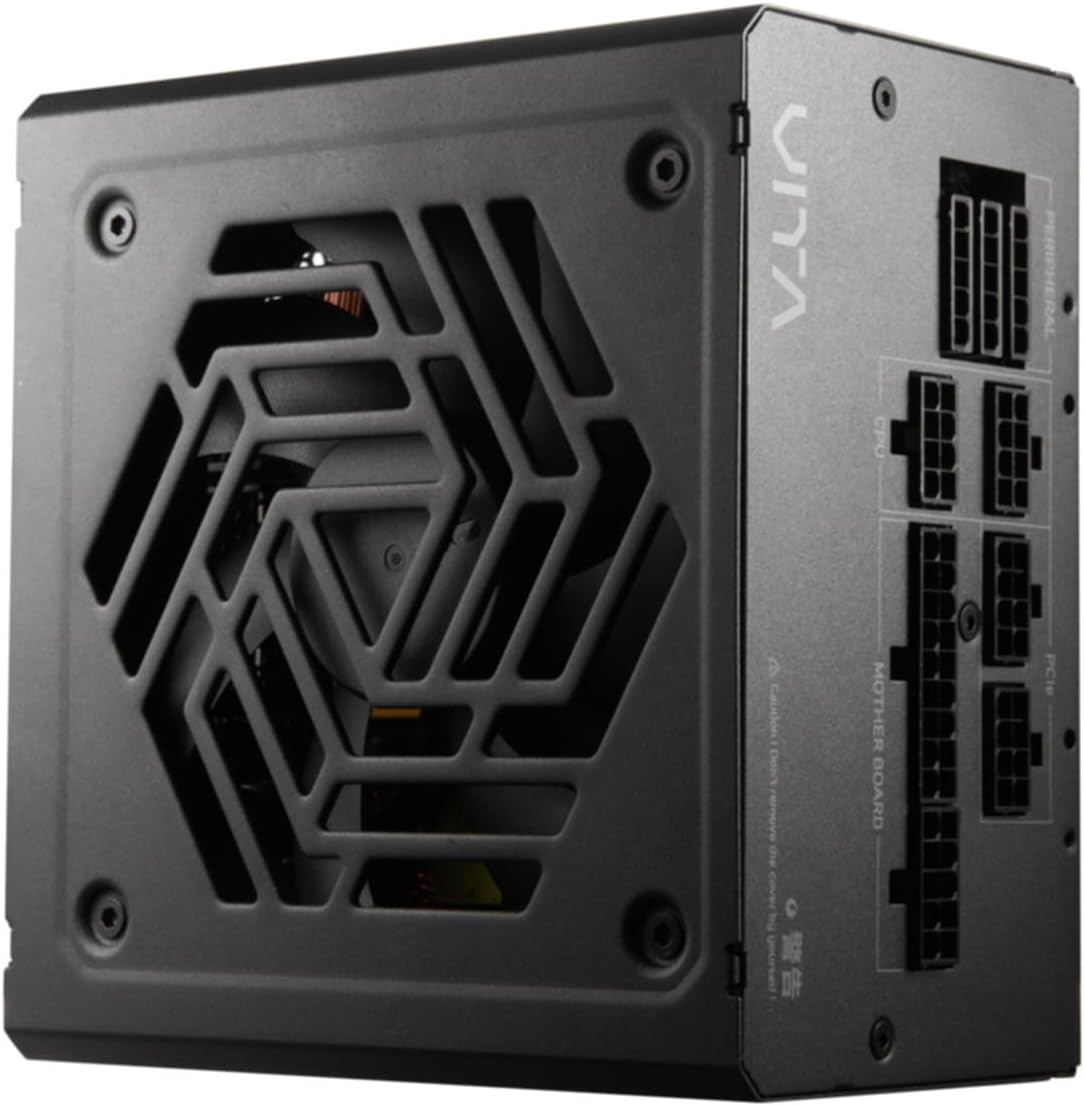
Rysunek 4.2: Widok z góry na dół view of the FSP VITA GM 650W Power Supply, highlighting the fan and ventilation design.

Rysunek 4.3: Strona view of the FSP VITA GM 650W Power Supply, showing the FSP branding and VITA model name.
5. Konfiguracja i instalacja
Follow these steps to install your FSP VITA GM 650W power supply:
- Przygotowanie:
- Wyłącz komputer i odłącz przewód zasilający od gniazdka ściennego.
- Otwórz obudowę komputera.
- Jeśli wymieniasz istniejący zasilacz, odłącz wszystkie kable od starego zasilacza i wyjmij go z obudowy.
- Montaż zasilacza:
- Carefully place the FSP VITA GM 650W into the power supply bay of your PC case.
- Dopasuj otwory na śruby w zasilaczu do otworów w obudowie.
- Zamocuj zasilacz za pomocą dostarczonych śrub montażowych.
- Podłączanie kabli modułowych:
The FSP VITA GM 650W is a modular power supply. Connect only the cables required for your system components.

Figure 5.1: Modular cable connection panel. Ensure cables are firmly seated.
- Zasilanie płyty głównej: Podłącz 24-pinowy kabel ATX do płyty głównej.
- Moc procesora: Connect the 4+4-pin or 8-pin EPS/ATX12V cable(s) to the CPU power connector(s) on your motherboard.
- Zasilanie PCIe: Connect the 6+2-pin PCIe cables to your graphics card(s).
- Moc SATA: Podłącz kable zasilające SATA do dysków SSD, HDD i napędów optycznych.
- Moc peryferyjna: Connect 4-pin Molex cables to other peripherals as needed.
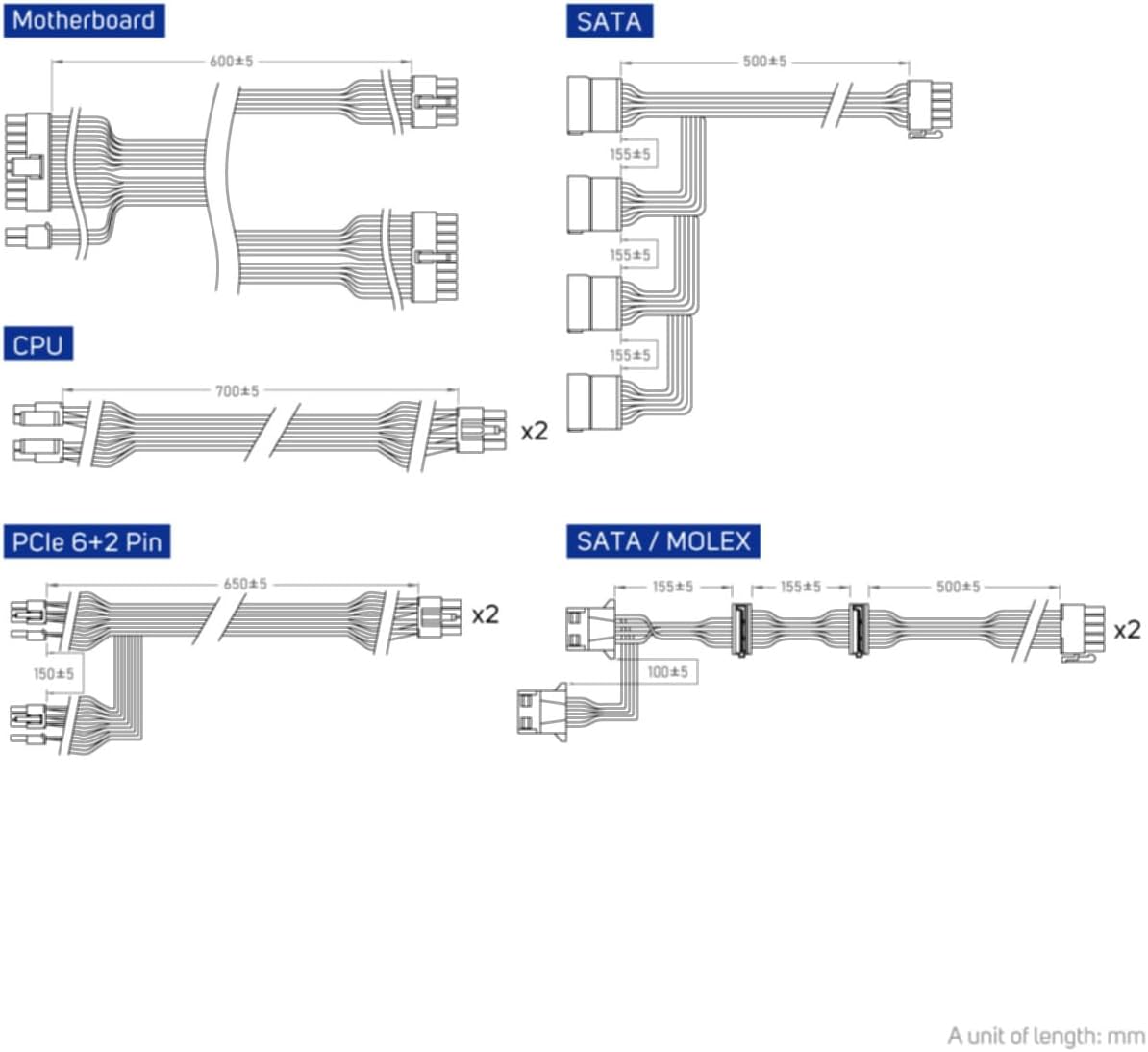
Figure 5.2: Diagram illustrating the various modular cables included and their approximate lengths (in mm).
- Kontrole końcowe:
- Ensure all cables are securely connected and routed to avoid obstructing airflow.
- Zamknij obudowę komputera.
- Podłącz przewód zasilający prądu zmiennego do zasilacza, a następnie do uziemionego gniazdka ściennego.
6. Instrukcja obsługi
After installation, you can power on your system:
- Ensure the power switch on the back of the power supply is in the "ON" (I) position.
- Naciśnij przycisk zasilania na obudowie komputera.
- The power supply will provide stable power to your components.

Rysunek 6.1: Tył view zasilacza, pokazujący wejście zasilania prądem zmiennym i główny wyłącznik zasilania.
Bridge Time Importance: The FSP VITA GM 650W adheres to the recommended ATX 3.1 bridge time values. This feature ensures the power supply can maintain a stable output voltage for a critical duration after a power interruption, preventing system instability or damage during sudden power fluctuations or outagt.j.
7. Konserwacja
Aby zapewnić optymalną wydajność i długą żywotność zasilacza:
- Czyszczenie kurzu: Okresowo czyść kratkę wentylatora i otwory wentylacyjne zasilacza sprężonym powietrzem, usuwając z nich kurz. Przed czyszczeniem upewnij się, że system jest wyłączony i odłączony od zasilania.
- Zarządzanie kablami: Maintain good cable management inside your PC case to ensure proper airflow and prevent overheating.
- Warunki środowiskowe: Operate the power supply within recommended temperature and humidity ranges.
8. Rozwiązywanie Problemów
If you encounter issues with your FSP VITA GM 650W power supply, refer to the following common problems and solutions:
| Problem | Możliwa przyczyna | Rozwiązanie |
|---|---|---|
| System nie włącza się. |
|
|
| System włącza się, ale natychmiast się wyłącza. |
|
|
| Nietypowe dźwięki dochodzące z zasilacza. |
|
|
If the problem persists after trying these solutions, please contact FSP customer support for further assistance.
9. Specyfikacje
| Funkcja | Szczegół |
|---|---|
| Numer modelu | 790980 |
| Marka | FSP |
| Cotage | 650 W |
| Wersja ATX | 3.1 |
| Certyfikacja efektywności | 80 PLUS złota |
| Waga przedmiotu | 2.72 kilogramów (5.98 funty) |
| Producent | FSP |
| Data pierwszej dostępności | 15 sierpnia 2024 r. |
10. Gwarancja i wsparcie
For warranty information, technical support, or service inquiries, please refer to the official FSP webOdwiedź witrynę lub skontaktuj się z działem obsługi klienta. Zachowaj dowód zakupu na wypadek reklamacji.
FSP Official Webstrona: www.fsp-group.com
11. Recykling i utylizacja
Please dispose of this product responsibly. Electronic waste should not be disposed of with household waste. Contact your local authorities or recycling center for information on proper disposal methods for electronic components.