
1. Ważne instrukcje bezpieczeństwa
Przed montażem i użyciem należy uważnie przeczytać wszystkie instrukcje. Zachowaj tę instrukcję do wykorzystania w przyszłości.
- Ensure the power supply is disconnected before assembly, disassembly, or cleaning.
- Nie używaj lamp z uszkodzonym przewodem lub wtyczką. W przypadku uszkodzenia skontaktuj się z wykwalifikowanym personelem serwisowym.
- To jestamp is intended for indoor use only. Do not expose to water or high humidity.
- Nie modyfikuj lamp or its components. Use only specified bulb types.
- Utrzymaj lamp z dala od źródeł ciepła i materiałów łatwopalnych.
- Do not exceed the maximum electrical ratings for the AC outlet and USB ports.
2. Zawartość opakowania
Po otwarciu opakowania sprawdź, czy wszystkie elementy są obecne i nieuszkodzone. Jeśli brakuje którejkolwiek części lub jest ona uszkodzona, skontaktuj się z obsługą klienta.
- 1 x dłamp Podstawa z kablem zasilającym
- 1 x dłampcień
- 1 x E26 LED Bulb (3000K/4000K/6500K)
- 1 x Pierścień mocujący

Obraz: Ponadview of the Addtam ADTJ100 Table Lamp, highlighting its design, integrated charging ports, and variable light color temperatures.
3. Instalacja i montaż
Follow these steps to assemble your Addtam ADTJ100 table lamp:
- Odkręć pierścień mocujący od lamp uchwyt.
- Umieść lampcień na lamp uchwyt.
- Screw the fixing ring back onto the lamp uchwyt do zabezpieczenia lampcień.
- Install the included E26 LED bulb into the lamp holder and rotate to tighten.

Image: Step-by-step visual guide for assembling the lamp, from securing the lampshade to installing the bulb.
4. Instrukcja obsługi
4.1 Włączanie/wyłączanie i regulacja temperatury barwowej
Lamp features a convenient switch control for power and light color adjustment.
- Aby obrócić lamp on or wyłączony, press the switch located on the lamp opierać.
- Aby zmienić temperatura barwowa, obróć lamp off and then immediately turn it back on. Each subsequent turn-on will cycle through the available color temperatures:
- 3000K Ciepła biel
- 4000K Naturalna biel
- 6500K Zimna biel

Image: Detail of the push-button switch on the lamp base, used for turning the lamp on/off and cycling through color temperatures.
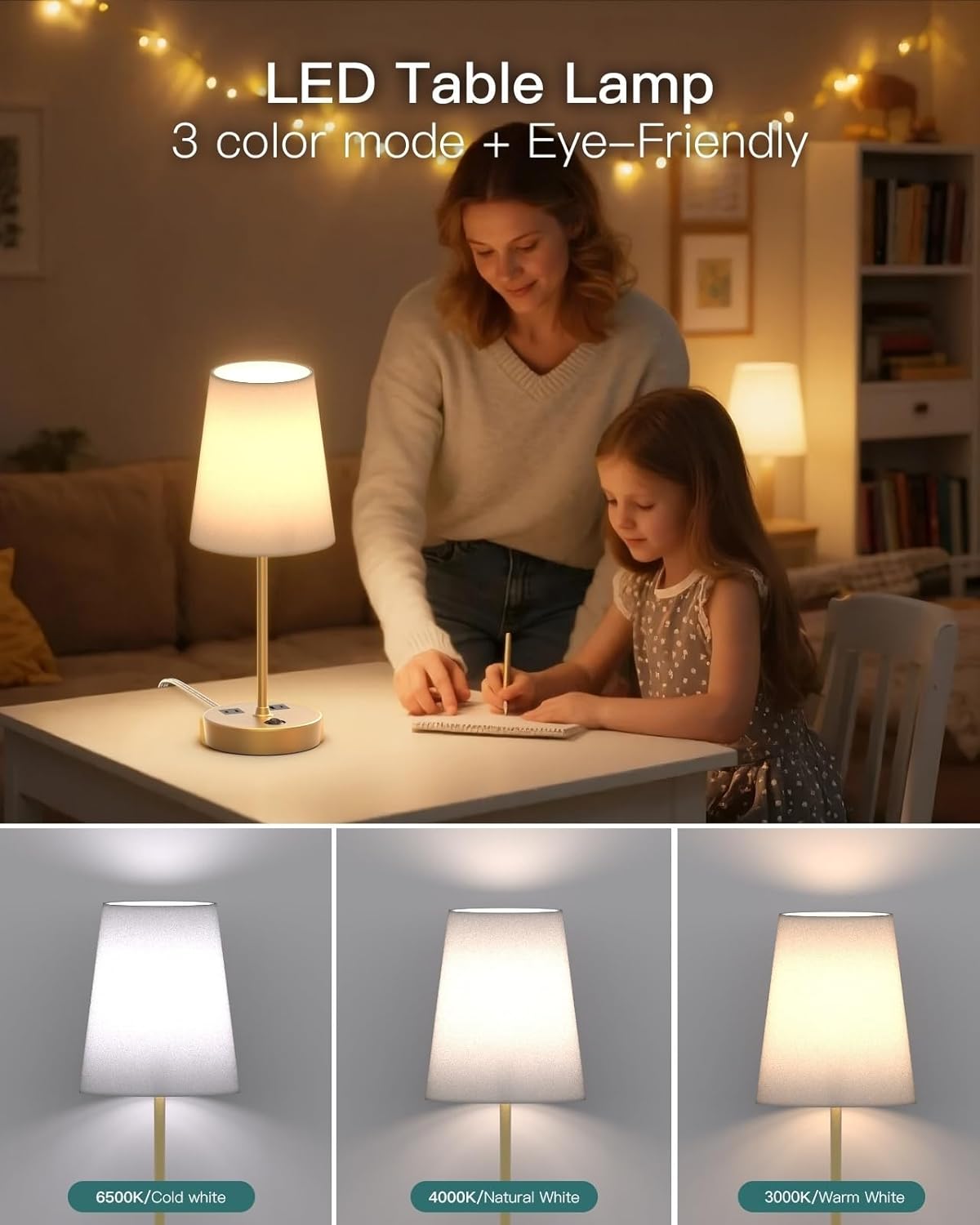
Image: Visual representation of the three distinct color temperatures the lamp can produce.
4.2 Using the Charging Ports and AC Outlet
Lamp base includes an AC outlet, a USB-A port, and a USB-C port for charging devices.
- Gniazdo prądu zmiennego: 125V/10A/1250W. Connect standard electrical devices.
- USB-C Port (PD 20W Max): 5V/3A, 9V/2.22A, 12V/1.67A. Supports Power Delivery for fast charging compatible devices.
- USB-A Port (QC 18W Max): 5V/3A, 9V/2A, 12V/1.5A. Supports Quick Charge for compatible devices.
- Notatka: Porty ładowania i gniazdo sieciowe działają niezależnie od siebie.amp's light being on or off. For maximum power output from a single USB port, use only one at a time. Total output for USB-A + USB-C is 5V/3.1A.

Image: Close-up of the integrated AC outlet, USB-C, and USB-A charging ports on the lamp base, demonstrating their use.
5. Konserwacja
To ensure the longevity and proper functioning of your lamp, postępuj zgodnie z poniższymi wytycznymi dotyczącymi konserwacji:
- Czyszczenie: Odłącz lamp Przed czyszczeniem odłącz urządzenie od źródła zasilania. Do wycierania użyj miękkiej, suchej ściereczki.amp base and shade. Do not use abrasive cleaners or solvents.
- Wymiana żarówki: Upewnij się, że lamp Przed wymianą upewnij się, że żarówka jest odłączona od zasilania i ostygła. Używaj wyłącznie żarówek LED z gwintem E26.
- Składowanie: Jeśli przechowujesz lamp for an extended period, disassemble it if necessary and store in a dry, cool place, preferably in its original packaging.
6. Rozwiązywanie Problemów
| Problem | Możliwa przyczyna | Rozwiązanie |
|---|---|---|
| Lamp nie włącza się. |
|
|
| Porty ładowania nie działają. |
|
|
| Nie można zmienić temperatury barwowej. |
|
|
7. Specyfikacje
| Funkcja | Szczegół |
|---|---|
| Nazwa modelu | ADTJ100 |
| Marka | addtam |
| Wymiary produktu | 5.25" gł. x 4.75" szer. x 17.2" wys. |
| Waga przedmiotu | 2.3 funtów |
| Tworzywo | Metal, Plastik |
| Rodzaj wykończenia | Błyszczący |
| Materiał zacieniający | Bielizna |
| Podstawa żarówki | E26 |
| Typ źródła światła | PROWADZONY |
| Temperatury barw | 3000K Warm White, 4000K Natural White, 6500K Cool White |
| Typ przełącznika | Naciśnij przycisk |
| Parametry znamionowe gniazda prądu zmiennego | 125 V/10 A/1250 W |
| Wyjście USB-C | PD 20W Max (5V/3A, 9V/2.22A, 12V/1.67A) |
| Wyjście USB-A | QC 18 W maks. (5 V/3 A, 9 V/2 A, 12 V/1.5 A) |
| Całkowite wyjście USB | 5V/3.1A (when both USB ports are used simultaneously) |
| Źródło zasilania | Elektryczny przewodowy |
| Zastosowanie wewnątrz/na zewnątrz | Wnętrz |
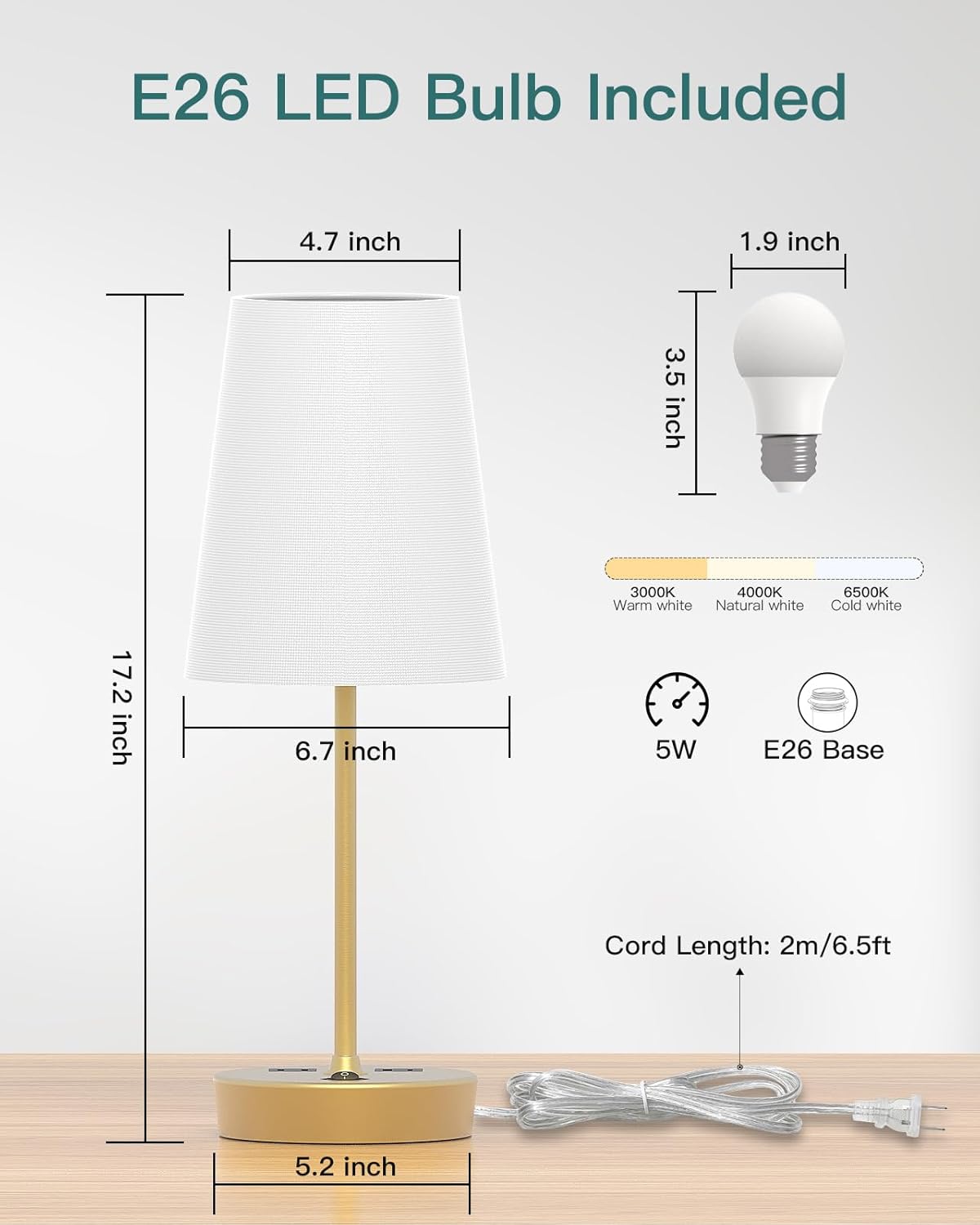
Image: Dimensional drawing of the lamp and its components, including the bulb specifications.
8. Gwarancja i wsparcie
Addtam products are designed for quality and reliability. For warranty information, technical support, or assistance with your product, please refer to the contact information provided with your purchase or visit the official Addtam webstrona.
Please have your model number (ADTJ100) and purchase date available when contacting support.