Produkt ponadview
This wireless WiFi doorbell system provides enhanced security for your home, featuring a peephole camera, an indoor display unit, and smart app integration. It allows for remote monitoring, two-way audio communication, and motion detection.

Figure 1: Main components of the Door Peephole Camera system, including the indoor monitor, outdoor peephole unit, and a 128GB memory card.
Główne cechy:
- Połączenie bezprzewodowe: 2.4G WiFi for remote monitoring via Tuya/Smart Life App.
- Kamera o wysokiej rozdzielczości: 2 Million pixels (1280x720 resolution) with a 121-degree wide-angle lens.
- Wyświetlacz wewnętrzny: 4.3-inch TFT color LCD screen.
- Detekcja ruchu (PIR): Automatically records video upon detecting movement, with adjustable sensitivity.
- Widzenie nocne: Automatic switching between day and night modes using infrared detection.
- Dwukierunkowy dźwięk: Communicate with visitors through the app.
- Pamięć lokalna: Supports up to 128GB memory card for photo and video recording.
- Integracja z asystentem głosowym: Compatible with Alexa and Google Assistant for doorbell press announcements.

Figure 2: Visual representation of the doorbell camera's key features, including 2.4G Wi-Fi, 2 Million Pixels, Night Vision, PIR Motion Detection, 121° Wide Angle, and Photo/Video Record capabilities.
Konfiguracja i instalacja
1. Kontrola przed instalacją:
- Upewnij się, że grubość drzwi wynosi od 35 do 90 mm.
- Verify your existing peephole diameter is between 17-65mm.
- Confirm you have a stable 2.4GHz Wi-Fi network available at the installation location.
2. Ładowanie urządzenia:
The device comes with a built-in 5000mAh rechargeable lithium-ion battery. Fully charge the device before initial use. A full charge typically provides about 30 days of standby time with normal use (3-5 activations per day). The app will notify you when the battery level drops below 5%.
3. Instalacja fizyczna:
- Usuń istniejący wizjer: Carefully unscrew and remove your current peephole from the door.
- Włóż jednostkę zewnętrzną: Thread the cable of the outdoor peephole camera unit through the peephole hole from the outside of the door. Position the outdoor unit flush against the door.
- Montaż monitora wewnętrznego: On the inside of the door, connect the cable from the outdoor unit to the designated port on the indoor monitor. Secure the indoor monitor to the door using the provided mounting bracket and screws. Ensure the unit is stable and the cable is not pinched.
4. App Setup (Tuya / Smart Life):
- Pobierz aplikację: Download and install the "Tuya Smart" or "Smart Life" app from your mobile device's app store (Google Play Store for Android, Apple App Store for iOS).
- Zarejestruj się/Zaloguj: Otwórz aplikację i zarejestruj nowe konto lub zaloguj się, jeśli już je posiadasz.
- Dodaj urządzenie: Follow the in-app instructions to add a new device. Select "Video Surveillance" or "Smart Doorbell" from the device list.
- Połącz się z Wi-Fi: Power on the doorbell camera. The app will guide you through connecting the device to your 2.4GHz Wi-Fi network. This usually involves putting the device into pairing mode and entering your Wi-Fi password.
- Konfiguracja: Once connected, you can name your device and configure settings such as motion detection sensitivity, notification preferences, and recording options.
Instrukcja obsługi
ViewTransmisja na żywo:
- Monitor wewnętrzny: Press the button on the indoor monitor to view transmisja na żywo z kamery zewnętrznej.
- Aplikacja mobilna: Open the Tuya Smart or Smart Life app, select your doorbell device, and tap to view the live feed remotely.

Figure 3: The mobile application interface demonstrating 2.4G WiFi connection monitoring, allowing remote conversation and peace of mind.
Detekcja ruchu (PIR):
The doorbell camera features Passive Infrared (PIR) motion detection. When motion is detected within approximately 3 meters, the device will automatically record video and send a notification to your mobile app.
- Dostosuj czułość: In the app settings, you can adjust the motion sensor reaction time to low, medium, or high sensitivity. High sensitivity may have a 1-3 second delay.

Figure 4: Illustration of PIR Motion Detection, showing the doorbell recording automatically when motion is detected, and a mobile notification being received.
Widzenie nocne:
The camera automatically switches to night vision mode in low-light conditions using infrared detection, ensuring clear visibility even at night.
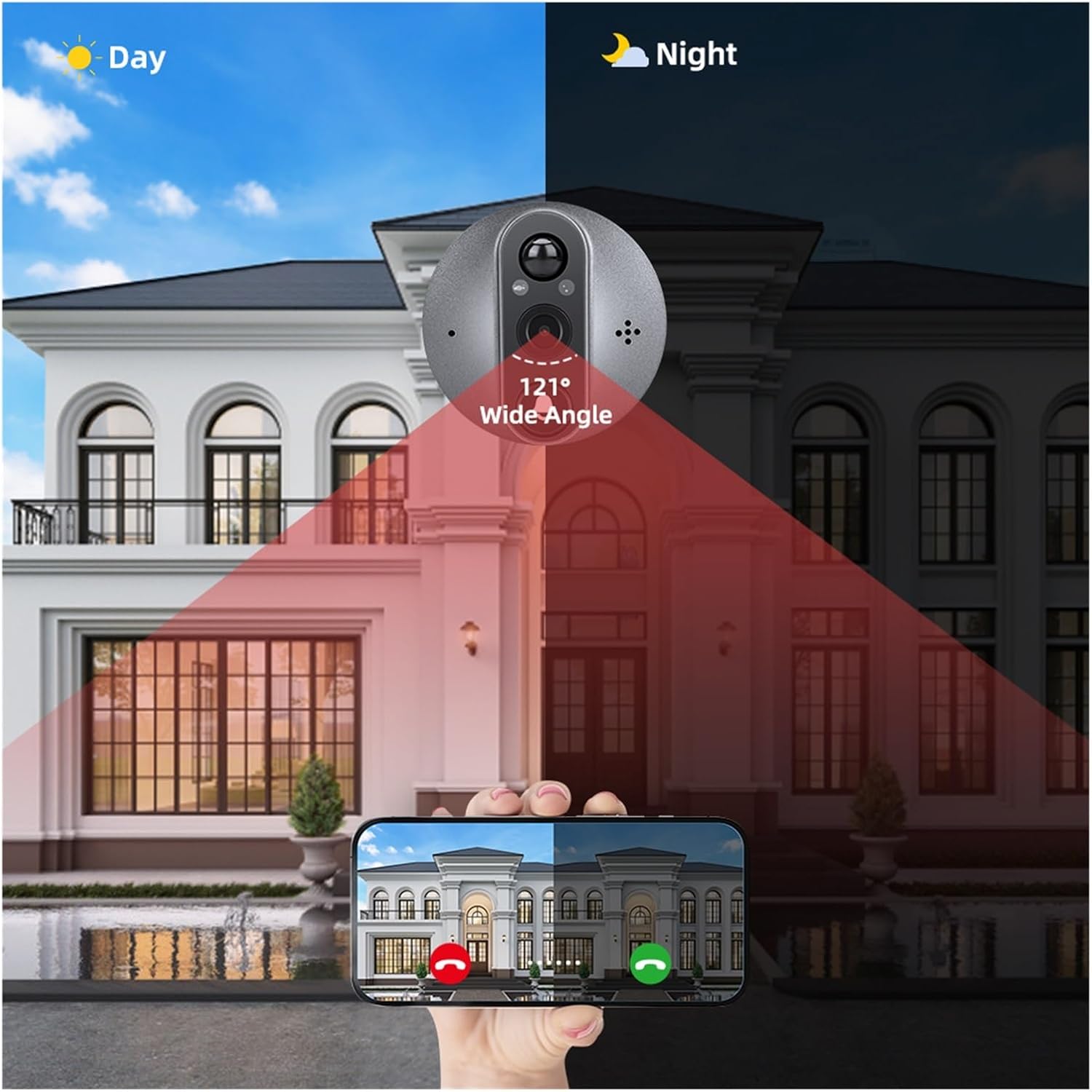
Figure 5: A comparison demonstrating the automatic switching between day and night vision modes, highlighting the 121° wide-angle view in both conditions.
Dwukierunkowy dźwięk:
When a visitor presses the doorbell or motion is detected, you can use the app to engage in two-way audio communication with them.

Figure 6: Depiction of the two-way audio feature, allowing users to reply to visitors remotely via their smartphone.
Integracja z asystentem głosowym:
The doorbell supports integration with Amazon Alexa and Google Assistant. When someone presses the doorbell, your connected voice assistant device can announce "Someone at the smart doorbell" (or similar, depending on your device name).

Figure 7: An illustration showing the doorbell's compatibility with Alexa and Google Assistant, enabling voice announcements when the doorbell is pressed.
Nagrywanie i odtwarzanie:
The device records photos and videos to a memory card (up to 128GB). You can access recorded footage through the mobile app's playback or gallery section.
Konserwacja
- Czyszczenie: Gently wipe the camera lens and display screen with a soft, dry cloth. Avoid using abrasive cleaners or solvents.
- Ładowanie akumulatora: Recharge the built-in battery promptly when the low battery alert is received. Use the provided charging cable.
- Aktualizacje oprogramowania układowego: Periodically check the Tuya/Smart Life app for any available firmware updates for your device. Keeping the firmware updated ensures optimal performance and security.
- Zarządzanie kartami pamięci: Regularnie ponownieview nagrano footagi usuń niepotrzebne files to free up space on the memory card. Consider backing up important recordings.
Rozwiązywanie problemów
Typowe problemy i rozwiązania:
- Urządzenie nie łączy się z siecią Wi-Fi:
- Upewnij się, że Twoja sieć Wi-Fi obsługuje częstotliwość 2.4 GHz. To urządzenie nie obsługuje Wi-Fi 5 GHz.
- Sprawdź siłę sygnału Wi-Fi w miejscu instalacji.
- Sprawdź, czy hasło Wi-Fi wprowadzone w aplikacji jest prawidłowe.
- Restart your Wi-Fi router and the doorbell device.
- Poor video quality or blurry images:
- Oczyść obiektyw aparatu miękką szmatką.
- Ensure adequate lighting. Night vision should activate automatically in low light.
- Check your Wi-Fi connection speed. A weak signal can affect streaming quality.
- Detekcja ruchu nie działa lub jest zbyt czuła:
- Adjust the PIR motion detection sensitivity in the Tuya/Smart Life app settings.
- Upewnij się, że nie ma żadnych przeszkód blokujących czujnik. view.
- Sprawdź, czy w aplikacji włączona jest funkcja wykrywania ruchu.
- Bateria szybko się rozładowuje:
- Częste zdarzenia wykrywania ruchu lub transmisji na żywo view access will consume more battery. Adjust sensitivity if needed.
- Upewnij się, że urządzenie jest w pełni naładowane.
- Ekstremalne temperatury mogą mieć wpływ na wydajność akumulatora.
- Brak dźwięku lub słaba jakość dźwięku:
- Sprawdź ustawienia mikrofonu i głośnika w aplikacji.
- Ensure there are no physical obstructions blocking the microphone or speaker on the outdoor unit.
- Sprawdź ustawienia głośności w urządzeniu mobilnym.
Specyfikacje
| Funkcja | Szczegół |
|---|---|
| Marka | Ogólny |
| Model | B0F2MJDMR7 |
| Zasilacz | Built-in 5000mAh Rechargeable Lithium-Ion Battery |
| Rozdzielczość kamery | 2 Million Pixels (1280 x 720) |
| Kamera View Kąt | 121 stopni szeroki kąt |
| Ekran wyświetlacza | Kolorowy wyświetlacz LCD TFT o przekątnej 4.3 cala |
| Kompatybilna aplikacja | Tuya Inteligentne / Inteligentne życie |
| Odległość wykrywania czujnika ruchu | Około. Liczniki 3 |
| Format zdjęcia | Plik JPG |
| Obsługa kart pamięci | Do 128 GB |
| Zgodność grubości drzwi | 35-90 mm |
| Zgodność średnicy wizjera | 17-65 mm |
| Temperatura pracy | -20°C do 55°C (-4°F do 131°F) |
Informacje o gwarancji
Ten produkt jest dostarczany z 3-miesięczna gwarancja od daty zakupu. Niniejsza gwarancja obejmuje wady produkcyjne i usterki powstałe w wyniku normalnego użytkowania. Nie obejmuje ona uszkodzeń spowodowanych niewłaściwym użytkowaniem, wypadkami, nieautoryzowanymi modyfikacjami lub nieprawidłową instalacją.
Proszę zachować dowód zakupu na potrzeby roszczeń gwarancyjnych.
Wsparcie
For technical assistance, troubleshooting, or warranty inquiries, please contact the seller or manufacturer through the platform where the product was purchased.
Manufacturer: YUD5DAS
For app-related issues, refer to the help section within the Tuya Smart or Smart Life application.