
Marea B59009/1
Instrukcja obsługi smartwatcha Marea B59009/1
Comprehensive instructions for your Marea Smartwatch B59009/1
1. Wprowadzenie
This manual provides detailed instructions for the Marea Smartwatch B59009/1. Please read this manual carefully before using your device to ensure proper operation and to maximize its features. Keep this manual for future reference.
The Marea Smartwatch B59009/1 is a versatile and modern device designed for individuals seeking technology and style in a single accessory. Its 1.85-inch color display provides a clear and bright viewing experience, while the rectangular black case offers an elegant and functional design. This smartwatch features a 280 mAh battery, providing up to 3 days of normal use and up to 7 days in standby mode. Equipped with Bluetooth, it allows synchronization with mobile devices to receive call, message, and social network notifications. Additionally, it includes multiple health and fitness tracking functions, making it an ideal companion for daily use.
2. Zawartość opakowania
Sprawdź, czy w przesyłce znajdują się wszystkie elementy:
- Marea Smartwatch B59009/1
- Kabel ładujący
- Instrukcja obsługi (ten dokument)
3. Koniec produktuview
Familiarize yourself with the components and features of your Marea Smartwatch B59009/1.
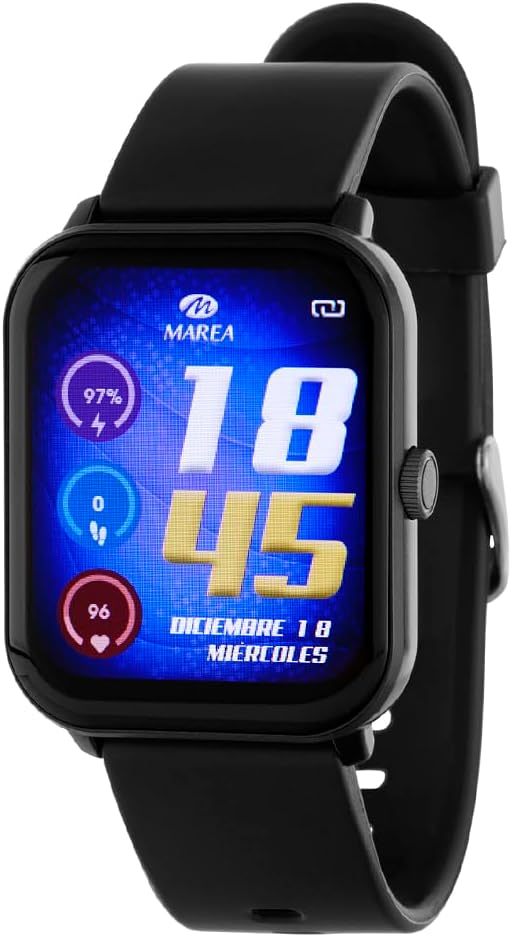
Figure 1: Marea Smartwatch B59009/1 Front View
This image displays the Marea Smartwatch B59009/1, featuring a rectangular black case and a black silicone strap. The vibrant color display shows the time (18:45), date (December 18, Wednesday), battery percentage (97%), step count (0), and heart rate (96 bpm). A physical button is visible on the right side of the watch case.
Główne cechy:
- 1.85-inch color display for a clear and intuitive user experience.
- Long-lasting battery: Up to 3 days in normal use and 7 days in standby mode.
- Advanced health functions: Heart rate monitoring, blood pressure, blood oxygen, and sleep tracking.
- Ideal for physical activity: Pedometer, calorie counter, distance traveled, and multiple sports modes.
- Smart notifications: Receive alerts for calls, messages, and social networks on your wrist.
- Multimedia remote control: Manage music and your phone's camera without taking it out of your pocket.
- Comfortable and modern design: Durable plastic case and silicone strap with buckle closure.
- Additional functions: Voice assistant, alarm, stopwatch, games, SOS signal, and more.
4. Konfiguracja i pierwsze użycie
4.1 Ładowanie urządzenia
- Podłącz kabel ładujący do portu ładowania z tyłu smartwatcha.
- Podłącz drugi koniec kabla ładującego do zasilacza USB (nie ma go w zestawie) lub do portu USB komputera.
- The watch display will indicate charging status. Ensure the device is fully charged before first use. A full charge typically takes approximately 2 hours.
4.2 Włączanie/wyłączanie
- Włączanie: Press and hold the side button for a few seconds until the Marea logo appears.
- Aby wyłączyć: From the watch face, swipe down or navigate to the settings menu, then select "Power Off" or "Shutdown". Confirm your selection. Alternatively, press and hold the side button and select "Power Off" from the options.
4.3 Instalacja i parowanie aplikacji
Aby w pełni wykorzystać potencjał smartwatcha, pobierz aplikację towarzyszącą na swój smartfon.
- Scan the QR code provided in the quick start guide (if applicable) or search for the official Marea Smartwatch app in your smartphone's app store (Google Play Store for Android, Apple App Store for iOS).
- Zainstaluj aplikację i załóż konto, jeśli zostaniesz o to poproszony.
- Włącz Bluetooth w swoim smartfonie.
- Open the Marea app, navigate to the "Device" or "Add Device" section.
- Select your smartwatch (e.g., "Marea B59009/1") from the list of available devices.
- Follow the on-screen prompts in the app and on your smartwatch to complete the pairing process. A confirmation message will appear on both devices once successfully paired.
Notatka: Ensure your smartwatch is sufficiently charged and within Bluetooth range of your smartphone during pairing.
5. Korzystanie ze smartwatcha
5.1 Podstawowa nawigacja
- Ekran dotykowy: Dotknij, aby wybrać, przesuń palcem w lewo/prawo/górę/dół, aby poruszać się po menu i ekranach.
- Przycisk boczny: Press once to return to the watch face or wake the screen. Press and hold for power options or to access a quick menu (functionality may vary).
5.2 Kluczowe funkcje
- Tarcze zegarka: Customize your watch face by pressing and holding the current watch face, then swiping left/right to choose from available options.
- Powiadomienia: Przesuń palcem w dół od tarczy zegarka, aby view recent notifications (calls, messages, social media alerts). Ensure notification permissions are enabled in the companion app.
- Monitorowanie zdrowia:
- Tętno: Navigate to the heart rate monitor function. The watch will automatically measure your heart rate.
- Tlen we krwi (SpO2): Access the SpO2 measurement function. Keep your arm still during measurement.
- Ciśnienie krwi: Use the dedicated blood pressure function. For accurate readings, follow instructions in the app.
- Monitorowanie snu: Wear the watch to bed. It will automatically track your sleep patterns, which can be viewed w aplikacji.
- Śledzenie aktywności:
- Krokomierz: The watch automatically counts your steps, distance, and calories burned throughout the day.
- Tryby sportowe: Select from various sports modes (e.g., running, cycling, walking) to track specific workouts.
- Asystent głosowy: Activate the voice assistant feature (if configured) by tapping its icon or using a specific gesture/button press.
- Sterowanie multimediami: Access music control to play, pause, skip tracks on your paired smartphone. Use the camera remote function to trigger your phone's camera shutter.
- Dodatkowe narzędzia: Explore other functions like alarm, stopwatch, timer, and games through the main menu.
6. Konserwacja i pielęgnacja
- Czyszczenie: Regularnie czyść smartwatch i pasek miękką, suchą i niepozostawiającą włókien ściereczką. W razie potrzeby użyj lekko zwilżonejamp Przetrzyj szmatkę łagodnym mydłem, a następnie dokładnie spłucz i osusz. Unikaj silnych środków chemicznych i materiałów ściernych.
- Wodoodporność: Refer to the product specifications for water resistance ratings. Avoid submerging the watch beyond its rated depth or exposing it to hot water, steam, or high-pressure water jets.
- Składowanie: When not in use for extended periods, store the smartwatch in a cool, dry place. Ensure it has some charge to prevent deep discharge of the battery.
- Unikaj ekstremalnych temperatur: Do not expose the device to extreme heat or cold, as this can damage the battery and internal components.
- Port ładowania: Aby zapewnić efektywne ładowanie, utrzymuj styki ładowania w czystości i bez zanieczyszczeń.
7. Rozwiązywanie Problemów
| Problem | Możliwe rozwiązanie |
|---|---|
| Zegarek się nie włącza. | Upewnij się, że zegarek jest w pełni naładowany. Podłącz go do ładowarki na co najmniej 30 minut. Jeśli nadal się nie włącza, spróbuj użyć innego kabla ładującego lub innego źródła zasilania. |
| Nie można sparować ze smartfonem. |
|
| Powiadomienia nie są odbierane. |
|
| Niedokładne dane dotyczące zdrowia. |
|
| Krótki czas pracy baterii. |
|
8. Specyfikacje
| Marka | Marea |
| Model | B59009/1 |
| Rozmiar wyświetlacza | 1.85 cali |
| Typ wyświetlacza | Cyfrowy, Kolor |
| Pojemność baterii | 280 mAh |
| Średnia żywotność baterii | Up to 3 days (normal use), up to 7 days (standby) |
| Skład ogniw baterii | Tlenek srebra |
| Łączność | Bluetooth |
| Kompatybilne urządzenia | Smartfon |
| Dodatkowe funkcje | Sterowanie głosowe |
| Wejście interfejsu ludzkiego | Mikrofon, guziki |
| Zawarte komponenty | Kabel ładujący |
| Waga przedmiotu | 200 gramów |
| Kształt | Prostokątny |
| GPS | Brak GPS-u |
| Grupa docelowa | Dorośli unisex |
9. Gwarancja i wsparcie
For warranty information, please refer to the documentation provided with your purchase or contact the retailer. For technical support, please visit the official Marea webOdwiedź witrynę lub skontaktuj się z działem obsługi klienta. Zachowaj dowód zakupu na wypadek reklamacji.
Zasady zwrotu: The product has a return policy duration of 15 days (refund/replacement) as per the retailer's terms.