
1. Wprowadzenie
This manual provides detailed instructions for the safe and efficient use of your Techkey MFi Certified 3-in-1 USB 3.0 Flash Drive. Please read this manual thoroughly before using the device to ensure optimal performance and to prevent damage.
The Techkey flash drive is designed for convenient data transfer and storage across various devices, including iPhones, iPads, Android phones, and personal computers. Its multi-interface design and MFi certification ensure broad compatibility and reliable performance.
2. Funkcje produktu
- Certyfikat MFi: Ensures compatibility and reliable performance with Apple devices.
- 3-in-1 Interface Design: Equipped with USB, Lightning, and Type-C connectors for universal compatibility.
- Szybki port USB 3.0: Offers fast read and write speeds for efficient data transfer.
- Pojemność pamięci masowej 256 GB: Zapewnia ample space for photos, videos, documents, and other files.
- Szyfrowanie danych: Supports Touch ID/Passcode encryption for enhanced data security.
- Trwała konstrukcja: Made from high-quality metal with dustproof, drop-proof, and anti-magnetic properties.
- Kompaktowy i przenośny: Lightweight design with a keychain for easy carrying.
- Automatyczne przechowywanie: In-app camera captures automatically save to the drive.
- Odtwarzanie w podróży: Directly play stored movies and music from the drive.
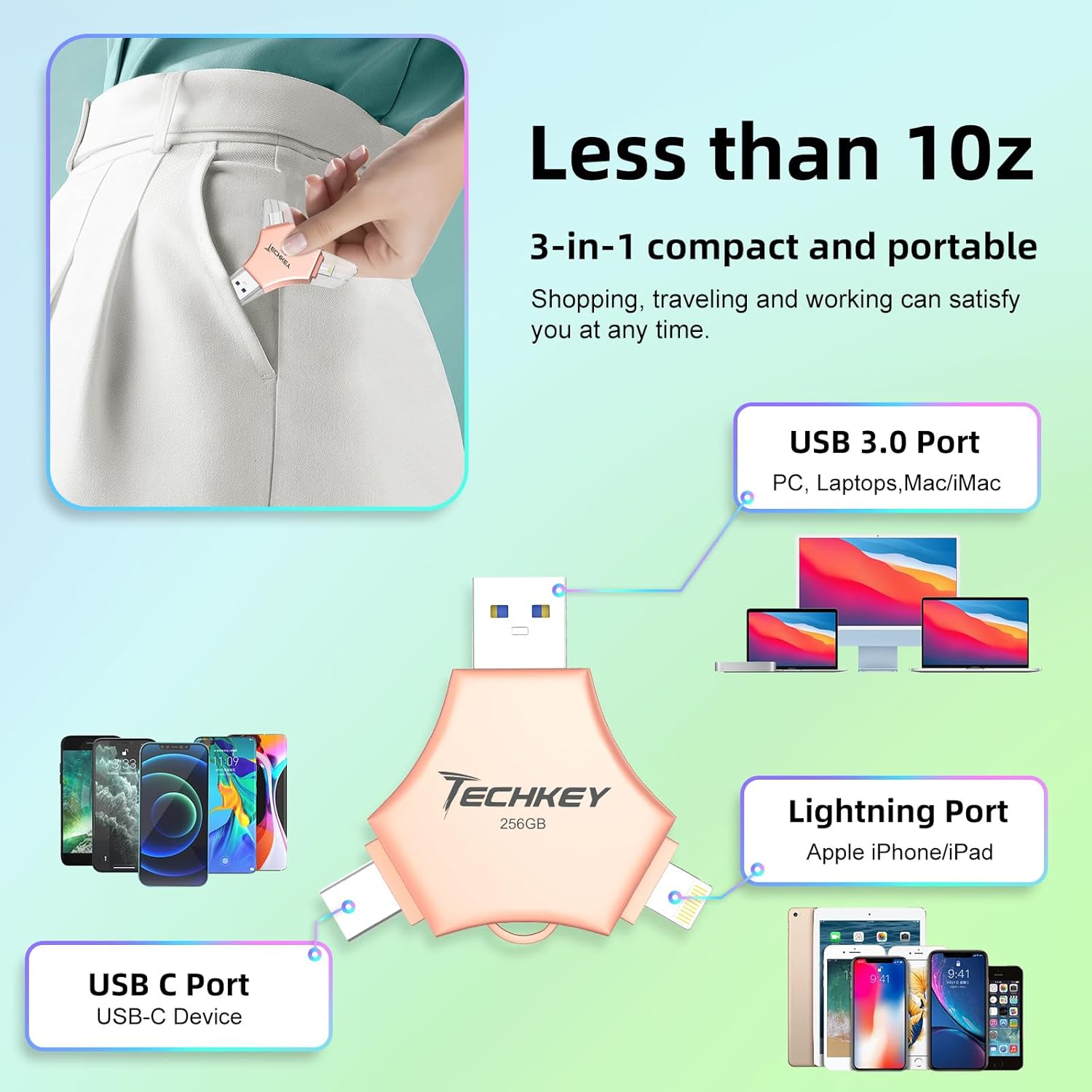
Image: The Techkey 3-in-1 USB Flash Drive showing its USB 3.0, Lightning, and USB-C ports, highlighting its compact and portable design.

Image: A diagram illustrating the three distinct connectors: Lightning for iPhone/iPad, Type-C for iPhone/iPad/Android, and USB for PC.

Image: An illustration of a high-tech chip, symbolizing the advanced technology and MFi certification integrated into the flash drive.

Image: Certificates of authority, indicating the product's compliance with industry standards and quality assurance.
3. Zawartość opakowania
Sprawdź, czy w przesyłce znajdują się wszystkie elementy:
- Techkey MFi Certified 3-in-1 USB 3.0 Flash Drive (256GB)
- Protective Caps (may include extra)
- Keychain/Lanyard
- Instrukcja obsługi (ten dokument)
4. Konfiguracja
4.1. Połączenie początkowe
The Techkey flash drive features three types of connectors: USB, Lightning, and Type-C. Select the appropriate connector for your device.
- For iOS Devices (iPhone/iPad): Insert the Lightning connector into your device's Lightning port.
- Dla urządzeń z systemem Android: Insert the Type-C connector into your device's USB-C port. Ensure your Android device supports OTG (On-The-Go) functionality.
- Dla komputerów PC/Mac: Insert the USB connector into an available USB port on your computer.
4.2. Instalacja aplikacji (tylko urządzenia z systemem iOS)
For iOS devices (iPhone/iPad), the "U-Disk" application is required for full functionality. When you connect the flash drive to an iOS device for the first time, a prompt to download the "U-Disk" app from the App Store should appear. Follow the on-screen instructions to install it.
- If the prompt does not appear, manually search for "U-Disk" in the Apple App Store and install it.
- Android and PC devices do not require a dedicated app for basic file kierownictwo.
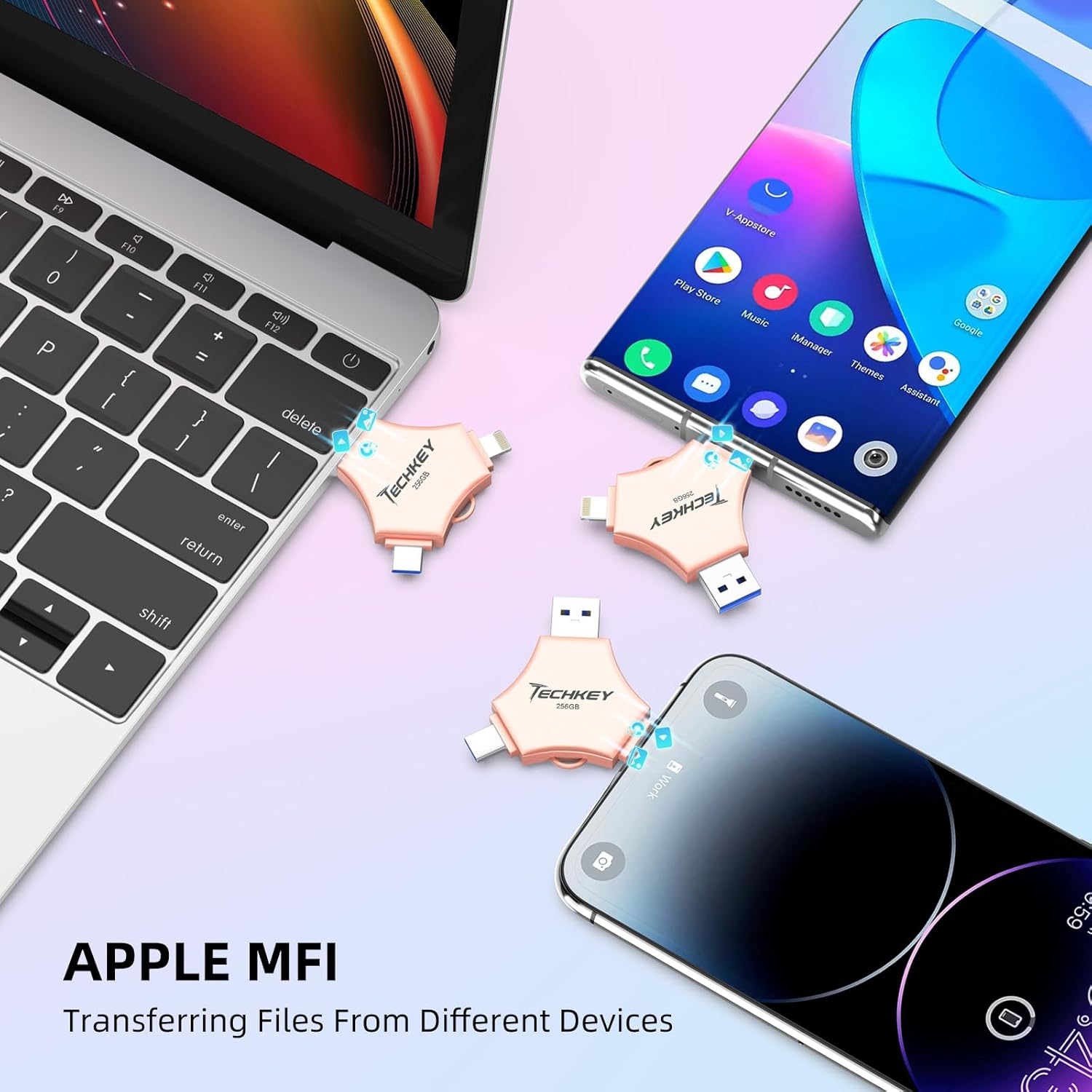
Image: The Techkey flash drive connected to an iPhone and iPad, illustrating its MFi compatibility and ease of use with Apple devices.
5. Instrukcja obsługi
5.1. Przesyłanie danych
The flash drive supports high-speed data transfer. Actual speeds may vary based on device, file size, and system conditions.
- For iOS Devices (via U-Disk App):
- Connect the flash drive to your iPhone/iPad.
- Open the "U-Disk" app.
- Przejdź do żądanego files on your device or within the app.
- Wybierać files and use the app's functions to copy or move them to the flash drive.
- To transfer from the flash drive to your device, select files on the drive and use the app's functions to copy them to your device.
- Dla urządzeń z systemem Android:
- Connect the flash drive to your Android device.
- Access the flash drive through your device's file manager (e.g., "Files," "My Files").
- Skopiuj lub przenieś files between your device's internal storage/SD card and the flash drive.
- Dla komputerów PC/Mac:
- Connect the flash drive to your computer's USB port.
- The drive will appear as a removable storage device (e.g., "USB Drive," "NO NAME").
- Przeciągnij i upuść files between your computer and the flash drive, or use copy/paste functions.
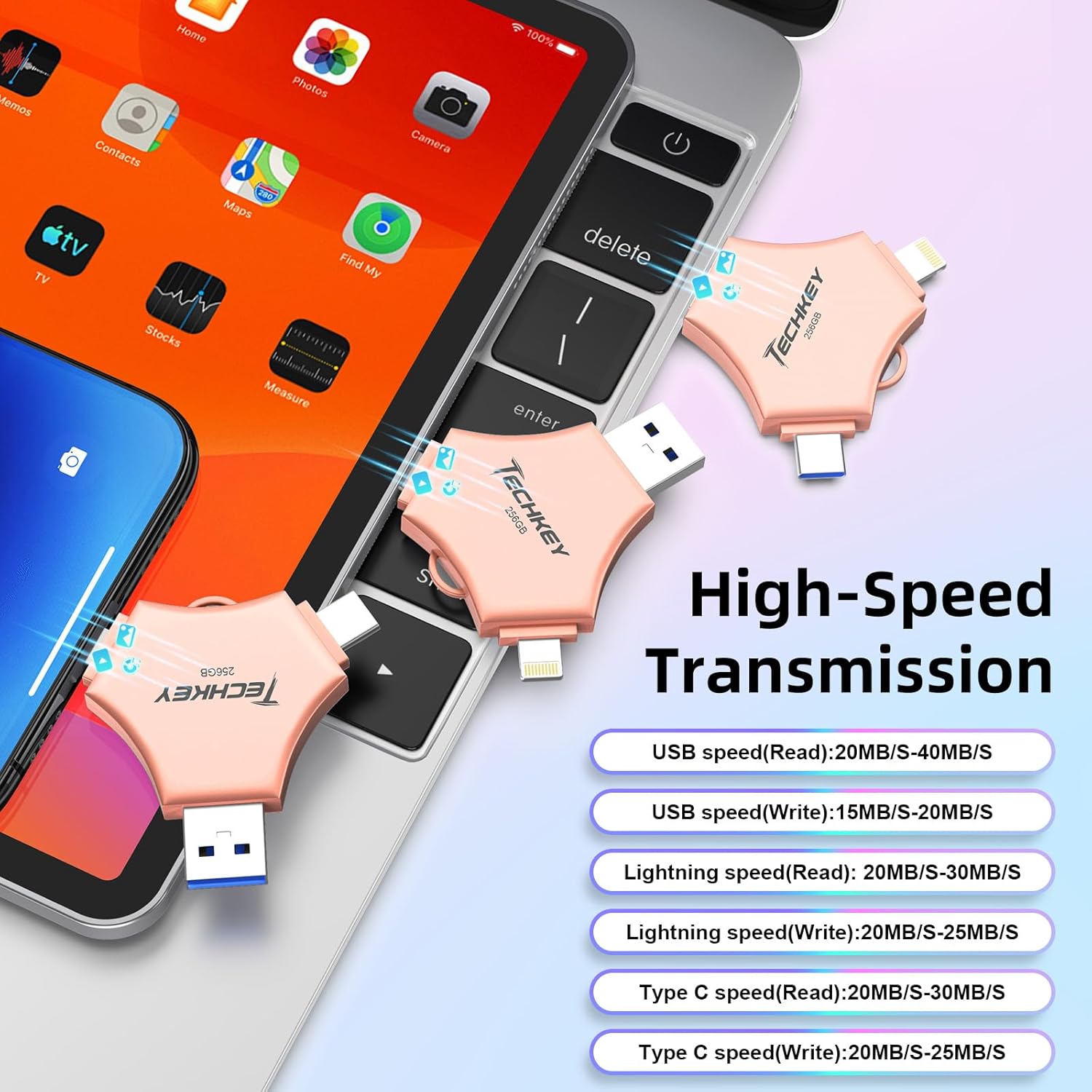
Image: A graphic detailing the high-speed transmission rates for the USB (Read: 20-40MB/s, Write: 15-20MB/s), Lightning (Read: 20-30MB/s, Write: 20-25MB/s), and Type-C (Read: 20-30MB/s, Write: 20-25MB/s) interfaces.
5.2. One-Click Backup (iOS Devices Only)
The "U-Disk" app allows for one-click backup of photos, videos, and contacts from your iOS device to the flash drive.
- Connect the flash drive and open the "U-Disk" app.
- Locate the "One-Click Backup" or similar function within the app.
- Follow the prompts to back up your selected data. This process copies files to the drive, freeing up space on your device. Remember to manually delete files from your device after confirming they are safely backed up on the flash drive.
5.3. Data Encryption
To protect your sensitive data, the "U-Disk" app (for iOS) offers encryption features.
- Open the "U-Disk" app with the flash drive connected.
- Navigate to the security or settings section within the app.
- You can choose to enable Touch ID/Passcode to encrypt the entire flash drive or select specific files for encryption.
- Follow the on-screen instructions to set up and manage your encryption preferences.
5.4. On-the-Go Playback
You can directly play media files stored on the flash drive without transferring them to your device's internal storage.
- Store your favorite movies, music, or documents on the flash drive.
- Connect the drive to your device (using the "U-Disk" app for iOS).
- Przeglądaj files on the flash drive through the app or file menedżer.
- Wybierz nośnik file to play it directly.

Image: A visual representation of the flash drive supporting various file formats, including MP4, MOV, RM, RMVB for videos; MP3, AIF, WAV, WMA, AAC for music; BMP, JPG, GIF, ICO, TIFF, PNG for pictures; and PDF, WORD, EXCEL, PPT, HTML, TXT for office documents.
6. Konserwacja
- Prawidłowe postępowanie: Always hold the flash drive by its body, not by the connectors.
- Chroń złącza: Use the provided protective caps to cover the connectors when not in use to prevent dust and damage.
- Bezpieczne usuwanie: Always safely eject the flash drive from your computer (PC/Mac) before physically removing it to prevent data corruption. For mobile devices, ensure no data transfer is active before disconnecting.
- Czyszczenie: Do czyszczenia zewnętrznej części napędu używaj miękkiej, suchej ściereczki. Unikaj płynnych środków czyszczących i materiałów ściernych.
- Składowanie: Store the flash drive in a cool, dry place away from extreme temperatures, direct sunlight, and strong magnetic fields.
7. Rozwiązywanie Problemów
7.1. Urządzenie nierozpoznane
- Sprawdź połączenie: Ensure the flash drive is fully and correctly inserted into the port.
- Try Another Port/Device: Test the flash drive on a different USB port, or a different compatible device (e.g., another computer, phone) to determine if the issue is with the drive or the port.
- Uruchom ponownie urządzenie: Sometimes, restarting your phone or computer can resolve connection issues.
- Aplikacja iOS: For iOS devices, confirm the "U-Disk" app is installed and updated.
- Android OTG: For Android, verify your device supports OTG and that OTG functionality is enabled in settings if required.
7.2. Niska prędkość transferu
- Typ portu USB: Ensure you are using a USB 3.0 port on your computer for optimal speeds. Connecting to a USB 2.0 port will result in slower transfer rates.
- File Rozmiar/typ: Przenoszenie wielu małych filemoże być wolniejsze niż przesyłanie pojedynczego dużego file o tym samym całkowitym rozmiarze.
- Wydajność urządzenia: The speed of your host device (phone, computer) can affect transfer rates.
- Procesy w tle: Close unnecessary applications on your device during transfer.
7.3. Data Corruption/Loss
- Bezpieczne wyrzucenie: Always safely eject the drive from computers. Avoid disconnecting during active data transfer.
- Wahania mocy: Ensure stable power supply to your computer during transfers.
- Uszkodzenia fizyczne: Inspect the drive for any visible physical damage.
7.4. App Issues (U-Disk)
- Aktualizacja aplikacji: Ensure the "U-Disk" app is updated to the latest version.
- Ponowna instalacja aplikacji: If issues persist, try uninstalling and reinstalling the app.
- Wersja iOS: Ensure your iOS device is running iOS 12.1 or above.
8. Specyfikacje
| Marka | Klucz techniczny |
| Numer modelu | 641837950528 |
| Pojemność pamięci masowej | 256 GB |
| Technologia łączności | USB, Lightning, USB Type C |
| Prędkość odczytu | Do 40 MB/s |
| Prędkość zapisu | Do 80 MB/s |
| Wymiary produktu (dł. x szer. x wys.) | 5.43 x 3.94 x 0.04 cala |
| Waga przedmiotu | 2.39 uncji |
| Funkcja specjalna | Wear Resistant, MFi Certified, Data Encryption |
| Kompatybilne systemy operacyjne | iOS 12.1 and above, OTG Android, Windows 7 and above, macOS 10.6 and above |
9. Gwarancja i wsparcie
This Techkey product comes with a standard manufacturer's warranty. Please refer to the packaging or the official Techkey webSzczegółowe warunki gwarancji można znaleźć na naszej stronie.
For technical support, troubleshooting assistance, or warranty claims, please contact Techkey customer service through their official channels. Contact information can typically be found on the product packaging or the manufacturer's webstrona.
Uwaga: Zachowaj paragon jako dowód zakupu na potrzeby gwarancji.