
Wstęp
The SVBONY SC002 WiFi Digiscoping Camera is designed to enhance your birdwatching and nature exploration experiences. It allows you to capture high-quality photos and 1080P videos through your telescope, with real-time viewing and sharing capabilities via Wi-Fi. This manual provides detailed instructions for setting up, operating, and maintaining your SC002 camera.

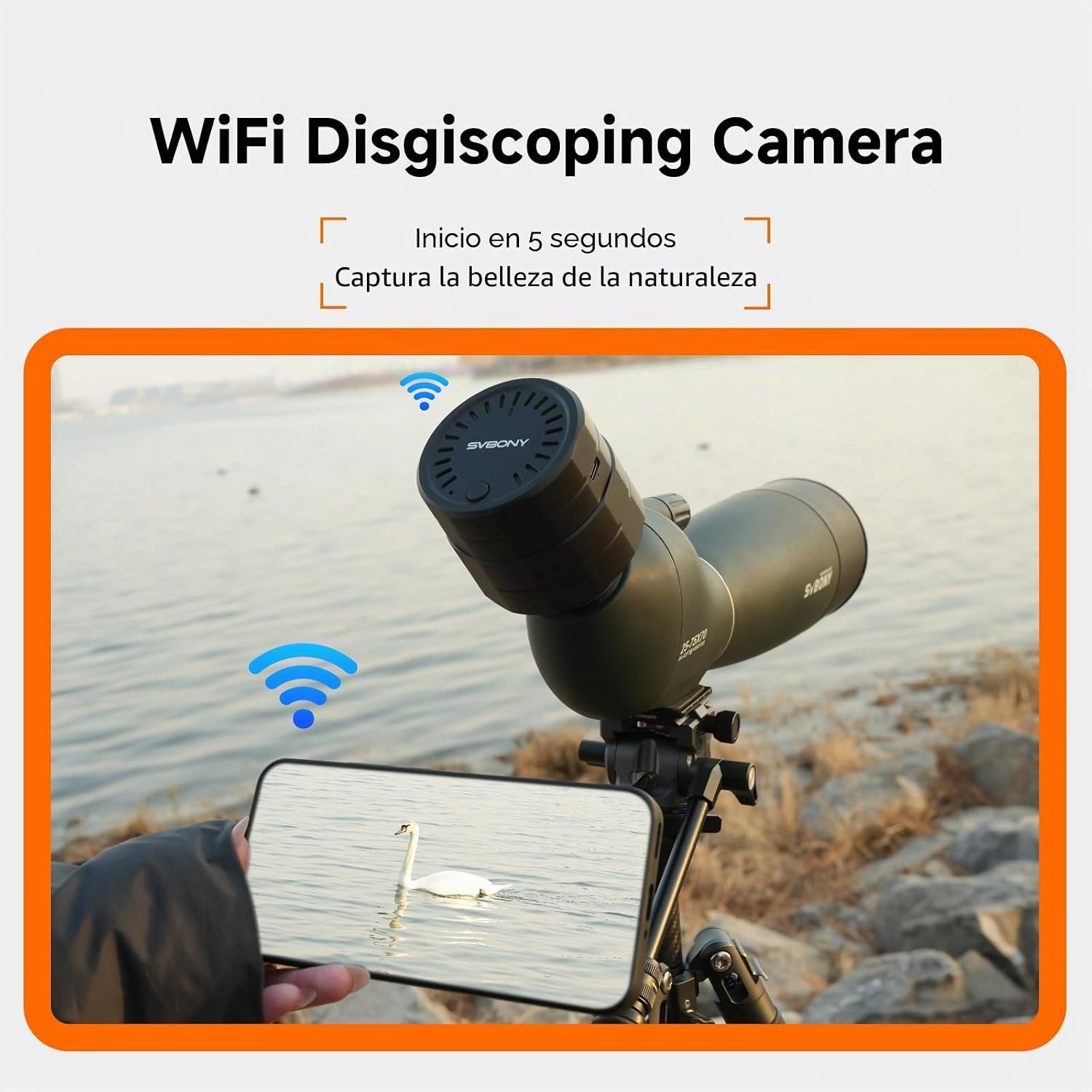
Image: The SVBONY SC002 camera attached to a telescope, wirelessly connected to a smartphone displaying a captured image of a bird. This illustrates the camera's primary function for digiscoping and birdwatching.
Co jest w pudełku
Sprawdź, czy w przesyłce znajdują się wszystkie elementy:
- 1x SVBONY SC002 WiFi Camera
- 1x Instrukcja obsługi
- 1x kabel ładujący typu C
- 1x 32GB TF Card (pre-installed or included separately)

Image: A visual representation of the package contents, showing the SC002 camera, a user manual, and a Type-C charging cable.
Produkt ponadview
The SC002 camera is a compact device designed for digiscoping. It features a robust housing, a lens, a power button, a Type-C charging port, and a TF card slot. The camera is equipped with a 2MP sensor for clear imaging and a 1500mAh battery for extended use.
Obraz: szczegółowy view of the SVBONY SC002 camera, showcasing its cylindrical shape, textured grip, and the SVBONY logo. This image provides a clear look at the device itself.
Instrukcje konfiguracji
- Ładowanie aparatu: Before first use, fully charge the camera using the provided Type-C cable and a compatible USB power adapter (not included). The charging port is located on the side of the camera.
- Wkładanie karty TF: The camera comes with a 32GB TF card. Ensure it is properly inserted into the designated slot. The camera supports up to 128GB TF cards.
- Attaching to a Telescope:
- The SC002 is compatible with eyepieces having an outer diameter between 37mm and 56mm.
- Carefully slide the camera onto the telescope's eyepiece.
- Rotate the knob on the camera to securely fasten it to the eyepiece, ensuring a stable connection.
- Ensure the camera is aligned straight, with the power button positioned downwards (at 6 o'clock) to prevent inverted images.

Image: A four-step visual guide demonstrating the process of attaching the SC002 camera to a telescope eyepiece, including adjusting the knob for a secure fit.
- Włączanie: Press and hold the power button on the camera for approximately 5 seconds until the indicator light illuminates.
- App Installation and Wi-Fi Connection:
- Download the official SVBONY app from your mobile device's app store (compatible with Android and iOS).
- Open the app and follow the on-screen instructions to connect to the camera's Wi-Fi hotspot. The default Wi-Fi password is typically "12345678".
- Once connected, you should see the live view from the camera on your mobile device.

Image: A graphic depicting the Wi-Fi connection between the SC002 camera and a smartphone, symbolizing fast data transfer for remote viewing.
Instrukcja obsługi
ViewTryby pracy
The SVBONY SC002 offers three primary modes accessible via the mobile app: Recording, Photo Capture, and Live Preview.
- Pre na żywoview: View foo w czasie rzeczywistymtage from your telescope on your connected mobile device.
- Ujęcie: Take still images of your observations. The camera supports various photo ratios (e.g., 1:1, 4:3, 16:9).
- Nagrywanie wideo: Record high-definition 1080P videos.

Image: A visual guide to the camera's app interface, illustrating options for different photo aspect ratios and the three shooting modes: recording, photo, and live preview.
Funkcjonalność Zoom
The app provides digital zoom capabilities to get closer to your subject. You can typically adjust zoom levels (e.g., 1x, 2x, 3x) directly within the application interface.

Image: A series of smartphone screens demonstrating the 4 zoom effects available through the app, from full view to 3x magnification, focusing on a bird.
Jednoczesny Viewwchodzenie
The SC002 camera supports simultaneous connection to two mobile devices, allowing multiple users to view the live feed at the same time. Note that only the primary connected device can control photo capture.

Image: Two hands holding smartphones, both showing the same live view from the camera, illustrating the simultaneous viewing feature for two mobile devices.
Zasięg Wi-Fi
The camera's integrated Wi-Fi hotspot provides a signal range of up to 10 meters, offering flexibility for remote viewing and control without external network requirements.

Image: A graphic illustrating the 10-meter extended transmission range of the camera's Wi-Fi, showing a user observing remotely with a smartphone.
Konserwacja
- Czyszczenie: Do czyszczenia korpusu aparatu używaj miękkiej, suchej ściereczki. Do czyszczenia obiektywu użyj specjalnej ściereczki i płynu do czyszczenia obiektywów. Unikaj materiałów ściernych i silnych środków chemicznych.
- Pielęgnacja baterii: The camera features a 1500mAh lithium-ion battery.
- Przed dłuższym przechowywaniem należy całkowicie naładować akumulator.
- Avoid exposing the camera to extreme temperatures, as this can affect battery life and performance.
- The battery provides approximately 2 hours of continuous shooting and 3.5 hours of standby time. Full charge takes about 3 hours.

Image: An infographic detailing the 1500mAh Li-ion battery's performance, including continuous shooting time, standby time, and charging duration via Type-C.
- Składowanie: Przechowuj kamerę w chłodnym i suchym miejscu, z dala od bezpośredniego światła słonecznego i wilgoci, gdy nie jest używana.
Rozwiązywanie problemów
| Problem | Możliwa przyczyna | Rozwiązanie |
|---|---|---|
| Kamera się nie włącza. | Niski poziom naładowania baterii lub przycisk zasilania nie był przytrzymywany wystarczająco długo. | Charge the camera fully. Press and hold the power button for 5 seconds. |
| Wi-Fi connection is unstable or disconnects frequently. | Interference, distance from device, or incorrect Wi-Fi password. | Ensure you are within 10 meters of the camera. Reduce interference from other electronic devices. Verify the Wi-Fi password (default is "12345678"). Restart both the camera and your mobile device. |
| Image appears upside down. | Camera not mounted straight on the eyepiece. | Re-mount the camera, ensuring the power button is at the bottom (6 o'clock position). |
| Poor image quality or blurry images. | Telescope focus issues, dirty lens, or camera not securely attached. | Ensure your telescope is properly focused. Clean the camera lens and telescope eyepiece. Verify the camera is securely attached and aligned. Adjust brightness settings in the app if the image is over/underexposed. |
| Nie można zapisać zdjęć/filmów. | TF card full, not inserted correctly, or corrupted. | Check TF card storage. Reinsert the TF card. Format the TF card (this will erase all data). Replace with a new TF card if corrupted. |
Specyfikacje
| Funkcja | Szczegół |
|---|---|
| Nazwa modelu | SC002 |
| Wymiary produktu | Wymiary 16.3 x 13.2 x 8.7 cm |
| Waga | 157 gram |
| Kolor | Czarny |
| Technologia łączności | Wi-Fi |
| Compatible Eyepiece Diameter | 37-56 mm |
| Effective Still Image Resolution | 2 MP |
| Rozdzielczość przechwytywania wideo | 1080p |
| Tryby fotografowania | Video, Photo, Preview |
| Typ kontroli ekspozycji | Automatyczny |
| Typ powiększenia | Zoom cyfrowy |
| Typ nośnika | Micro SDXC Card (32GB included, expandable up to 128GB) |
| File Formaty | JPG, MP4 |
| Bateria | 1500mAh litowo-jonowy (w zestawie) |
| Średnia żywotność baterii | 2 Hours (continuous shooting) |
| Interfejs ładowania | USB typu C |
| Poziom wodoodporności | Nie jest wodoodporny |
| Zakres ostrości makro | 10-50cm |
| Zakres ISO | 100-3200 |

Image: A close-up of the camera's TF card slot, highlighting the included 32GB card and the capacity for expansion up to 128GB.
Gwarancja i wsparcie
For warranty information and technical support, please refer to the documentation included with your product or visit the official SVBONY website. The product typically includes a user manual with detailed warranty terms. For safety information, please consult the provided "Información de seguridad (PDF)" document.
Producent: Svbony
Numer modelu: EUF9396A
Oficjalne filmy produktowe
W udostępnionych danych nie znaleziono żadnych oficjalnych filmów produktu od sprzedawcy, które można by umieścić w niniejszej instrukcji.


